
A health record where the AI never gets the last word
Solene is a patient-owned record for the menopause transition and pelvic-floor health. Two apps share one design language: a patient app and a clinician portal. The rule that shaped every decision is that a physician approves anything a patient sees, and that rule is enforced in code rather than promised in a policy document.
A patient-owned record for perimenopause, menopause and pelvic-floor health
Women navigating the midlife transition, and the clinicians who review their records
An iOS and Android patient app, plus a browser portal for the practice
A UI and UX prototype on mocked fixtures, captured at one commit
Summarizing a clinical visit is easy. Being accountable for the summary is not.
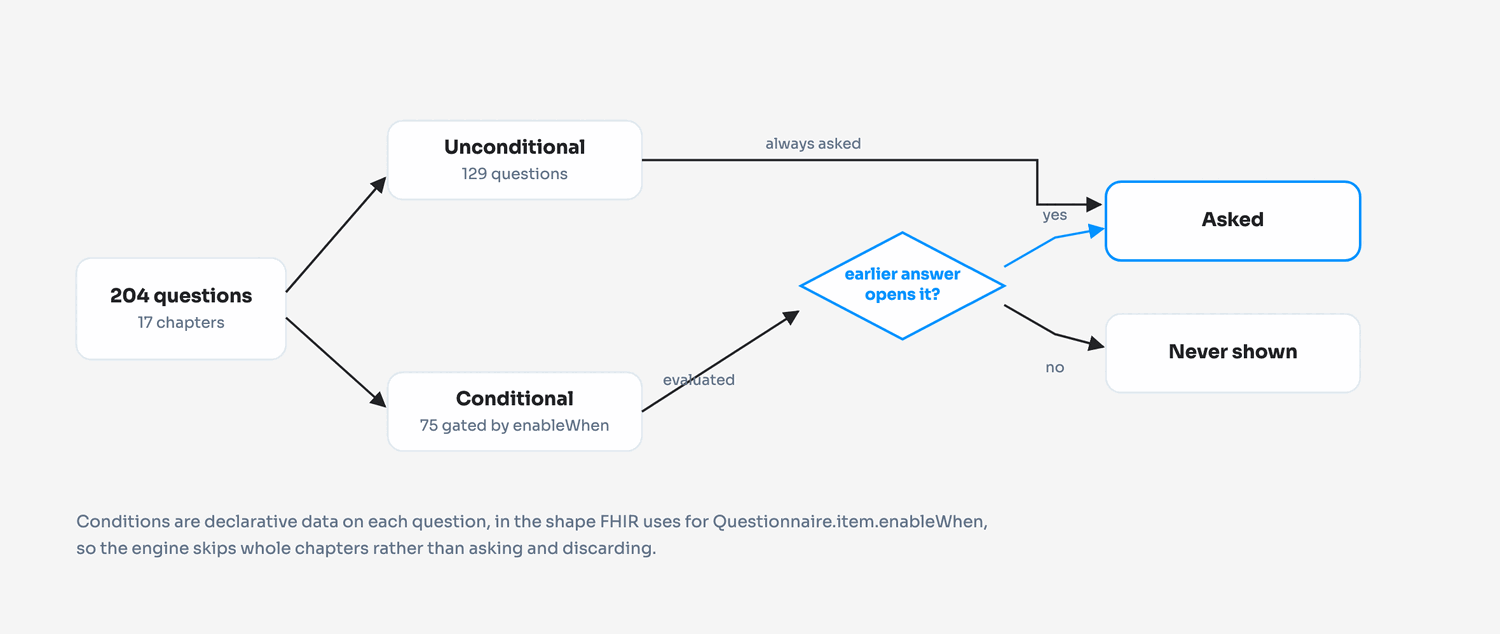
Midlife women's health runs on long histories. The intake for this record merges two published instruments, the NAMS Menopause Health Questionnaire and the Australian Pelvic Floor Questionnaire, which together come to 204 questions across 17 chapters covering gynecologic history, hormone therapy, and bladder, bowel and prolapse function. No patient should answer all 204, and no clinician has time to read a transcript of one that they did.
That makes AI summarization obviously useful and quietly dangerous. A generated visit summary that reaches a patient unreviewed is not a product defect, it is a clinical one, and it is the practice that carries it. So the interesting design question was never how to generate a summary. It was where the human sits, how visible that seat is to the patient, and what stops anyone from routing around it later when someone is in a hurry.
The speciality is the product, not a category label
It would have been easier to build a general health record and describe it as a menopause one. The difference shows up in the question bank. Nearly half of it is gynecologic history, sexual health, bladder, bowel, prolapse and hormone therapy, which is exactly the territory general intake forms skip or reduce to a single checkbox.
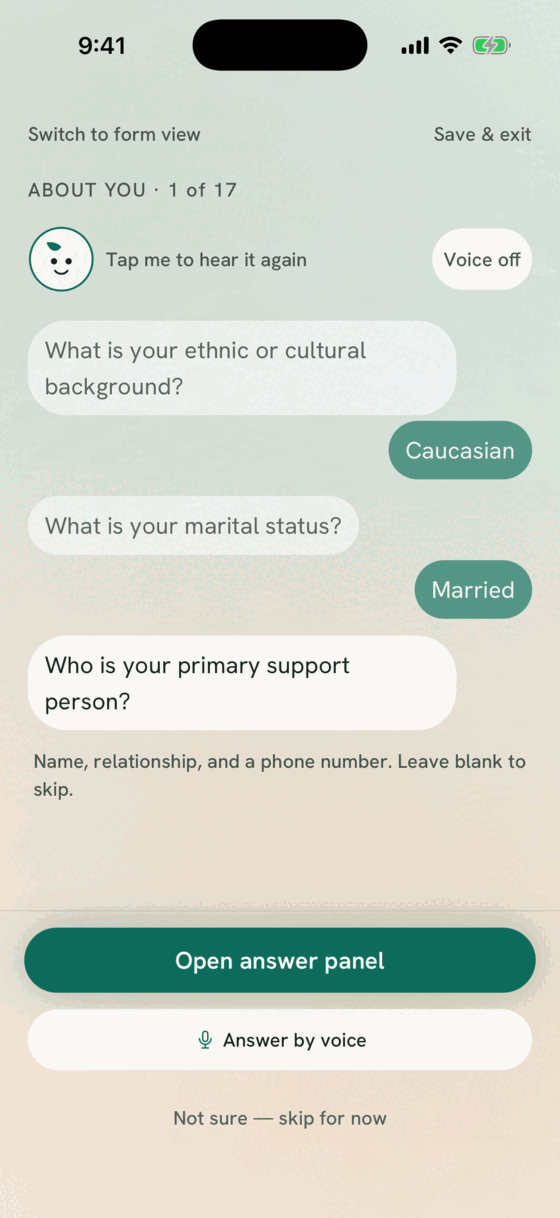
That territory is also the part patients find hardest to raise in a ten-minute appointment. Putting it in a private, self-paced intake that reads the question aloud if you want it to, and lets you switch to a plain form if you would rather scan, is a clinical decision as much as a design one.
Five stages, each one leaving evidence behind
Every claim on this page traces to something in the repository: a file, a commit, or the output of a command. Where we could not verify something, we left it out.
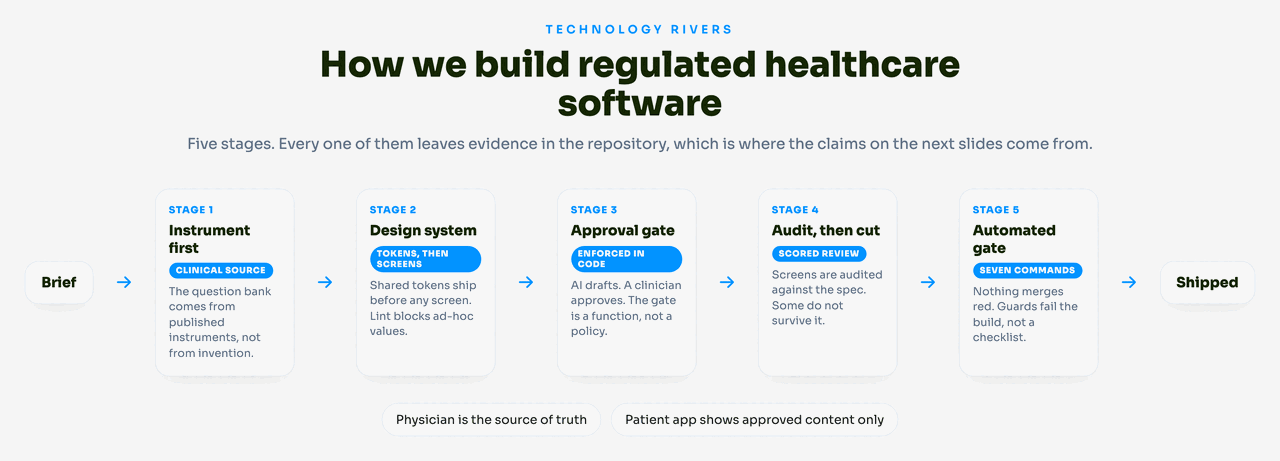
What happens at each stage, and what it produced here
Let the clinical instrument set the scope
The temptation on a health product is to design a friendly form and then work out what to ask. We inverted it. The question bank is a transcription of two published instruments, with the original wording kept intact, because a clinician reading the answers needs to know the question was the standard one.
The cost of that fidelity is length, so the flow engine does the work instead of the patient. 75 of the 204 questions carry a condition and never appear unless an earlier answer opens them. Those conditions are declarative data on each question, in the shape FHIR uses for Questionnaire.item.enableWhen, rather than branching code. That choice was made so the same bank can be handed to a real FHIR-backed system later without rewriting the logic that decides what to ask.
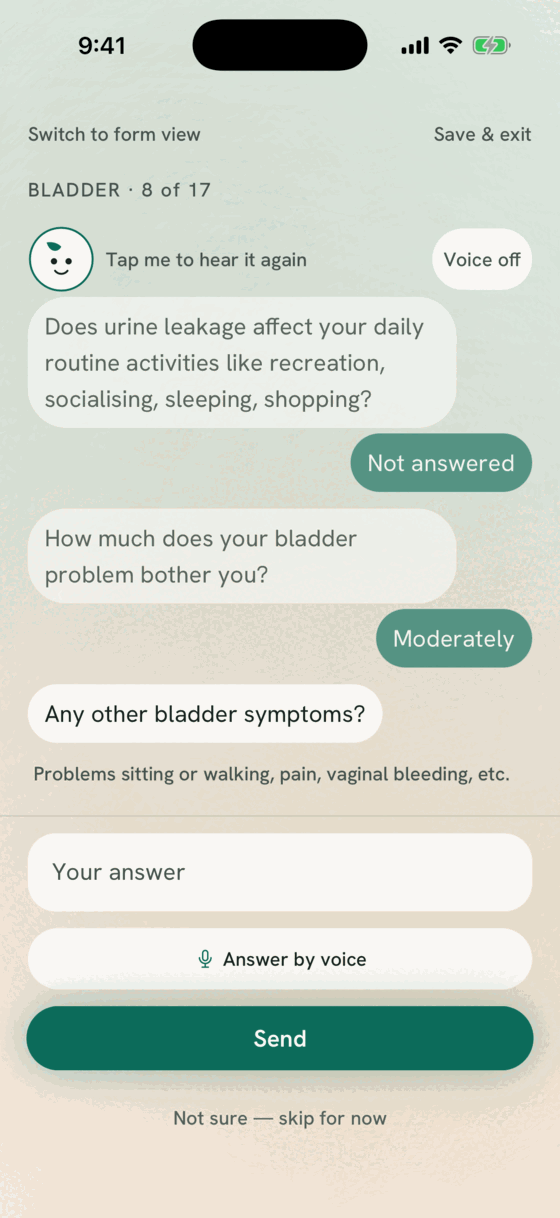
The weighting is the giveaway that this is not a general-purpose form: 33 questions on gynecologic history, 22 on sexual health, 16 on bladder, 13 on bowel, 8 on menopause and hormone therapy, 6 on prolapse. Ten are demographics. A patient answering the bladder chapter is reading the Australian Pelvic Floor Questionnaire's own wording, because a clinician comparing this answer to a previous one needs the question to have been the standard one.
The intake is also the first thing a new patient does, so it got the engagement work: a chapter-by-chapter chat view with a mascot that reads each question aloud, and a plain stepper for anyone who would rather scan a form. Both views are switchable mid-flow, at the same question.
Ship the design system before any screen
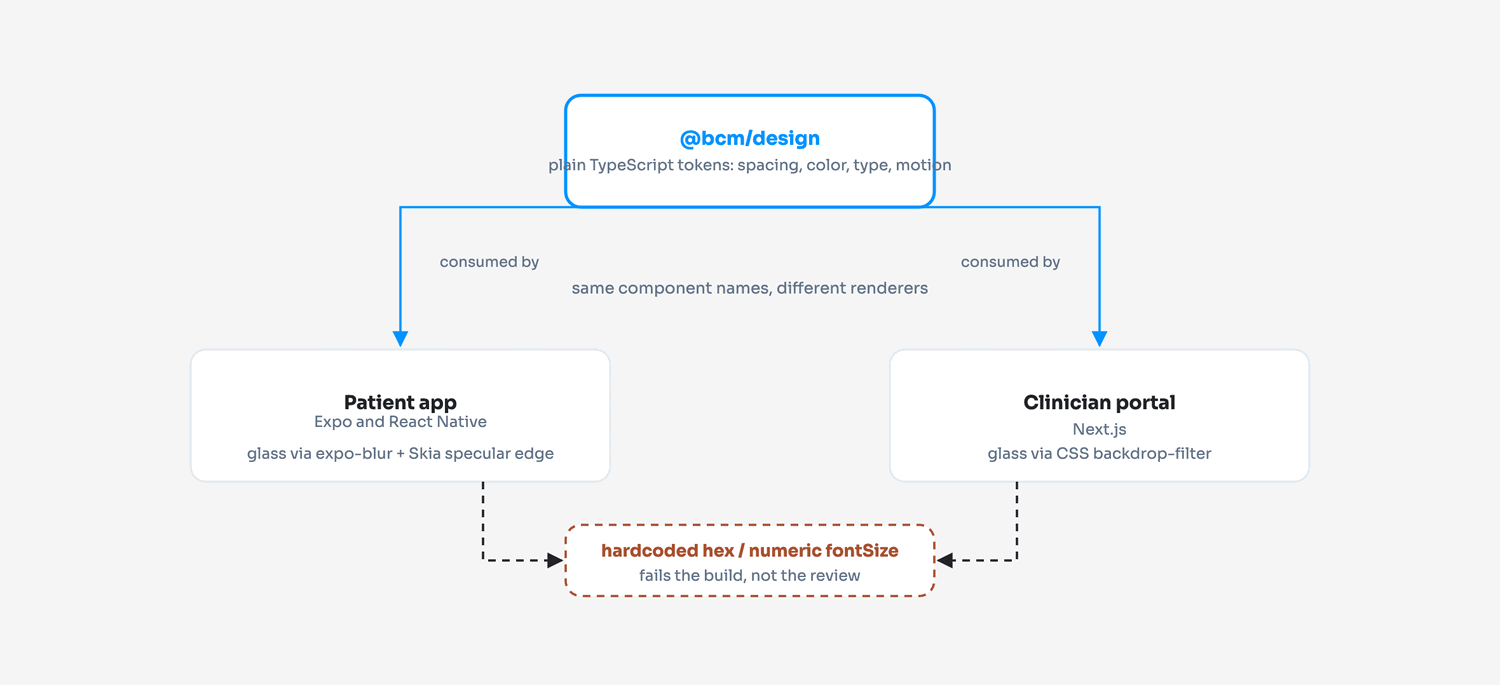
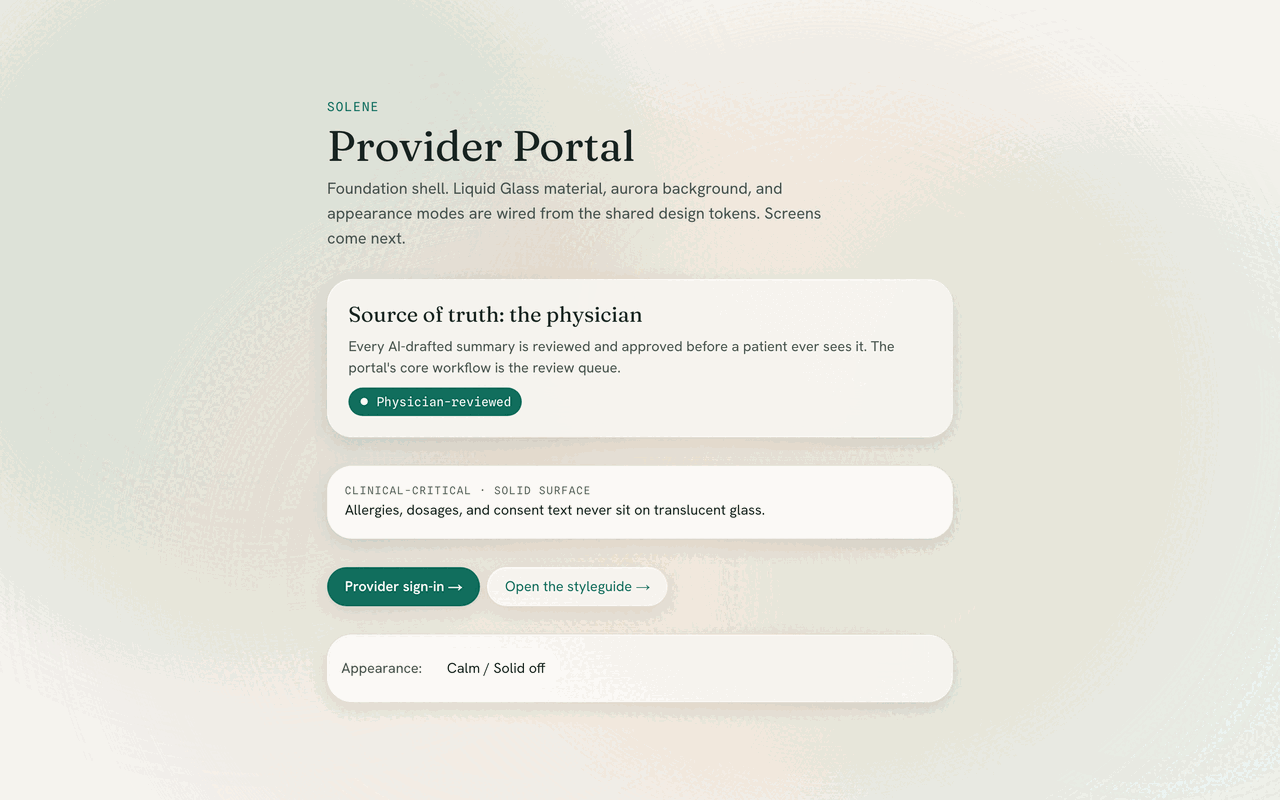
The two apps cannot share components. One is Expo and React Native, drawing frosted glass with expo-blur and a Skia specular edge; the other is Next.js, doing it with CSS backdrop-filter. What they share is a package of plain TypeScript tokens: spacing, radii, blur, elevation, the color palette, the type scale, spring configs.
Component names are deliberately identical across both apps even though the implementations are not, so a change to a card is one conversation rather than two. To stop the tokens being bypassed under deadline, the lint config bans hardcoded hex colors and numeric font sizes in application source outright. It is not a review comment, it fails the build.
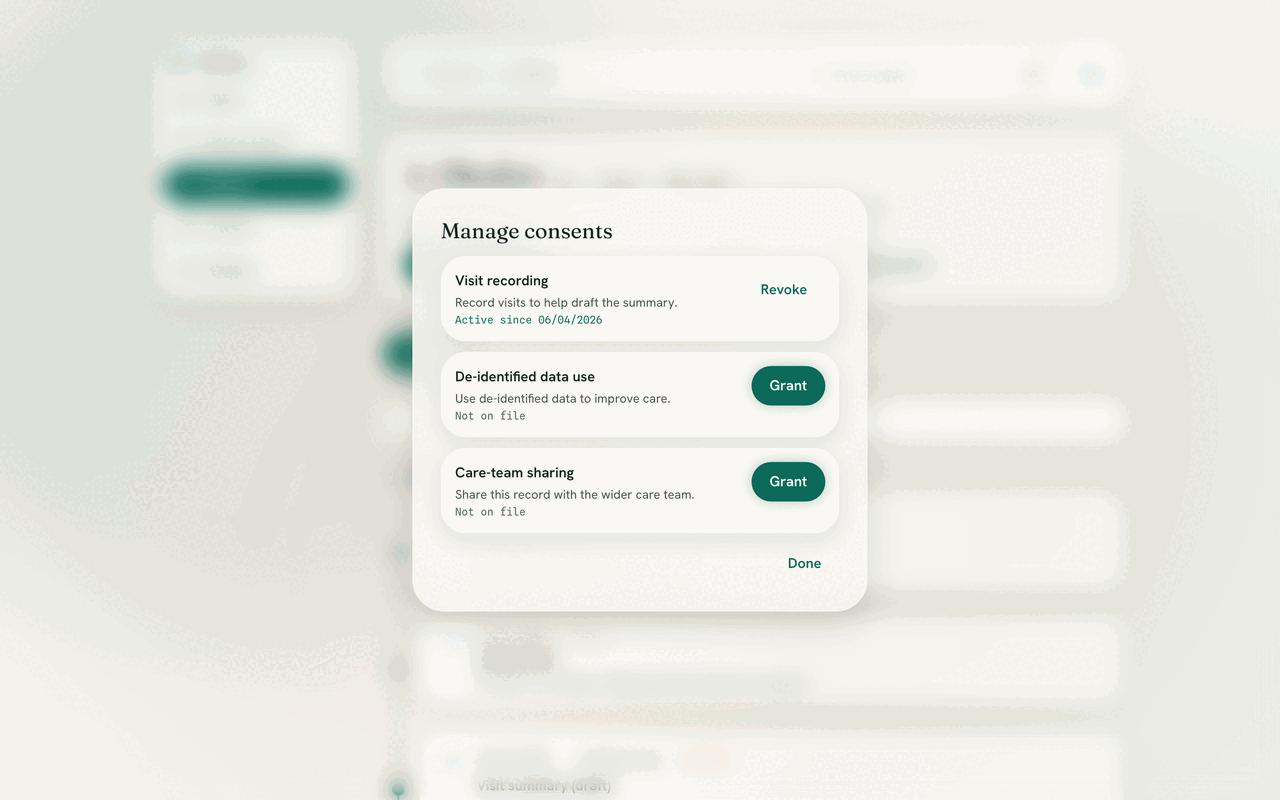
Accessibility was treated as a constraint rather than a phase. Text over glass gets an adaptive scrim to hold WCAG AA. Clinical-critical text, meaning dosages, instructions, consent and allergies, is always placed on a solid surface rather than a translucent one. A Calm mode that turns off blur and the animated background shipped from the beginning, alongside honoring the operating system's reduced-motion setting.
Make the approval gate a function
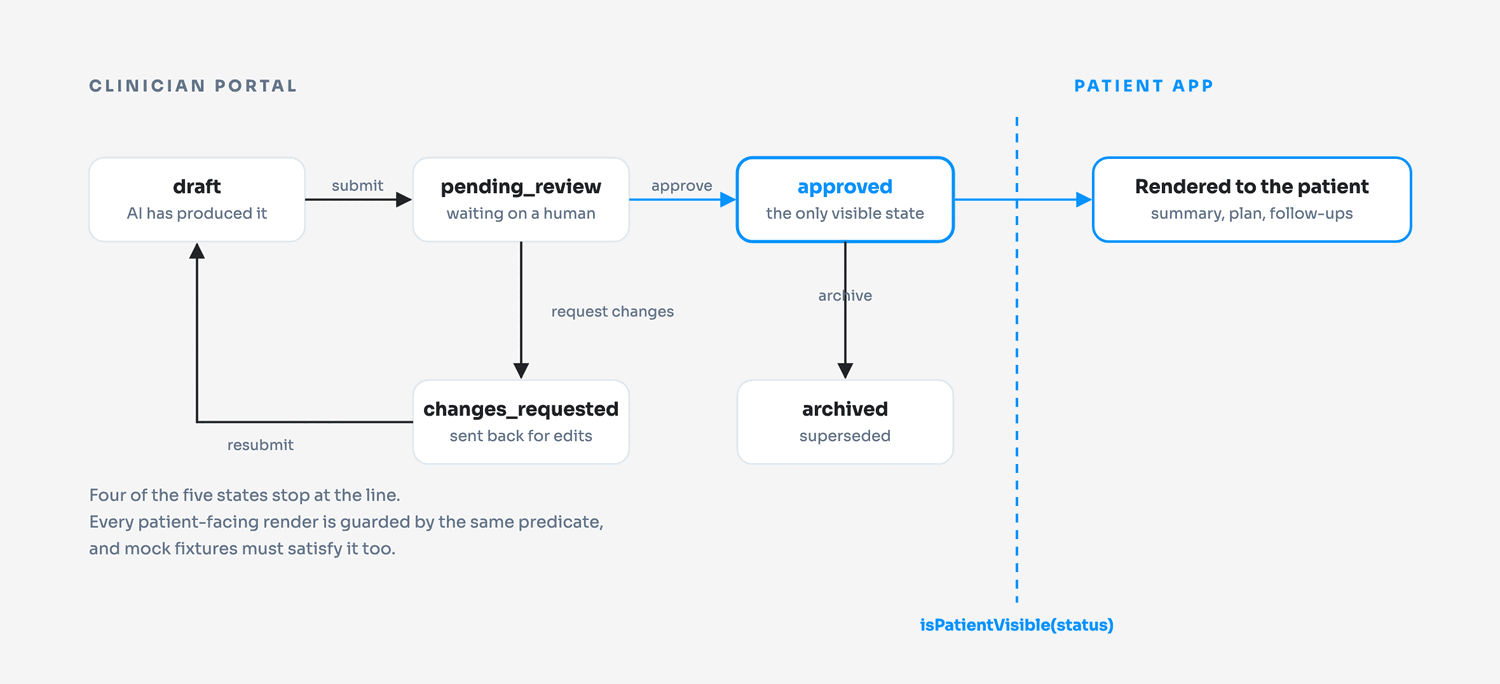
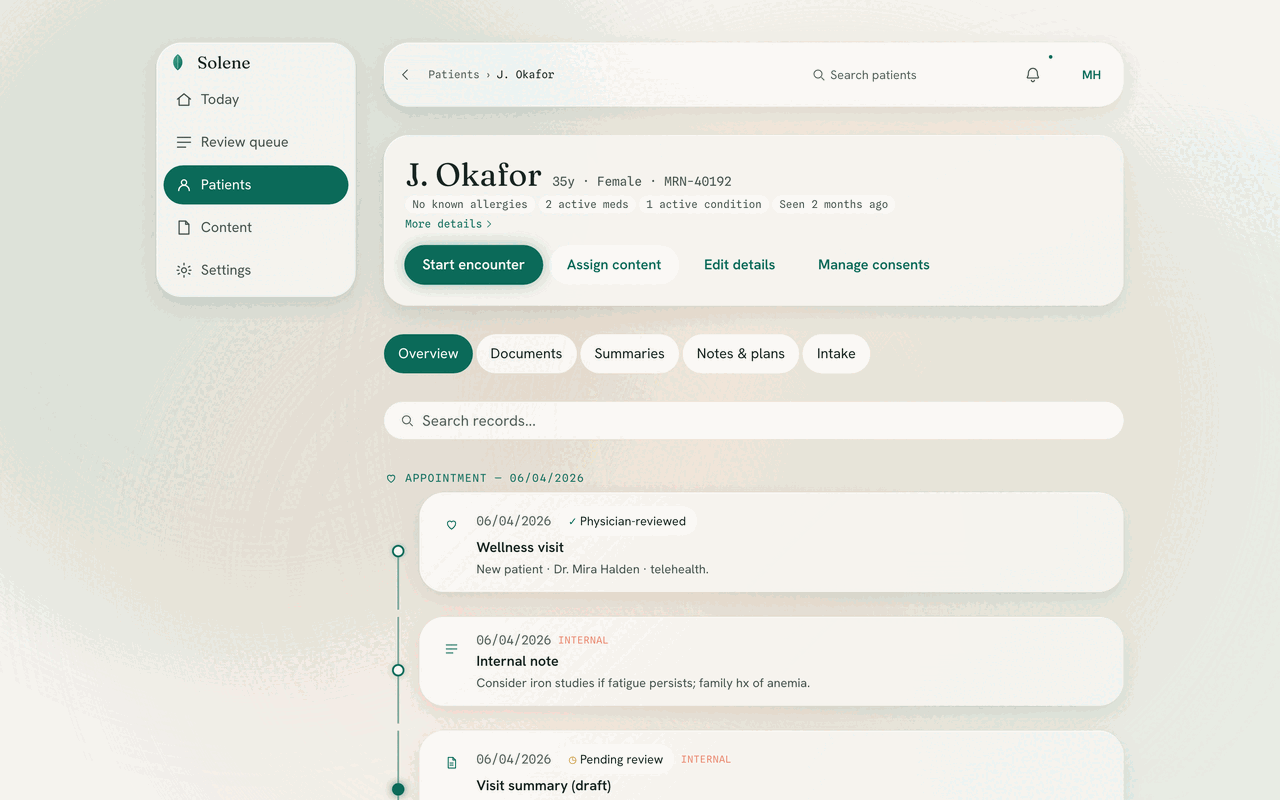
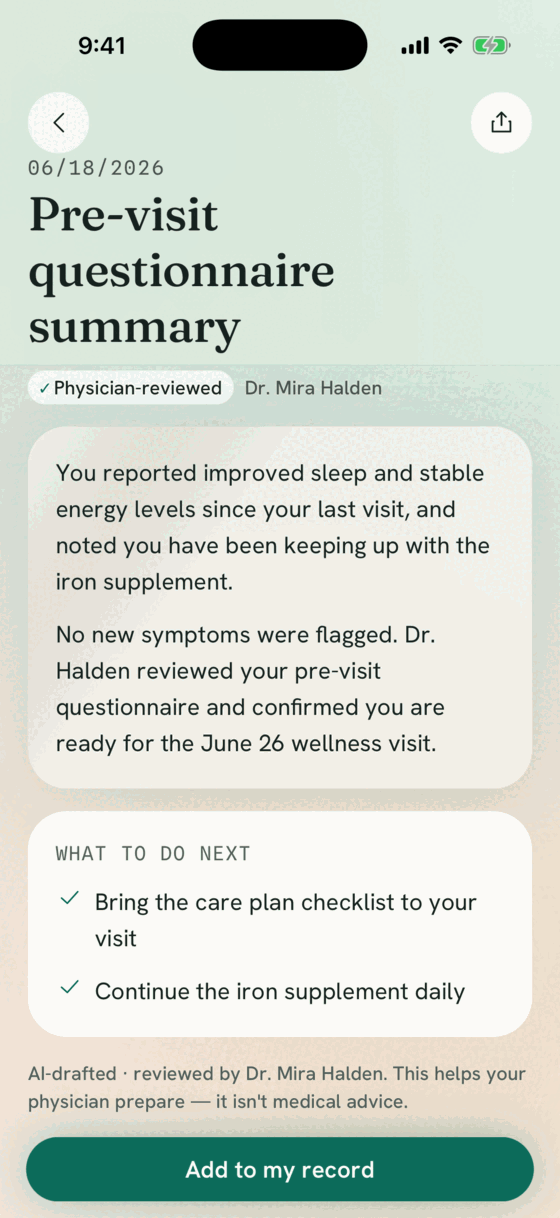
Every AI-produced item carries a review status. A single shared predicate decides whether a patient may see it, and every patient-facing render is guarded by that predicate. The rule is short enough to hold in your head and mechanical enough that it cannot drift.
The detail that makes it hold is that mock fixtures are required to carry a status too. An unreviewed item cannot exist even in test data, so a developer cannot accidentally build a screen against a shape the gate would never allow.
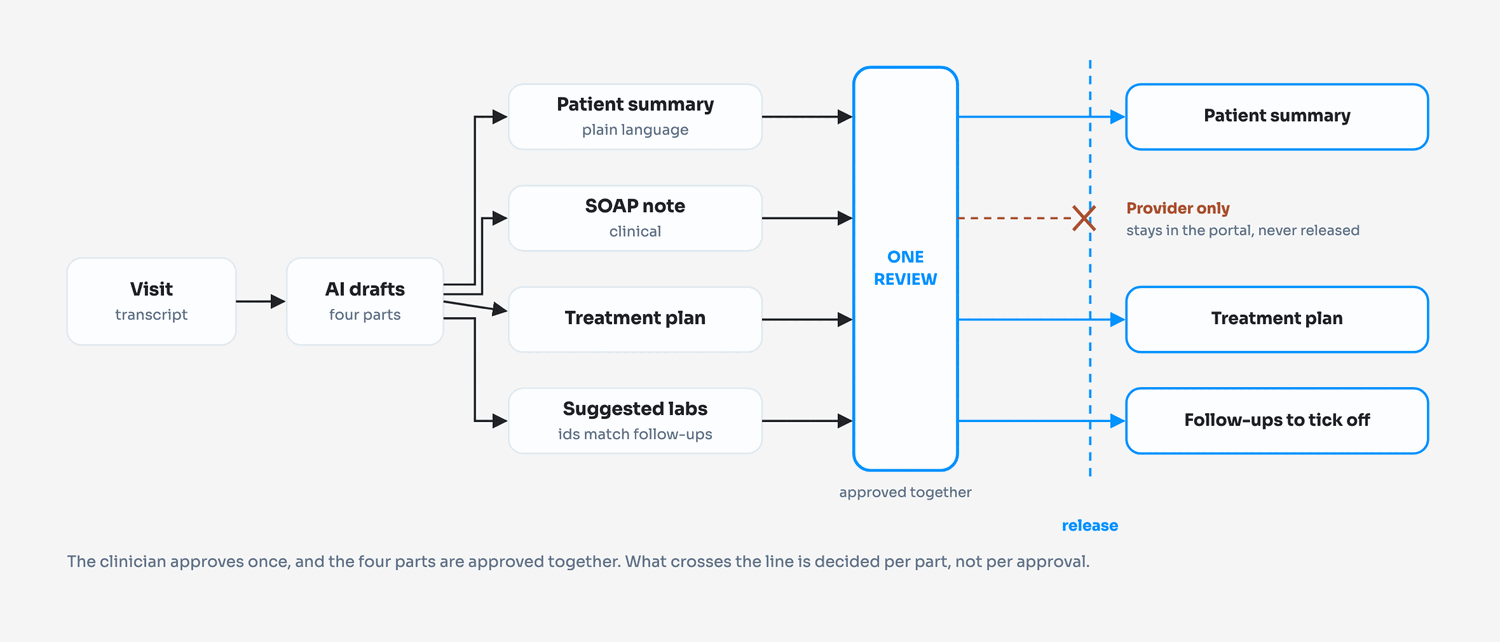
What the clinician actually reviews is one artifact, not four: the patient-readable summary, the SOAP note, the treatment plan and the suggested labs are approved together. The SOAP note is marked provider-only and is never released to the patient. Until approval, the draft carries a line on screen saying it is not medical advice.
Audit screens against the spec, and act on the result
Three screens were scored against the design system and a written definition of done. The audit raised 15 findings and all 15 were resolved, with fixes recorded per finding: a missing error state, a skeleton shimmer that ignored the reduced-motion setting, a detail view using a raw modal instead of the glass sheet component.
The part we would point at is the six findings that were left as partial passes and written down rather than quietly closed, including some remaining magic numbers and a badge still using text glyphs instead of the icon component. An audit that resolves everything on the first pass is usually an audit that was scored generously.
Four days after that audit, one of the three screens was deleted. Fixing it was what made clear it should not exist.
Put the rules in a gate, not in a checklist
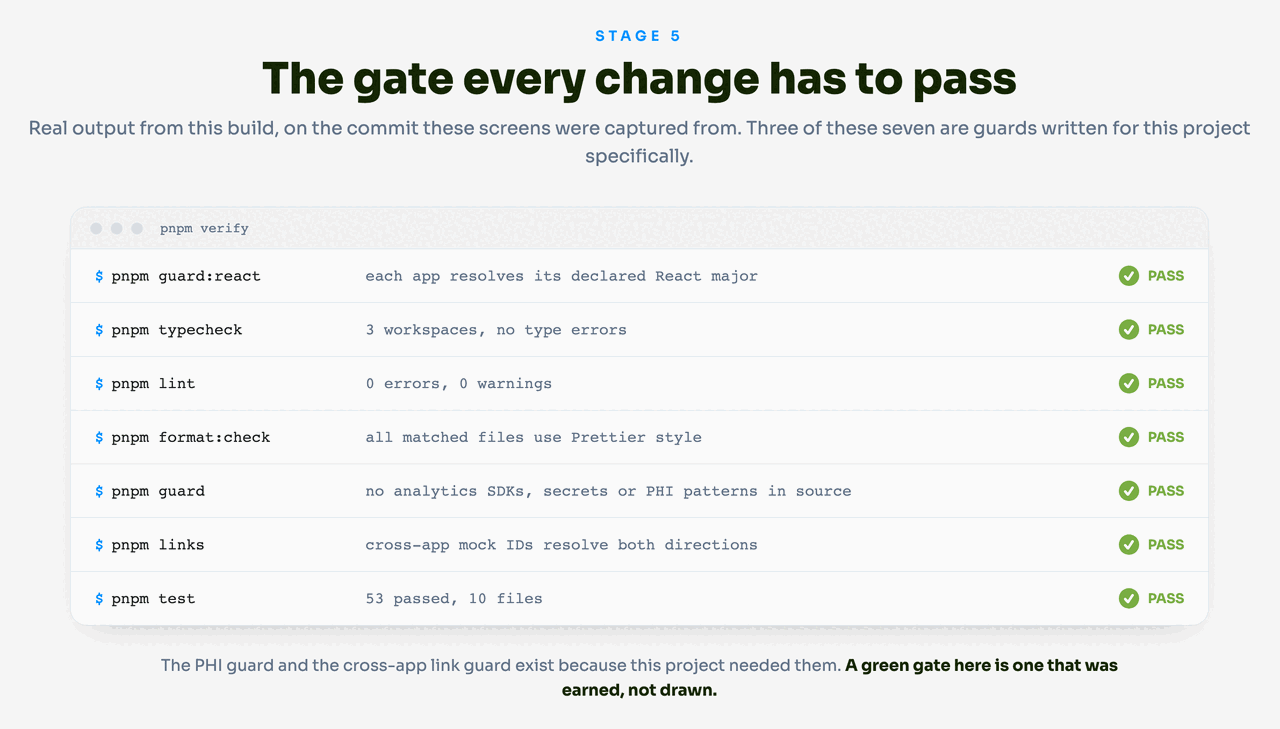
Seven commands run before anything merges: a React version guard, type-checking across three workspaces, lint at zero warnings, a formatting check, a prototype guard, a cross-app link guard, and the tests.
Three of those seven were written for this project specifically. The prototype guard fails the build if analytics SDKs, secrets, or anything matching a PHI pattern appear in application source, which matters on a codebase where the real thing will hold protected health information. The cross-app link guard checks that IDs referenced across the two apps actually resolve, so a document the portal links to cannot go missing from the patient app. The React guard exists because of a bug described further down.
The run behind this page came back green with 53 tests passing across the three workspaces. We ran it on the exact commit these screens were captured from, and on the unmodified code rather than the renamed copy used for the captures.
Approved together, released separately
The part of the design that prose keeps fumbling: the clinician approves one artifact, but what crosses into the patient app is decided per part. The clinical note is not withheld by policy, it is withheld by the release path.
Four things we changed our minds about
Each of these took work to build and then more work to remove. They are here because a review loop that never reverses a decision is not a review loop.
Deleting is a design decision
Two features shipped, were used, and were then taken out. In both cases the reason was that the thing was standing in for a job that already had a better home, or was describing something the build did not actually do.
A whole tab, audited and then deleted
A voice intake deleted, then built for real
One clinical fact, one review story
The approval gate only works if there is exactly one path to the patient. Anything that creates a second path is a hole, even when each path looks reasonable on its own.
Two ways to author a plan became one
A dependency pin that crashed the app in silence
The two sides of one record
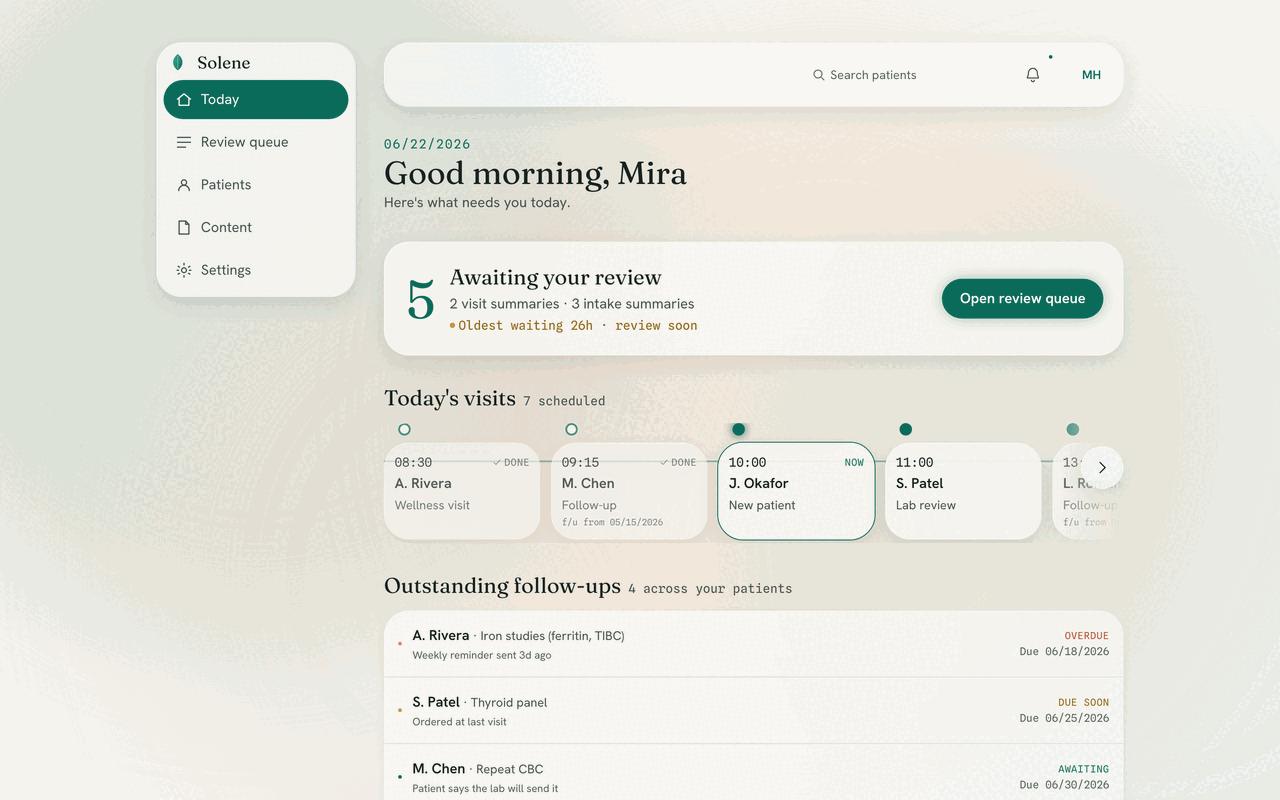
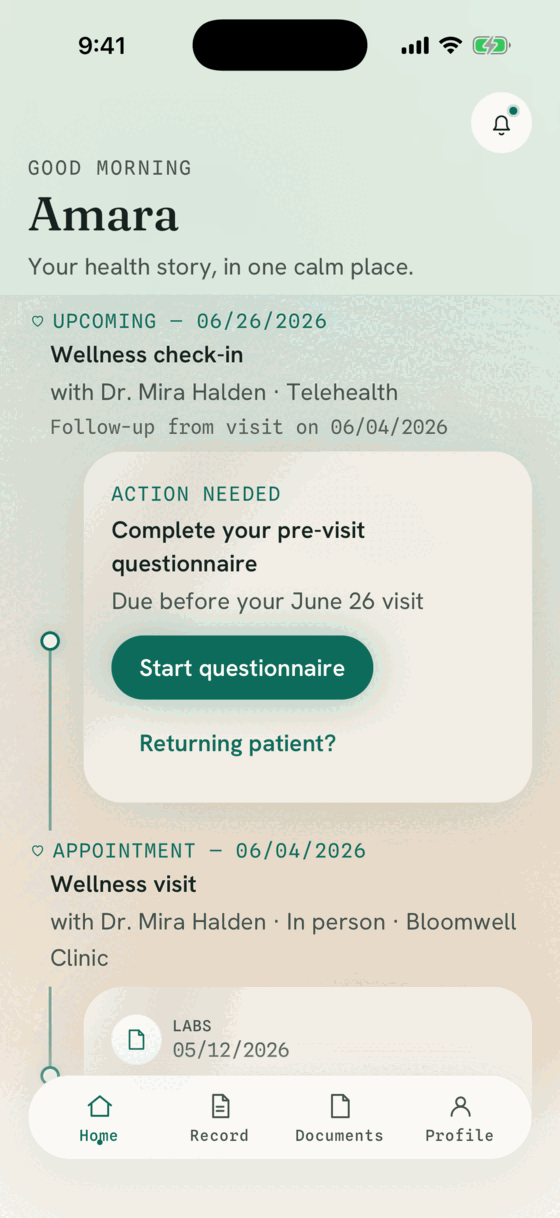
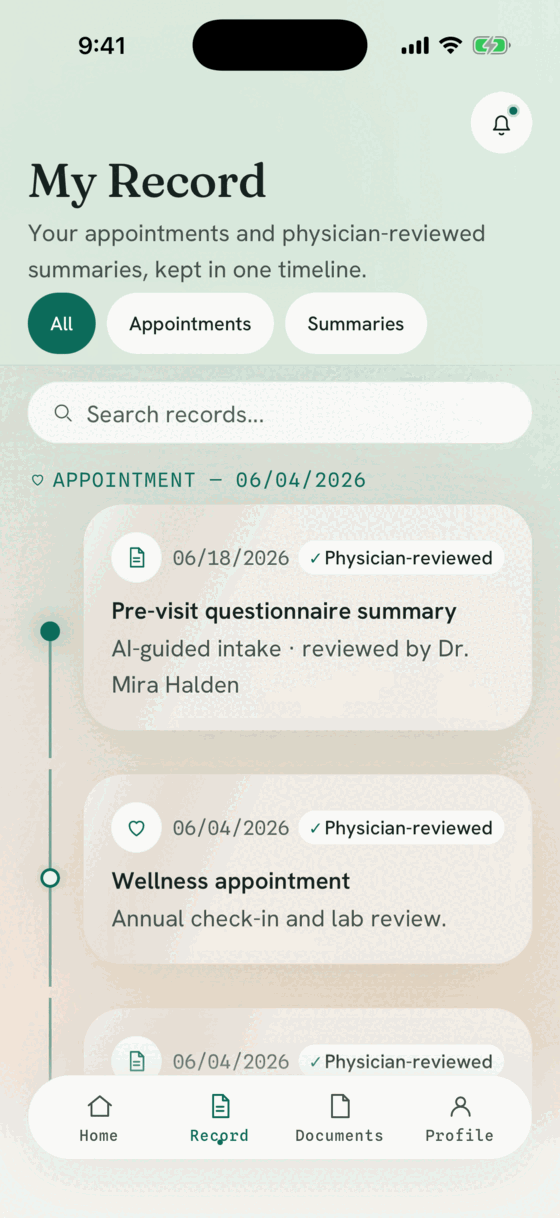
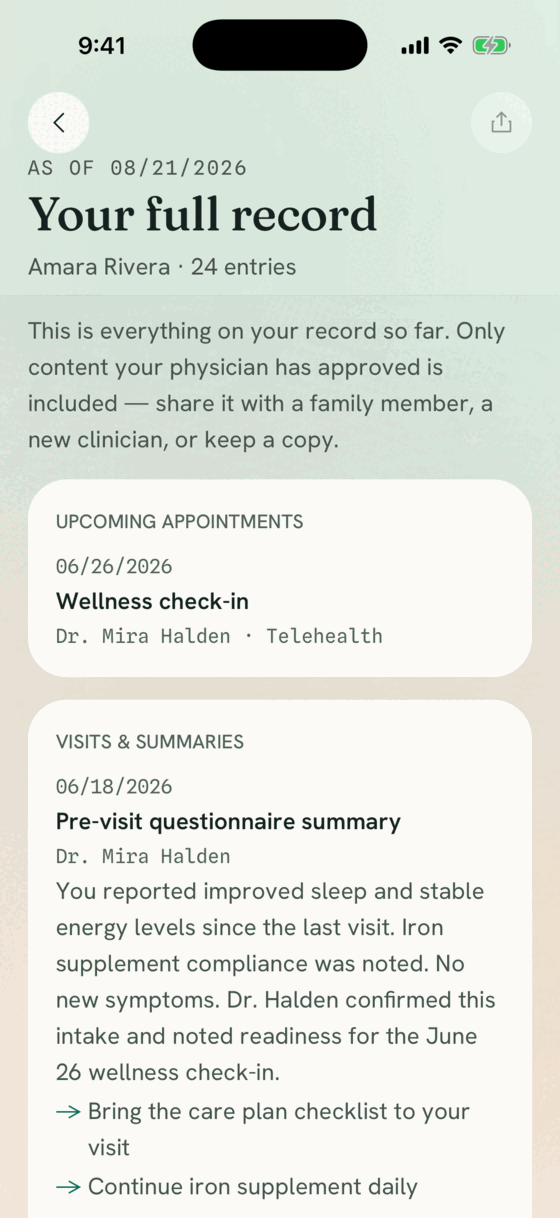
The portal screens below were captured from the running application. The patient screens were captured from an iOS simulator build, not a browser at phone width, so the layout shown is the real native one.
Measured, not estimated
Every figure here came from a command run against the repository at the captured commit. There are no adoption numbers or time-saved percentages on this page, because we do not have any we could stand behind.
Questions, 17 chapters
Transcribed from two published clinical instruments, with 75 of them conditional on an earlier answer.
Tests across three workspaces
47 in the patient app, 3 in the portal, 3 in the shared design package. Counted from the gate run, not estimated.
Commands in the merge gate
Three of them are guards written for this project: PHI patterns, cross-app links, and React versions.
Audit findings raised and resolved
With six remaining partial passes written down rather than closed, and one audited screen later deleted.
What to take from this
If you are weighing an AI feature inside a regulated product, these are the points we would argue for:
- ✓Decide where the human sits before designing the AI output, and make that seat visible to the end user.
- ✓Enforce the review rule in code, not in a policy document. Here it is one shared predicate that every patient-facing render is guarded by, and mock data has to satisfy it too.
- ✓Let the clinical instrument set the scope of what you ask, and keep the published wording intact so a clinician can trust the answer.
- ✓Ship the design tokens before the screens, and let lint fail the build when someone bypasses them.
- ✓Write the guards your specific product needs. A generic gate would not have caught a PHI pattern in source or a broken cross-app ID.
- ✓Treat a reversal as a working review loop rather than a mistake. Four features here were built and then removed, one of them four days after being audited and fixed.
- ✓Keep planned work and delivered work clearly separate. Everything on this page exists at the captured commit; the prototype runs on mocked fixtures and no real patient data was used.
- ✓Confirm BAA coverage with any third-party service before real protected health information touches it.
Building something that has to be reviewed?
We build custom software, web and mobile apps, and HIPAA-aware healthcare products. If you have a regulated workflow with an AI-shaped opportunity in it, we would like to see it.