
A HIPAA behavioral health platform, built with our AI-driven workflow.
A multi-role platform connecting behavioral health specialists, pediatric primary care physicians, and families, built around a Medicaid-supported Collaborative Care Model. This is how we work: what we do at every stage, the decisions we make, and how the design gets torn apart and rebuilt with the client in the room.
Children wait months for mental health care, and the adults trying to help them work in silos.
Families face long waitlists, confusing insurance rules, and specialists who are hard to reach. Pediatric primary care physicians, who usually see the problem first, have nowhere to refer with confidence. And the clinical model that ties them together, Collaborative Care, only works when a shared record, structured assessments, and billable time tracking live in one place.
The brief was a single platform serving four very different users, holding up under HIPAA, supporting Medicaid reimbursement, and delivered in stages so that value arrives early and the hardest clinical work builds on foundations that already work.
Collaborative Care, in one shared workflow
This model improves outcomes by connecting three roles around a single patient case. The platform gives each of them the right view and keeps them in sync.
Pediatric PCP
Sees the child first, refers into behavioral health, and follows the case from the primary care side.
Care manager
Runs structured assessments, tracks billable time, and keeps the case moving between visits.
Behavioral health specialist
Delivers care, updates the shared record, and collaborates with the PCP on next steps.
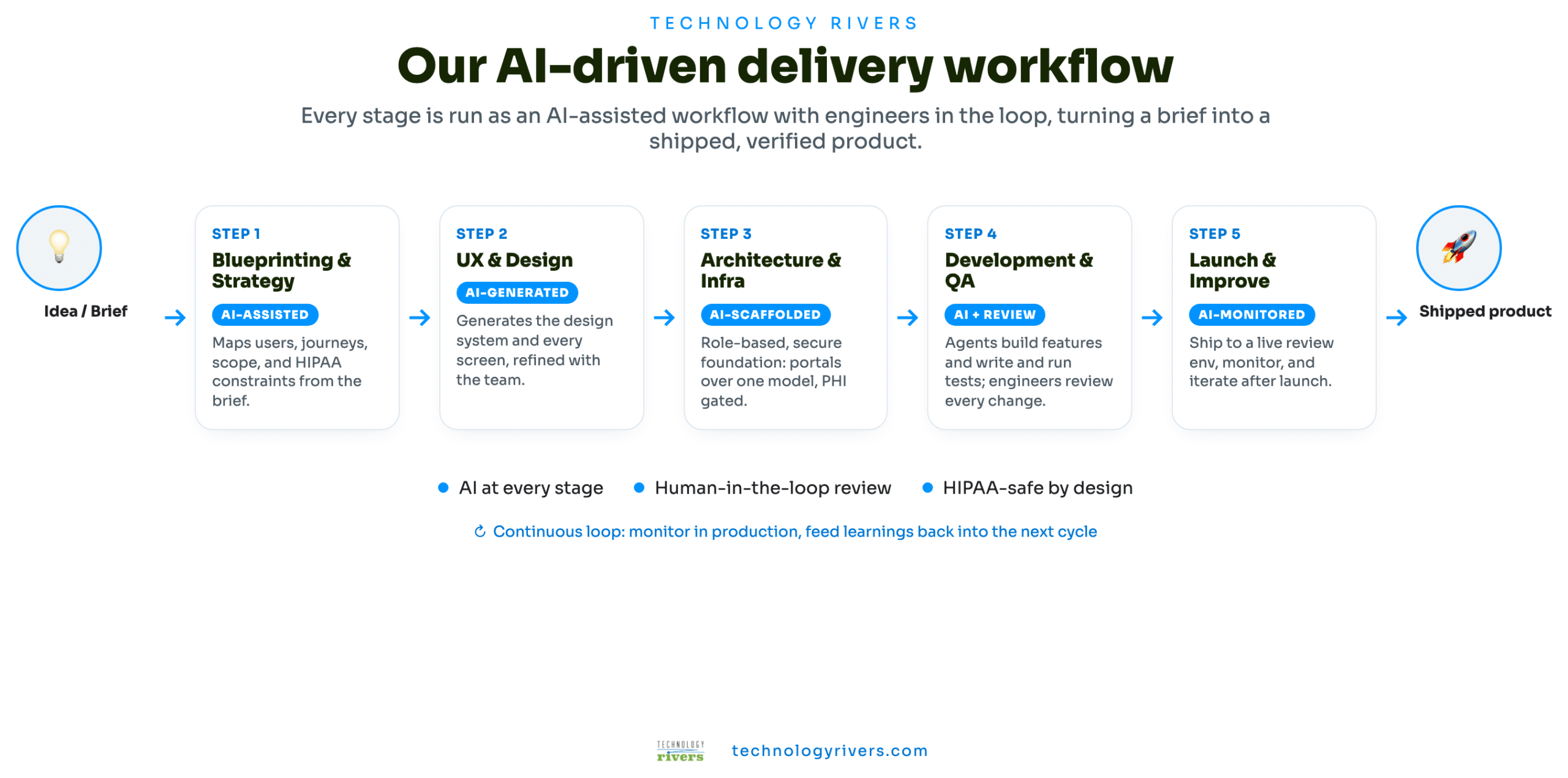
An AI-driven delivery workflow
Every stage runs as an AI-assisted workflow with engineers reviewing the output. The same method turns a brief into a shipped, verified product.
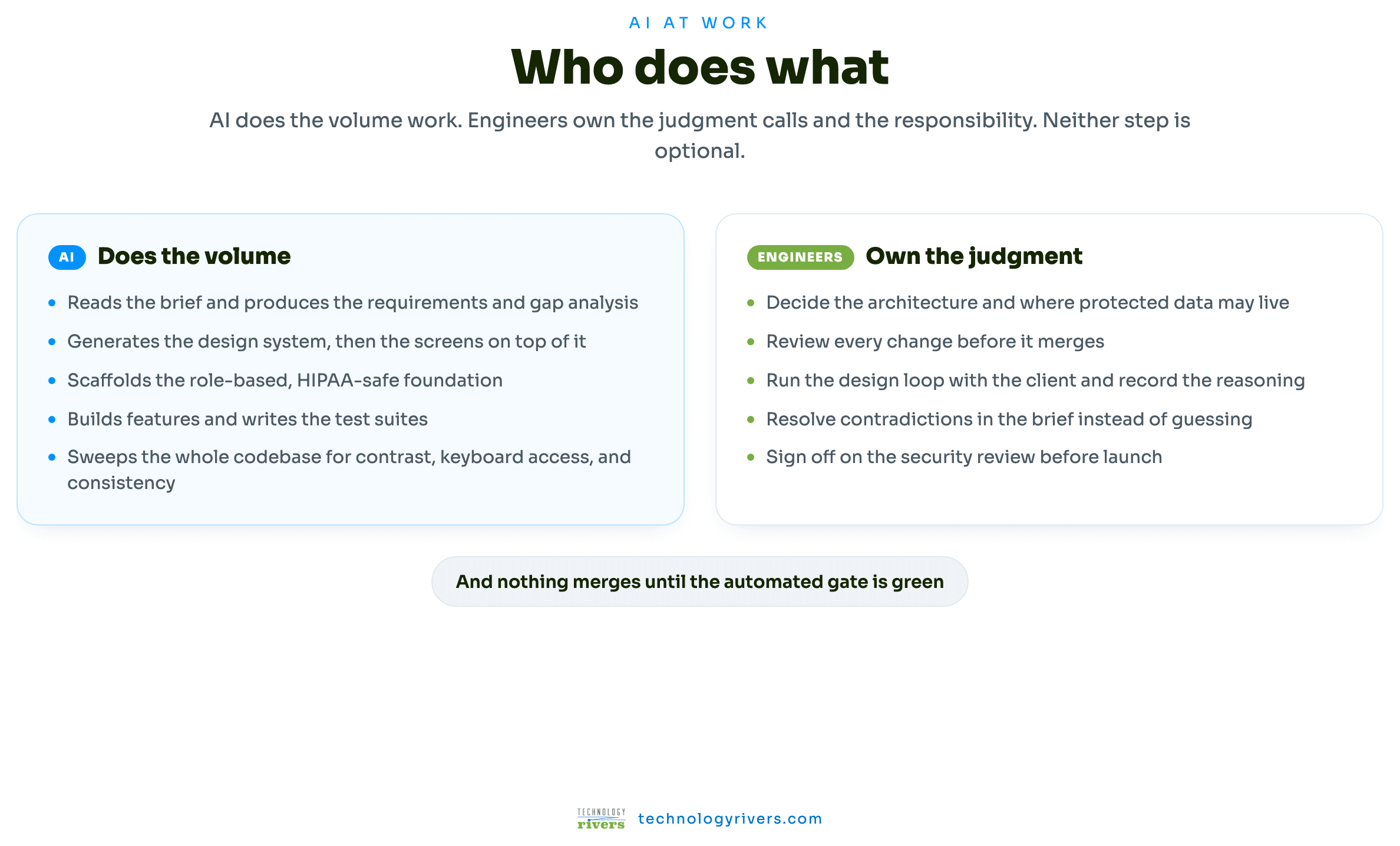
What the AI actually does, and what it never decides
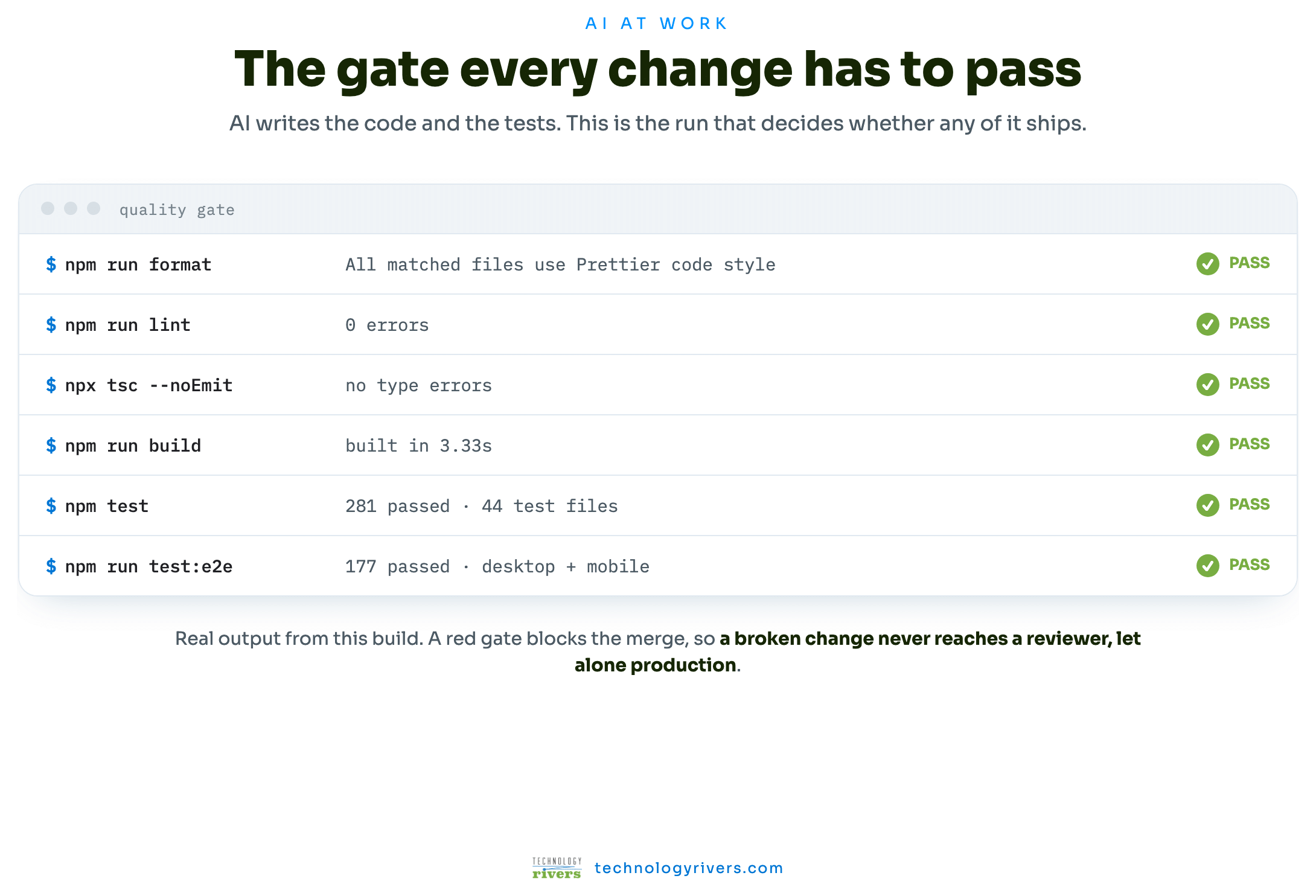
"AI-driven" is easy to claim, so here is the division of labor, and the run that has the final say on whether anything ships.
What actually happens at each stage
Each stage has its own outputs and its own decisions. These are the real ones from this build.
Blueprinting & Strategy
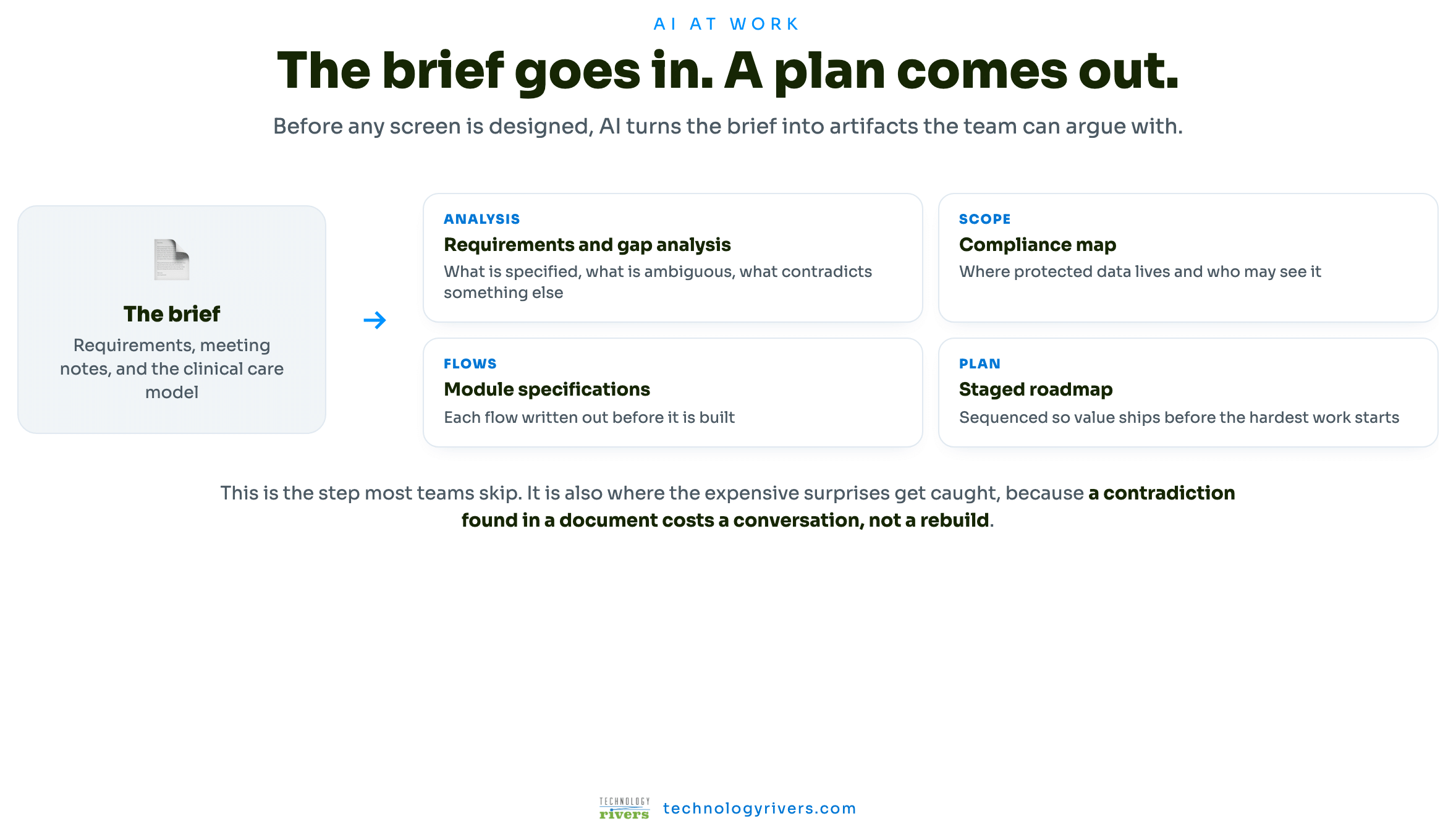
We turn the brief into a plan we can build against. AI helps us read the client's requirements against a working product model and produce a gap analysis: what is specified, what is ambiguous, what contradicts something else, and what is missing entirely. We map the users and their journeys, translate the clinical care model into concrete product surfaces, and mark where protected health information will live before a single screen is designed.
Sequencing is part of this stage, not an afterthought. The work is ordered so that the marketplace ships first and the harder clinical and billing systems land on foundations that already work in production.
User Experience & Design
AI generates the design system first: tokens, components, and patterns defined once, so that three portals stay coherent and new screens are assembly rather than invention. Then the screens themselves, wireframed and turned into clickable flows.
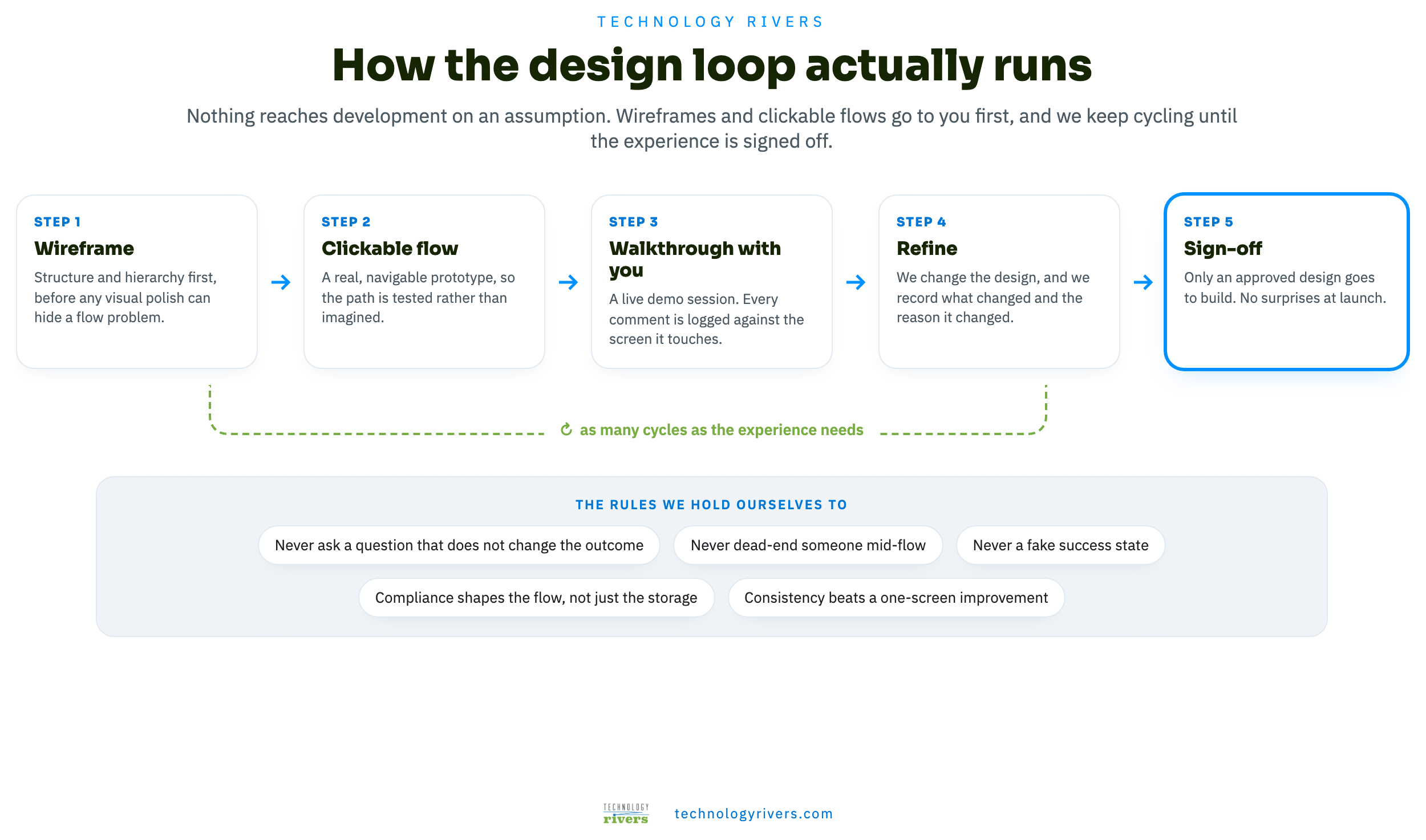
The important part is what happens next. The flows go to the client before anything is built, and they come back marked up. That loop is where most of the product's quality comes from, so it has its own chapter below.
Wireframes and clickable flows are reviewed with you in a live walkthrough. Every comment is logged against the screen it touches, the design changes, and we record what changed and why. Build starts from an approved design.
Architecture & Infrastructure
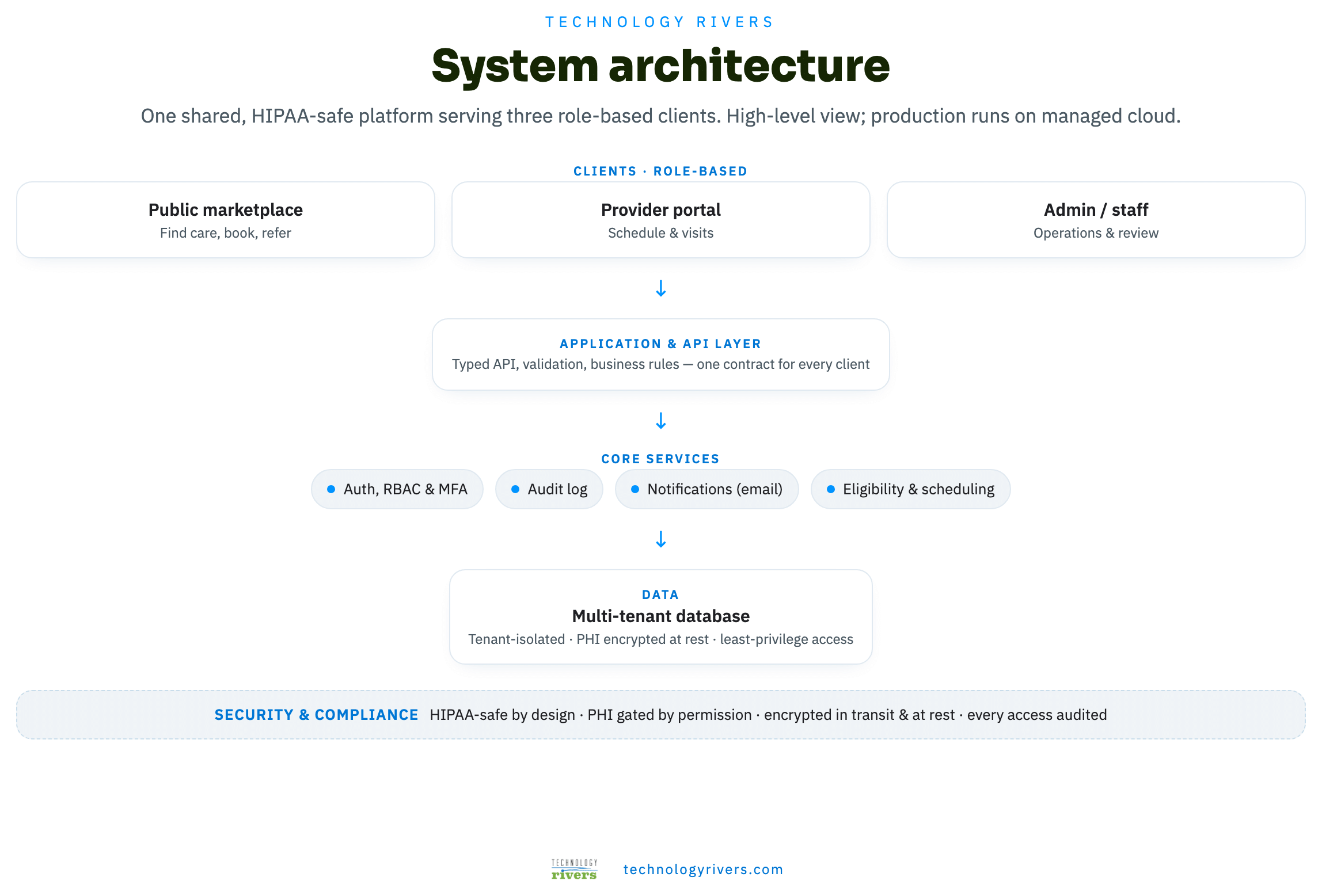
AI scaffolds a role-based, HIPAA-safe foundation on AWS: a server-rendered React front end over a typed API, PostgreSQL with encryption at rest, managed authentication with role-based access, object storage for credentialing documents, and transactional email under a BAA. Protected health information is gated by permission and every access is written to a tamper-evident audit log.
A strict server and client boundary is enforced by the build itself, so secrets and PHI cannot accidentally reach the browser. The data model is shaped for tenant isolation from the start, because the later phases add multiple practices to the same platform.
Development & QA
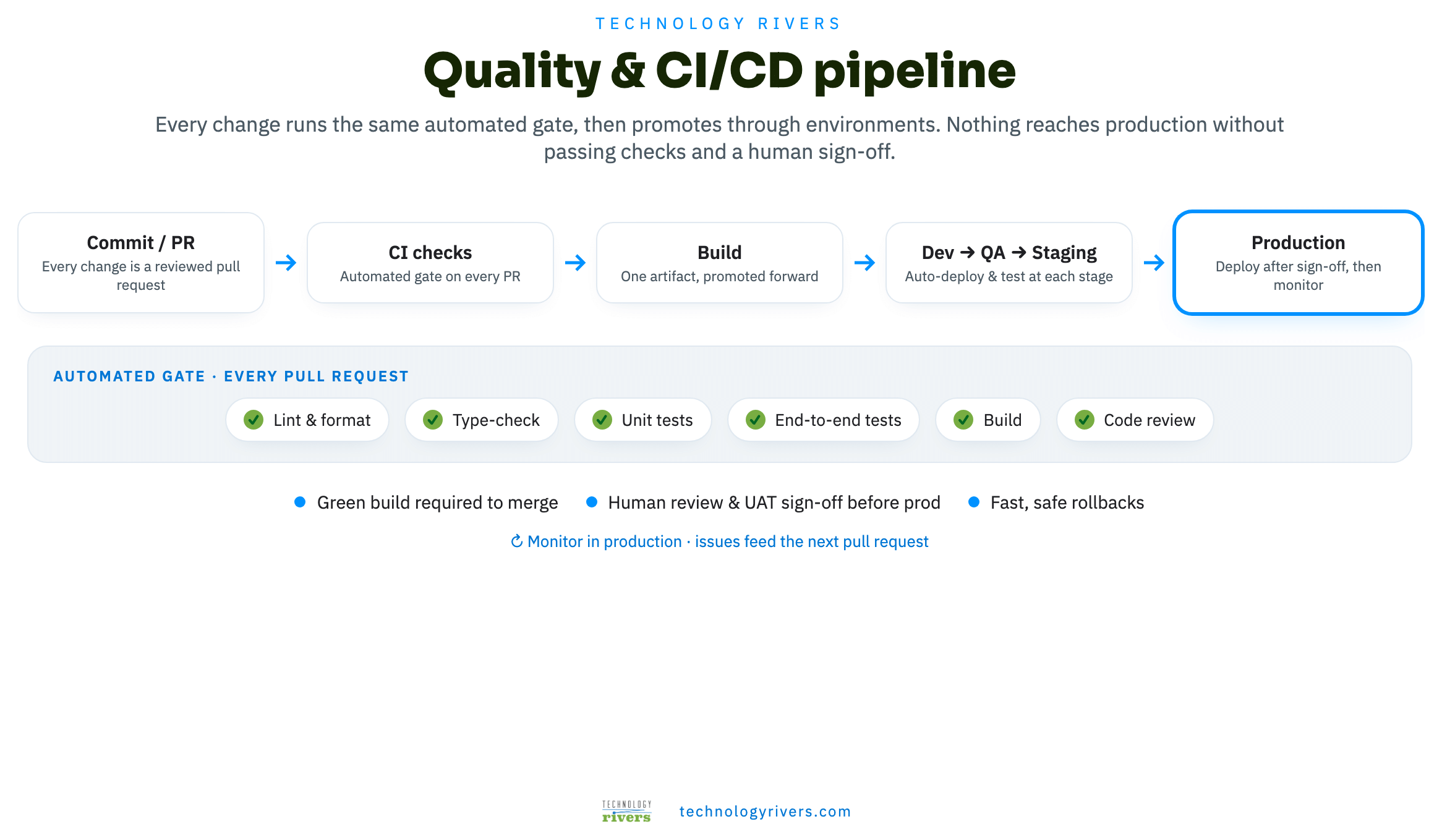
AI agents build features and write the tests; engineers review every change. The same automated gate runs on every pull request, and a change that fails any part of it does not merge.
We also hold a rule that keeps a mocked or staged product honest: anything not yet wired to a real backend must show a visible preview or coming-soon state. Never a fake success message. A demo that lies is worse than a demo with gaps.
Launch, Monitor & Improve
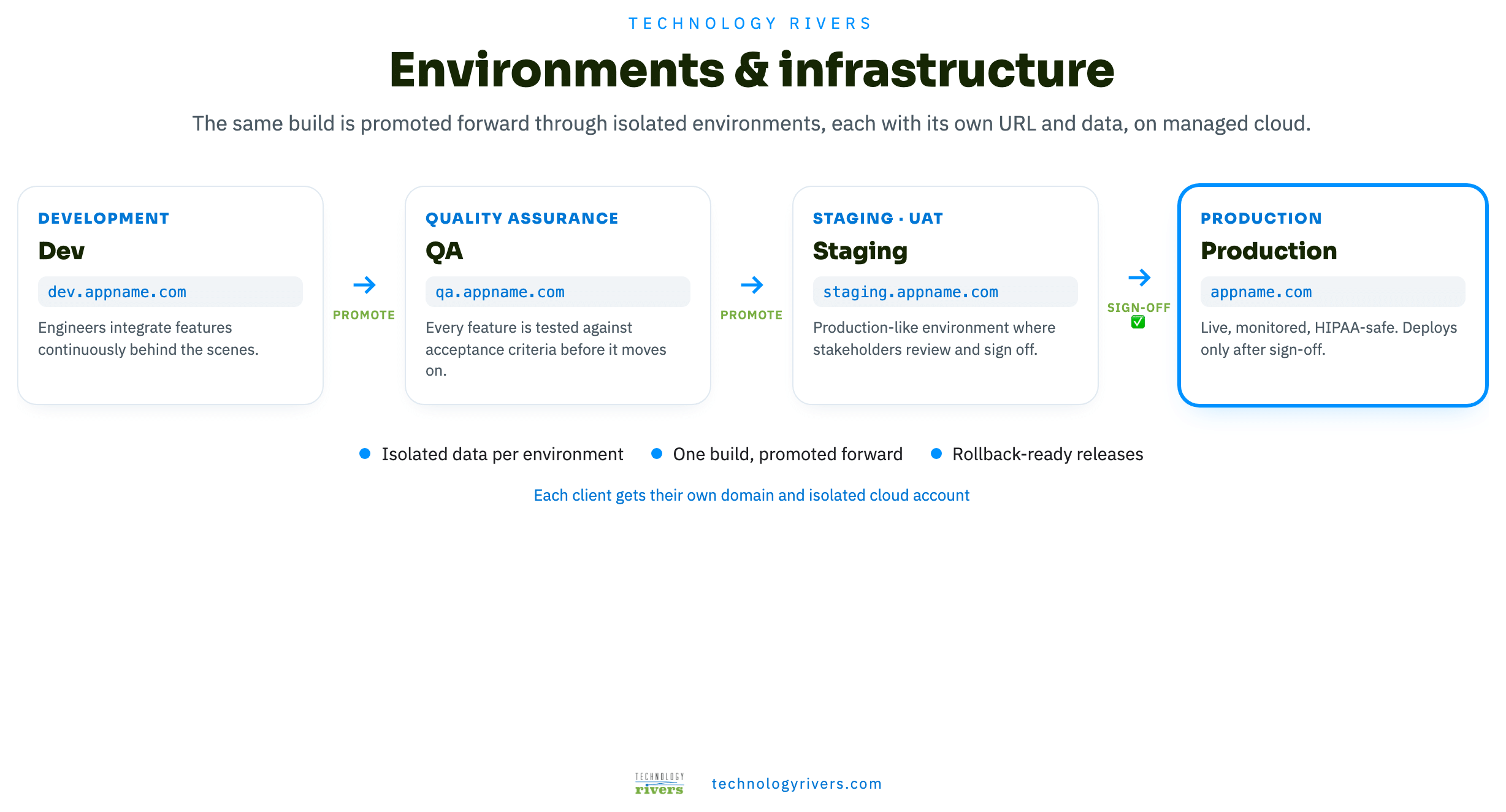
The same build is promoted forward through isolated environments, each with its own URL and data, and reaches production only after sign-off. Before launch it clears a security review: encryption at rest and in transit, enforced TLS, audit logging on every PHI event, role-based access at the API rather than only in the interface, and a signed BAA with every third-party service in scope.
Where the product actually gets good
Design quality does not come from the first draft. It comes from putting a real flow in front of the people who know the domain, and being willing to take it apart.
We score the screens that matter
The public provider profile is where a family decides whether to trust a clinician, so we audited it formally rather than trusting our own taste. Fourteen issues, six of them fixable the same day. These were the scores it started with.
The finding was uncomfortable and useful: the page was functionally complete and structurally wrong. Booking competed with content instead of supporting it, and the strongest trust signals were buried below the fold.
Eighteen changes, and the reason behind each one
These are real iterations from this build, grouped by the principle that drove them. Each one started as something we or the client had already agreed to.
Ask less, and only what changes the answer
Every extra question costs completion. If an answer does not change what the family sees next, it comes out.
The intake quiz lost two of its six questions
Insurance stopped opening with a wall of logos
The provider attestation lost a whole screen
Never dead-end anyone mid-flow
A person who has started telling you about their child should always be able to finish, then be told where they stand.
Adults over 18 were stopped halfway
A full calendar lost the family entirely
Earn trust before asking for a commitment
A formal audit of the provider profile scored booking experience and mobile readiness lowest. The page worked, but it asked for the booking before it had earned it.
The calendar came before the reason to book
The main action was the wrong color
You could book without knowing how long the visit was
A trust badge nobody could decode
Design for the density real operations create
Staff screens fail differently from consumer screens. They fail when there is a lot of data and no time.
The appointment list was rebuilt from eight columns to five
The listing hierarchy was inverted
Every admin table broke on a narrow screen
Detail views were trapped in slide-over drawers
Two queues that nobody wanted separated
Five overlapping status words became one lifecycle
Let compliance shape the flow, not just the database
In regulated healthcare the rules change what the screen can do, so they belong in the design conversation rather than a later hardening pass.
Returning-patient prefill was redesigned around the rules
Operational lists stopped carrying clinical detail
Native date fields were banned outright
Iterate honestly, including backwards
The strongest evidence that a review loop is real is that it sometimes reverses us, or the brief.
A review screen went out, came back, and settled in between
A request that would have reversed a settled decision was pushed back
Tapping a card stopped meaning committing to it
One sentence that sounded like an accusation
One system, three portals, no drift
Consistency at this scale is not discipline, it is architecture. Change a token, and every screen moves together.
Color, type, spacing, and radius live as semantic tokens in a perceptual color space. A screen never names a raw color, so global changes stay global and contrast stays predictable.
We do not restyle a single instance of a component to fix how one page feels. If a variant is wrong it is wrong everywhere, so the change is global or it does not happen. This rule is written down, because the temptation is constant.
Duplicate variants had grown up in different corners of the product. Collapsing them removed code and, more importantly, removed the chance of them drifting apart again.
Below a shared breakpoint, tables become stacked cards rather than scrolling sideways. Built once, applied to every list in the product.
The system ships as a route inside the app, showing real tokens and live components. It cannot go stale, because it is the product.
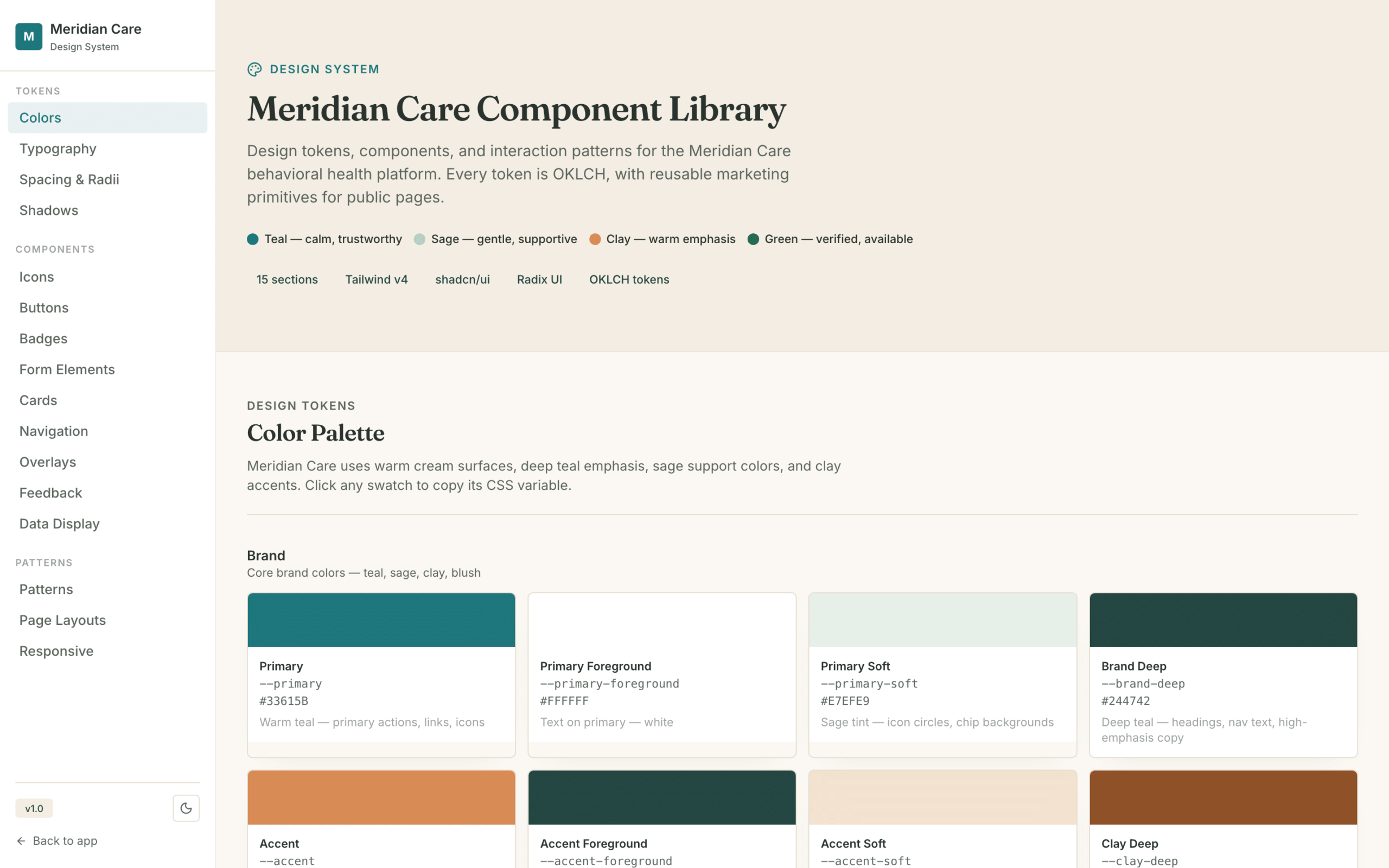
Built to be usable by everyone who needs it
This platform operates where accessibility is a legal requirement, not a preference. It was designed in, then verified.
Status colors were darkened at the token level, so every badge in every portal became readable at once. White text on pale backgrounds was found and fixed.
Clickable table rows made keyboard-operable, icon-only buttons and filters given real names, focus states visible throughout.
Calendar states carry markers as well as tints, and protected data is marked with an icon and a word, not just a shade.
Heading levels were audited and repaired so screen readers get a real structure instead of a visual approximation.
English and Traditional Chinese across the family-facing experience, with preferred language captured at intake and surfaced on provider cards.
Built in stages
Value arrives early, and each stage stands on foundations that are already working.
Marketplace
- Public provider directory and search
- Guided intake and online booking
- Provider onboarding and credentialing
- Admin console with audit trail
- Transactional email under a BAA
Care coordination
- The PCP portal, closing the referral loop
- A shared case record across roles
- Structured clinical scoring
- Billable time tracking and reporting
- Secure messaging, tenant isolation
Records and billing
- EMR integration over industry standards
- Claims and revenue cycle management
- Real-time eligibility at booking
- Remittance processing
- Denial management workflow
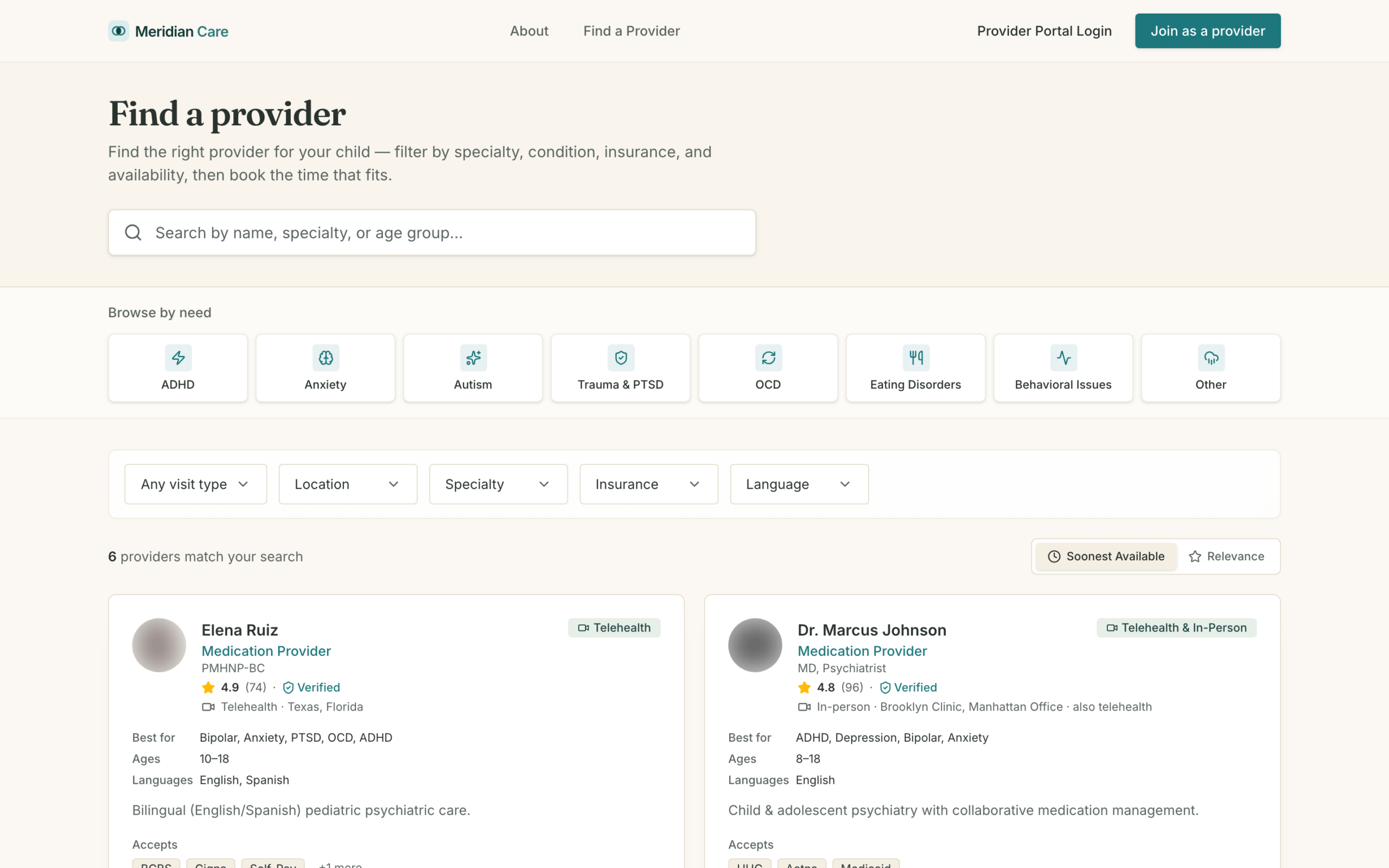
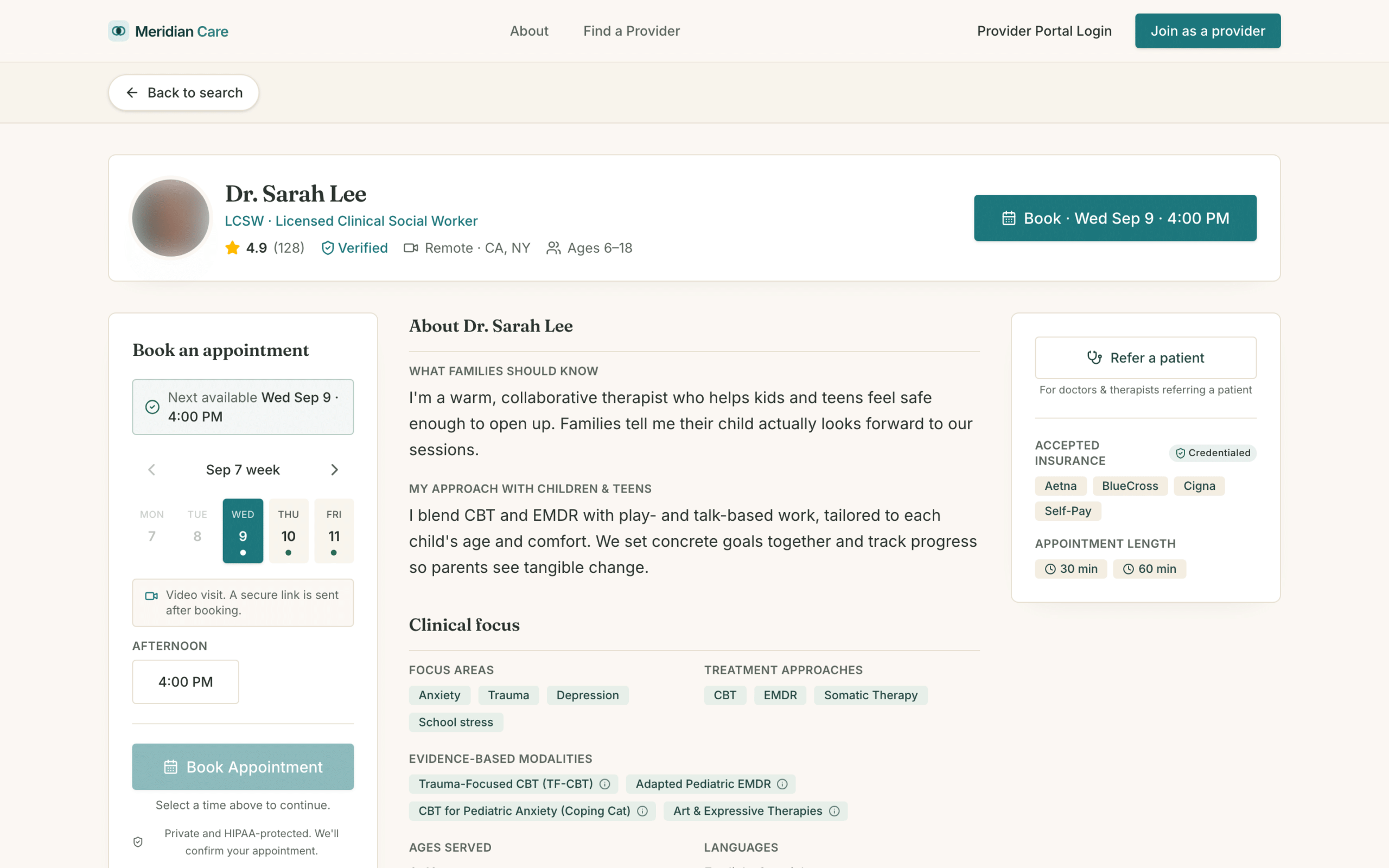
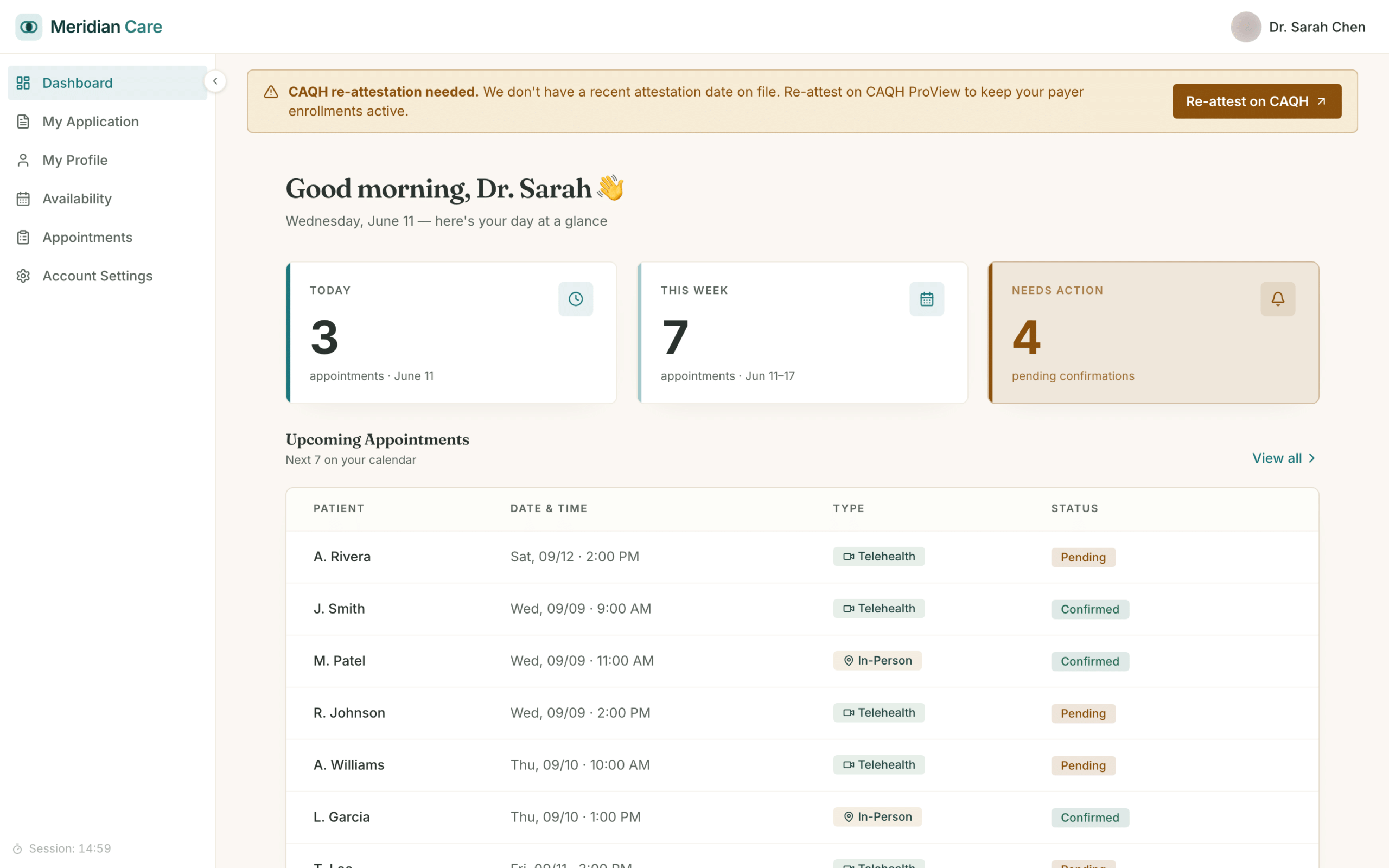
Three role-based portals, one shared model
Public marketplace
A guided intake, filtered provider search, clear profiles, online booking, and a separate path for pediatrician referrals.
Provider portal
Schedule and availability, each visit with its context, onboarding and credentialing, and profile management.
Admin console
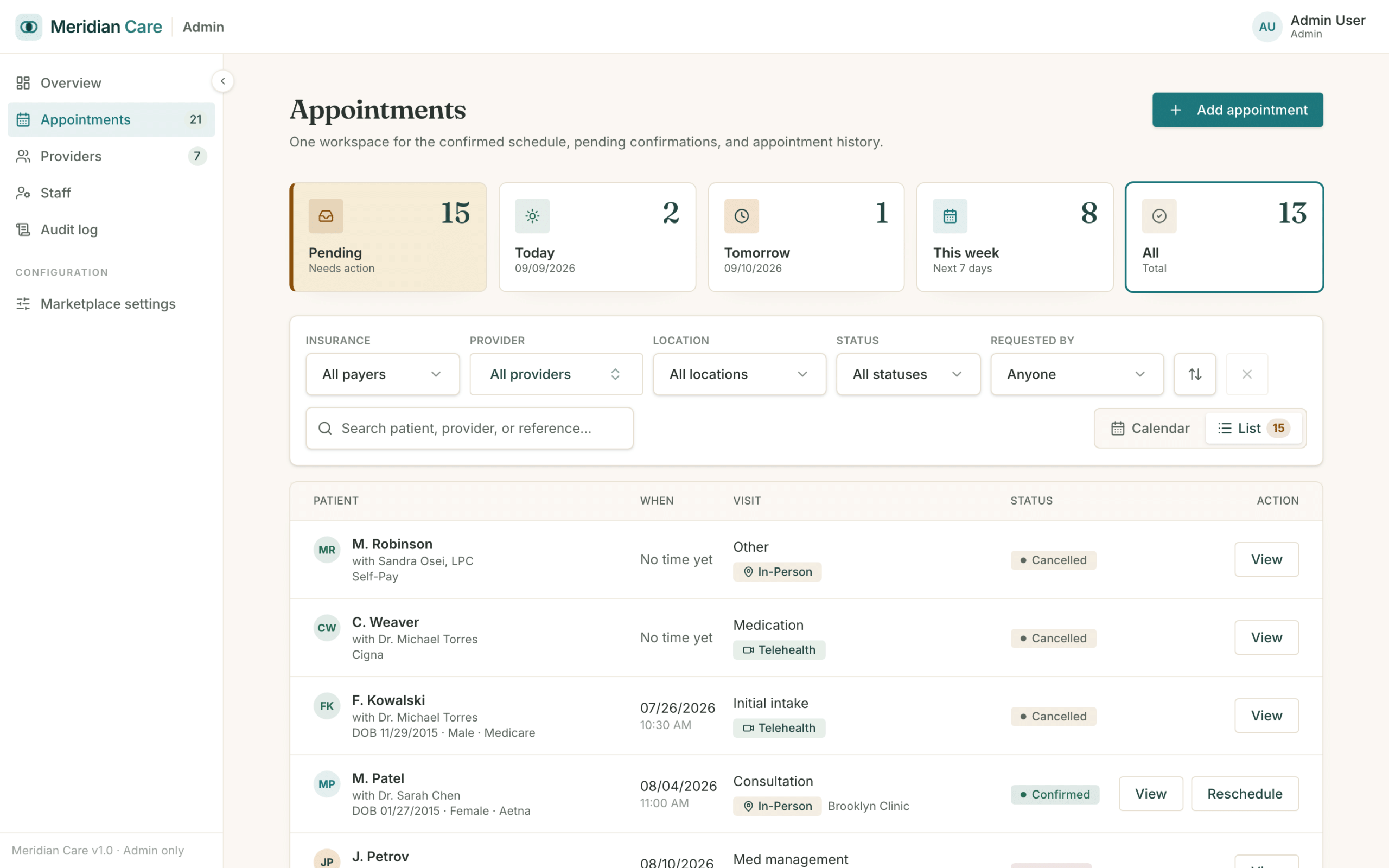
One workspace for the schedule, applications, providers, and audit trail, with protected data behind permissions.
PCP portal
Primary care physicians refer patients and follow shared cases, closing the Collaborative Care loop.
What the process delivered
The shipped experience across the portals.
What building this way gets you
Portals, one codebase
Families, clinicians, referrers, and staff each get a purpose-built experience over a single shared model, so the product stays coherent as it grows.
Automated tests
Unit and end-to-end coverage gating every change, so a fix in one portal cannot quietly break another.
Documented iterations
Design changes with the reason recorded, which is why the product fits the work instead of fitting the first draft.
Safe by design
Protected data gated by permission, encrypted, and audited from the first architecture decision rather than a later hardening pass.
Proprietary by default
A custom platform on infrastructure you own is a business asset and a point of differentiation, not a rented template.
You steer it
Wireframes, flows, and staging sign-offs keep you in control at every stage, with no surprises at launch.
How we build
An AI-driven workflow took a regulated healthcare brief through strategy, design, architecture, build, and launch across three role-based portals, with engineers reviewing every change and the client steering the design at every step.
- ✓Blueprinting. The brief read against a working model, gaps and contradictions surfaced early, compliance scoped before design.
- ✓Design. A design system first, then wireframes and clickable flows reviewed with you until signed off.
- ✓Iteration. Eighteen documented changes with the reasoning kept, including the ones that reversed us.
- ✓Architecture. Role-based, encrypted, audited foundations on cloud infrastructure you own.
- ✓Development and QA. AI builds and tests, engineers review, and a full automated gate runs on every change.
- ✓Launch. Promotion through isolated environments, cleared by a security review and your sign-off.
Have a product like this in mind?
We build custom software, web and mobile apps, and HIPAA-compliant, AI-driven healthcare products. Let's talk about taking yours from idea to shipped.