AI app development with Vercel v0 is transforming how quickly developers can turn ideas into working applications. This tutorial shows how to build apps using Vercel v0 and why Vercel v0 app development is gaining traction among founders and product teams looking for faster AI-generated app development workflows.
This guide takes a different approach. It shows how to build a production-ready HIPAA-compliant AI app using Vercel v0 by combining architecture, security, and compliance into a single structured prompt.
This is Part 1 of our Vercel v0 series. We also cover the full journey from initial build to production-ready, HIPAA-compliant applications in the other parts of this guide:
- Part 2: From AI Prototype to Production Ready: Deploy AI Apps with Vercel v0
- Part 3: How to Make Vercel v0 Apps HIPAA Compliant (Step-by-Step Vibe Coding Guide)
- Part 4: How to Build a Production-Ready HIPAA-Compliant App with Vercel v0 (Vibe Coding Complete Guide)
What is Vercel v0?
Vercel v0 (v0.dev) is an AI-powered UI generation tool that converts plain-English prompts into working React component trees using Next.js App Router conventions.
It can be considered similar to a highly efficient frontend engineer that can scaffold an entire application in a very short time. Vercel v0 is one of the most advanced vibe coding tools available today. To better understand this approach, see our guide on Vibe Coding: Conversational AI for Developers.
What is AI App Development with Vercel v0?
AI app development with Vercel v0 is the process of using AI-powered prompts to generate full-stack applications, including frontend, backend, and database integration, using Next.js and modern development tools. It enables rapid prototyping and more efficient AI-generated app development by letting teams define structured prompts instead of writing everything from scratch.
For many teams, it is one of the fastest ways to begin building production-quality apps with AI, provided the generated code is later reviewed, tested, and hardened for real-world use.
The quality of the generated output is largely determined by the quality of the prompt.
Pro Tip: Don’t go straight to v0 with a vague idea. First, brainstorm requirements — then use ChatGPT or Claude to generate a detailed, structured prompt. A structured prompt with page breakdowns, component lists, and tech stack specifications produces near production-ready results on the first attempt.
Here is how the structural prompt was generated using ChatGPT
Original Prompt:
generate a prompt for vercel V0 base on this requirement. Build a medication
tracker app. Where user signup using email and password. on dashboard user can add
medication and track daily intake. Track adherence and print report.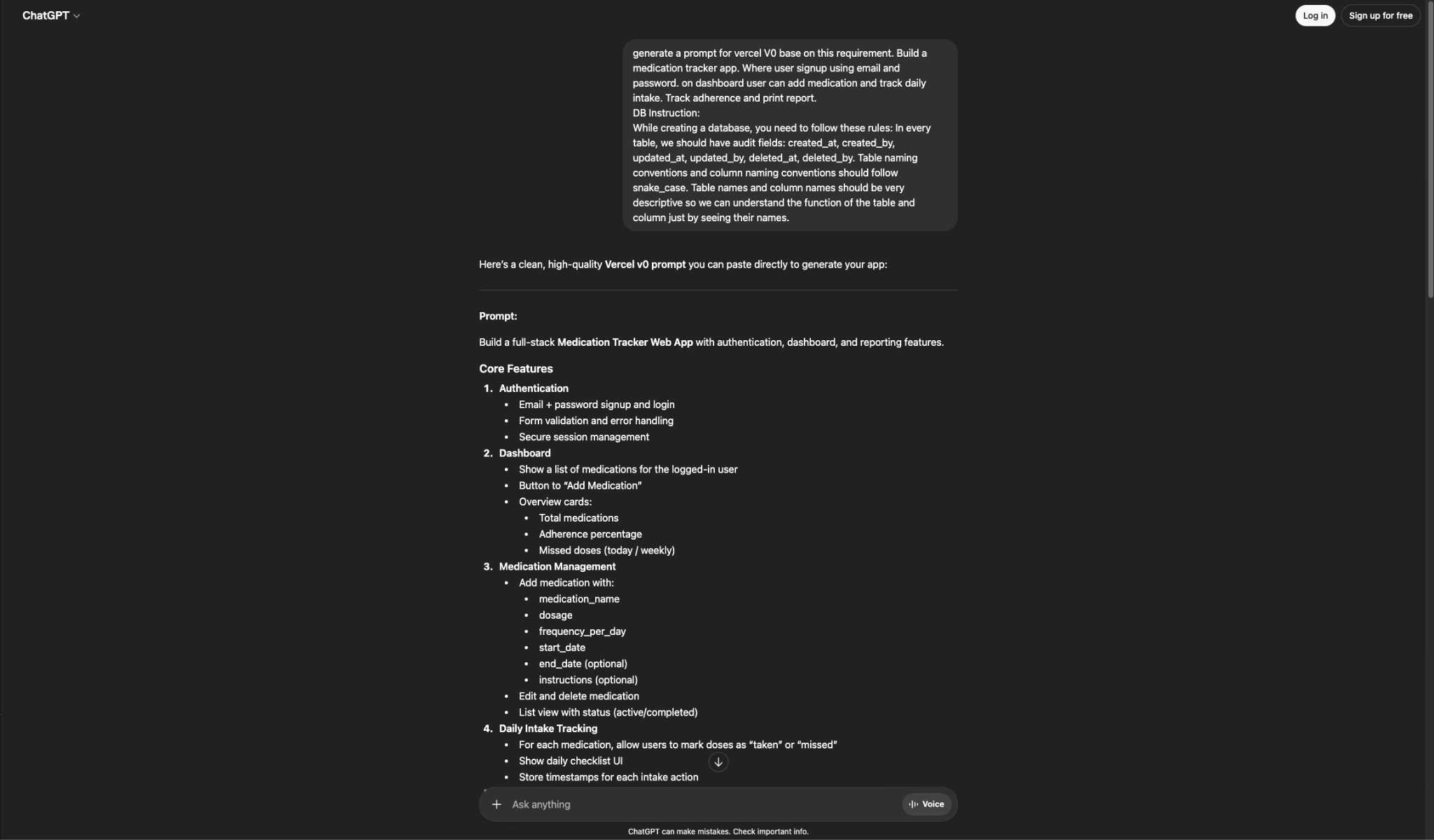
DB Instruction:
While creating a database, you need to follow these rules: In every table, we
should have audit fields: created_at, created_by, updated_at, updated_by,
deleted_at, deleted_by. Table naming conventions and column naming conventions
should follow snake_case. Table names and column names should be very descriptive
so we can understand the function of the table and column just by seeing their
names.
What We’re Building
The Medication Adherence Tracker is a secure healthcare web application designed to help users manage their medications and track intake behavior over time. It is also a useful example of how to create a healthcare app with AI tools while keeping architecture, security, and product structure in mind from the beginning.
Core Features
- Secure email and password sign-up and login using Supabase Auth
- Dashboard displaying today’s medications, adherence percentage, and key statistics
- Medication management with the ability to add, edit, and delete entries, including fields such as dosage, frequency, and schedule
- Daily tracking to mark doses as taken with timestamps and an undo option
- Adherence charts with progress bars and visual analytics
- Printable adherence reports with custom date ranges
Tech Stack
- Next.js (App Router) with TypeScript
- Tailwind CSS for styling
- shadcn/ui for accessible component primitives
- Supabase for authentication and database
For teams building healthcare applications, secure architecture and thoughtful planning matter from the beginning. Explore our Healthcare Software Development services for guidance on building scalable healthcare products.

Step 1: Setting Up Vercel v0
The first step in AI app development with Vercel v0 is setting up the environment and preparing a structured prompt.
Navigate to Vercel v0 (v0.dev) and sign in with a Vercel account. A plain prompt input field is displayed, which is where the process begins. Before entering any prompt, it is important to prepare a structured prompt, as outlined in Step 2.
Step 2: Crafting the Perfect Prompt
In AI app development with Vercel v0, prompt quality directly determines output quality.
A common mistake when using Vercel v0 is entering a one-line prompt. Instead, a fully structured prompt should be written to cover every major area of the application.
Below is the prompt used to generate the Medication Tracker:
Build a full-stack Medication Tracker Web App with authentication, dashboard, and
reporting features.

Core Features

Authentication
  Email + password signup and login
  Form validation and error handling
  Secure session management

Dashboard
  Show a list of medications for the logged-in user
  Button to "Add Medication"
  Overview cards:
    Total medications
    Adherence percentage
    Missed doses (today / weekly)

Medication Management
  Add medication with:
    medication_name
    dosage
    frequency_per_day
    start_date
    end_date (optional)
    instructions (optional)
  Edit and delete medication
  List view with status (active/completed)

Daily Intake Tracking
  For each medication, allow users to mark doses as "taken" or "missed"
  Show daily checklist UI
  Store timestamps for each intake action

Adherence Tracking
  Calculate adherence percentage:
    (taken doses / total scheduled doses) * 100
  Visual display (progress bar or chart)

Reports
  Generate adherence report by date range
  Show:
    medication-wise adherence
    total doses vs taken vs missed
  Provide printable report (PDF-friendly layout)

UI/UX Requirements
  Use modern UI with cards, tables, and charts
  Responsive design (mobile + desktop)
  Clean dashboard layout with sidebar navigation
  Use components for:
    forms
    modals
    tables
    charts (for adherence)

Tech Stack
  Next.js (App Router)
  React
  Tailwind CSS
  Use server actions or API routes

Database Design Instructions
  Follow these strict rules:

  Naming Conventions
    All table names: snake_case and descriptive

  Audit Fields (MANDATORY in every table)
    created_at
    created_by
    updated_at
    updated_by
    deleted_at
    deleted_by
The system will prompt for the installation of required services. In this case, Supabase is installed to handle data storage and management for the application.

Step 3: Reviewing the Generated Plan
After the prompt is submitted, Vercel v0 analyzes it and presents a generation plan before any code is written. This stage allows a review of the proposed architecture and the opportunity to request changes.
If any issues are identified, such as missing pages or an unintended state management approach, the “Request Changes” option can be used before approval. Once approved, Vercel v0 proceeds to generate the complete component tree.
Heads Up: v0 will also prompt you to install required services like Supabase. You can skip this during initial exploration and come back to it. The code will still be generated; you’ll just need to wire up the environment variables manually later.
Step 4: Improving the UI
The initial generation is functional but may include design inconsistencies across pages, such as varying font weights, inconsistent card styles, and misaligned spacing. A follow-up prompt can be used to refine and improve the overall UI design.
Redesign and significantly improve the UI/UX of the Medication Tracker app.

Goal:
Make the product feel like a polished healthcare SaaS product used by thousands of users.
This second pass improved visual consistency across all pages, including the login page, signup page, dashboard, and medication management screens, making them feel like part of the same product.
This is where many vibe coding tools for developers show their limits, because generating screens is easy, but creating a polished and consistent product experience still requires iteration.
Step 5: Reviewing Your Application
At this stage, a fully functional application is generated with the following pages connected and working together:
- Landing page with feature highlights
- Login and signup pages with Supabase authentication
- Dashboard with statistics cards and adherence visualization
- Add/Edit Medication modal with complete form validation
- Medication list with inline edit and delete functionality
- Daily tracker with mark-as-taken and undo options
- Reports page with date range selection and print support
The generated code serves as a starting point rather than a deployed product. It should be exported and run in a controlled environment.
Ready to move beyond a prototype? Our team provides app development services to help founders and product teams turn AI-generated ideas into secure, scalable, production-ready software.

Up Next: Moving to Production
Continue the Series
In Tutorial 2, From AI Prototype to Production Ready: Deploy AI Apps with Vercel v0, the next phase focuses on transforming the prototype into a production-ready application. This includes exporting the codebase, configuring a secure Supabase production environment, managing environment variables, and deploying the application on infrastructure capable of supporting a scalable, real-world healthcare platform.
For deeper insights into building compliant healthcare applications, refer to Healthcare App Development: Building HIPAA-Compliant AI Solutions.
Final Thoughts
Vercel v0 significantly accelerates AI app development by enabling rapid transformation from concept to a functional healthcare application. A well-structured prompt plays a critical role in generating high-quality results, while a second iteration helps refine the overall user interface.
At this stage, a complete multi-page application with authentication, database integration, and working UI components is in place. However, this serves as a foundation rather than a finished product, with production readiness and compliance addressed in the next parts of the series.
Ready to build a scalable AI-powered application? Book a free consultation call to discuss your project.