Most AI projects that fail don’t fail loudly. They fail quietly: a chatbot gives confident wrong answers, a model that worked beautifully in the demo breaks down in production, or a dashboard nobody bothers to open anymore.
If you’re considering an AI project rescue right now, you’re probably not dealing with a project that needs to be scrapped entirely. Fixing broken AI development projects starts with a real diagnosis: figuring out which part actually failed, then deciding whether to repair it, replace it, or rebuild around it. Skipping that diagnosis is what can turn a fixable problem into an unnecessary rebuild.
An AI project rescue is that diagnosis and the plan that follows. It’s most useful for an inherited project nobody wants to own, a stalled pilot, an underperforming chatbot, or a proof of concept that never made it into production.
What a Broken AI Project Looks Like From the Inside
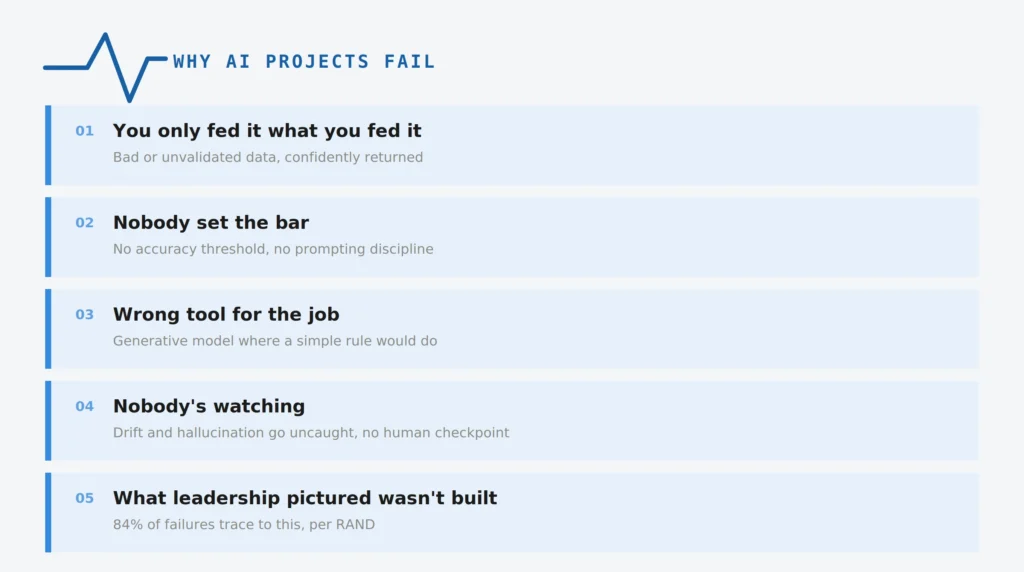
From the outside, a broken AI project usually looks perfectly fine:
- A demo that works
- A slide deck full of promising numbers
- A roadmap that mentions “AI-powered” in three different places
Inside the team, the picture looks different. The model handles the examples everyone tested carefully, then falls apart when real users start sending the inputs they actually use: incomplete questions, malformed documents, unexpected terminology, or requests that never appeared in the demo.
Nobody fully agrees on why. The person who originally built it has usually moved on to another project, so there’s no one left who really owns fixing it. Meanwhile, leadership is asking why the AI investment isn’t paying off, and someone ends up spending their weekend trying to explain what went wrong.
This kind of quiet failure is more common than many teams realize, and a stalled or underperforming project isn’t automatically a reason to start over from scratch, whether the team built it in-house or brought in another AI vendor first. Plenty of rescues begin after a first attempt somewhere else already fell short.
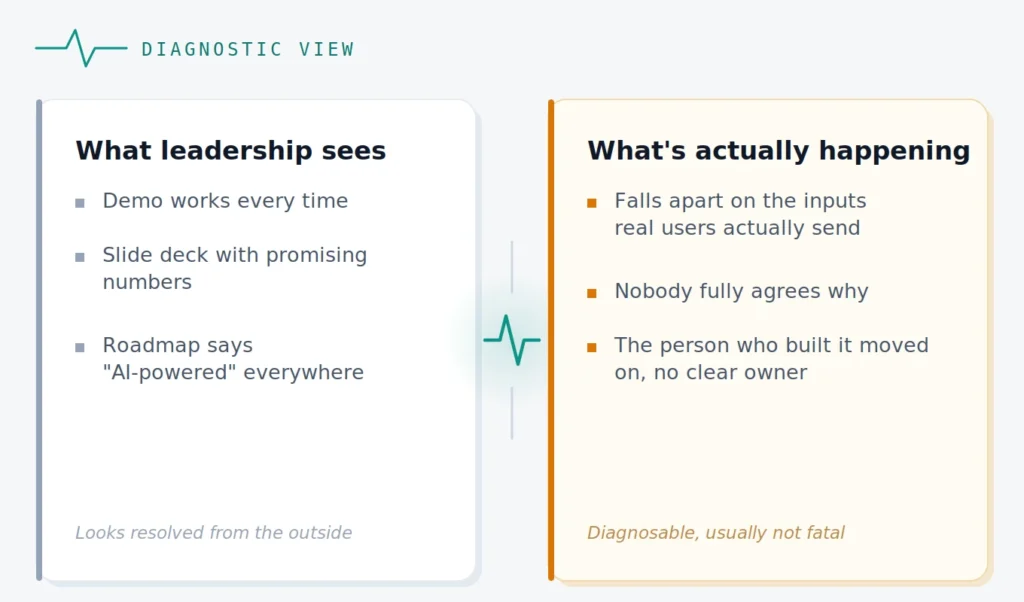
Across the AI-powered proof-of-concept builds and production healthcare tools we’ve built and rebuilt, the failures tend to repeat the same handful of patterns rather than appearing as isolated incidents. RAND’s research, based on interviews with 65 experienced data scientists and engineers, identifies five leading root causes of AI project failure and notes that, by some estimates, more than 80 percent of AI projects fail, roughly twice the failure rate of conventional IT projects that don’t involve AI.
Before assuming a project is actually broken, run this quick filter:
- Does it fail the same way every time, or only on occasional edge cases?
- Has adoption genuinely stalled, or is it still ramping up?
- Can your team explain why it’s getting things wrong, or is the system a black box even to the people who built it?
When failure is consistent, adoption has stalled, and nobody can explain what’s happening, that’s a signal worth investigating before committing to a rebuild.
Why AI Projects Actually Fail
Five patterns account for most of what actually goes wrong, and they’re rarely mutually exclusive.
Your AI Is Only Honest About What You Fed It
Ask an AI model a question and it will usually produce an answer. That’s the trap. Unlike conventional software, which can throw an error when something breaks, a model can produce a confident response whether or not that response is correct.
This usually shows up as:
- Labels applied inconsistently across the training data
- Training data pulled from one narrow slice of how the business actually operates
- A retrieval system still pointing at last year’s documents because nobody updated the index
The model may not be the part that’s broken. It may simply be responding to information that is incomplete, stale, poorly labeled, or mismatched with how the business actually works.
Nobody Told It What “Good Enough” Actually Means
Ask your team this before anything else: does anyone know what an acceptable answer looks like, or has everyone just been eyeballing it?
Many teams never write this down. There’s a ship date, but no agreed threshold for accuracy, hallucination tolerance, or acceptable error.
The same gap shows up in how the model is prompted, not just how its output is graded:
- A vague prompt with no examples of the output format anyone actually wants
- A system prompt nobody has revisited since launch
- No agreed threshold for what counts as a wrong answer versus an imperfect one
An undefined accuracy bar and a vague prompt can produce the same symptom: answers that are technically generated but practically unreliable.
You Might Be Using the Wrong Tool for the Job
Not every problem needs a generative model. A simpler rules-based system, lookup, or classifier can sometimes do the same job for less money and with fewer surprises.
Signs this may be the actual issue:
- The model’s mistakes are unpredictable rather than consistent
- A basic decision tree or lookup could reasonably replace the task
- Maintenance costs keep climbing without the output improving
Sometimes the problem isn’t that the AI was implemented badly. The problem is that generative AI wasn’t the best tool for that particular job.
It Drifts, It Hallucinates, and Nobody’s Watching Either One
Software that isn’t touched stays the same. AI systems don’t. As the questions, documents, terminology, or workflows people actually use drift further from what the model was trained or tuned on, performance can quietly degrade. Users may start double-checking answers long before the team realizes trust has dropped.
Hallucination compounds the problem: the system can generate answers that sound plausible but aren’t supported by the available information.
The monitoring gap tends to hide in plain sight:
- No one is checking real outputs against real usage on a regular schedule
- Higher-stakes decisions such as recommendations, eligibility decisions, or customer commitments, are going out without an appropriate human checkpoint
- The only monitoring in place confirms the server is up, not that the answers are still useful and accurate
This is the human-in-the-loop gap: nobody is consistently reviewing whether the system’s outputs remain fit for the decisions they’re being used to support.
What Leadership Pictured Was Never What Got Built
This is one of the problems that can quietly wreck a project. Leadership imagines something close to human judgment. What actually gets built is a narrower tool with a fixed, limited scope because that’s what was technically feasible on the timeline.
Nobody necessarily lied. The gap simply never got named out loud.
RAND’s research identifies misunderstanding or miscommunication about the problem to be solved as the most common root cause among the five failure causes identified in its interviews.
The result is predictable: leadership evaluates the system against an expectation the technical team was never actually building toward.
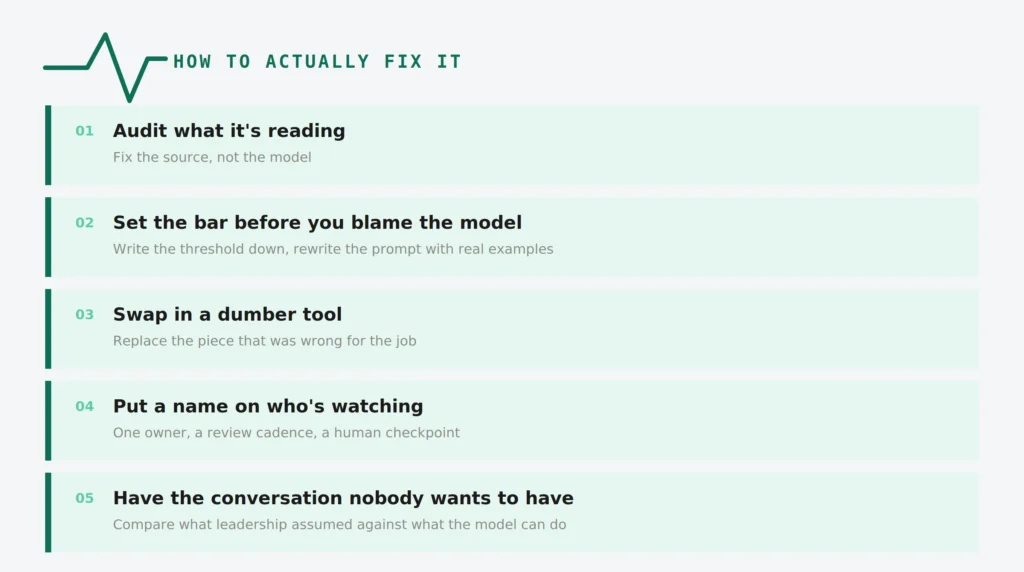
How to Actually Fix It
Each cause above has a fix that starts the same way: check the actual layer before touching anything else.
Stop Auditing the Model. Audit What It’s Reading.
When the real problem is stale or mismatched source data, retraining can feel like the obvious move. But if the failure originates in the information reaching the model, retraining won’t fix the underlying source.
Here’s what to check first:
- Pull what the model is drawing from and check it against what’s current
- Fix the index or the source data itself, not the model sitting on top of it
- Re-run the same test cases that failed against the corrected source before changing anything else
In our experience, auditing the source can uncover the actual problem much faster than spending weeks retuning a model that was never receiving the right information.
Set the Bar Before You Blame the Model
Start with one working session:
- Set the accuracy or hallucination bar as a team, in writing, rather than relying on gut feeling
- Rewrite the prompt with real examples, not the polished examples from the demo
- Test it against the messy inputs actual users send, not the clean inputs from the pitch deck
This is one of the easiest steps to skip because teams often reach for a monitoring dashboard before they’ve agreed on what the model is supposed to get right.
Sometimes the Smartest Fix Is a Dumber Tool
If the underlying approach was wrong, model selection, architecture, or the decision to use a generative model at all, the fix is replacing that component rather than endlessly tuning it.
- Swap the generative model for a rules-based system or classifier where the task doesn’t actually require generative judgment
- Keep the generative component only where its capabilities justify its cost
- Re-test after the change against the same edge cases that were failing before
Changing the underlying model or architecture can require rebuilding a meaningful component of the system, but that’s a targeted rebuild of one diagnosed piece, not the full-project rebuild that follows from skipping the diagnosis altogether.
This is the kind of work our AI troubleshooting services cover more broadly, including architecture reviews, targeted rebuilds, and fixes across the failure modes above.
Put a Name on Who’s Watching
Closing this gap comes down to ownership, not more dashboards:
- Assign one named person responsible for the model’s output, not just its uptime
- Set a review cadence that checks real outputs against real usage
- Put an appropriate human checkpoint on anything flagged as uncertain, especially when the output influences a higher-stakes decision
The implementation can be simple: name an owner and establish a review cadence. The important part is making sure small errors don’t compound quietly until users notice before the team does.
Have the Conversation Nobody Wants to Have
The fix starts with an honest conversation, although it may take more than one meeting to fully settle the issue:
- Compare what the model can reliably do against what leadership originally assumed
- Decide what actually needs to change: the model, the scope, or the expectation
- Write the decision down so it doesn’t quietly drift back to the original assumption three months later
Not sure which of these five causes is actually behind your project’s problems? Get a free diagnostic call to talk through what’s happening and identify the most likely area to investigate. That’s the same starting point our AI troubleshooting services use, scoped to a single conversation rather than a full audit.
The Compliance Gaps Healthcare Teams Miss
If you’re not building in a regulated space, this section may not apply. For healthcare teams, an AI project rescue may need to address technical architecture and compliance considerations together, starting with a signed BAA on every third-party AI tool touching patient data as the baseline. The two technical checks below matter most from there, and the specifics depend on your data, architecture, contractual relationships, and jurisdiction, so treat what follows as a technical starting point rather than a complete compliance review. Healthcare teams should involve their legal and compliance advisors for requirements that apply to their particular implementation.
A retrieval layer that exposes more than the task requires. If a RAG implementation lets the model access more of a patient record than the task requires, the problem may sit in the retrieval and access-control layer rather than in the model itself.
Depending on the architecture, the fix may involve data minimization, tighter access controls, de-identification, or changes to retrieval logic. Whether that can be corrected without rebuilding the whole system depends on the existing design.
RAG, sandboxing, and anonymization each play a role in reducing risk in healthcare AI by controlling what the model can access and how patient data moves through the system.
No record of what data the system actually touched. In an audit or investigation, being unable to reconstruct what the system accessed and when can make it difficult to establish what happened.
Logging can help close that gap by recording relevant access events, timestamps, and the processes involved, subject to the requirements of the specific environment.
For a healthcare AI project, it’s worth checking auditability and access controls early rather than assuming the model itself is the first thing that needs attention. For broader HIPAA-related considerations beyond AI specifically, including data encryption and access controls, our HIPAA Compliant Mobile & Web App Development Checklist covers the wider set of considerations.
Most Broken AI Projects Don’t Need to Be Scrapped
Once the actual failing layer, data, evaluation criteria, architecture, monitoring, ownership, or scope—gets fixed, the rest of the system may still be usable. Sometimes the affected component needs to be replaced. Sometimes the problem is a configuration, data, or process issue that can be repaired without rebuilding the system.
That’s what a real AI project rescue looks like in practice: diagnose first, then repair, replace, or rebuild only what the diagnosis justifies.
The same principle applies beyond AI. Our The $1M Mistake: Why Healthcare Software Projects Fail walks through broader failure-and-repair patterns across healthcare software projects if this is one of several projects you’re trying to get back on track.

Find the actual cause, fix the affected layer, and keep everything else that isn’t broken.
Ready to find out which layer needs fixing? Schedule an AI project rescue consultation. We’ll walk through what’s happening, compare it against the failure patterns above, and give you our view on what needs attention, including if the right answer is that you can fix it yourselves.