Picture a founder who hired a freelance developer three years ago to build an MVP. The freelancer delivered something that worked. Then he took a full-time job somewhere else and left behind a codebase with no comments, no documentation, and no one who could explain why half the authentication flow was built the way it was.
Eighteen months later, she was searching for how to fix a broken mobile app instead of adding the features she actually wanted to ship. Two engineers had already quit trying to untangle the login flow. She was quietly getting quotes to rebuild the entire thing from scratch.
This situation is common. It happens when a codebase nobody understands meets a business that cannot afford to pause. Fixing broken mobile apps at that point usually comes down to three choices: find developers willing to reverse-engineer the code, start over, or bring in a partner who can do both safely.
The question is what to do once it happens.
What Does It Mean When a Mobile App Is “Broken” or “Stalled”?
A slow sprint is not the same thing as a stalled project.
A stalled project is one where development has dragged on for months with no clear path to users. Sometimes the app is already live but failing users instead. Rescuing stalled apps and fixing apps that are live but broken are related problems, but they don’t always call for the same response.
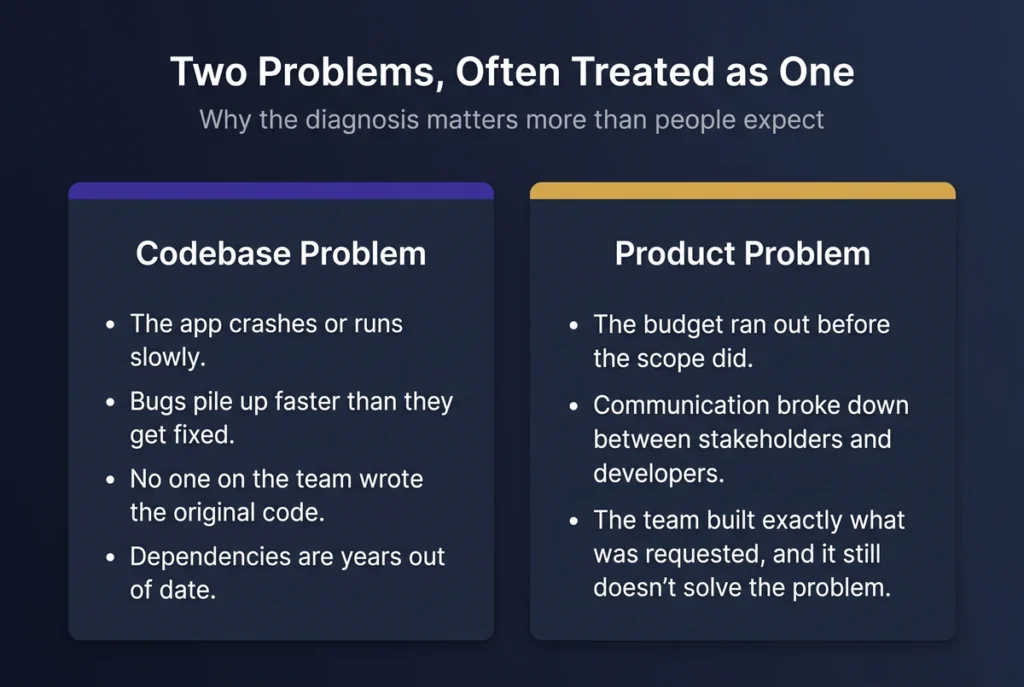
There are two broad problems that often get treated as one: a codebase problem and a product problem.
A codebase problem looks like this:
- The app crashes or runs slowly.
- Bugs pile up faster than they get fixed.
- No one on the current team wrote the original code.
- Documentation is missing.
- Dependencies are years out of date.
These are signs of technical debt. The first job is to find out what is actually broken, what is just old, and what parts of the system are still safe to build on.
A product problem looks different. The budget ran out before the scope did. Communication broke down between stakeholders and developers. Or the team built exactly what was requested and it still doesn’t solve the user’s actual problem.
These patterns show up often enough that we’ve written about them separately in why software projects fail and how to fix them. If the codebase itself checks out but the project still stalled, that’s worth reading before assuming it’s a technical problem.
An AI code audit cannot fix a product that nobody agrees on. It also can’t fix a development process that keeps changing direction. The distinction matters because it changes where your money should go next. A technical problem calls for a structured rescue: understand the system, stabilize it, then decide what to change.
A product or process problem calls for something else entirely, and paying someone to “fix the code” won’t solve it. Getting this diagnosis right matters more than people expect, since fixing broken mobile apps in the wrong category wastes both the budget and the time it was supposed to save.
What Can AI Actually Do on an Old, Undocumented Codebase?
Here is the honest version, not the exciting one.
AI is most useful during the discovery phase of a rescue. It can read and summarize unfamiliar code, identify likely problem areas, generate tests for code that lacks coverage, and map dependencies so the team can see what a change might affect.
We’ve seen this play out on the SaaS side too, where AI speeds up the same discovery work. Code-generation platforms such as GitHub Copilot and Cursor help developers understand, modify, and generate code. Test automation platforms such as Testim, Mabl, and Autify use machine learning to catch regressions and flag behavior changes.
What AI cannot do is determine why undocumented code was written the way it was. A strange piece of code might be a bug. It might also be an intentional workaround for an edge case nobody wrote down.
A clean-looking AI-generated refactor could remove behavior that a user, integration, or downstream system still depends on. Deciding whether something is broken, unusual on purpose, or load-bearing still takes an experienced developer who understands the business behind the code.
So this is the one rule worth remembering for fixing broken mobile apps with AI: it speeds up discovery. It does not replace the judgment that comes after discovery.
A good AI-assisted audit should leave the team with a clear picture of the app’s architecture, its major dependencies, its technical debt, and which parts of the system are safe to touch. What the team does with that picture is still a human decision.
Does AI-Assisted Rescue Actually Save Time and Money?
Yes, but the more useful question is where the savings actually come from.
According to Technology Rivers’ ebook The $1M Mistake: Why Healthcare Software Projects Fail, problems get more expensive to fix the later they’re caught, following a rough cost-multiplier pattern: 1x at discovery, 5x at design, 10x at development, 20x at testing, up to 50x in production, and around 100x for a full rebuild.
That pattern isn’t unique to healthcare, or to Technology Rivers’ own data. Stripe’s research on developer time found technical debt eats up roughly a third of the average developer’s week industry-wide.
The lesson still holds broadly: finding a problem early gives a team more options than finding it after months of development, or after users are already depending on the product.
Timing is really the whole game here. Fixing broken mobile apps costs less at every stage the problem is caught earlier, which is the entire argument for running an assessment before committing to a fix.
An AI-assisted code audit helps with that first stage by cutting down the manual time developers spend locating and organizing problems in a codebase they didn’t build.
The actual time saved depends on the app’s size, age, and complexity, and it does not eliminate the human work of deciding what those problems mean. A senior developer still has to decide whether a flagged issue gets fixed now, scheduled for later, or left alone.
The benefit isn’t that AI fixes the app for less money. The benefit is that the team spends less time figuring out what exists and more time deciding what to do about it. That’s the real value of AI-driven mobile app recovery: faster clarity, not a shortcut past the work.
What Actually Happens During an AI-Driven App Rescue
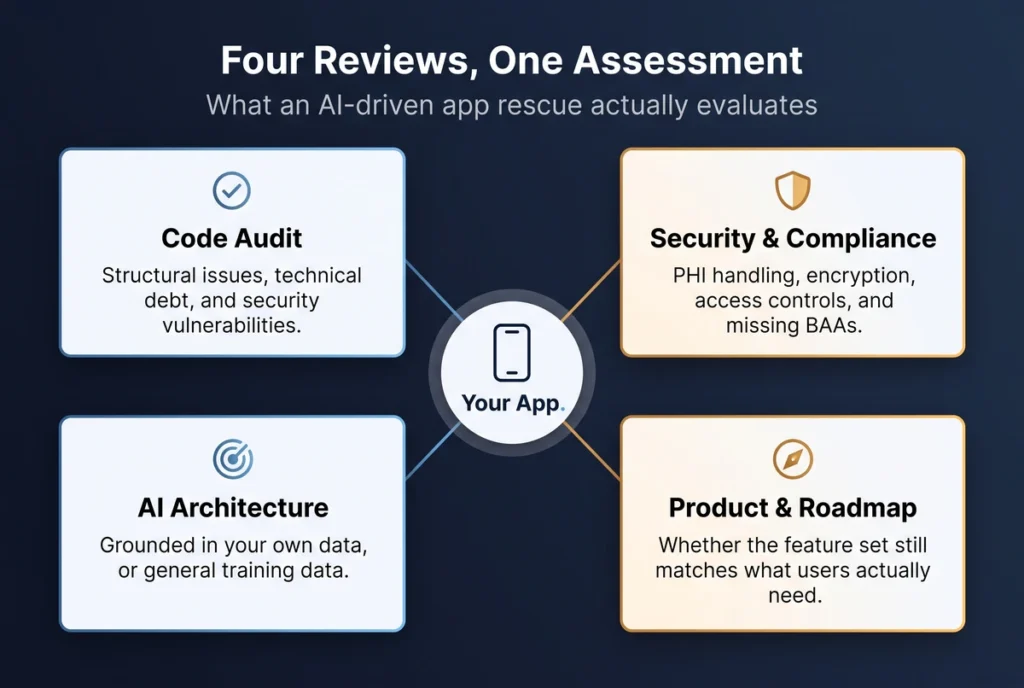
An AI-driven rescue isn’t one action. It’s a small number of distinct reviews, each answering a different question about the same codebase:
- Code audit — structural issues, technical debt, and security vulnerabilities.
- Security and compliance review — PHI handling, encryption, access controls, and whether any required BAAs are missing.
- AI architecture review — whether the AI is grounded in the app’s own data or just running on general training data, if AI is already part of the product.
- Product and roadmap review — whether the current feature set still matches what users actually need.
The code audit is the one most people picture when they hear “audit.” It maps what’s fragile, what’s stable, and what would break if touched, without anyone reverse-engineering the whole app by hand. The security and compliance review is the one most likely to turn up a surprise, since it’s aimed specifically at tools and integrations the current team may never have documented.
The product and roadmap review is different from the other three because it isn’t really a technical question: it asks whether the app, even once it’s technically sound, is still solving the problem it was built to solve, and whether it’s worth saving at all.
Fixing broken mobile apps well means running all four reviews together, not picking the one that seems most urgent and skipping the rest.
The AI architecture review is where the technical work gets specific. If the app connects to an AI model, the reliable version of that connection follows a clear pattern.
A user’s question triggers a search of the app’s own verified content first. That retrieved content gets handed to the model as context. Only then does the model generate a response, one that traces back to a specific source instead of general training data.
That traceability is what makes an answer reviewable instead of just plausible-sounding. This is the kind of assessment our mobile app development team runs before recommending a fix.
Where AI-Assisted Rescue Can Go Wrong
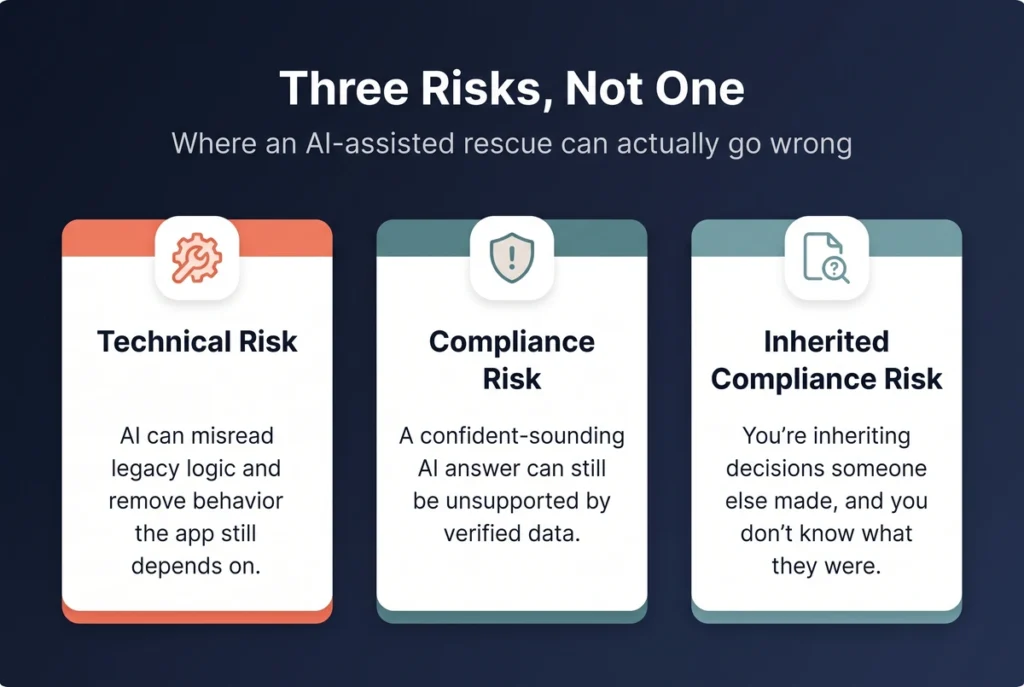
There are three distinct risks here, and they shouldn’t be flattened into one warning: technical risk, compliance risk, and inherited compliance risk.
Technical risk
AI can misread legacy business logic and suggest a change that looks cleaner but removes behavior the app still depends on. This is exactly why the discovery-versus-judgment split from earlier matters in practice, not just in theory: AI-generated changes need a human developer’s review before they merge into production, not after.
The goal isn’t to put AI in charge of the rescue. It’s to use AI to cut down repetitive discovery work while keeping the decisions that actually matter under human review.
Compliance risk
This is where fixing broken mobile apps carries higher stakes than a purely technical rescue. A code mistake is a bug to patch.
A compliance mistake can mean real legal exposure, which is why this risk matters most if the app handles protected health information, or PHI.
Connecting an AI system to clinical documents or patient data without the right architecture, vendor agreements, and security controls can create real problems, regardless of how confident the AI’s answers sound.
A model can produce a response that sounds right while being unsupported by the app’s actual verified data.
A retrieval-based architecture, often called RAG, is one way to connect an AI system to verified information before it generates a response. It isn’t a universal fix.
This is one of the more common healthcare AI failures: a general model gets connected directly to clinical documents, the answers turn out inconsistent, and the whole architecture ends up rebuilt around RAG after the fact. The right architecture depends on the specific use case, data, model, and requirements involved.
Inherited compliance risk
A rescue has a wrinkle a new build doesn’t: you’re inheriting decisions someone else already made, and you usually don’t know what they were. A previous developer might have added an analytics library that logs PHI without anyone realizing it, embedded a support chatbot in a patient portal with no signed agreement behind it, or used a regular Slack channel to discuss patient cases because nobody flagged it as a problem at the time. None of that shows up in a normal code review unless someone is specifically looking for it.
The first real step in a healthcare rescue isn’t fixing anything, it’s pulling a complete inventory of every third-party tool already touching patient data and checking whether a BAA actually exists for each one.
Popular tools like Slack and Google Workspace only support HIPAA use under specific paid plans and signed agreements, not by default. That’s exactly the kind of gap a rescue needs to catch before it becomes someone else’s problem to explain.
Once a gap turns up, there’s a real decision to make: get the missing BAA signed if the vendor can support it, migrate off the tool if it can’t, or treat any PHI that may have already passed through it as a potential exposure that needs its own review. Skipping that follow-through means finding the risk and then leaving it exactly where it was.
Not sure whether your app needs a targeted fix or a full rebuild? Schedule a free assessment and find out what’s actually broken, what can be preserved, and what to do next before committing more development budget.
What Changes When AI-Driven Development Takes Over a Stalled Project
Before an assessment, a stalled project usually looks the same from the inside. Nobody is fully sure what’s actually broken, how long a real fix would take, or whether the smarter move is to keep building or start over. Without that clarity, most decisions come down to guessing, and guessing gets expensive.
After an AI-assisted assessment, the team isn’t just told there are problems. They get a ranked list: what needs attention now, what can wait, what shouldn’t be touched yet, and whether the app is worth rescuing at all.
Most stalled projects are not beyond saving. The earlier a team gets clarity, the more options it has. That’s ultimately the standard worth holding fixing broken mobile apps to: not just a working app again, but a clear, ranked list of what to do next.
Verbina’s founder describes a similar situation: a bug-filled app from another firm that wasn’t usable, and what changed once the assessment and rescue actually happened.
Go back to the founder from the beginning of this piece. An assessment like the one described above is exactly what would have told her whether the login flow was a two-week fix or a sign the whole authentication system needed to be rebuilt, before she spent more money guessing.
That’s the real value of running one: not a guarantee that every app gets saved, but an answer to the question she’d been stuck on for eighteen months.
Checklist: Signs Your App Needs a Rescue, Not Just a Fix
Your app may need a deeper technical assessment if:
- The app crashes, freezes, or runs slowly enough that users are abandoning it.
- Nobody on the current team fully understands the existing codebase.
- Documentation is missing or years out of date.
- A compliance or security question has come up that nobody could fully answer.
- The backend cannot handle current or expected user volume.
- AI features use a general model without a clear connection to verified data from your own application.
- Development has run six or more months with no clear path to users.
- Fixing one part of the application repeatedly creates problems somewhere else.
None of these signs automatically mean you need a rebuild. They mean you have enough uncertainty that continuing to build without understanding the system could be the more expensive choice.
If your app has been stalled for months, or you’re not sure what shape the codebase is really in, get a project assessment before spending another six months guessing.