We asked Replit Agent to add HIPAA safeguards to our healthcare app. It built access control, audit logging, encryption, and automatic sign-out, passed 95 automated tests, and still couldn’t make the app compliant on its own.
That’s the real lesson of this part of the series: the code is one piece of HIPAA, and the rest is contracts, hosting, and people.
If you’ve built a healthcare app with an AI tool, the next question is usually whether it can safely handle patient data, and what HIPAA actually requires inside the app. This guide answers both, step by step, using a real build as the worked example: Stillwell, a therapy scheduling app built with Replit Agent in Part 1 and made production-ready in Part 2.
You’ll see how to add access control, audit logging, record history, encryption, and automatic sign-out, then how to check that each one works. These are the parts of HIPAA that live in the app’s code. If you want to make a Replit app HIPAA compliant, they’re necessary but not the whole picture, so Steps 1 and 2 cover what else HIPAA involves before any building starts.
This is Part 3 of a four-part series:
- Part 1: AI App Development with Replit Agent: How to Build a Healthcare App Prototype (Step-by-Step)
- Part 2: From AI Prototype to Production Ready: Deploy AI Apps with Replit
- Part 3: How to Make a Replit App HIPAA Compliant (Step-by-Step Guide)
- Part 4: How to Build a Production-Ready HIPAA-Compliant App with Replit (Complete Guide)
This series is part of our complete guide, How to Vibe Code: From Idea to Production-Ready, HIPAA-Ready Application.
Step 1: Know What HIPAA Covers Before You Build
HIPAA isn’t a feature you add to an app. It covers the app, the hosting it runs on, every vendor that touches patient data, your contracts, your written policies, and an ongoing risk analysis. The HIPAA Security Rule groups its requirements into administrative, physical, and technical safeguards, and only the technical ones live in your code.
Before building anything, work out whether HIPAA applies to your app, and in what role:
- Do you handle health information on behalf of a healthcare provider, health plan, or clearinghouse? If so, you’re likely a business associate, and you’ll need a signed Business Associate Agreement (BAA) with them before real patient data enters your app.
- Are you a provider, plan, or clearinghouse yourself? Then you’re likely a covered entity, responsible for HIPAA directly.
- Does your app only hold information users enter about themselves, with no provider or plan involved? HIPAA may not apply, though state privacy laws still can.
- Is a client asking you to sign a BAA? That’s usually the clearest sign of which category you’re in.
These questions give you a working answer, not a legal one. Stillwell connects patients with therapists, so it’s built on the assumption that it handles protected health information. For your own app, HHS’s guidance on covered entities and business associates is the definitive source, and a compliance advisor can settle anything unclear.
Step 2: Map the Readiness Areas, Then Pick Where to Start
HIPAA readiness for an AI-built app breaks into roughly ten areas:
- Your HIPAA role, and whether your platforms and vendors can support it
- Authentication and role-based access
- Patient-level data isolation, so users only reach their own records
- Audit logging
- Encryption, in transit and at rest
- Automatic sign-out after inactivity
- Backup and disaster recovery
- Privacy controls, such as retention, deletion, and data requests
- Incident and breach response
- Administrative safeguards and a formal risk assessment, including a security officer, staff training, and access reviews
Areas 2 through 6 are the HIPAA technical safeguards that live in the app’s code, and they’re what this guide builds. The rest depend on hosting, contracts, and people, so they run alongside the technical work rather than after it.
Choose your starting point based on what your app actually does. An app that stores uploaded documents needs secure file storage early, while one that only schedules appointments doesn’t. For Stillwell, the starting point was authentication, role-based access, audit logging, encryption, and session timeouts.
Step 3: Ask Agent What the App Needs
An app built with AI often has some safeguards already, from earlier work, and some gaps you can’t see from the screen. With your starting areas chosen, the next step to make a Replit app HIPAA compliant is finding out which is which. Start in Plan mode, so Agent reviews the app without changing anything. Ask it to compare the app against these safeguards:
I'm preparing this healthcare app to handle patient data. Review the
app and tell me the main HIPAA technical safeguards it needs, such as
access control, audit logging, authentication, encryption, and
automatic logoff. For each one, tell me what the app already has and
what's missing. Don't change any code yet.
This gives you a gap list before any building starts. Some safeguards may already exist from earlier work, and you don’t want Agent rebuilding them.
Step 4: Build the Safeguards
Next, tell Agent exactly which safeguards to build. Being specific matters here, because a vague request like “make it HIPAA compliant” leaves Agent to decide what that means.
Plan and build these safeguards:
- Authentication: verify the signed-in session on every private request
- Role-based access: patients see only their own records, therapists
  see only their own appointments and patients, and admin access comes
  only from a server-side list
- Audit logging: record who created, viewed, changed, or deleted
  records, and when, without storing patient details in the log
- Session timeout: sign users out after a period of inactivity, with a
  warning first
- Encryption of sensitive fields such as names, emails, and meeting links

Business associate agreements and hosting are handled separately, so
don't treat them as done, and don't describe the app as HIPAA compliant.
Show me the plan before building.
The last lines matter as much as the list. They stop Agent from treating unsigned agreements as done, or from labeling the app compliant when it isn’t.
One safeguard worth adding to this list is two-step sign-in, also called multi-factor authentication or MFA, for all users. HHS has proposed updating the HIPAA Security Rule to require it, and although that update isn’t final yet, building it in now avoids rework later.
Adapt the Prompt to Your App
Role-based access control only works if every role is named. Stillwell has two roles and one main record, the appointment. Your app may have more, such as front-desk staff, billing, or administrators. Before you send the prompt:
- List your roles, and for each one, what it can see and what it must never see
- List the records that need an owner, such as appointments, messages, or documents, so each gets its own access check
- Choose which actions to log, focusing on anything that touches patient data or a permission boundary in your app
- Replace Stillwell’s details in the prompt with yours, keeping the same structure
Step 5: Add Standard Audit Fields
The audit log records events. Audit fields record, on each row of data, who created it, who last changed it, and who deleted it. Our team adds the same six fields to every table in every project, so this was its own request:
Add our standard audit fields to every table in the app:
created_at, created_by, updated_at, updated_by, deleted_at, deleted_by.

Requirements:
- Use these exact snake_case column names on every table
- Set created_by, updated_by, and deleted_by on the server from the
  signed-in user's ID, never from anything the browser sends
- Use deleted_at and deleted_by for removals and cancellations, so
  records are marked as deleted rather than physically removed.
  Deleted records should not appear in normal app views
- For existing records, leave the "by" fields empty or mark them as
  legacy. Don't guess or invent who created them
- These fields don't replace the existing audit_events table. Keep it
  as the record of who did what
- Don't change the encryption setup or any existing safeguard

Before building, show me the plan: which tables change, how existing
records are handled, and how this will be tested.
Two details are worth noticing. The user ID comes from the server, so no one can fake it from their browser. And existing records are left empty rather than filled with a guess, so the data never claims something that isn’t true. If your team already uses its own audit field names, swap them into the prompt.
Step 6: Add Record History
The audit log shows that a record changed and who changed it, but not what it used to say. Record history fills that gap by saving the previous version of a record before every change, so mistakes can be traced and corrected. It supports HIPAA’s integrity safeguard, which protects data from being changed or deleted improperly.
A short prompt is enough here, because Plan mode shows the details before anything is built:
Add record history: before any change to a record, save its previous version with who changed it and when. Keep sensitive fields encrypted in the history, and make it read-only and visible to operators only. Show me the plan first.Two lines in it do the important work. Asking for encrypted history stops the old copies from storing names and emails as readable text, which would quietly undo the encryption. And read-only history means no one can rewrite the past. In your own app, focus history on the tables that hold patient data or control who can access what.
Step 7: Ask Agent What It Actually Built
Agent’s plan describes what it intended. This prompt tells you what exists now:
List every HIPAA-related feature in this app. For each one, tell me:
- What it does, in plain language
- Whether it's fully built, partly built, or not built
- Where I can see it in the app or in the Database tool
- How it was tested

Then list anything that isn't finished, and anything that needs a
person or a signed agreement rather than code. Don't change any code.
In this build, Agent’s answer listed authentication, role-based access, audit logging, field encryption, session timeouts, and protections against caching private pages, along with 95 passing automated tests. It also saved the full details in a project file, docs/security-controls.md.
Step 8: Verify Each Safeguard Yourself
When you make a Replit app HIPAA compliant, Agent’s report is a claim until you’ve seen the result. Here’s how to check each safeguard in your own app, and what each looked like in Stillwell.
Role-Based Access Control
Role-based access control should block users from pages and records outside their role, even if they type the address directly. Hiding a button isn’t enough. To test it, sign in as a regular user and type the address of an admin page. In Stillwell, a patient account opening the operator page gets “Operator access required,” with a note that access is never granted automatically:
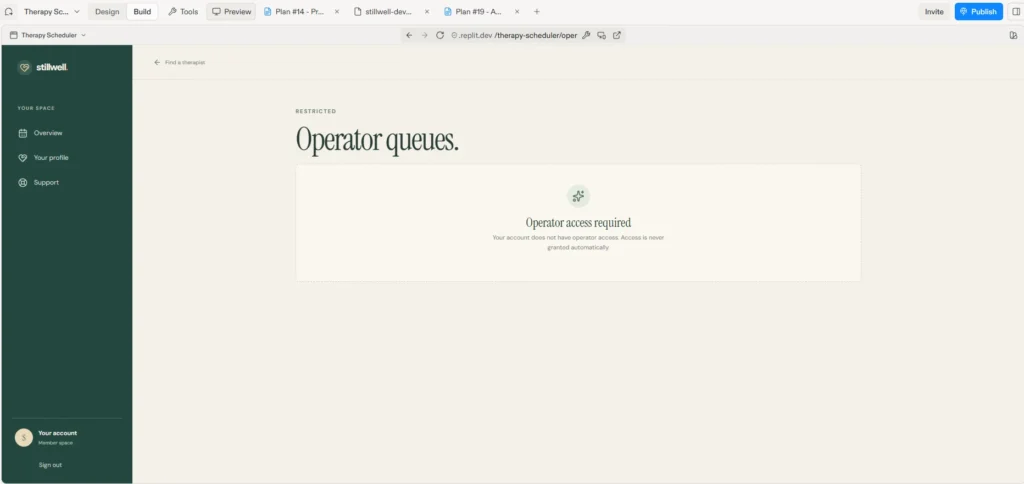
The check runs on the server, and admin access comes only from a list stored there, so changing a profile can’t grant it. The same checks keep each patient to their own records and each therapist to their own appointments and patients. To confirm this in your app, create two accounts with the same role, sign in as one, and try to open a record that belongs to the other. It should be blocked, and the attempt should show up in the audit log as denied.
Audit Logging
The audit log should record who did what, to which record, when, and whether it was allowed. Take a few actions, including one blocked attempt, then open the audit table in Replit’s Database tool. In Stillwell, the audit_events table shows each action with the user, the record, and the time. Most entries here came from Agent’s automated test accounts:
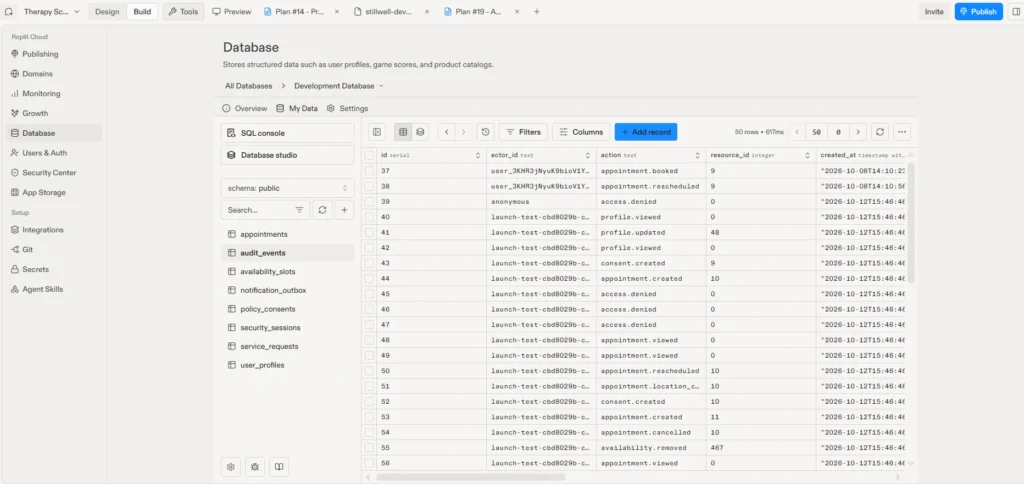
Each entry is marked as a success or a denial, so blocked attempts show up too:
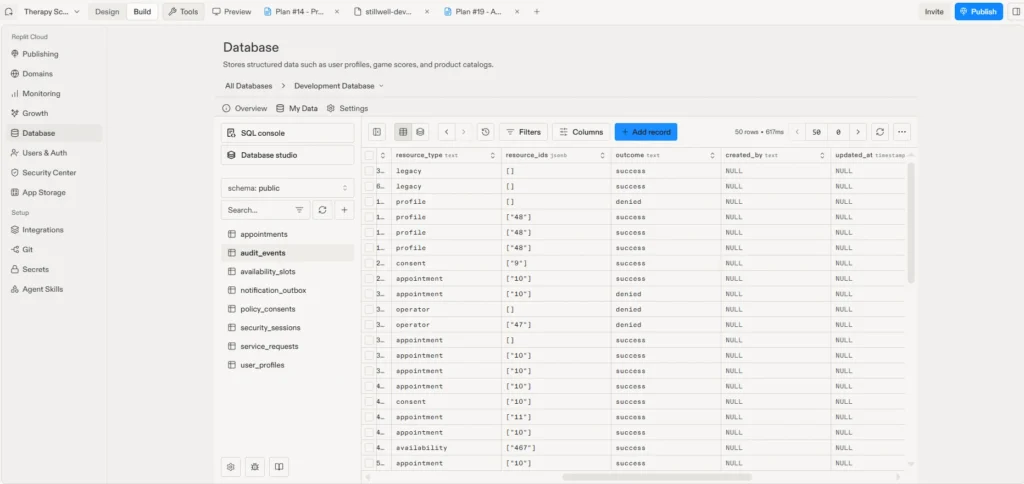
The log stores IDs rather than names, emails, or messages, so it doesn’t expose patient details itself, and any action whose log entry can’t be saved is blocked. Stillwell’s log doesn’t record IP addresses. HIPAA doesn’t require them, but they help in investigations, so ask Agent to add them if you need them.
Deleted Records
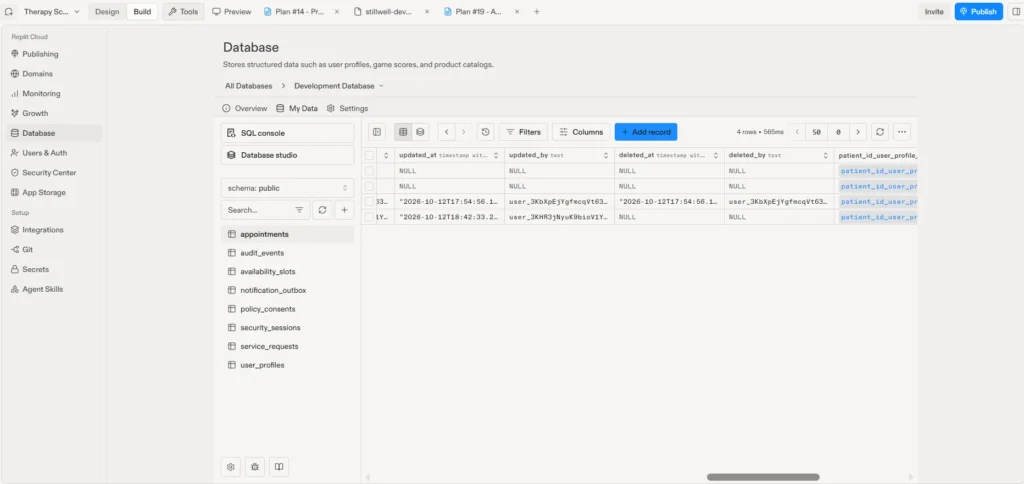
Cancelling or removing a record should mark it rather than erase it, and record who did it and when. Cancel a test record, then find it in the Database tool. In Stillwell, the cancelled appointment is still in the table, with its status changed:
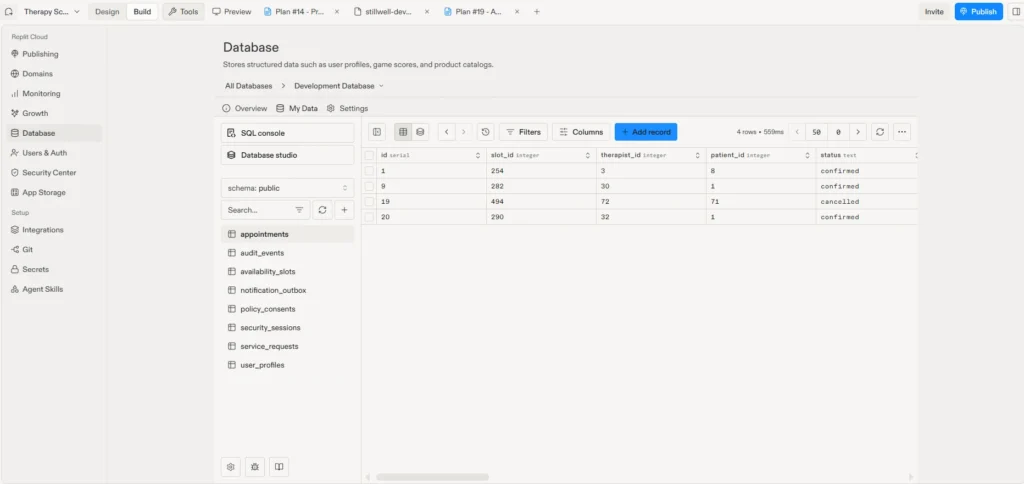
Its audit fields show who cancelled it and when. The oldest records stay empty because they existed before the fields were added:
Record History
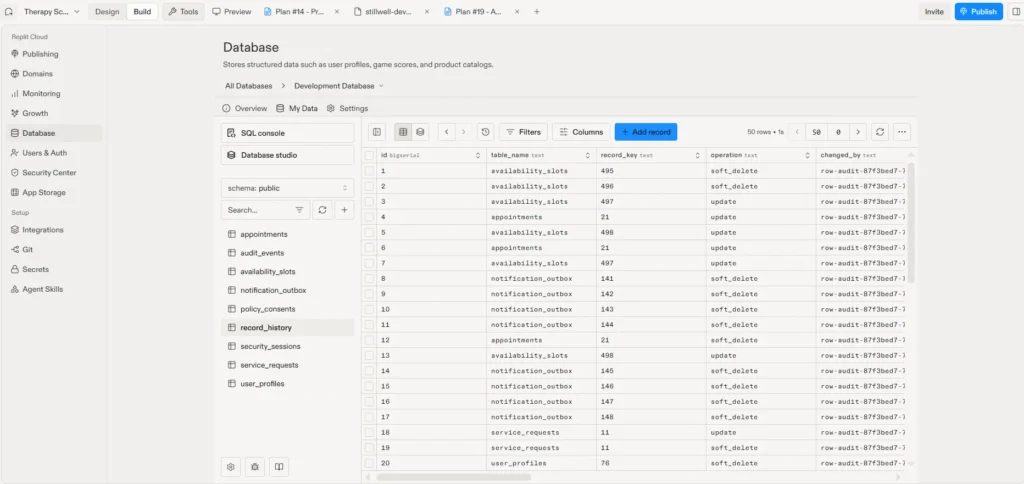
Every change should save the version before it, and those saved copies should be as protected as the live data. Edit a test record, then open the history table. In Stillwell, the record_history table shows which table and record changed, the type of change, who made it, and when. These entries came from Agent’s automated test run:
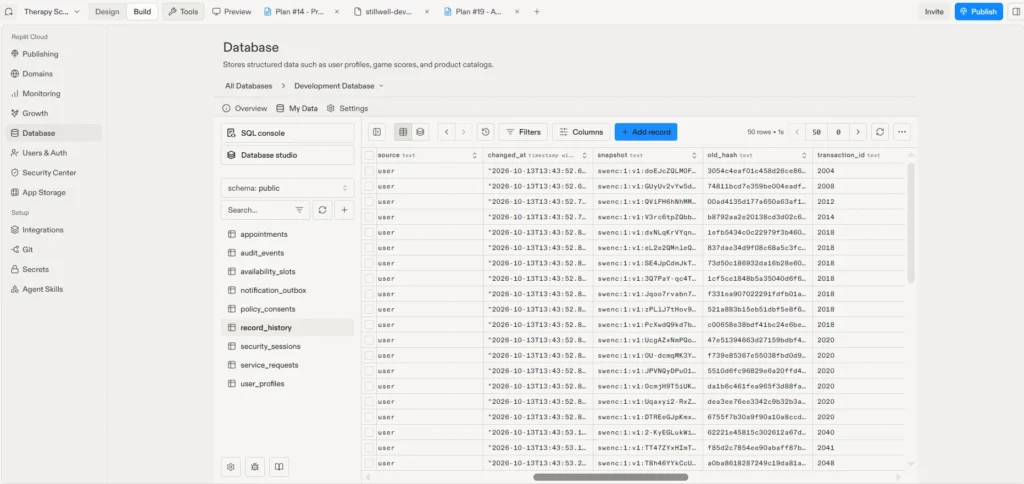
The saved versions are encrypted, the same as the live data:
Encryption
Sensitive fields should look like random text when you open their table, not readable values. In Stillwell, meeting links appear as scrambled text rather than readable URLs:
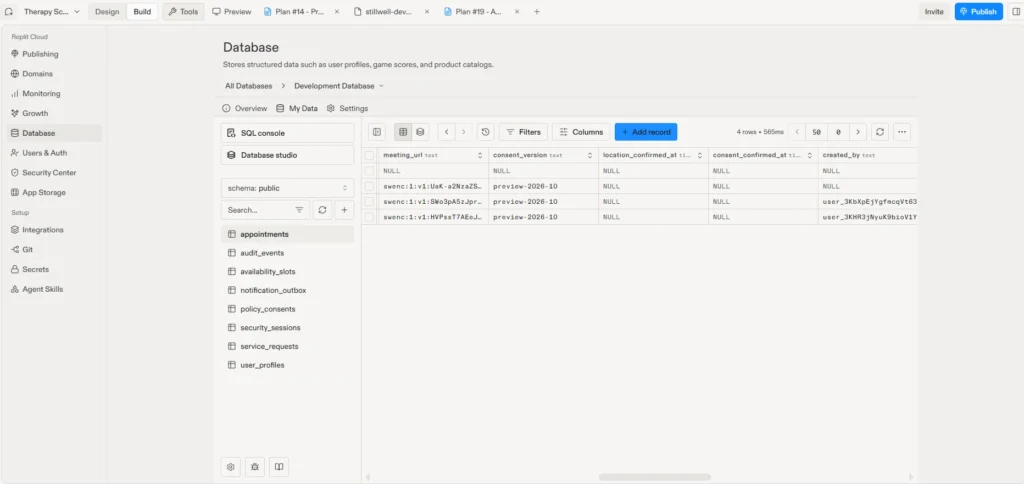
Names, emails, clinic addresses, and support messages are encrypted the same way, and the app requires HTTPS in production. Fields used for searching, such as state or appointment time, usually stay unencrypted so the app can filter by them, which is why the database and its backups also need encryption from the hosting provider.
Session Timeout
Users should be signed out after a period of inactivity, with a warning first, and private screens should clear when they are. The easiest way to test this is to ask Agent to shorten the timeout temporarily, then leave the app idle. Stillwell signs users out after 15 minutes of inactivity, with a warning one minute before, and after 12 hours no matter what. Viewing data doesn’t keep a session alive, and private screens clear on sign-out, including in other open tabs. Agent’s browser tests confirmed the warning and the sign-out. HIPAA doesn’t set a specific timeout, so choose limits that fit how your users work.
Safeguards from Part 2
Some protections were added earlier, in Part 2, as part of the “security hardening” item in Agent’s production plan. They don’t need building again, but check that they still work after the new changes:
- Limits on misuse: the app caps how many requests one person can send in a short time, rejects information entered in the wrong format, and only accepts requests coming from the app’s own website
- Safe error messages: when something goes wrong, users see a plain message, not technical details that could help an attacker
- Browser protections: extra settings, called security headers, that tell the browser how to handle the app’s pages safely
- Secrets kept out of the code: passwords and keys, including the encryption key, are stored in Replit’s Secrets tool, so they never end up in the project files or on GitHub
Step 9: Cover the Areas Beyond the App
The technical safeguards are now built and verified, which completes the code side of what it takes to make a Replit app HIPAA compliant. The other areas from Step 2 are handled at the hosting and organizational level by design, so they’re planned alongside the app rather than built into it:
- Vendors and hosting: signed agreements with every vendor that handles patient data, and hosting that encrypts the database and backups
- Backup and recovery: tested backups, plus a secure, separate copy of the key that unlocks the app’s encrypted data, since the data can’t be recovered without it
- Privacy controls: rules for how long data is kept and how access and deletion requests are handled. Stillwell’s support form already accepts these requests, and the rules decide how they’re fulfilled
- Incident response: a plan for who does what if something goes wrong, and regular review of the audit log
- Emergency access: a documented way for authorized staff to reach patient data in an emergency, such as when the usual sign-in isn’t available. HIPAA’s access control standard requires this procedure
- Administrative safeguards: a named security officer, staff training, access reviews, and a formal risk assessment
With these in place alongside the app’s safeguards, the app is ready for review before real patients use it. Our HIPAA Compliant Mobile & Web App Development Checklist walks through each of these areas.
From Safeguards to Compliance: Where Technology Rivers Comes In
Replit Agent built and tested the safeguards that live in the code. It can’t sign a BAA, choose compliant hosting, write your policies, or run a risk assessment, and those decide whether a healthcare app is ready for real patients.
That’s where Technology Rivers comes in. We help you take an AI-built healthcare app from working safeguards to a HIPAA-compliant product designed for real-world use and business growth. Our team handles the parts of this guide that carry the most risk:
- Reviewing the safeguards Agent built, to confirm they work the way its report says
- Moving the app to hosting that signs a BAA and encrypts the database and backups
- Setting up vendor agreements, tested backups, and incident response before real patient data arrives
- Helping you plan the administrative side, from the risk assessment to access reviews
- Supporting the app with monitoring and updates as your business grows
Your Replit app’s safeguards are a strong starting point, not the finish line.
Key Lessons
Name the safeguards you want rather than asking for “HIPAA compliance,” and tell Agent what not to claim. Then verify each safeguard in the app and the Database tool, since a screenshot of a denied request or an audit entry is stronger proof than any summary. To make a Replit app HIPAA compliant, the code is one piece. For a review of the rest, an application assessment looks at an AI-built app’s code and security before launch.
Up Next
Part 4 takes a different route to the same goal. It builds a separate healthcare app from one structured master prompt, with production and HIPAA requirements planned from the start.
Frequently Asked Questions
Is Replit HIPAA compliant?
No. Replit’s own site says it isn’t HIPAA compliant. To make a Replit app HIPAA compliant, you can build and test these safeguards on Replit with fictional data, but real patient data needs hosting set up for healthcare.
Can Replit Agent make my app HIPAA compliant?
Agent can build the technical safeguards, as Steps 3 through 8 show. Compliance also depends on your agreements, policies, and procedures, which no AI tool can provide for you.
Does HIPAA apply to my app?
It depends on your role. If you handle health information for a healthcare provider, health plan, or clearinghouse, or you are one, it likely does. Step 1 walks through the questions to ask.
Do the services connected to my app need a BAA?
If HIPAA applies to your app, every vendor that receives patient data needs a signed agreement, including services like email, analytics, and error tracking. Check each one before real data flows through it.
Ready to Take Your App to Real Patients?
Building an app is easier than ever. Building a scalable business around it is a different story.
If you’re building a healthcare app and want help with the safeguards and what comes after, our HIPAA-compliant vibe coding team can help, or you can book a free consultation call.