Blogs » Amazon AWS, Microsoft Azure, or Google Cloud – What Cloud Platform Should I Consider for My Next SaaS App?
Comparing AWS vs Azure vs Google Cloud for SaaS involves more than evaluating infrastructure services. Amazon Web Services (AWS), Microsoft Azure, and Google Cloud all offer application hosting, databases, security, analytics, and AI capabilities, but their services, integrations, and pricing structures differ.
The platform you choose affects development costs, application performance, scalability, security, and long-term maintenance. A startup launching its first product may have different priorities from an enterprise building software that must integrate with existing systems.
For a new SaaS application without existing cloud infrastructure, we recommend starting with AWS. It offers extensive managed services, database technologies, and deployment options, and it’s the platform we use most often at Technology Rivers.
Azure may be a better fit for applications that depend heavily on Microsoft enterprise technologies, while Google Cloud may be preferable for certain analytics and AI workloads.
This guide compares the three platforms across hosting, scalability, databases, security, AI development, pricing, and enterprise integration.
AWS vs Azure vs Google Cloud: Quick Comparison
An AWS vs Azure vs GCP comparison should focus on the services an application actually needs rather than the total number of products each provider offers.
| Feature | AWS | Microsoft Azure | Google Cloud |
|---|---|---|---|
| Application hosting | EC2, ECS with Fargate, EKS | Virtual Machines, App Service, AKS | Compute Engine, Cloud Run, GKE |
| Serverless computing | AWS Lambda | Azure Functions | Cloud Run functions |
| Relational databases | Amazon RDS, Aurora | Azure SQL Database, Azure Database for PostgreSQL | Cloud SQL, AlloyDB |
| NoSQL databases | DynamoDB | Cosmos DB | Firestore, Bigtable |
| AI and machine learning | Amazon Bedrock, SageMaker AI | Microsoft Foundry, Azure Machine Learning | Vertex AI |
| Data analytics | Redshift, Athena | Microsoft Fabric, Azure Databricks | BigQuery, Dataflow |
| Security | IAM, KMS, GuardDuty | Microsoft Entra ID, Key Vault, Defender for Cloud | Cloud IAM, Cloud KMS, Security Command Center |
| Pricing discounts | Savings Plans, Reserved Instances | Savings plans, reservations | Committed-use and sustained-use discounts |
What Should You Look for in a Cloud Platform for SaaS?
Before selecting a provider, identify the technical and business requirements your application must support.
Scalability and Performance
Your infrastructure should accommodate increasing users, transactions, and data volumes without creating unnecessary performance bottlenecks.
Evaluate application hosting, autoscaling, database capacity, caching, and geographic availability.
Security and Compliance
Consider identity management, encryption, audit logging, threat detection, and any industry-specific regulatory requirements.
Healthcare SaaS applications, for example, may require additional safeguards for handling protected health information.
Pricing and Cost Management
Compare more than basic hosting prices. Databases, storage, networking, monitoring, backups, and AI services can contribute significantly to ongoing costs.
Development and Deployment
Managed services, development tools, automated deployment pipelines, and monitoring capabilities affect how quickly teams can release and maintain software.
Database and Integration Requirements
Your application may need PostgreSQL, SQL Server, NoSQL databases, enterprise identity integration, or specialized third-party services.
Reliability and Disaster Recovery
Review availability zones, regional deployment options, backups, failover capabilities, and disaster recovery requirements.
Team Experience
A platform your developers already understand may reduce implementation time and operational complexity.
AWS vs Azure vs Google Cloud for SaaS Hosting and Scalability
SaaS cloud hosting requirements change as an application grows. Infrastructure that supports a small initial user base must also accommodate increasing traffic, background processing, and database workloads.
AWS, Azure, and Google Cloud provide several hosting approaches, including virtual machines, managed application hosting, containers, Kubernetes, and serverless computing.
How Do Their Hosting Options Compare?
| Hosting approach | AWS | Azure | Google Cloud |
|---|---|---|---|
| Virtual machines | EC2 | Azure Virtual Machines | Compute Engine |
| Managed web hosting | Elastic Beanstalk | App Service | App Engine |
| Managed containers | ECS with Fargate | Container Apps | Cloud Run |
| Kubernetes | EKS | AKS | GKE |
| Event-driven functions | Lambda | Azure Functions | Cloud Run functions |
AWS for SaaS Hosting
AWS provides multiple deployment options depending on how much infrastructure control an application requires.
Amazon EC2 supports virtual machine hosting, while ECS with Fargate allows teams to run containers without directly managing the underlying servers.
Amazon EKS supports Kubernetes-based applications, and AWS Lambda handles event-driven workloads.
Azure for SaaS Hosting
Azure App Service provides managed hosting for web applications and APIs.
Azure Container Apps supports containerized applications with automatic scaling options, while Azure Kubernetes Service provides Kubernetes orchestration.
Google Cloud for SaaS Hosting
Google Cloud provides Compute Engine for virtual machines, Google Kubernetes Engine for Kubernetes workloads, and Cloud Run for managed container hosting.
Cloud Run can automatically scale application instances based on demand and, depending on configuration, scale to zero when idle.
This can be useful for applications with variable traffic or teams seeking to reduce container infrastructure management.
Which Cloud Platform Scales Better for SaaS?
SaaS scalability depends on application architecture, database performance, resource allocation, and the ability to handle changing traffic patterns.
All three providers offer autoscaling capabilities, but their services differ in configuration, operational requirements, and pricing.
For example, an application with inefficient database queries may experience performance problems even when its hosting infrastructure scales automatically.
When comparing providers, consider:
- Expected concurrent users and traffic patterns.
- Database performance and scaling requirements.
- Background processing and scheduled workloads.
- Geographic distribution of customers.
- Availability and recovery requirements.
- Infrastructure management and operating costs.
For independent software vendors (ISVs) building SaaS products, the most suitable platform is the one that supports these requirements with manageable complexity and cost.
The hosting model should match your application’s traffic patterns, technical requirements, and maintenance resources. Technology Rivers provides cloud development services covering infrastructure planning, deployment, migration, and cloud architecture.
Database Options and Performance
SaaS applications rely on databases to store customer accounts, subscriptions, transactions, and other business information.
Database selection affects application performance, data integrity, availability, and long-term operating costs.
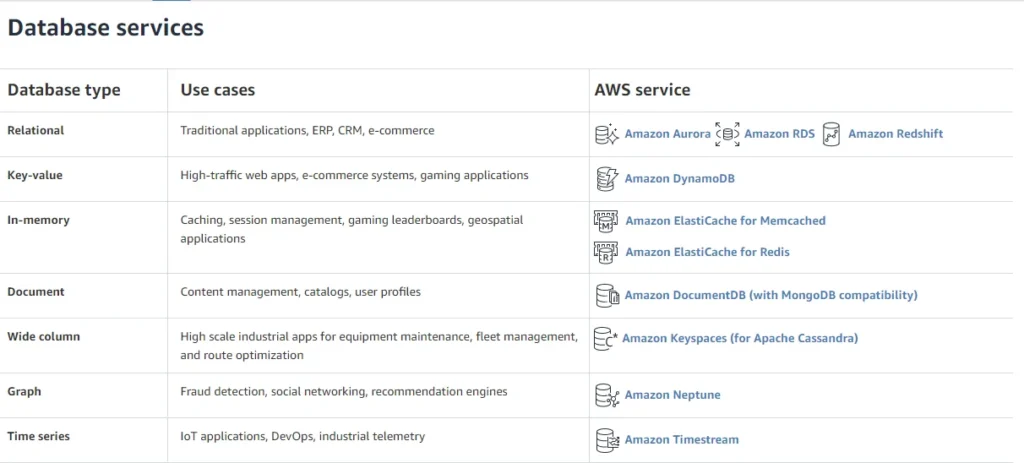
AWS Database Services
Amazon RDS supports managed relational databases, including PostgreSQL, MySQL, and SQL Server.
Amazon Aurora offers MySQL- and PostgreSQL-compatible database engines with additional scaling and availability capabilities.
DynamoDB provides a managed NoSQL option for applications requiring low-latency data access at scale.
Azure Database Services
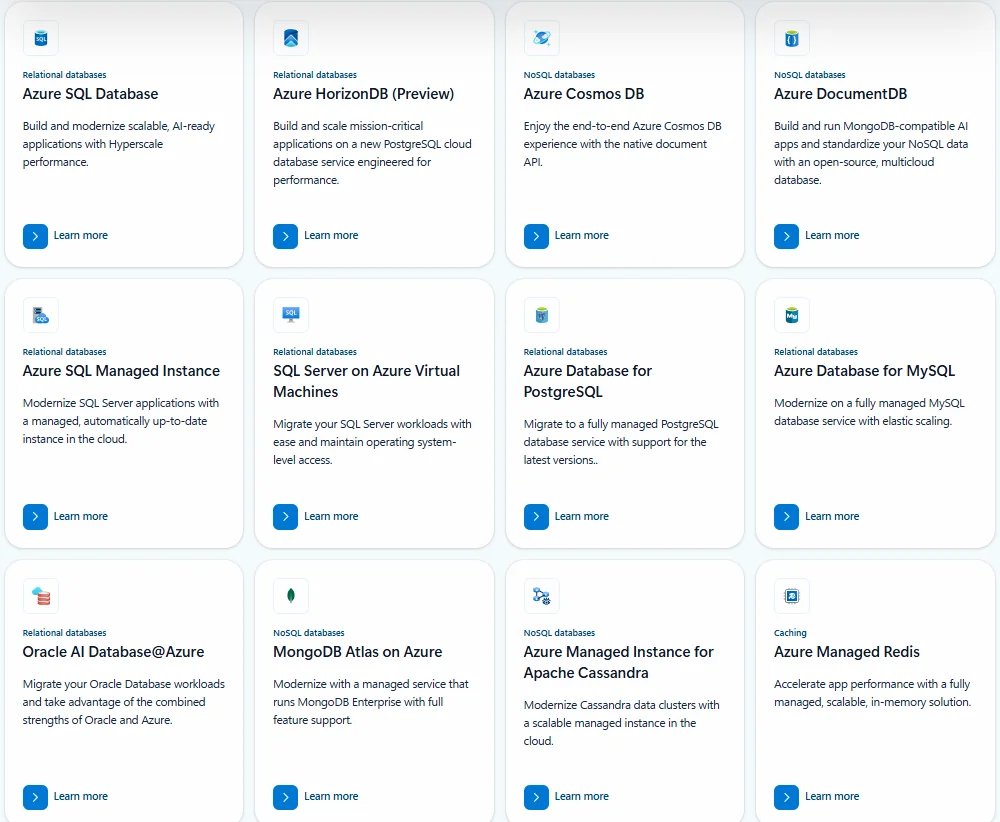
Azure SQL Database provides a managed relational database service based on Microsoft SQL Server technology.
Azure Database for PostgreSQL supports PostgreSQL workloads, while Azure Cosmos DB offers NoSQL database capabilities.
Azure can be particularly useful when an application already depends on SQL Server or related Microsoft technologies.
Google Cloud Database Services
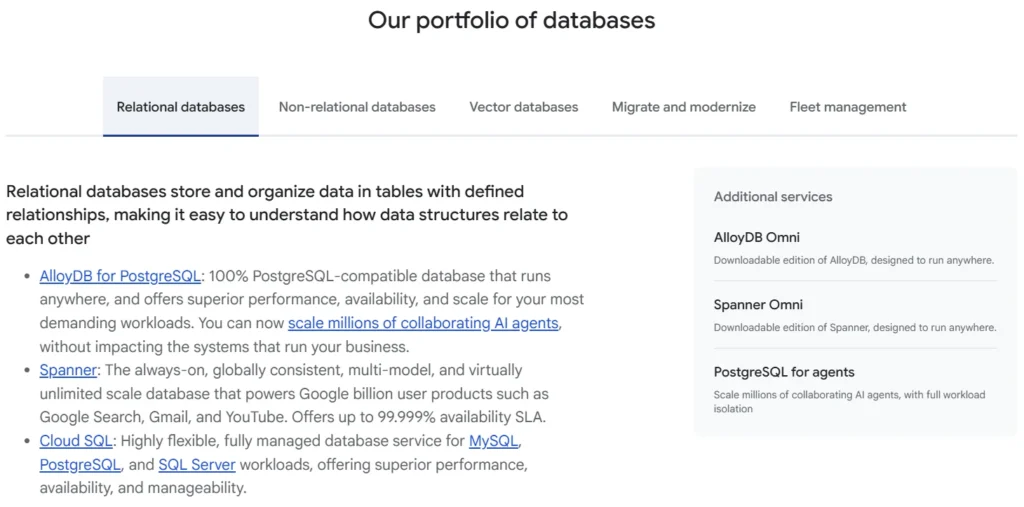
Cloud SQL supports managed PostgreSQL, MySQL, and SQL Server databases.
AlloyDB provides PostgreSQL compatibility for demanding transactional applications.
Firestore and Bigtable offer NoSQL options for different data structures and access patterns.
Which Database Platform Should You Choose?
The decision should depend on your data model and workload.
A SaaS application requiring complex relational transactions may benefit from PostgreSQL or SQL Server. Applications with different data access patterns may need NoSQL technologies.
For multi-tenant SaaS products, database architecture must also address tenant isolation, access permissions, backup strategies, and performance as customer numbers increase.
The database engine and architecture generally matter more than a broad claim that one cloud provider has the best databases.
Security, Compliance, and HIPAA
Security is essential for SaaS applications handling customer information, financial records, or healthcare data.
AWS, Azure, and Google Cloud provide identity management, encryption, threat detection, and monitoring services.
However, using these services does not automatically make an application secure or compliant.
Security Features Compared
| Capability | AWS | Azure | Google Cloud |
|---|---|---|---|
| Identity and access | AWS IAM | Microsoft Entra ID, Azure RBAC | Cloud IAM |
| Encryption keys | AWS KMS | Azure Key Vault | Cloud KMS |
| Threat detection | GuardDuty | Defender for Cloud | Security Command Center |
| Audit logging | CloudTrail | Azure Monitor and activity logs | Cloud Audit Logs |
Understanding Shared Responsibility
Cloud providers secure the infrastructure they operate, while SaaS businesses remain responsible for security measures under their control.
Depending on the service, these responsibilities may include application security, user permissions, database configurations, data protection, and monitoring.
Managed infrastructure reduces some operational responsibilities but does not eliminate the need for secure software development.
Which Cloud Platform Is Better for HIPAA-Regulated SaaS?
Healthcare applications handling protected health information require more than a provider willing to sign a Business Associate Agreement (BAA).
AWS, Azure, and Google Cloud offer services that can support HIPAA-regulated workloads, but compliance depends on the complete application and operating environment.
AWS provides HIPAA-eligible services and a BAA. Microsoft and Google Cloud also offer applicable BAAs covering specified services.
However, a BAA does not automatically make a SaaS application HIPAA compliant.
Healthcare businesses must evaluate the services they use, implement appropriate safeguards, and meet applicable administrative, physical, and technical requirements.
Important considerations include access controls, encryption, audit logging, risk assessments, incident response, and the handling of protected health information (PHI).
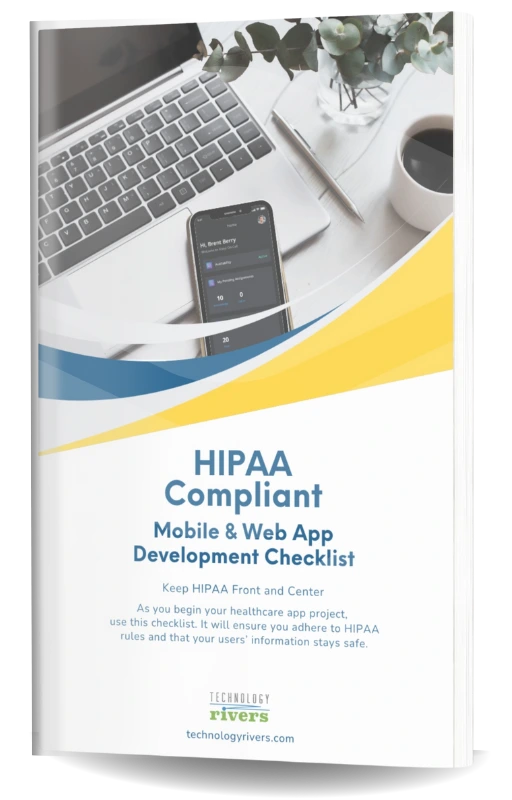
Building a Healthcare SaaS Application?
Use our HIPAA-Compliant Web App Development Checklist to review important security and compliance considerations before launching your healthcare application.
Disclaimer: This article provides general technical information and is not legal or compliance advice. Consult qualified legal and compliance professionals about your organization’s specific obligations.
AI and Machine Learning: AWS vs Azure vs Google Cloud
SaaS applications may use AI for document processing, customer support, intelligent search, predictive analytics, or workflow automation.
Each cloud provider offers services for developing and deploying AI-powered applications.
AI Services Compared
| Capability | AWS | Azure | Google Cloud |
|---|---|---|---|
| Generative AI | Amazon Bedrock | Microsoft Foundry | Vertex AI |
| Machine learning | SageMaker AI | Azure Machine Learning | Vertex AI |
| AI agent development | Bedrock AgentCore | Foundry Agent Service | Vertex AI Agent Builder |
| Analytics integration | Redshift, Athena | Microsoft Fabric | BigQuery |
AWS for AI Application Development
Amazon Bedrock provides access to supported foundation models for generative AI applications.
SageMaker AI supports machine learning development, training, and deployment.
Amazon Bedrock AgentCore provides infrastructure for developing and operating AI agents that interact with tools and business systems.
Azure for AI Application Development
Microsoft Foundry provides capabilities for working with supported AI models, including models from OpenAI and other providers.
Azure Machine Learning supports custom machine learning workflows.
Foundry Agent Service provides capabilities for building and operating AI agents.
Azure may be particularly relevant for AI applications that need to integrate with Microsoft enterprise systems.
Google Cloud for AI Application Development
Vertex AI provides tools for developing, evaluating, and deploying machine learning and generative AI applications, including supported Gemini models.
Google Cloud also offers BigQuery for analytics workloads.
These services can support SaaS applications that combine AI features with substantial data processing.
Is Google Cloud More Developer-Friendly Than AWS or Azure for AI Applications?
Developer experience depends on the tools, models, and integrations required.
Google Cloud may be convenient for teams already working with BigQuery and Vertex AI.
Azure may be suitable for organizations using Microsoft enterprise technologies, while AWS offers extensive options for integrating AI with existing cloud infrastructure.
To compare developer experience, evaluate:
- Model availability and supported capabilities.
- SDKs, APIs, and documentation.
- Integration with existing application services.
- Testing, evaluation, and monitoring tools.
- Model inference costs and performance.
- Security and access controls.
For a team already using BigQuery and Vertex AI, Google Cloud may offer a more straightforward development workflow. For Microsoft-oriented enterprise applications, Azure may provide a more convenient integration path.
AWS vs Azure vs Google Cloud Pricing for SaaS
Cloud pricing depends on the resources an application consumes and how those resources are configured.
AWS, Azure, and Google Cloud offer usage-based pricing and discounts for eligible workloads, but their billing structures differ.
Pricing Models Compared
| Pricing feature | AWS | Azure | Google Cloud |
|---|---|---|---|
| Pay-as-you-go | Available | Available | Available |
| Commitment discounts | Savings Plans, Reserved Instances | Savings plans, reservations | Committed use discounts |
| Additional discounts | Service-specific discounts | Service-specific discounts | Sustained use discounts for eligible resources |
| Cost management | Cost Explorer, AWS Budgets | Microsoft Cost Management | Cloud Billing, budgets |
| Pricing calculator | AWS Pricing Calculator | Azure Pricing Calculator | Google Cloud Pricing Calculator |
AWS Pricing
AWS offers pay-as-you-go pricing and commitment-based discounts for eligible services.
Savings Plans and Reserved Instances may reduce costs when workloads meet the relevant commitment requirements.
AWS Cost Explorer and AWS Budgets help businesses monitor and manage spending.
Azure Pricing
Azure provides usage-based pricing, reservations, and savings plans for supported resources.
Microsoft Cost Management helps organizations analyze spending and establish budgets.
Eligible Microsoft licensing arrangements may also affect the total cost of certain Azure workloads.
Google Cloud Pricing
Google Cloud provides usage-based pricing, committed use discounts, and sustained use discounts for eligible resources.
Its billing tools help businesses track spending and configure budgets.
What Actually Determines SaaS Hosting Costs?
SaaS cloud hosting costs extend beyond application servers. Databases, storage, networking, monitoring, and backups can all contribute to monthly expenses.
Other cost drivers include AI model usage, background processing, high-availability infrastructure, and disaster recovery requirements.
Serverless services may reduce idle compute costs, but they are not always cheaper for continuously running workloads.
Startup credits can reduce initial expenses without necessarily improving long-term cost efficiency.
Which Cloud Platform Is Cheapest for SaaS?
There is no universally cheapest cloud provider.
The most useful comparison is to estimate equivalent workloads across AWS, Azure, and Google Cloud.
Include expected traffic, database usage, storage, networking, and operational requirements.
Development and maintenance costs should also be considered. A lower infrastructure bill does not always mean a lower total cost of ownership.
Developer Experience, Deployment, and Support
Cloud platforms differ in their development tools, deployment workflows, and operational ecosystems.
These differences influence how quickly teams can release updates and maintain SaaS applications.
AWS offers SDKs, command-line tools, CloudFormation, and the Cloud Development Kit for infrastructure automation. CodePipeline and CodeBuild support automated development workflows, while CloudWatch provides monitoring capabilities.
Azure integrates with Visual Studio, GitHub Actions, and Azure DevOps. Azure Pipelines supports automated builds and deployments, while Bicep provides infrastructure-as-code capabilities.
Google Cloud provides Cloud Build and Cloud Deploy for automated deployment workflows. It also supports Terraform-based infrastructure provisioning and offers monitoring through Cloud Monitoring.
What Is the Best Developer Environment: AWS, Azure, or Google Cloud?
The best developer environment depends on the team’s preferred languages, frameworks, deployment processes, and existing experience.
A team familiar with one provider may build and maintain applications more efficiently on that platform.
However, familiarity should be balanced against technical requirements, service availability, infrastructure costs, and long-term maintenance.
What Matters When Choosing a Cloud Platform for Enterprise SaaS?
Choosing a cloud platform for enterprise SaaS requires evaluating identity management, existing infrastructure, integration requirements, security, and governance.
Enterprise SaaS applications often need to connect with existing business systems while supporting large numbers of users and maintaining consistent security controls.
Important evaluation criteria include:
- Enterprise integration: Compatibility with identity providers, databases, APIs, and existing applications.
- Security and compliance: Access controls, auditing, data protection, and regulatory obligations.
- Scalability and performance: Support for growing workloads, concurrent users, and geographic expansion.
- Availability: Backup, disaster recovery, and service continuity requirements.
- Governance: Consistent policies, monitoring, and resource management.
- Cost management: Visibility into infrastructure spending and long-term operational expenses.
When Is Azure a Strong Choice for Enterprise SaaS?
Azure can be a strong choice when an organization already uses Microsoft Entra ID, SQL Server, or other Microsoft technologies.
Integration with these systems may simplify parts of the architecture and reduce the need for additional infrastructure components.
However, AWS and Google Cloud also offer enterprise identity, integration, security, and governance capabilities.
The decision should reflect the organization’s actual systems and requirements rather than assuming Azure is always the best enterprise cloud.
Single Cloud vs Multicloud for SaaS
A single-cloud strategy relies on one primary provider, while a multicloud strategy uses services from two or more providers.
When Does Single Cloud Make Sense?
For many SaaS startups, a single-cloud architecture is a practical starting point.
It allows teams to focus on product development without managing multiple cloud environments.
High availability and disaster recovery can also be designed within one provider using appropriate regional and availability-zone configurations.
When Should You Consider Multicloud?
Multicloud may be justified when an application requires specialized services from different providers, an organization already operates across multiple clouds, or specific business and resilience requirements warrant the additional complexity.
However, multicloud introduces networking, monitoring, security, deployment, and data transfer considerations.
Using multiple providers does not automatically improve availability or reduce costs.
Which Cloud Platform Should You Choose for Your SaaS Application?
The AWS vs Azure vs GCP decision becomes easier when you compare application requirements, existing integrations, expected growth, and long-term operating costs.
| Your SaaS requirements | Platform to evaluate | Why |
|---|---|---|
| New SaaS product without existing infrastructure | AWS as an initial option | Broad service selection and deployment flexibility |
| Existing Microsoft enterprise systems | Azure | Integration with Microsoft identity, databases, and infrastructure |
| BigQuery-based analytics and Vertex AI workflows | Google Cloud | Integration with its data and AI ecosystem |
| AI-powered SaaS | All three | Compare models, development tools, security, and costs |
| Healthcare SaaS | All three | Evaluate BAA coverage, eligible services, and compliance architecture |
| Early-stage SaaS MVP | All three | Compare managed hosting, costs, and team expertise |
When Should You Choose AWS?
AWS is suitable when your SaaS application needs a broad range of infrastructure services, databases, and deployment options.
Technology Rivers has used AWS in healthcare application development. Our MKidney kidney donor mobile app uses AWS and PostgreSQL to support donor follow-ups, lab submissions, and healthcare data management.
When Should You Choose Microsoft Azure?
Azure may be a strong fit for SaaS applications that integrate with Microsoft enterprise technologies, including Microsoft Entra ID and SQL Server.
It can also support organizations with existing hybrid cloud infrastructure.
When Should You Choose Google Cloud?
Google Cloud can be a good fit for SaaS products that rely on BigQuery analytics, Vertex AI, or managed container deployment through Cloud Run.
Questions to Ask Before Deciding
Before selecting a cloud platform, consider:
- Which hosting and database services does the application require?
- What existing systems must it integrate with?
- Are AI, analytics, or specialized services essential?
- What security and compliance obligations apply?
- How much traffic and growth should the architecture support?
- What are the expected infrastructure and maintenance costs?
- Which platform can the development team operate effectively?
Final Verdict: AWS, Azure, or Google Cloud for SaaS?
The best cloud platform for SaaS is not necessarily the one with the most services. It is the one that supports your application’s requirements while keeping infrastructure and maintenance manageable.
For businesses starting a new SaaS product without an existing cloud environment, AWS is our recommended starting point because of its broad infrastructure options, managed services, and deployment flexibility.
However, Azure may be more appropriate for applications closely integrated with Microsoft enterprise systems, while Google Cloud may be preferable for workloads built around its analytics and AI ecosystem.
Technology Rivers has hands-on experience working with AWS, Microsoft Azure, and Google Cloud. Our approach is to evaluate each application’s architecture, security requirements, expected growth, and operating costs before recommending a platform.
Frequently Asked Questions
Is AWS, Azure, or Google Cloud Cheaper for SaaS?
There is no universally cheapest provider. Costs depend on compute usage, databases, storage, networking, and application architecture. Comparing equivalent workloads through each provider’s pricing calculator is a useful starting point.
Can I Migrate My SaaS Application From AWS to Azure or Google Cloud?
Yes. Migration complexity depends on the application’s architecture, databases, and provider-specific integrations. Applications built around portable technologies may be easier to move, but migrations still require planning, testing, and security reviews.
Which Cloud Platform Is Best for Healthcare SaaS?
AWS, Azure, and Google Cloud can support healthcare SaaS applications, subject to applicable agreements, service coverage, and appropriate security safeguards.
For a broader comparison of healthcare hosting options, read our Top 10 HIPAA Compliant Cloud Hosting Providers for Startups and Enterprises.
Should a SaaS Startup Use More Than One Cloud Provider?
For many early-stage SaaS businesses, starting with one cloud provider is simpler. Multicloud may become appropriate when specific technical or business requirements justify the additional complexity.
Need Help Choosing a Cloud Platform for Your SaaS Application?
Technology Rivers helps businesses evaluate cloud infrastructure, develop applications, and plan for security, scalability, and long-term maintenance.
Whether you’re launching a new SaaS product or modernizing an existing application, our team can help assess your requirements and recommend an appropriate approach.