We asked Replit Agent to make our healthcare app ready for launch. It built seven new safeguards, tested them, and then handed us a list of everything it couldn’t do.
That list is the real story of this article. In Part 1, we built Stillwell, a therapy scheduling app, with Replit Agent from a four-sentence prompt. It worked, but it had no time zones, no online or in-person options, no way for therapists to cancel, and no privacy or support pages.
This guide covers the next two stages: hardening the app with Agent on Replit, then exporting it so it can move to new hosting. If you want to deploy AI apps with Replit for healthcare, you’ll need both. Along the way, you’ll see why a healthcare app ready for real patients means far more than working code. It has to be safe for real patients, real data, and real growth.
This is Part 2 of a four-part series:
- Part 1: AI App Development with Replit Agent: How to Build a Healthcare App Prototype Using Vibe Coding (Step-by-Step)
- Part 2: From AI Prototype to Production Ready: Deploy AI Apps with Replit (you are here)
- Part 3: How to Make a Replit App HIPAA Compliant (Step-by-Step Guide for Vibe Coding)
- Part 4: How to Build a Production-Ready HIPAA-Compliant App with Replit (Vibe Coding Complete Guide)
This series is part of our complete guide, How to Vibe Code: From Idea to Production-Ready, HIPAA-Ready Application.
A task this size tends to go past the free plan’s daily limit, so this build ran on Replit’s Core plan. See Replit’s pricing page for current plans.
Part A: Harden the App on Replit
Step 1: Start in Replit Plan Mode
Whenever you deploy AI apps with Replit, start big changes in Plan mode. Replit Plan mode is a toggle next to Agent’s message box. In it, Agent can look through your app and propose changes but can’t edit any code until you switch to Build, so you see the full scope before anything changes.
Our request was simply to make the app ready for launch. Agent then asked a few questions to get the scope right, including where the app would launch and what kinds of appointments it would offer. Answer these carefully, because they decide which features end up in the plan.
Step 2: Review the Plan Before You Build
Agent turned our request into a plan called “Prepare Stillwell for U.S. launch.” Reviewing it before building lets you catch anything missing or unwanted while it’s still easy to change. The main items were:
- Search by state, city, specialty, and appointment type, with online and in-person booking
- Cancelling and rescheduling for both patients and therapists
- Explicit time zones, with correct daylight-saving behavior
- State checks for online sessions, limited to the states each therapist reports
- Private meeting links, security hardening, and audit records
- Privacy, terms, and support pages, plus a restricted admin area
- A launch checklist of what’s done and what’s still open
The plan also listed what it would leave out, including payments, clinical notes, credential verification, and any change to the database or hosting without approval.
Step 3: Build and Let Agent Test
Once the plan looks right, switch to Build. Agent builds the changes and tests them as it goes, including booking conflicts, rescheduling, private links, and daylight-saving errors, then runs a full browser test as both a patient and a therapist.
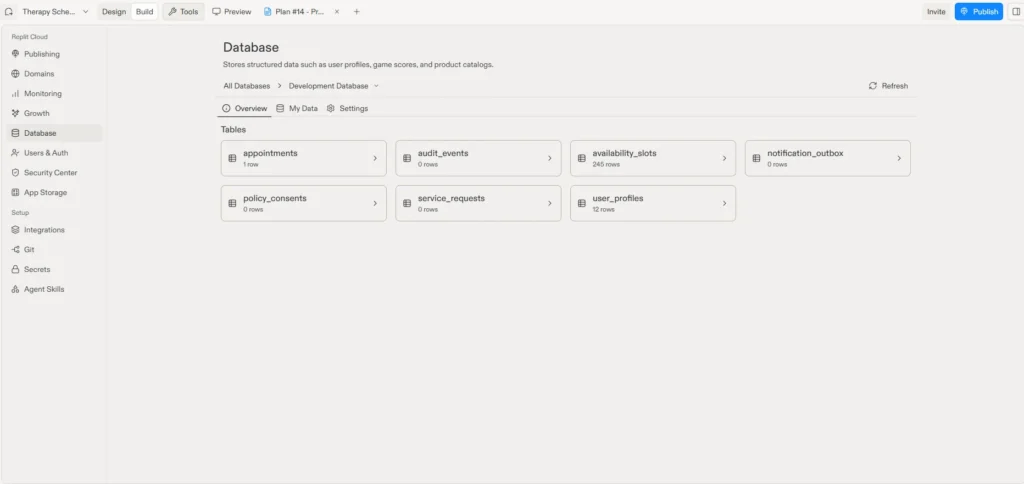
You can see the result in Replit’s Database tool. The app went from three tables in Part 1 to seven, with new tables for audit events, notifications, policy consents, and support requests:
Step 4: Check the Key Safeguards Yourself
Agent’s tests show the code runs. They don’t show it works the way you intended. Agent is a fast builder, not a tester.
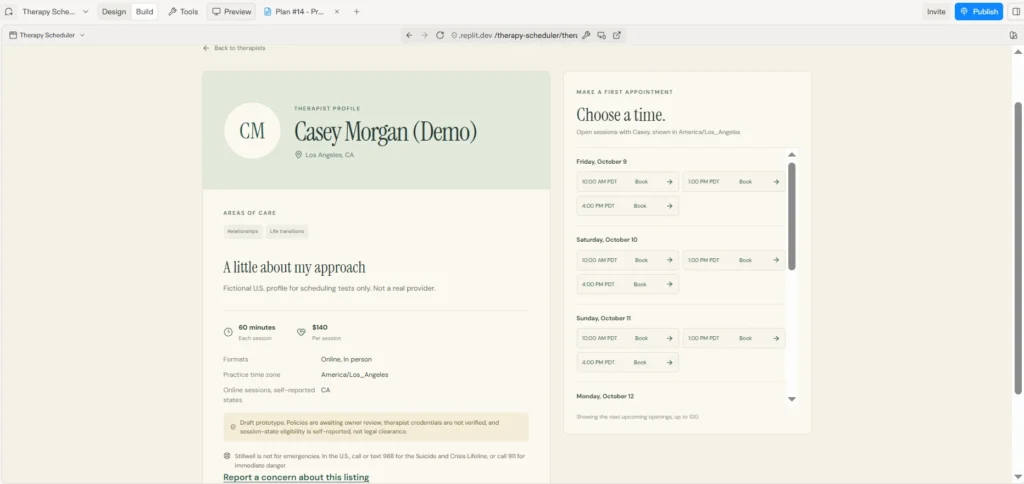
The Therapist Profile
Profiles show session formats, the practice time zone, and the states each therapist has reported for online sessions, along with notices that credentials aren’t verified and the app isn’t for emergencies.
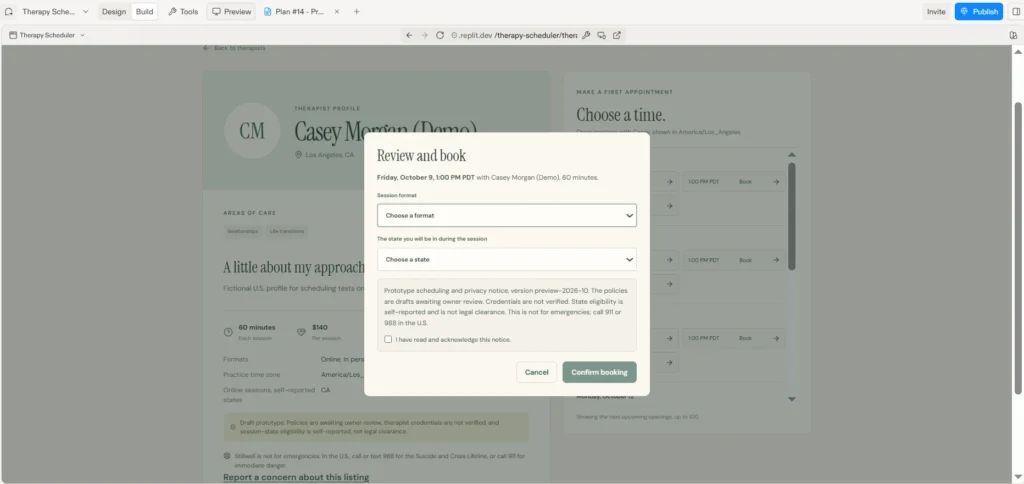
The Booking Window
Booking asks for the session format and the state the patient will be in, and the patient acknowledges a short notice before confirming.
The State Check for Online Sessions
Online sessions can cross state lines, so the app checks the patient’s state against the states the therapist has listed. This therapist listed only California, so an online session from Delaware is blocked:
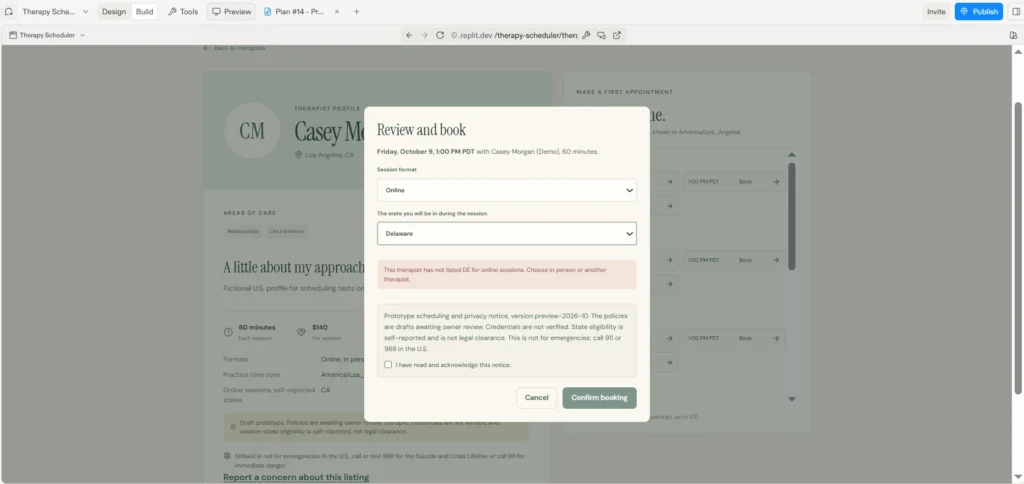
If a safeguard like this looks wrong, ask Agent why it’s there before removing it.
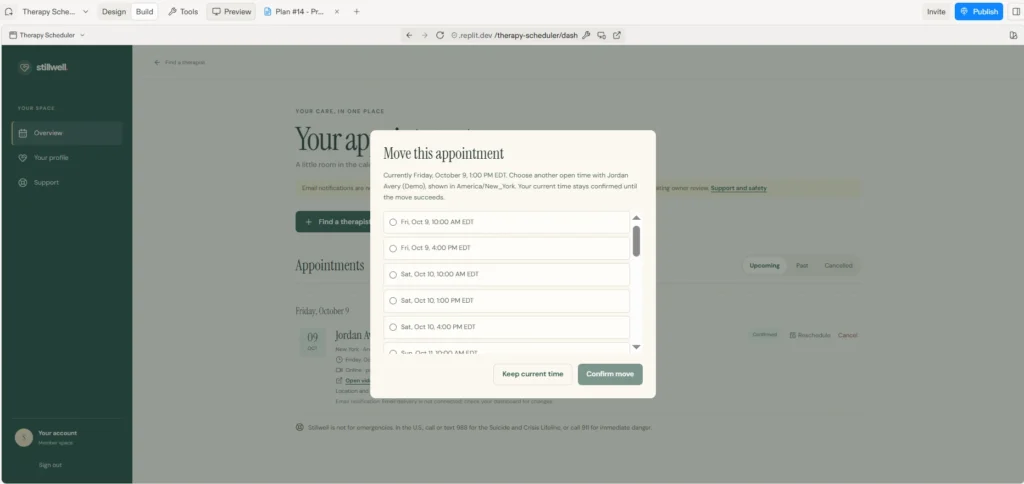
Rescheduling
Patients can move an appointment to another open time, and the original booking stays confirmed until the move succeeds, so a failed move doesn’t cancel it:
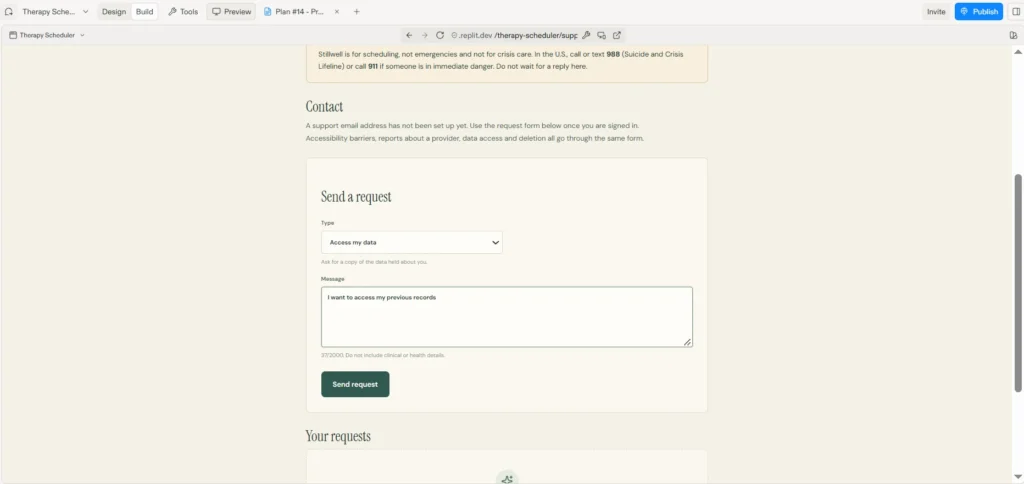
The Support Page
One form handles accessibility issues, provider reports, and data requests, with a reminder not to include health details:
Step 5: Review Agent’s Launch Checklist
Agent also saves a launch checklist in the project, in docs/launch-readiness.md, and you can ask it to show you the contents. It separates what was built and tested from what’s still open, so you know what needs attention before launch.
What a Healthcare App Actually Requires Before Real Patients
This is where the build gets honest. After all that work, Agent’s own checklist listed what was still open:
- Legal advice on telehealth rules
- Agreements with vendors that handle patient data
- Real policies to replace the placeholder privacy and terms pages
- A way to verify therapists’ licenses
None of these are coding tasks, and no amount of prompting closes them. They take legal review, compliance planning, vendor contracts, and integrations with real licensing systems. That’s the gap between a working prototype and a healthcare app real patients can rely on: the prototype proves the idea, and the product has to protect patients, satisfy regulators, and hold up as the business grows.
Part B: How to Export a Replit App
To deploy AI apps with Replit for real patient data, the app needs to leave Replit for hosting set up for healthcare, such as AWS, Google Cloud, or Microsoft Azure.
Step 6: Know What Moves and What Gets Rebuilt
When you export a Replit app, the code and the database come with you. Hosting, sign-in, and settings and secrets stay behind and have to be set up again.
Sign-in needs the most care, and it’s where a migration can go badly wrong. Stillwell uses Clerk Auth on Replit, which Replit manages, so user accounts live in Replit’s Users & Auth tool rather than in your database:
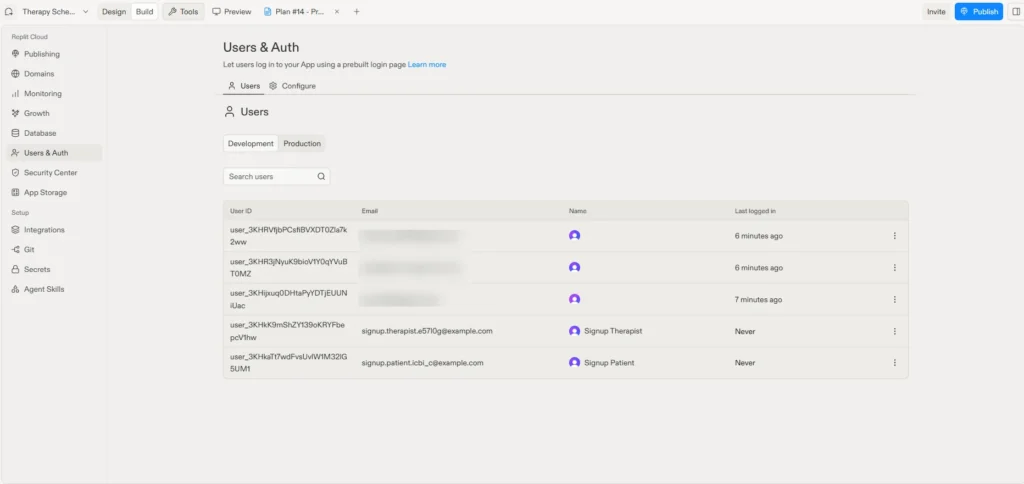
Each profile in the database is linked to one of those accounts. When sign-in is rebuilt, those links have to carry over exactly. Get it wrong, and patients lose access to their own records.
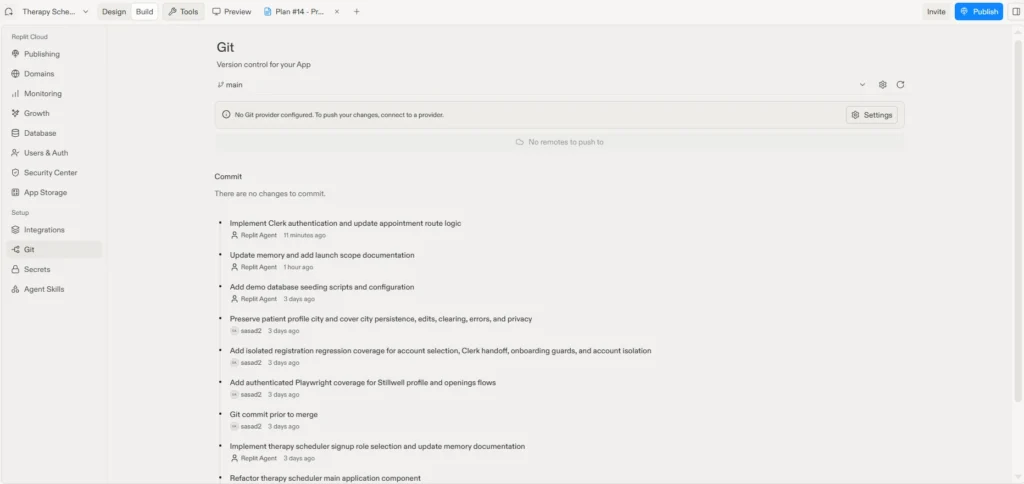
Step 7: Push Replit Code to GitHub
First, ask Agent to check that no secrets, keys, or passwords are in any file that would be pushed, so they don’t end up in the repository. Then, to push Replit code to GitHub:
- Open Tools, then the Git pane
- If the project isn’t a Git repository yet, select Initialize repository
- Select Connect to GitHub and sign in
- Create or choose a private repository, so your code isn’t public
- Write a commit message and select Push
Step 8: Export Your Database
Ask Agent to do it:
Create a backup of my app's database that I can download, and tell me where to find the file.Replit keeps separate databases for development and for the published app, so make sure the backup comes from the right one. Store the file securely, and remove the demo profiles before real users arrive.
Step 9: Package and Deploy the App
Our team has moved Replit apps to AWS, and here’s what that move involves. Each piece is its own system to configure, secure, and maintain:
- Backend: packaged with Docker, stored in Amazon ECR, and run on Amazon ECS behind an Application Load Balancer
- Database: Amazon RDS for PostgreSQL. Replit’s built-in database is also PostgreSQL, so the schema should carry over with little or no change
- Frontend: the existing code, hosted on Amazon S3 and served through CloudFront
- Sign-in: rebuilt inside the app with JWT authentication, covering sign-up, sign-in, and password reset, with every existing account kept linked to its data
- Settings and secrets: new credentials for the new database and services
Google Cloud and Microsoft Azure offer equivalents for each piece. Off Replit, every piece, plus monitoring, backups, and security updates, is your responsibility.
Step 10: Plan the Rebuild with AI
Every app is built a little differently, so the prompt below asks the AI to read your code before planning anything. Give it to Replit Agent before you export, or to ChatGPT or Claude with your exported code attached, and fill in the brackets.
Treat what comes back as a scoping document, not a migration. It will show you how many moving parts your app has, which makes it a useful brief to bring to an engineering team.
You are a senior engineer helping me move a web app off Replit.

My app in one sentence: [what it does and who uses it].

Step 1: Before planning anything, read my full codebase carefully
and tell me:
- What the frontend, backend, and database are built with
- How users sign in, and where their accounts are stored
- Which settings and secrets the app needs to run
- Anything that only works on Replit

Step 2: Then give me a step-by-step plan to rebuild what can't come
with me: packaging the backend with Docker, hosting on
[AWS / Google Cloud / Microsoft Azure], sign-in (keeping every
existing account linked to its data), settings and secrets, email
notifications, and backups and monitoring.

Rules:
- Don't remove any existing safeguard. If one looks unnecessary,
  explain why before suggesting a change
- Never put personal details, meeting links, tokens, or email
  addresses in logs
- Use fictional test data only
- Don't claim the app is compliant with any regulation

Don't write any code yet. List what I need to set up or approve
myself, and ask me any questions you need answered.
Step 11: Check What’s Left Before Real Patients
Before inviting real patients, work through the open items on your launch checklist. Our HIPAA Compliant Mobile & Web App Development Checklist covers the safeguards to review, and an application assessment can review an AI-built app’s code and security before launch.
From Prototype to Product: Where Technology Rivers Comes In
Replit can’t close the gap its own checklist identified: compliance, vendor agreements, licensing checks, a safe sign-in migration, and infrastructure built to grow.
That’s where Technology Rivers comes in. We help founders move from AI-built prototypes to reliable, HIPAA-compliant products designed for real-world use and business growth. As an AWS Consulting Partner that has launched 130+ products, including 55+ healthcare platforms, our team handles the parts of this guide that carry the most risk:
- Assessing the exported code and what needs to be rebuilt
- Migrating sign-in without breaking the link between patients and their records
- Deploying on secure, BAA-covered infrastructure on AWS, Google Cloud, or Azure
- Closing the open items on the launch checklist, from vendor agreements to license verification
- Supporting the product with monitoring, backups, and updates as your business grows
Your Replit prototype is the clearest possible starting point. Our HIPAA-compliant vibe coding and healthcare software development teams can take it from export to launch.
Key Lessons for Teams That Deploy AI Apps with Replit
Start in Replit Plan mode, check the key safeguards yourself, and read what Agent says it didn’t finish. That list is the most important output of the whole process.
When you deploy AI apps with Replit for healthcare, the export is a step toward a real-world healthcare product, not the finish line.
Frequently Asked Questions
Is Replit HIPAA compliant?
No. Replit’s own site says it isn’t HIPAA compliant. If you deploy AI apps with Replit for healthcare, use it to build and test with fictional data, then move real patient data to hosting set up for healthcare.
How do I push code from Replit to GitHub?
To push Replit code to GitHub, open Tools, then the Git pane, connect to GitHub, choose a private repository, and select Push. Step 7 covers it in full.
How do I save my work off Replit?
The simplest way to export a Replit app is to push your code to GitHub and ask Agent for a downloadable backup of your database. Getting that code running safely somewhere else is the bigger job.
How do I make my app run outside Replit the way it did on Replit?
Rebuild hosting, sign-in, and settings on the new platform. Step 9 shows the setup our team uses, and the prompt in Step 10 scopes it for your app.
What happens to Replit sign-in when I move off Replit?
The accounts stay in Replit’s Users & Auth tool, so the app needs a new sign-in system. The key is keeping each existing account linked to its data, or patients lose access to their records.
Up Next
In Part 3, How to Make a Replit App HIPAA Compliant, we’ll add the HIPAA safeguards, including encryption, access control, and audit logs.
In Part 4, How to Build a Production-Ready HIPAA-Compliant App with Replit, we’ll bring it all together into a complete guide for taking a vibe-coded app to a secure, HIPAA-compliant product.
Ready to Take Your Prototype to Production?
Building an app is easier than ever. Building a scalable business around it is a different story. If you’ve built a healthcare prototype and want help taking it to production, book a free consultation call with our team.