Four sentences were enough to get a working healthcare scheduling app with Replit Agent. The app had sign-in, patient search, therapist dashboards and appointment booking. But we would not have put it in front of one real patient. That gap is the story founders need to understand: building an app is easier than ever; building a scalable business around it is a different challenge.
AI app development with Replit gives non-technical founders a way to make an idea tangible without first hiring a full development team. A prototype can help communicate a vision, test assumptions and attract early feedback. But the moment real customers, sensitive data, integrations, security and growth enter the picture, a convincing demo is no longer enough.
This Replit Agent tutorial documents exactly what we built, how we tested it and the problems we uncovered. We have kept the step-by-step build so readers can see what the technology can do. The more important question is what it takes to turn that early success into a dependable product.
This is Part 1 of a four-part series:
- Part 1: AI App Development with Replit Agent: How to Build a Healthcare App Prototype Using Vibe Coding (Step-by-Step)
- Part 2: From AI Prototype to Production Ready: Deploy AI Apps with Replit
- Part 3: How to Make a Replit App HIPAA Compliant (Step-by-Step Guide for Vibe Coding)
- Part 4: How to Build a Production-Ready HIPAA-Compliant App with Replit (Vibe Coding Complete Guide)
This series is part of our complete guide, How to Vibe Code: From Idea to Production-Ready, HIPAA-Ready Application.
What You Need Before You Start
- A Replit account. This build started on the free plan and moved to Core when it reached usage limits; check Replit’s pricing page for current plans.
- A clear idea of the users, workflows and decisions the product must support.
- Fictional test data only. Never enter actual patient names, emails or health details in this tutorial.
What Is Replit Agent?
Replit lets people build and run applications in a browser. Replit Agent accepts plain-language instructions, proposes a plan, writes code, sets up a database and presents a preview. That accessibility is why vibe coding has captured founders’ attention. If you are comparing tools, see our existing comparison of Cursor, Replit, and Claude Code.
AI app development with Replit removes much of the friction of creating a first version. It does not remove the need to define the business rules, verify what the software actually does or evaluate the infrastructure behind it. The experiment below illustrates both sides.
Step-by-Step: How We Built the Stillwell Prototype
Step 1: Describe Your App in Plain Language
Open Replit, start a new app and enter a description in Agent’s chat box. Focus on the users and what they need to accomplish. Here is the exact prompt used in this build:
“I want to build an app that helps schedule patient and therapist appointment. I want patients to be able to see therapists close to their area and then for therapists I want for them to be able to see their appointments and fetch patients data. I want it to be a mvp not a big app.”
Here’s that first message in the Agent chat, with Agent’s reply and its booking question below it:
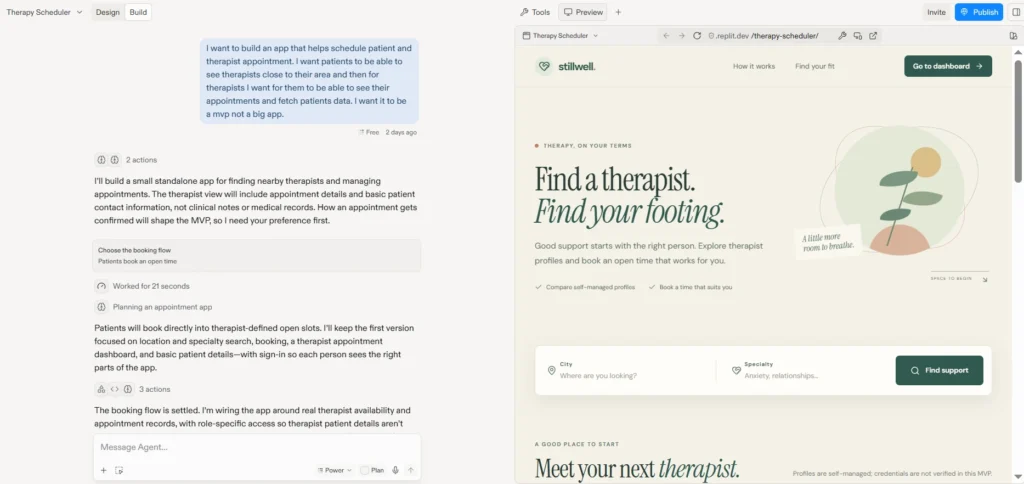
That short request created the basis for a two-sided healthcare app prototype. It also left important questions unanswered. Could one account act as both patient and therapist? What data should each role see? Which information must never be collected? Agent made assumptions where we did not provide rules, including allowing both roles in one account.
For a founder, this is the first lesson: clarity about the business matters even when the tool can generate the code. Before building, document who the users are, what each role may do and what the product should not do.
Step 2: Answer Agent’s Questions and Review Its Plan
Agent asked how appointments should be confirmed. We chose direct booking into an available time slot. Its plan included therapist search by location and specialty, open-slot booking, a therapist dashboard, basic appointment information and sign-in. We had not requested sign-in explicitly; Agent added it to distinguish the two sides of the product.
Review the plan before approving the build. It is easier to correct a mistaken assumption before the application has been generated. This is especially important when you build a healthcare app with Replit, because user roles and data visibility affect trust and privacy.
Check What Agent Does With Patient Data
Our prompt asked therapists to “fetch patients data.” Agent interpreted that as booking details and basic contact information, not clinical notes or medical records. That was a useful boundary for a demo. Still, a patient’s name and email associated with a therapy appointment may constitute protected health information. Narrowing the information shown is not the same as establishing a compliant environment.
Step 3: Let Agent Build the First Version
Once the plan was approved, Agent generated the application. Its activity log showed it fixing configuration problems, investigating server connection errors and adding automated browser tests. It also chose branding we had not requested: the project was named Therapy Scheduler, but the interface appeared as Stillwell, complete with its own visual identity.
This is the exciting part of AI app development with Replit. The interface appeared quickly and looked credible. A founder could demonstrate the concept without waiting for a traditional build cycle. Yet appearance is not evidence of readiness. We still needed to test the actual user journeys.
Step 4: Add Seeded Test Data
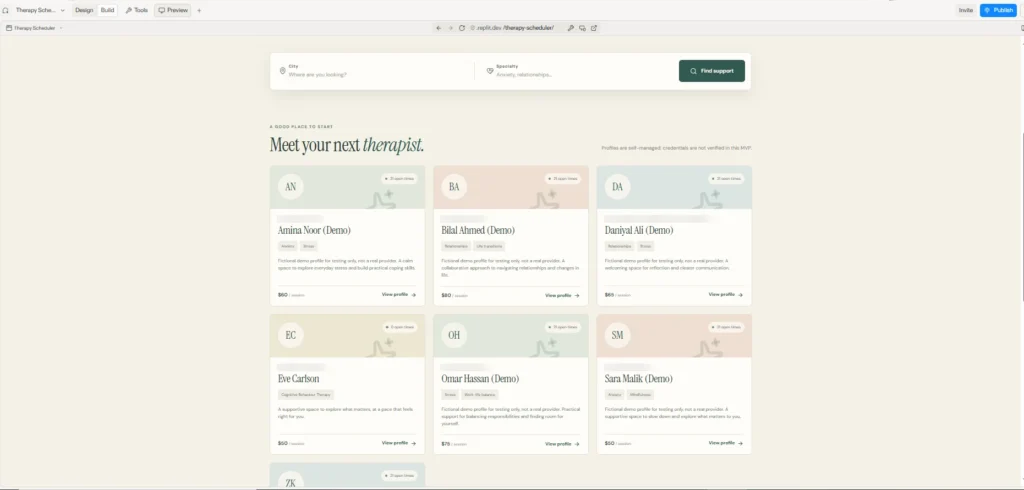
A scheduling application is hard to evaluate without realistic test scenarios. The initial database had one therapist and no upcoming availability. We asked Agent: “add seeded data so i can test.” It generated six fictional therapists across three cities, 126 open appointment times over seven days, and varied specialties, rates and session lengths.
We could now filter by city and specialty, book a time and cancel a booking. Agent checked filtering and ran the seed twice to confirm it did not duplicate entries. The sample records belonged in the development database, demo profiles were labeled as fictional, existing records were retained and Agent proposed a cleanup tool. Those safeguards matter because test data must not be mistaken for real provider information.
Here’s the patient search after seeding, with each demo therapist labeled as a fictional profile:
Step 5: Test Every Flow and Report Bugs in Plain Words
We tested sign-up, login, profile completion, search and booking as each user type. When something failed, we described the behavior in everyday language: “This button doesn’t go anywhere” or “Booking an appointment fails.” Agent proposed fixes and explained what it would change before we approved them.
Step 6: Test Again as a Brand-New User
After the first fixes, we created a fresh account and repeated the entire journey. That exposed issues the established test accounts had hidden. Always test the first-time experience after major changes, not just the screens you already know.
The Bugs: Why a Working Demo Is Not Proof of Product Readiness
Five problems emerged from ordinary use. They were fixable, but each illustrates the distance between an attractive first version and software that real customers can depend on.
Bug 1: Neither Sign-In Method Worked
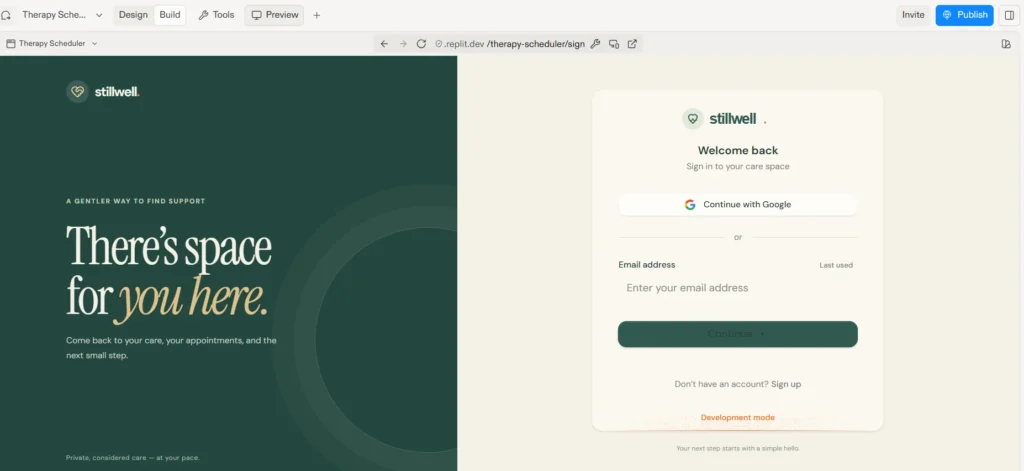
Email registration failed with a message saying it could not find the email address. Google authentication failed too. We reported both problems; Agent corrected them, and login began working. In a real product, a broken sign-in flow blocks access to the service entirely.
Here’s the sign-in screen after the fix:
Bug 2: Buttons That Didn’t Go Anywhere
“Save and Continue” reacted to a click without moving to the next screen. The patient’s “Find a Therapist” button had a similar problem. Agent fixed both. A screen that looks finished can still conceal broken navigation and abandoned customer journeys.
Bug 3: Booking a Slot Failed
The app returned an error when a patient tried to book an appointment. We described it to Agent and it repaired the flow. For a live scheduling business, failed bookings are not cosmetic defects: they can undermine customer confidence and interrupt the service itself.
Bug 4: New Accounts Skipped Role Selection
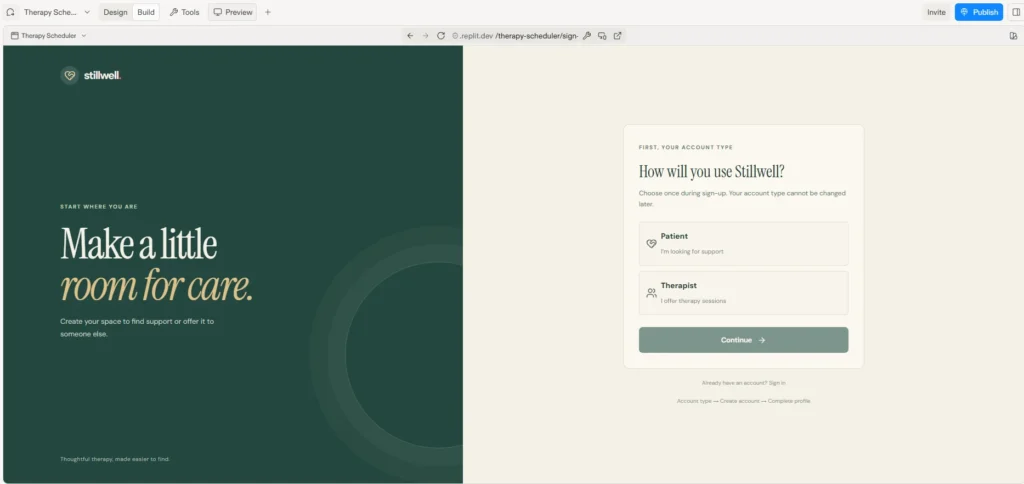
After verification, a new user reached the dashboard without choosing Patient or Therapist. The interface offered both paths, even after profile setup. We clarified that each account must have one role. Agent moved role selection into a staged sign-up process: choose account type, create login, complete the corresponding profile. It also added a check for account-type setup failures. We verified that an existing patient account no longer offered a therapist option.
Here’s the staged sign-up screen, where every new user picks Patient or Therapist first:
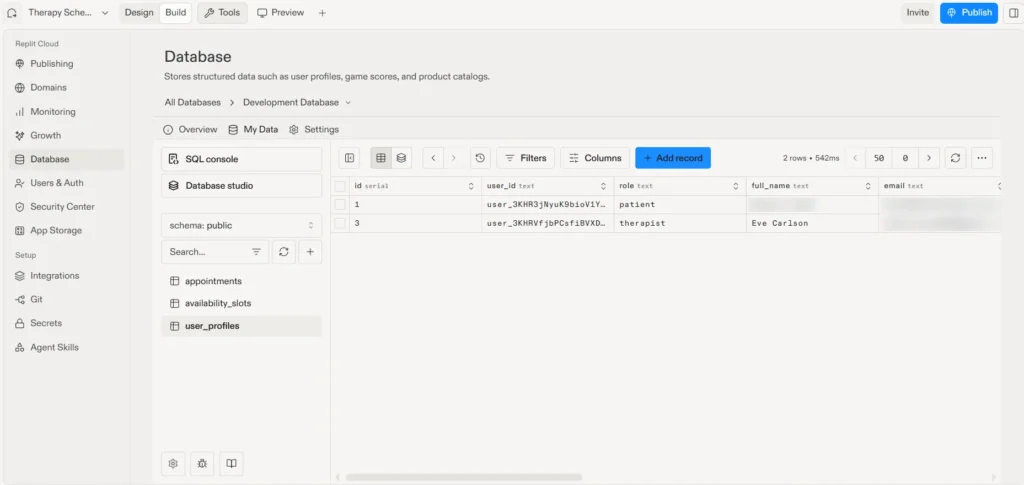
In Replit’s Database tool, the app uses appointments, availability_slots and user_profiles tables. The user_profiles records showed one role per account after the fix. This was more than a confusing screen: incorrect role logic can become an access-control problem if it is not properly designed and tested.
Here’s the user_profiles table in Replit’s Database tool, with one role stored per account:
Bug 5: City and State Were Not Saving
On another fresh account, city and state appeared to save but returned blank after refresh. Agent traced the problem to server logic that discarded the patient’s city value. It updated the handling for both account types and added a persistence check. Silent data loss is particularly dangerous because the user may never know the record is incomplete.
These failures do not prove that Replit cannot scale. They prove something narrower and important: AI can produce a working-looking app rapidly, but generated code, automated tests and a few successful clicks do not establish complete functionality, security or reliability. Independent testing and architectural review are separate jobs.
Step 7: Review What You’ve Built
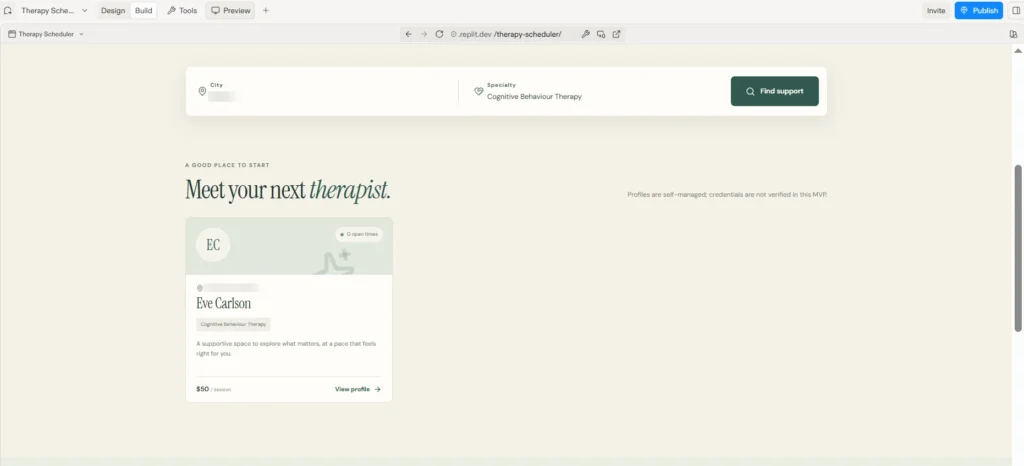
After fixes, Stillwell offered staged registration, with a single Patient or Therapist role per account. Patients could search by city and specialty, see available therapists, book open slots and cancel appointments. The app also disclosed that provider profiles were self-managed and credentials had not been verified.
Here’s a patient search filtered by city and the specialty Cognitive Behaviour Therapy, narrowed to one matching therapist:
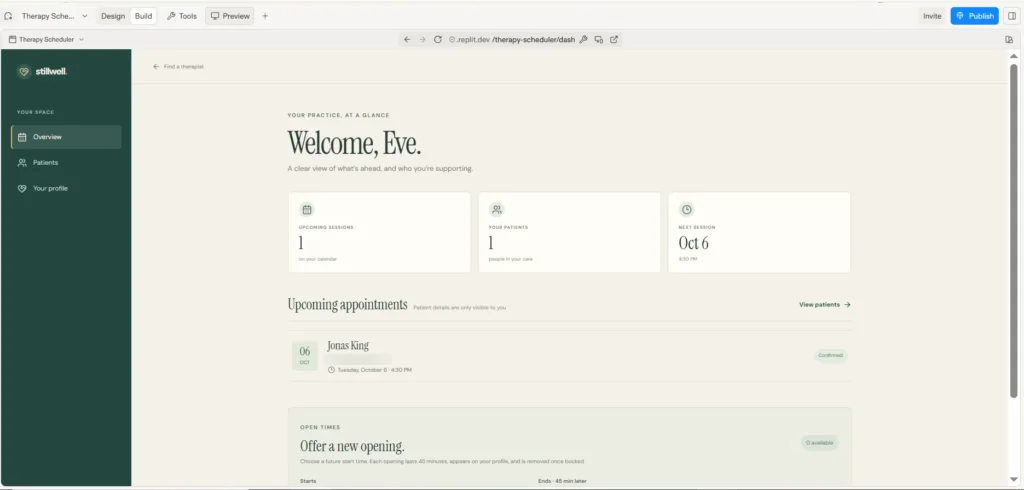
Therapists saw summary cards for upcoming sessions, patient count and next appointment, plus an appointment list showing patient name, email, time and status. They could create future 45-minute availability slots that disappeared once booked. This was a useful healthcare app prototype: it demonstrated the main business workflow without proving that the product was suitable for live clinical operations.
Here’s the therapist dashboard with one confirmed upcoming appointment, with the patient’s email blurred:
A Working Prototype Isn’t a Scalable Product
A prototype answers, “Can we show how this idea might work?” A production-ready product must answer much harder questions: Can customers use it consistently? Can it protect their information? Can it integrate with the systems the business needs? Can the team maintain it when requirements change and usage grows?
A healthcare app may need secure authentication, role-based access, provider credential verification, appointment time zones, reliable notifications, auditability, incident response and integrations with existing systems. Some requirements are regulatory; others are simply necessary to operate a dependable service. Neither a successful preview nor a security scan demonstrates that all of them have been met.
AI app development with Replit is valuable at the discovery stage because it makes ideas concrete. The risk is treating the result as the finish line. Founders should evaluate what can be retained, what must be redesigned and what needs independent validation before customers are invited in.
Step 8: Check Security and Privacy Before You Publish
Replit’s Publish flow may offer a security scan, controls for critical vulnerabilities and uptime alerts, depending on the plan and current product features. To run the scan:
- Open Security Center from Tools, or choose Review security during publishing.
- Give the scan context: patients must not see one another’s records, and therapists must see only their own appointments.
- Run the scan and review the findings.
- Send accepted issues to Agent for correction, understanding that fixes may consume credits.
A scan is not a full security assessment. It does not establish HIPAA compliance or certify the application for real patients. Review access control, data handling, infrastructure, operations and vendor agreements before launching.
Is Replit HIPAA Compliant?
This build documented that Replit was not offered as a HIPAA compliant environment and did not provide a Business Associate Agreement (BAA) for the intended patient-data use. Verify current vendor terms before making deployment decisions. For this tutorial, use fictional data only, check sharing settings before publishing and never paste actual patient information into Agent chat.
If you build a healthcare app with Replit, treat the prototype environment separately from any future system that will process patient data. Our HIPAA Compliant Mobile & Web App Development Checklist describes safeguards to consider; Parts 2 and 3 of this series cover deployment and compliance planning in more detail.
Step 9 (Optional): How to Use Replit Agent to Build Mobile Apps for Beginners
The project is a web app, but Replit supports adding a mobile experience that shares its backend and accounts. The workflow is:
- Ask Agent to “add a mobile app to this project,” or use the plus control in the preview.
- Let Agent build with Expo for iOS and Android.
- Install Expo Go and scan the QR code from the Replit preview to test on a phone.
- Test sign-in first, then booking, profile persistence and role restrictions.
- For release, follow the available iOS TestFlight/App Store process or prepare an Android release for Google Play Console; verify the current Replit publishing options.
Expo Go does not fully validate push notifications, in-app purchases or Sign in with Apple. Those features require appropriate device builds and additional testing. A mobile interface also does not make the underlying healthcare app production-ready by itself.
What It Took: Time and Cost
The build took a few hours, with much of that time spent testing and describing defects rather than waiting for code generation. It began on the free tier and finished on the $20 Core plan after hitting daily limits. Pricing and features change; check Replit’s pricing page for current information.
The small initial cost is an advantage for idea validation. It should not be confused with the total cost of delivering, operating and supporting a reliable commercial product.
How Technology Rivers Helps Turn Prototypes Into Products
A founder does not necessarily need to throw away an AI-built prototype. The right first move is to assess it. Technology Rivers helps teams bridge the gap between a promising demonstration and software designed for real-world use.
1. Assess What Exists
Review workflows, code quality, dependencies, data structures, security risks and business requirements. Identify what is reusable and what would create risk if carried forward.
2. Re-Architect for Reliability and Growth
Design the backend, data model, hosting and deployment practices around expected usage, maintainability and future product requirements rather than assuming the first generated structure will support them.
3. Secure the Product
Establish appropriate access controls, encryption, audit logging, testing and operational safeguards. For regulated healthcare workflows, assess HIPAA obligations and the vendors and agreements involved rather than treating a tool setting as proof of compliance.
4. Integrate Essential Systems
Connect the application with the scheduling, communications, identity, payment or other business systems it actually needs, with reliable data flows and clear ownership of failures.
5. Launch, Monitor and Support
Test the complete experience, plan deployment and rollback, monitor performance and security, and improve the product as real customer feedback and demand evolve.
Technology Rivers builds custom healthcare and HIPAA-compliant software. The point for founders is practical: an experienced team can help protect what is valuable in the initial build while addressing what is missing for launch.
Key Lessons for AI App Development with Replit
AI app development with Replit can dramatically shorten the path from idea to demo. This Replit Agent tutorial shows that plain language can create a functioning interface and can also help report and fix defects. But the tool fixed the issues we found; it did not independently demonstrate that the application was secure, compliant, scalable or ready for patients.
Good planning reduces ambiguity. Testing reveals broken journeys. Engineering review evaluates the system beneath the interface. Production readiness requires all three, plus the ongoing work of running a product as the business grows.
Who Should Build This Way?
For founders testing a concept, demonstrating a workflow to investors or clarifying requirements before engaging engineers, vibe coding is a practical starting point. You can build a healthcare app with Replit using fictional records and still gain useful insight into what users need.
For a live healthcare business, however, the question changes. You need to know whether the product can be safely operated, supported and extended. A prototype is progress, not a substitute for that assessment. Technology Rivers can help founders decide what to retain and how to move forward without assuming every early experiment needs a complete rebuild.

Up Next
Part 2, From AI Prototype to Production Ready: Deploy AI Apps with Replit, continues with planning, code export, database and infrastructure considerations. Part 3, How to Make a Replit App HIPAA Compliant, examines safeguards such as encryption, access control and audit logs. Together they show why moving beyond a prototype requires deliberate engineering decisions.
Frequently Asked Questions
Is Replit HIPAA compliant?
Do not assume so. In this build, the platform was not treated as a HIPAA compliant environment for patient data. Confirm current contractual and technical terms, including whether an appropriate BAA is available, before handling regulated information. Use fictional records in this tutorial.
What’s the difference between a prototype and a production-ready app?
A prototype demonstrates an idea or workflow. A production-ready app has been designed and validated for actual customers, with appropriate reliability, security, data handling, operations and support. A polished demo alone does not establish those qualities.
Do I need to know how to code to use Replit Agent?
No. AI app development with Replit uses plain-language requests. In this experiment, the first version came from four sentences, and bugs were reported without writing code. The harder skill is knowing the users, business rules and risks to validate.
Do I need a structured prompt to start?
Not necessarily. A short description was enough to get the first version. Clear rules about account types, access and sensitive information would have prevented some confusion, however.
Can Replit Agent turn my web app into a mobile app?
Yes. Step 9 covers how to use Replit Agent to build mobile apps for beginners, including Expo testing and the extra work needed before app-store release.
How much does it cost to build an app with Replit Agent?
This build started free and finished on a paid Core plan. Check the current pricing page for rates and usage limits. Development-tool cost is only one part of the cost of a commercial product.
Can an AI-built healthcare prototype become a scalable product?
Potentially, yes. The answer depends on its code, architecture, security model, integrations and business requirements. A technical assessment helps determine whether to improve the existing foundation or rebuild particular components.
Ready to Take Your Prototype Further?
Built something promising with AI? Technology Rivers helps founders evaluate early applications and turn viable ideas into secure, reliable products built for real customers and growth. Talk with our team about what it would take to move your prototype toward production.