Learning how to deploy AI apps with Lovable starts with understanding what separates a working prototype from a production-ready application. Your AI-generated app may already allow users to sign in, complete tasks, and interact with its features. But what needs to change before it can support real users?
A working MVP proves that the core idea can function. Production readiness requires more: secure account access, reliable workflows, appropriate data permissions, maintainable code, and a deployment environment suited to the application.
In Part 1 of our Lovable series, we built VitalWatch, a remote patient monitoring (RPM) prototype. Patients could enter vital readings, doctors could review assigned patients, and administrators could manage approvals and assignments.
Now we’re taking that same application through the next stage.
In this guide, we explain how to deploy AI apps with Lovable by preparing an existing prototype for production. Using VitalWatch, we demonstrate the improvements we made and tested. We’ll also explain how to export the application to GitHub, review its code, prepare it for deployment using Docker, and test it outside Lovable.
This is Part 2 of our four-part Lovable app development series:
- Part 1: AI App Development with Lovable: From Idea to Working MVP
- Part 2: Deploy AI Apps with Lovable (this guide)
- Part 3: Preparing a Lovable App for HIPAA Requirements
- Part 4: Building With Production and HIPAA Requirements From the Start
We’ll keep HIPAA-specific requirements separate because making an application production-ready and preparing it to handle protected health information are different stages of development.
For the broader approach across AI coding platforms, our complete guide to vibe coding explains the journey from an initial idea to production and healthcare-specific safeguards.
What Was Missing From Our Working Lovable MVP?
VitalWatch already supported its main workflow.
Patients could record blood pressure, blood glucose, and heart-rate readings. The application displayed reading history and flagged values outside predefined thresholds.
Doctors could review readings for assigned patients, while administrators could approve doctors and manage patient assignments.
That was enough to demonstrate the product concept.
But several important capabilities were missing.
Users had no password recovery option or dedicated profile settings page. Doctors could see flagged readings, but there was no separate workflow for acknowledging them.
We also needed to examine security, input validation, performance, and reliability more closely.
These are the kinds of gaps worth investigating when moving any Lovable MVP toward production. Rather than start over, we returned to the existing project and asked Lovable to assess it.
Step 1: Asking Lovable What the MVP Needed for Production
We opened Lovable Plan Mode and entered this prompt:
Now I want to make my app production ready. what things are missing in the current mvp to take it to a production ready app
We intentionally kept the prompt simple.
Instead of giving Lovable a detailed checklist, we wanted to see whether it could identify gaps in the application it had already generated.
You can start with the same prompt in your own Lovable project. The recommendations will depend on your application’s existing features, architecture, and intended use.
What Lovable Recommended
Lovable returned a three-phase plan.
Phase 1: Essential improvements
The first phase focused on security, authentication, account management, doctor alerts, validation, performance, and legal notices.
It recommended restricting exposed database functions, improving password protection, adding password recovery and Google sign-in, creating profile settings, and introducing an alert review workflow.
It also recommended better input validation, loading and error states, mobile responsiveness, and dashboard performance.
Phase 2: Additional capabilities
The second phase proposed doctor notes, messaging, patient-specific thresholds, reminders, data export, activity logging, and expanded administrator tools.
Phase 3: Launch and operations
The final phase covered custom domain configuration, branded email, account deletion and retention, and application monitoring.
We proceeded with the first set of improvements.
We focused on strengthening the existing workflows before introducing additional features.
When reviewing your own production-readiness plan, prioritize the improvements needed for your application’s existing workflows before introducing additional functionality.
Step 2: Improving Authentication and Account Management
Before taking a Lovable app into production, account management needs to go beyond basic registration and login. Users should be able to recover forgotten passwords, update their information, and access their accounts securely.
Our original VitalWatch MVP allowed users to register and sign in, but it did not provide a password recovery flow.
Lovable added a Forgot password? option and a reset-password process.
It also introduced Google sign-in, with new Google accounts starting in the patient role.
Password protection was strengthened with an eight-character minimum, checks against known leaked passwords, and a requirement to enter the current password before changing it while signed in.
We tested Google sign-in and password recovery. Both worked in our test accounts.

Adding Profile Settings
Lovable also created a Settings page.
Users could update their name, phone number, and date of birth, and change their password.
We tested the profile update workflow and confirmed that changes saved successfully.
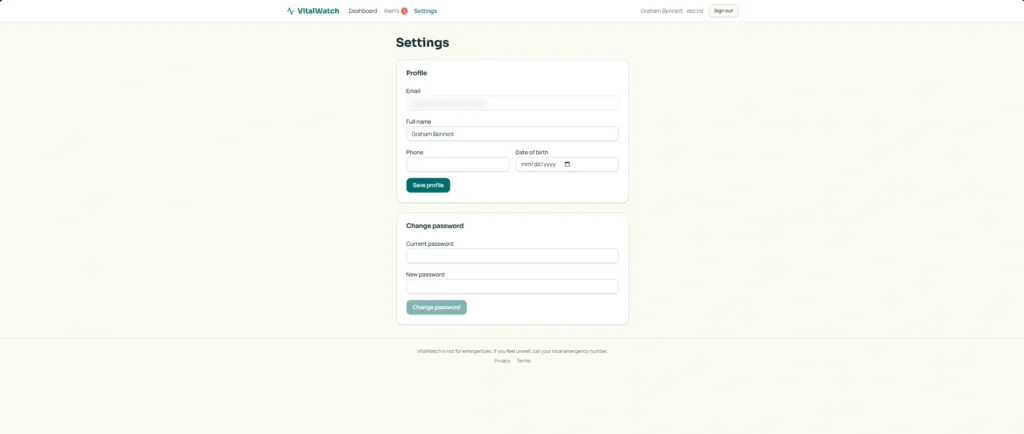
These improvements address account-management capabilities that a working MVP may be missing. When preparing your own Lovable app for production, the goal is to make sure users can manage and recover their accounts without depending on manual support.
Step 3: Adding a Doctor Alert Review Workflow
A production-ready application needs more than working screens. Its important user workflows must also be complete.
In the original VitalWatch MVP, doctors could view flagged readings within their assigned patients’ records.
However, there was no dedicated process for reviewing and acknowledging those readings.
Lovable introduced an Alerts page that displayed readings awaiting review.
Doctors could select Mark reviewed to acknowledge an alert. The application also displayed a pending-alert count in the navigation menu.
We tested this workflow using a doctor account.
A flagged blood pressure reading appeared on the Alerts page. After selecting Mark reviewed, it disappeared from the pending list.
The workflow operated as intended.
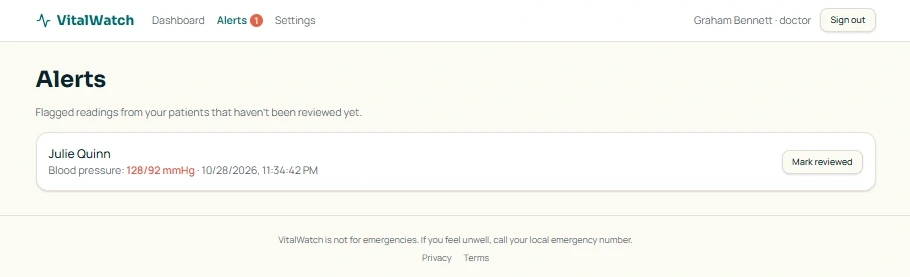
This was a useful improvement because doctors no longer had to rely only on opening individual patient records to find readings awaiting attention.
For your own Lovable app, the equivalent improvement may be different. It could involve completing an approval process, adding an order-status workflow, or ensuring users can follow up on an important action.
The objective is to identify where an existing workflow stops short and complete it before launch.
In a clinical application, acknowledging an alert is not the same as confirming that appropriate medical action was taken. Clinical escalation procedures and alert-delivery reliability require additional evaluation.
Step 4: Testing Input Validation With Realistic and Abnormal Values
Input validation helps prevent incorrect information from entering an application.
But validation should not reject legitimate information simply because it is unusual.
For VitalWatch, Lovable introduced limits intended to prevent clearly invalid vital readings from being submitted.
During testing, we entered an unusually high heart rate of 300 bpm, which the application rejected. A low reading of 30 bpm was accepted but flagged as abnormal. This confirmed that the application could distinguish between invalid inputs and readings that required attention.
This distinction matters in a healthcare monitoring application.
A concerning measurement is not necessarily invalid data. A monitoring system needs to preserve abnormal readings that may require attention while preventing entries outside its accepted range.
When testing your own Lovable app, use realistic values alongside invalid and unusual inputs. The application should respond appropriately to each rather than simply accepting everything users enter.
For your own application, also check that validation is enforced when data is saved, not just in the form. For healthcare measurements, use thresholds appropriate to the intended clinical workflow.
Step 5: Reviewing Database Structure and Security
As an application moves toward production, protecting its data becomes just as important as improving its visible features.
VitalWatch relies on connected records for patients, doctors, administrators, patient assignments, and vital readings.
In Lovable’s database interface, we reviewed tables including profiles, user_roles, patient_assignments, doctor_requests, and vital_readings.
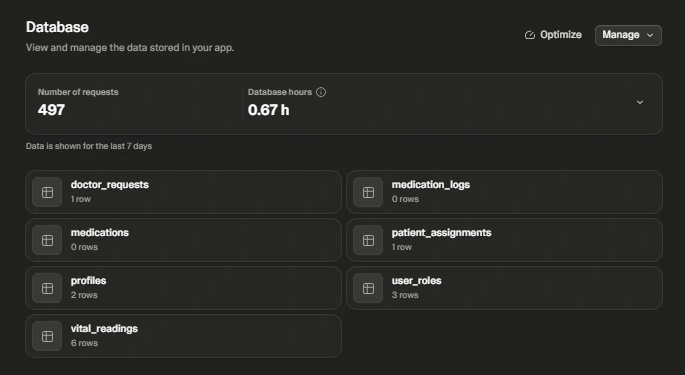
These relationships support the application’s different user roles.
For example, a doctor should only access records belonging to patients they are authorized to review. Simply having a doctor account should not provide unrestricted access to every patient’s information.
Lovable reported that it tightened access to several internal database functions that had previously been callable too broadly.
It also reported that its security check found no issues after the initial improvements.

Use the scan results to identify issues to fix, then review the actual data-access permissions for each role.
For your own application, review how different user roles access information and whether the database enforces the intended restrictions. Security checks should cover the underlying data access, not only what the interface displays.
Step 6: Testing the Updated Application Across Devices
After implementing the improvements, the next step is to return to the application’s main workflows.
For VitalWatch, we tested Google sign-in, password recovery, profile updates, doctor alerts, and vital-reading validation.
Google sign-in worked. Password recovery worked. Profile changes saved successfully.
Doctors could view flagged readings and mark them as reviewed.
The vital-reading form rejected a heart rate of 300 bpm while accepting and flagging a reading of 30 bpm.
We also tested the application in mobile and tablet views. The existing interfaces worked during our testing.
These checks confirmed that the new user-facing functionality operated as expected.
When following this process with your own app, test the main workflows after each change. Check mobile and tablet layouts, try invalid inputs, and confirm that updates to one feature have not disrupted another.
Once those workflows are working, move on to preparing the code and deployment environment.
The first six steps covered the improvements we implemented and tested inside Lovable. The remaining steps describe how to take the application beyond the platform by exporting its code, reviewing its architecture, preparing its deployment environment, and testing it independently.
Step 7: Export the Application to GitHub
To deploy AI apps with Lovable beyond its editor, start by connecting your improved and tested project to a private GitHub repository.
Open your Lovable project, find the GitHub integration, and connect your GitHub account. Create or select a private repository for the application and confirm that the project files are available there.
Use GitHub to access the source code, track changes, and work on the application outside Lovable’s editor.
For VitalWatch, the exported code would need to be reviewed alongside its dependencies, including the services supporting patient records, doctor assignments, and vital readings.
This matters because exporting code does not automatically transfer your database, authentication services, or stored records.
Before moving to the next step, make sure you understand which parts of the application are included in the repository and which still depend on external services.
Step 8: Review and Clean Up the AI-Generated Code
Once the code is available in GitHub, the next step is to review it.
AI-generated applications can work well during initial testing, but their underlying code still needs to be assessed for security, maintainability, and unnecessary complexity.
Start by examining how the application is organized, how its different features connect, and whether the code contains duplicated functionality, unnecessary components, or insecure configurations.
For VitalWatch, this would mean reviewing the code supporting patient accounts, doctor access, vital readings, and alert management.
Review one area at a time. Remove unused code, simplify duplicated functions, and organize related files so they are easier to navigate. After each change, run the app and retest the affected features. Avoid changing too many things at once, which can make errors harder to trace.
If you’re deciding whether to preserve the generated code or start over, our guide to fixing or rebuilding a vibe-coded app breaks the decision into what to keep, fix, replace, or rebuild.
After making changes, test the affected workflows again to confirm they still operate as expected.
Step 9: Prepare the Application for Deployment Using Docker
After reviewing the code, prepare the application to run outside Lovable. This is a key part of learning how to deploy AI apps with Lovable in a separate environment.
One way to do this is through Docker, which packages the application and its runtime requirements into a container.
This helps create a more consistent environment for running the software across development, testing, and production systems.
For VitalWatch, the next step would be to create a Docker configuration for the exported application and identify the external services it needs to connect to.
Those services may include the database, authentication system, and other backend components.
Docker does not automatically migrate those services. They must be configured separately so the application can communicate with them.
Once the container is configured, run the application in the new environment and confirm that it starts successfully and connects to its required services.
Save the Docker configuration with the project so you can repeat the setup and update it as the application changes.
Before deploying, you can use The Ultimate Software Development Checklist to review the planning and preparation tasks involved in taking a software project toward launch.
Step 10: Test the Application Outside Lovable
Once your application is running in its intended deployment environment, test the complete experience again.
This is important because an application may work inside Lovable but encounter problems when moved to a different environment.
For VitalWatch, patients would need to sign in, enter vital readings, and view their history.
Doctors would need to access assigned patients, review flagged readings, and mark alerts as reviewed.
Administrators would need to approve doctors and manage patient assignments.
Password recovery, profile settings, and database connections would also need to work.
An application that works inside Lovable may rely on configurations or services that are not automatically transferred with its code.
Beyond the main workflows, test how the deployed application handles errors, unexpected inputs, simultaneous users, and performance demands.
Any issues discovered during testing should be resolved and tested again before launch.
To organize these checks into a repeatable workflow, see our software development process, which covers quality assurance, deployment, monitoring, and ongoing improvements.
Use the results to decide what to fix before launch, and repeat the tests after each fix.
How Technology Rivers Helps Move AI-Generated Apps Toward Production
AI development tools have made it easier for founders to build working applications without assembling a full development team at the beginning.
But once the prototype works, the decisions become more consequential.
Should the business continue with the generated code? Is the existing architecture suitable for future growth? Can another team maintain the application? What needs to change before it can support real users?
At Technology Rivers, we help healthcare startups and businesses evaluate existing software and determine the most practical path forward.
That may involve reviewing AI-generated code, assessing database and security architecture, identifying reliability concerns, and preparing applications for independent development and deployment.
Our approach is to evaluate what already exists before recommending major changes.
A working prototype may contain components worth keeping. Other parts may need improvement or replacement to support the intended product.
For healthcare applications, these decisions also need to account for patient data protection, clinical workflows, and the regulatory requirements that apply to the intended use.
If you’ve built an application with Lovable or another AI development platform and are unsure whether it can support your next stage of growth, Technology Rivers’ Application Assessment can help identify technical gaps and practical next steps.
Frequently Asked Questions About Lovable Production Readiness
Can Lovable make an existing MVP production-ready?
Lovable can identify and implement production improvements. In our experiment, it strengthened authentication, account management, doctor alerts, input validation, and database security. The complete process also involves reviewing the code, preparing the deployment environment, and testing the application against its production requirements.
Do you need to rebuild a Lovable app before production?
Not automatically. Our VitalWatch experiment showed that the existing MVP could be improved without rebuilding it. A technical assessment can help determine which components should be retained and which need further development.
Can you export both frontend and backend code from Lovable?
Lovable supports exporting application source through GitHub integration. Frontend code, server-side functions, and database-related source files may be available depending on the project architecture. Managed database infrastructure, records, and authentication services are not automatically exported as a complete running system.
Can you Dockerize a Lovable application?
Exported application code can be containerized if its architecture and dependencies support that approach. Backend services may still require separate hosting and configuration. The containerized application should be tested before it is used in production.
Does a production-ready Lovable app automatically meet HIPAA requirements?
No. General production-readiness improvements do not establish HIPAA compliance. Applications handling protected health information require additional legal, contractual, technical, and operational safeguards.
Final Verdict: How to Take a Lovable App From MVP to Production
To deploy AI apps with Lovable, start with a working application, strengthen its essential workflows, review its code and data access, and prepare it for deployment in an environment suited to its intended use.
Our VitalWatch experiment demonstrated the first stage. We implemented and tested improvements to authentication, account management, doctor alerts, input validation, and security-related settings.
The next stage involves exporting the source code, assessing its quality, configuring the required infrastructure, and validating the application outside Lovable.
Completing those steps helps establish whether the existing application is suitable for launch or requires further engineering.
Next in the series: Part 3: Prepare the Lovable App for HIPAA Requirements explores the additional safeguards and architectural decisions involved in healthcare applications handling protected health information.