Your healthcare app works in a demo. Patients can enter readings, doctors can review them, and the dashboard looks convincing. But can you put it in front of real patients?
Not yet. A working prototype can demonstrate a product idea without proving that the software is secure, clinically reliable, or ready for real users.
We explored AI app development with Lovable by building a healthcare MVP, then testing how far the generated app could take us. We chose a remote patient monitoring (RPM) app with patient, doctor, and administrator roles.
We started with a short description in Lovable Plan Mode, built the proposed app, and tested its main workflows. Here is what we did, what worked, and what you should consider before investing further. For the detailed journey, see our guide to vibe coding.
This is Part 1 of our four-part Lovable series. We start by turning an idea into a working MVP. The next guides cover what it takes to move beyond the prototype:
- Part 2: Make the Lovable app production-ready
- Part 3: Prepare the Lovable app for HIPAA requirements
- Part 4: Build with production and HIPAA requirements from the start
From Healthcare App Idea to MVP: What Are We Building?
Our concept was straightforward. Patients would log blood pressure, blood glucose, and heart rate. Doctors would review readings from their assigned patients. Administrators would approve doctors and manage assignments.
The app would also flag measurements outside predefined ranges. Those flags would help demonstrate the monitoring experience, not make medical decisions.
For AI app development with Lovable, this is a useful scope for an early prototype: it tests whether three different users can complete a connected workflow. It does not attempt device integration, clinical alert escalation, or deployment with real patient records.
The business question for this remote patient monitoring MVP was whether the app could demonstrate its central value before committing to a larger build. A polished dashboard alone would not answer that question. For a real-world comparison, see our remote patient monitoring application, which uses connected devices and clinician alerts.
Turning a Healthcare Idea Into a Product Plan With Lovable
We used Lovable Plan Mode before generating the app. That gave Lovable a chance to clarify the workflow rather than guess at every missing requirement.
Here is the initial prompt we used:
I want to build a remote patient monitoring app where patients can log in and record their vitals, including blood pressure, blood glucose levels, and heart rate. Doctors should be able to view their patients’ readings, and the app should flag measurements that fall outside normal ranges. There should also be an admin dashboard for managing users, doctors, patient assignments, and other administrative tasks.
Lovable asked whether doctors needed approval and whether patients should be assigned to specific doctors. We chose an approval-based process with patient-to-doctor assignments.
Those answers mattered. In AI app development with Lovable, defining who can see patient information is more useful than generating extra screens. Without those decisions, the app could have given every registered doctor access to patients they were not supposed to monitor.
What the generated plan covered
Lovable’s plan proposed:
- Three roles: patient, doctor, and admin, each with a different dashboard.
- Patient workflows: logging readings, viewing history and charts, and tracking medications.
- Doctor workflows: viewing assigned patients, flagged readings, and patient details.
- Admin workflows: approving doctors, managing users, and assigning patients.
- Backend design: Lovable Cloud, authentication, database tables, and proposed row-level security rules.
- Flagging logic: predefined thresholds for blood pressure, blood glucose, and heart rate.
The plan also proposed unit tests for the threshold logic. We did not independently inspect those tests or verify the database policies during this experiment.
Why this matters: A planning tool can surface decisions you have not made yet. It cannot decide your clinical responsibilities or business operating model for you. Technology Rivers CEO Ghazenfer Mansoor makes a related point in his SaaS Fuel interview: focus on the problem the product solves rather than adding features for their own sake.
Building the First Version: Can Lovable Turn the Plan Into a Working App?
After reviewing the plan, we moved from requirements to Lovable MVP development and had the tool implement the agreed workflows. The generated app included registration, sign-in, a patient dashboard, and role-specific interfaces.
The patient dashboard offered forms for logging vitals, cards for recent readings, charts, and a medication area. The registration flow allowed users to choose a patient or doctor path.
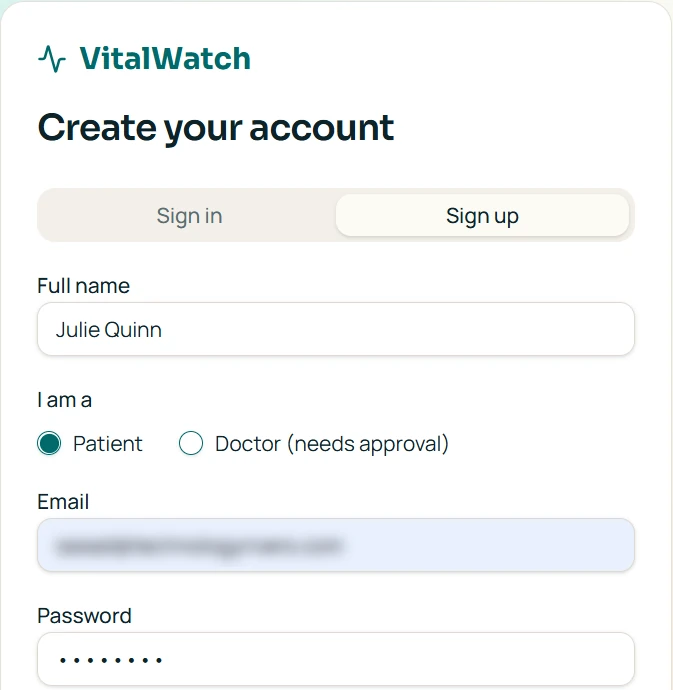
We did not manually design each page. Lovable generated the initial experience from the agreed plan. For this healthcare app prototype, the first build gave us something concrete to test rather than just a set of mockups.
That can shorten the path to a demonstrable product. But it also creates a new responsibility: review what the tool actually built instead of assuming every planned feature is complete. Our software development process explains why reviewing requirements and workflows remains important even when a tool generates the first build.
Does the MVP Deliver Its Core Value? Testing Patient Health Monitoring
To test AI app development with Lovable beyond the generated screens, we signed in as a patient and entered sample blood pressure, blood glucose, and heart-rate readings.
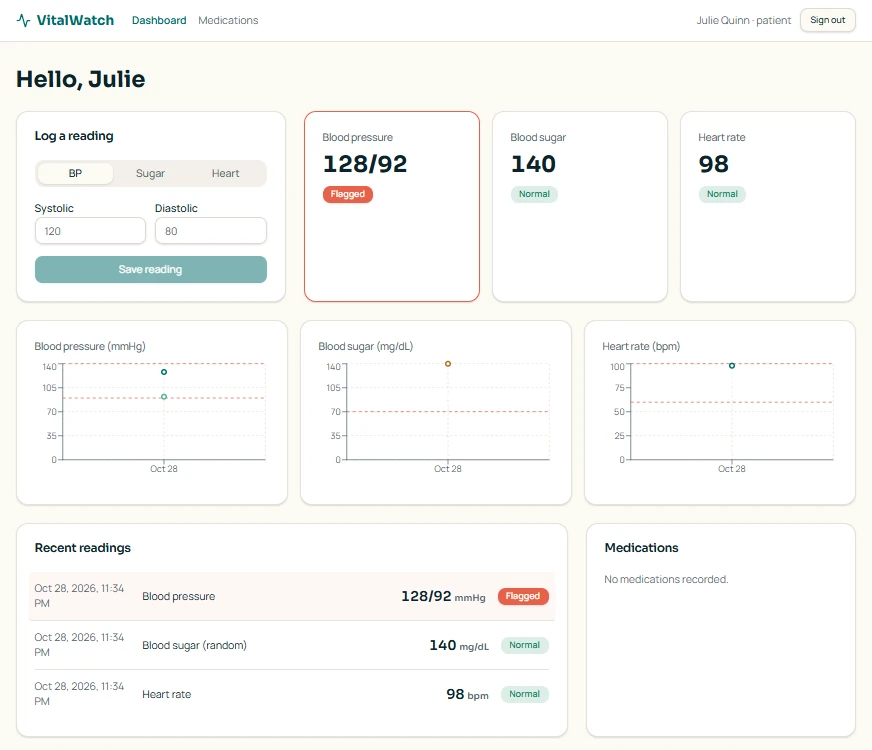
The app saved the values and displayed them in the dashboard and reading history. It also applied the thresholds specified in its plan.
For example, a blood pressure reading of 128/92 mmHg appeared as flagged. That matched the planned rule because the diastolic value was at least 90.
The dashboard also showed a random blood glucose reading of 140 mg/dL as normal under its configured rules.
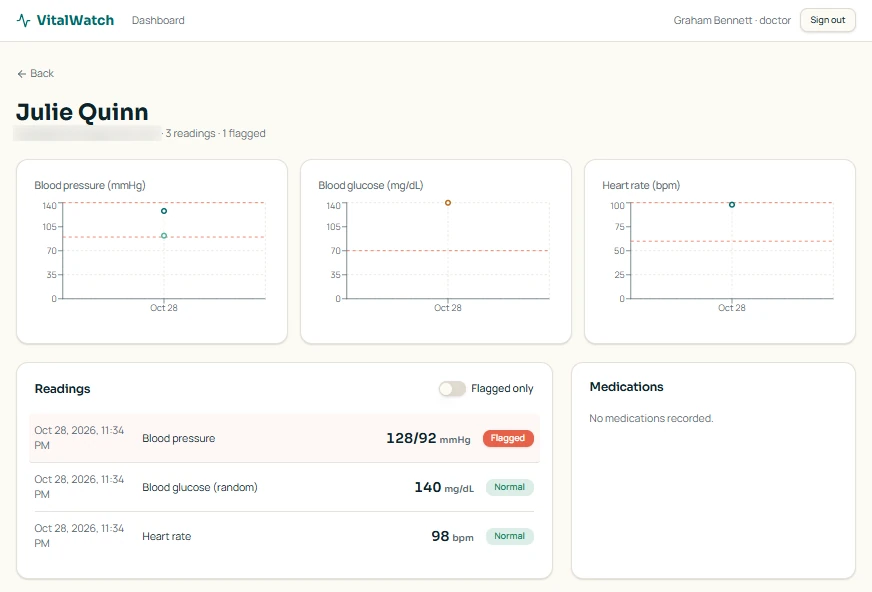
The same readings, flags, and charts also appeared in the doctor’s view of the patient record.
For a Lovable healthcare app focused on monitoring, saving readings and showing flags is a central workflow. Our test confirmed that the visible workflow operated as intended. It did not establish that the thresholds were clinically appropriate for every patient. For another hands-on example of testing, see how we built an AI-generated healthcare app using Replit Agent.
In a real service, clinicians would need to review thresholds, patient-specific exceptions, and how staff respond to concerning measurements. An incorrect alert workflow can undermine trust even when the software functions correctly.
Who Can Access Patient Information? Testing Doctor and Admin Workflows
A remote patient monitoring MVP is not useful if readings remain isolated in a patient dashboard. We needed to confirm that the provider and administrative experiences connected.
We registered a doctor account. The app placed it in a pending approval state, matching the decision made in Plan Mode.
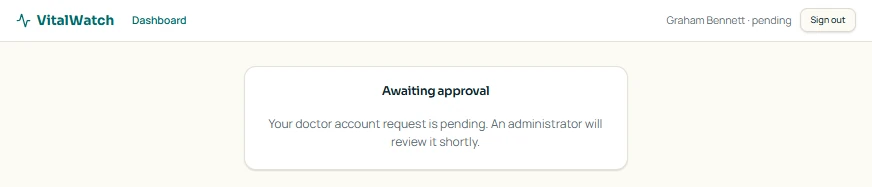
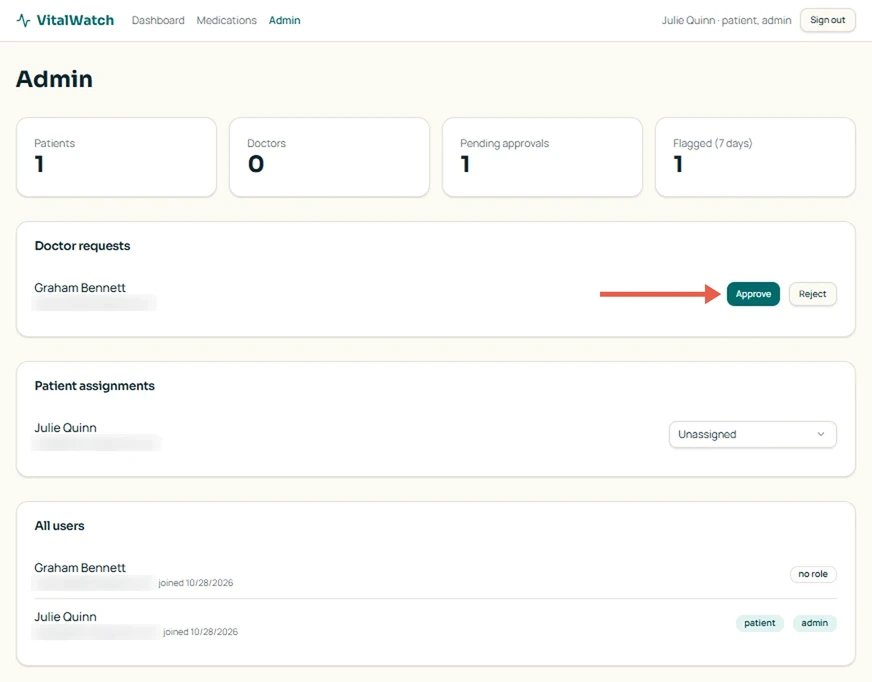
We then needed access to the admin dashboard. Our initial account did not have that role, so we asked Lovable through the chat how to access it.
Lovable asked which account should be made admin. After we supplied the account, it assigned the role. We refreshed, accessed the admin dashboard, and approved the doctor.
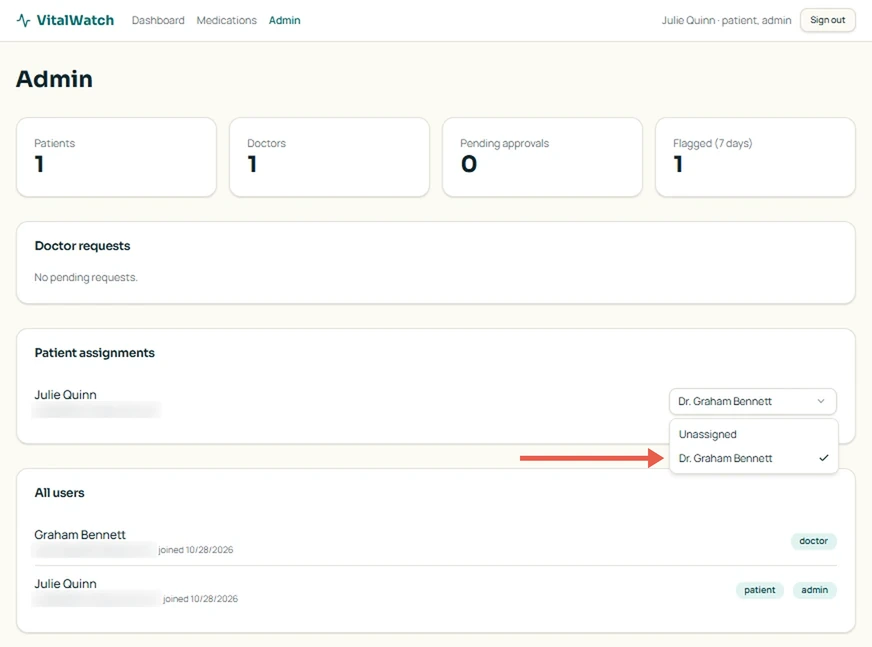
Next, we assigned a patient to the approved doctor through the admin interface.
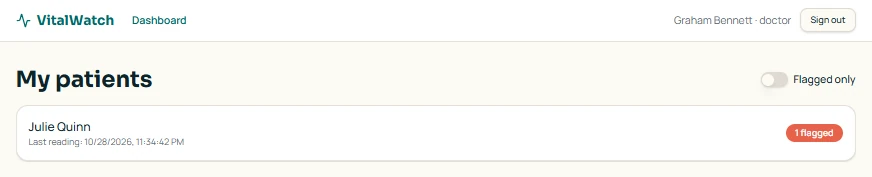
When we signed in as the doctor, the assigned patient appeared in the doctor dashboard with a flagged-reading indicator.
From the doctor dashboard, we opened the assigned patient’s record to check whether the detailed readings and trends were available in the same workflow. They were, with the same reading history and charts pictured earlier.
This was the most important check for AI app development with Lovable in our test: the workflow connected patient entry, administrator approval and assignment, and doctor review.
It did not prove that a doctor could never access an unassigned patient’s data through another route or API. That requires authorization testing beyond clicking through the interface.
If you are deciding what to build next, assess the complete workflow before paying to polish individual screens. Broken handoffs can make an attractive product unusable.
What Did Lovable Get Right, and What Still Required Our Input?
The planning step handled much of the initial requirements discussion. The generated app supported the patient, doctor, and admin journeys we tested.
During Lovable MVP development, we also needed a way to test the admin workflow. After the first build, we asked Lovable to grant our test account the admin role. This did not require us to restart the project.
These tests confirmed that the core patient, doctor, and admin workflows worked in our prototype. However, a functional MVP is only the starting point. Before using an application with real patients, additional work is needed to evaluate its reliability, security, and compliance requirements. We’ll explore those steps in the next parts of this series.
Thinking about building your own healthcare app? Talk to Technology Rivers about your idea, user workflows, and priorities before committing to a larger build.
Is a Working Lovable MVP Ready for Real Patients?
No. This healthcare app prototype demonstrated a working flow with fictional test readings, not a production healthcare service.
Before launch, you would need to verify access controls, reliability, clinical workflows, data handling, vendor agreements, and incident-response procedures.
There is also a platform-specific restriction. Lovable does not offer a HIPAA Business Associate Agreement, and its Terms of Service prohibit uploading protected health information (PHI) through its services, including apps built on the platform.
That makes synthetic data essential for this demonstration and real patient information should not be entered in the Lovable project.
The application could still be useful for validating a workflow and discussing requirements with potential customers. Using real patient records would require a separately evaluated, appropriately contracted technology stack.
This is why Part 2 of the series will examine production readiness before we address HIPAA requirements in Part 3.
Where Technology Rivers Comes In
Getting an application to work is one milestone. Deciding whether its architecture, security, and workflows can support a real business is another.
If you have built a Lovable healthcare app as an MVP, you may not need to start again. But you do need to understand what was generated, what can be retained, and what needs additional engineering.
At Technology Rivers, we help businesses evaluate AI-generated applications and plan the work required to move beyond early prototypes.
That can include reviewing application architecture, identifying security gaps, strengthening access controls, and evaluating whether the existing code can support future development.
For healthcare applications, these decisions become especially important when patient information, clinical workflows, and regulatory obligations are involved.
The goal is not to rebuild software unnecessarily. It is to make informed decisions about what to keep, what to improve, and what must change before launch. If you already have an MVP, our Application Assessment can help identify the next steps.
Frequently Asked Questions About Building With Lovable
Can you build an app with Lovable without coding?
Yes. Lovable can generate an initial app from a plain-English description, without requiring you to write the starting code. You still need to clarify requirements, review the generated features, and test whether the workflows behave as intended.
What should you include in your first Lovable prompt?
Describe the problem your app solves, who will use it, the core features, and what each user should be able to do. Start with the essential workflows rather than trying to describe every screen or design detail.
Should you use Lovable Plan Mode before building your app?
Plan Mode is useful when requirements or user permissions need clarification. In our RPM MVP, it helped define doctor approval and patient assignment rules before the app was generated.
Can Lovable create different dashboards for different users?
Yes. Lovable can generate separate interfaces for different user roles, such as customers, staff, and administrators. Specify what each role can view and do, then test those permissions using separate accounts.
How do you know if your Lovable MVP is actually working?
Test complete user journeys, not just whether screens load. For our RPM MVP, we checked registration, vital-sign entry, abnormal-reading flags, doctor approval, patient assignment, and access to readings. Those tests confirmed core prototype flows, not production readiness.
Final Verdict: Should You Build a Healthcare MVP With Lovable?
Our work on AI app development with Lovable turned a simple healthcare app idea into a working, multi-role prototype. Plan Mode clarified doctor approvals and patient assignments before implementation.
We tested patient readings, flags, administrative approval, assignments, and doctor access to assigned patient information. We also used the chat to configure administrator access.
That is enough to make the concept tangible and reveal the next questions. It is not enough to establish that the application is ready for clinical use.
That is the value of AI app development with Lovable at this stage: a working prototype gives you something concrete to test and discuss. The next step is deciding what it needs before real-world use.
Next in the series: Part 2: Make the Lovable app production-ready explores what this monitoring prototype needs before production deployment.
This article is for informational purposes and is not legal advice. Confirm applicable HIPAA obligations and Business Associate Agreement coverage with qualified counsel and every vendor handling PHI before using real patient information.