

Choosing a cloud hosting provider starts with understanding your application’s performance, security, scalability, and budget needs. Cloud hosting lets you run websites and applications on virtualized infrastructure, offering flexible resources and deployment options that traditional hosting may not provide.
Many businesses move to cloud hosting for better flexibility and growth. However, choosing the wrong provider can result in unexpected costs, performance issues, and security risks. With dozens of providers available, from global giants like AWS and Azure to specialized hosts like Atlantic.Net and Kinsta, finding the right fit can be challenging.
This guide explains what to look for in a cloud hosting provider, highlights leading options, and provides practical evaluation steps to help you choose infrastructure that supports your business as it grows.
1. Define Hosting Requirements
The first step in how to choose a cloud hosting provider is understanding what your project actually needs. A personal blog requires different resources than an enterprise application handling thousands of users daily. Start by estimating your expected traffic, storage requirements, and application complexity.
A small business website might need basic shared hosting, while a growing e-commerce store may benefit from dedicated resources. Applications with databases, APIs, or resource-intensive workloads may require more CPU, RAM, and high-performance SSD or NVMe storage.
Also consider the technical expertise you have available. Some providers offer managed services that handle server maintenance, while others give you complete control but require more technical knowledge.
Be realistic about your budget, not just for today, but for the growth you expect in the next year or two. Before comparing plans, identify whether you need automated backups, disaster recovery, operating system support, or compliance-related services.
For example, Wix suits non-technical users who want a website builder with hosting included. Kinsta is designed for WordPress websites that need managed performance and security. Atlantic.Net supports Linux and Windows cloud servers, along with managed and compliance-focused hosting options.
Before comparing providers, document your expected traffic, application stack, peak resource usage, required regions, and monthly budget. These requirements will help you eliminate unsuitable options early.
2. Check Performance and Reliability
Your hosting provider should keep your website or application available and deliver consistent performance. Look for providers with documented uptime SLAs, SSD or NVMe storage, and infrastructure redundancy. A 99.9% uptime guarantee is a useful starting point, but critical applications may require stronger availability designs.
Check whether the provider supports content delivery networks (CDNs) to serve cached content closer to visitors. This can reduce loading times, particularly for websites with a geographically distributed audience.
Ask providers about server response times, network performance, and storage speed. Test actual page load times and application response times during a trial, using locations that match your target audience.
For US-based workloads, Atlantic.Net is worth considering because it offers a 100% network and infrastructure uptime SLA across its covered cloud services. However, its SLA has defined conditions and exclusions, and does not guarantee uninterrupted application availability.
For global workloads, AWS provides extensive regional infrastructure and redundancy options, while Google Cloud offers a premium network tier designed for high-performance connectivity.
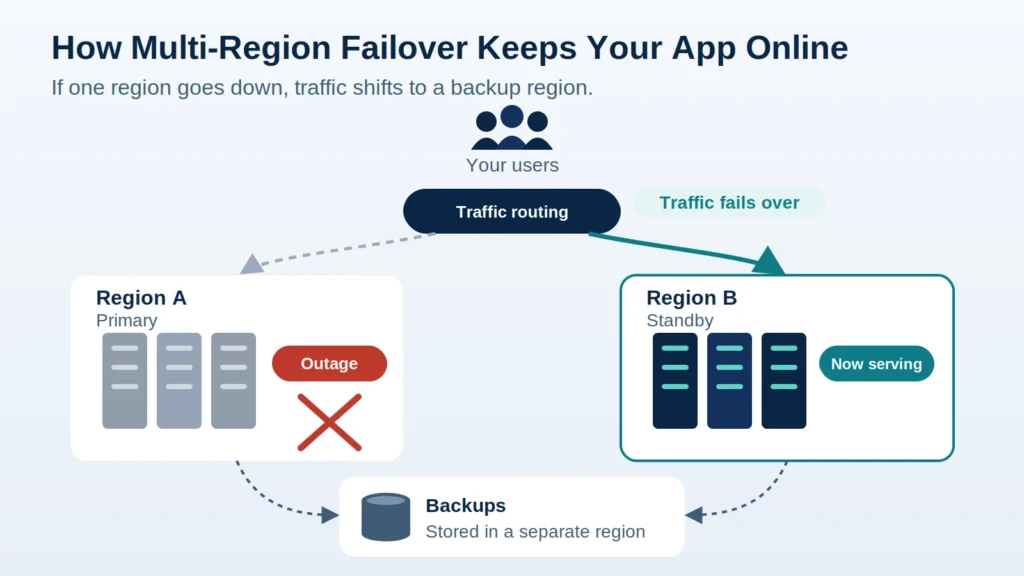
An uptime SLA is not the whole story. AWS experienced a significant US-EAST-1 service disruption in October 2025, demonstrating that even major cloud platforms can experience regional outages. Ask whether your provider supports multi-region failover and test restoration from backups stored separately from your primary environment.
3. Evaluate Scalability and Flexibility
As your business grows, your cloud hosting should grow with it. Some providers let you increase CPU and RAM on existing servers, while others support adding multiple instances to distribute traffic.
Advanced platforms offer auto-scaling that adjusts resources based on demand. However, automatic scaling may require load balancers, application changes, and additional configuration. It does not automatically eliminate unused capacity or guarantee lower costs.
Before choosing a provider, check how easily you can upgrade server resources, add storage, and deploy additional instances. Also confirm whether scaling requires downtime or application migration.
AWS provides extensive auto-scaling services for enterprise workloads. Kamatera allows businesses to customize server resources with hourly billing options. Akamai Cloud (formerly Linode) provides cloud compute instances with developer-friendly management and predictable plan pricing.
For growing SaaS applications, scalability should include the database, application servers, and network architecture—not just additional virtual machines. This is an important part of effective cloud development.
4. Prioritize Security and Compliance
Security should be at the top of your list when choosing a cloud hosting provider, especially when handling customer data, payments, or sensitive business information.
Look for providers offering firewalls, SSL/TLS support, DDoS protection, encryption, access controls, and regular security updates. Also check whether automated backups, disaster recovery, and security monitoring are included or require additional services.
If compliance is a factor, such as HIPAA, PCI DSS, or GDPR, verify which services and security controls are covered. Certifications and compliance-related marketing claims should not replace a review of the actual hosting environment, contractual commitments, and your responsibilities.
For HIPAA-regulated workloads, covered entities and business associates must have an appropriate Business Associate Agreement (BAA) with a cloud provider that handles electronic protected health information (ePHI) on their behalf. Confirm the BAA covers the services you intend to use before storing or processing ePHI.
For a deeper comparison, see our guide to HIPAA-compliant cloud hosting providers.
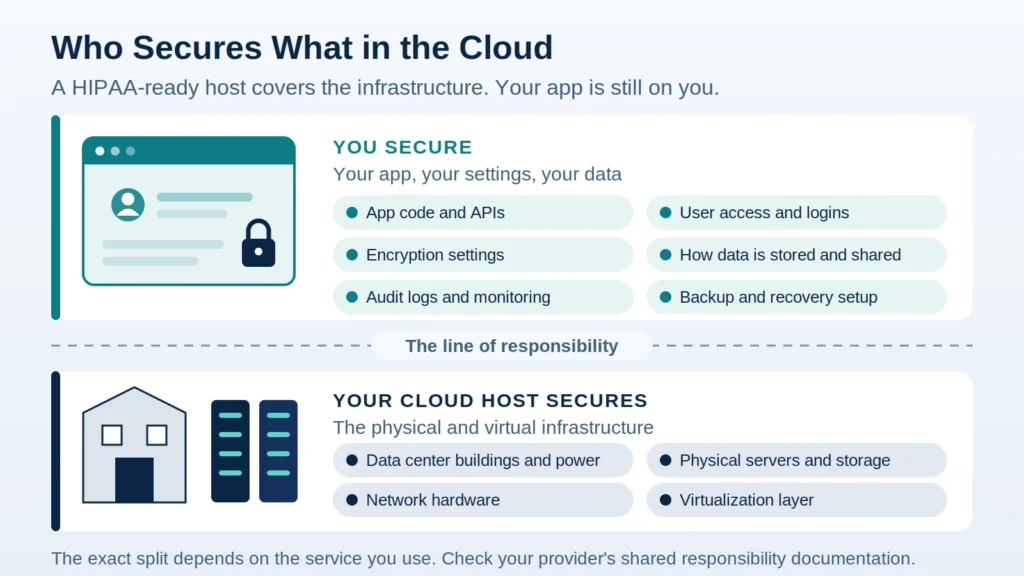
Keep in mind that a HIPAA-ready hosting environment does not make your application compliant on its own. The provider may protect the underlying infrastructure, while your organization remains responsible for applicable application security, access controls, risk assessments, and data handling.
Among leading hosting providers in this area, Atlantic.Net has operated since 1994. It offers HIPAA- and HITECH-audited cloud and dedicated hosting, Business Associate Agreements, and 24/7/365 US-based technical support. Its infrastructure spans eight data center regions.
Kinsta provides managed WordPress security features through Cloudflare integration, while Azure offers a broad portfolio of compliance-related services and documentation for enterprise workloads.
Not sure your current hosting setup is ready to scale? Technology Rivers’ Application Assessment reviews application architecture, security, production readiness, and relevant HIPAA/PHI considerations to help you identify improvements before deployment or expansion.
5. Compare Pricing Models and Transparency
Cloud hosting prices often appear very different at first, so it is worth understanding how providers calculate them. Some charge for resource consumption, while others offer fixed monthly packages or discounted long-term commitments.
Compare the total hosting cost rather than the advertised starting price. Consider CPU, RAM, storage, outbound data transfer, backups, operating system licenses, and premium support.
For example, an application running continuously may be more economical on a fixed monthly plan, while a workload that runs only for short periods could benefit from hourly billing. However, some providers continue billing for reserved resources even when a server is powered off.
Atlantic.Net offers hourly cloud server billing with monthly caps on eligible plans, along with discounted commitment options. Optional backups, additional bandwidth, and Windows licensing can affect the final price. Kamatera also supports customizable cloud configurations and hourly billing.
GoDaddy and HostGator offer hosting packages for businesses that want simpler monthly pricing. AWS and Google Cloud offer free usage allowances or introductory credits for eligible services, although usage beyond those limits can generate charges.
Before committing, estimate your monthly costs under normal and peak traffic conditions. Check renewal pricing, data transfer charges, and the cost of migrating away from the provider.
6. Assess Customer Support
When your website goes down, you need timely help to identify and resolve the issue. Look for providers offering 24/7 technical support through appropriate channels, including phone, live chat, or support tickets.
However, support availability does not necessarily mean every technical issue is covered. Ask whether the provider handles operating system updates, application troubleshooting, security incidents, and database problems, or only underlying infrastructure.
Atlantic.Net provides 24/7/365 access to US-based technical support, with additional server management services available. Kinsta focuses on managed WordPress hosting support, making it suitable for WordPress-specific issues. ScalaHosting offers round-the-clock technical support for its hosting services.
Before selecting a provider, test support responsiveness and review the available escalation procedures. Businesses running mission-critical applications should also confirm whether priority response commitments are included in their plans.
7. Consider Data Center Locations
The closer your hosting infrastructure is to your audience, the lower network latency may be. If your business serves customers worldwide, consider providers with multiple regions and CDN support.
However, choosing a nearby data center is not always enough. Network routing, application architecture, and caching also affect performance.
Check data storage regulations and contractual requirements for your country or industry. For US healthcare, HHS guidance explains HIPAA responsibilities when cloud providers process or store patient information.
Also confirm where backups, logs, and disaster recovery copies are stored. These locations may differ from your primary hosting region and can affect data residency requirements.
AWS, Google Cloud, and Azure offer extensive global infrastructure. Atlantic.Net operates eight data center regions across North America, Europe, and Asia, while Kamatera expanded to 25 data center locations worldwide in 2026.
Choose locations based on your users, regulatory needs, and disaster recovery strategy, not region count alone.
8. Check Compatibility with Your Tools and Workflows
Your hosting provider should support the operating systems, programming languages, databases, and development tools your project relies on.
If you use WordPress, look for optimized hosting environments with automated updates and backups. For developers, API access, infrastructure automation, and integration options can make a significant difference.
Kinsta is designed for managed WordPress performance and security. ScalaHosting provides its SPanel control panel for simplified hosting management. AWS and Azure support a wide range of programming frameworks, databases, and deployment tools.
To compare major platforms, explore our guide to AWS, Azure, and Google Cloud for SaaS apps.
If you plan to introduce AI features, check whether the provider offers suitable GPU resources, managed AI services, or integrations with external AI platforms. Also consider model hosting costs, network latency, and data security.
For healthcare applications using AI, confirm that the selected services can handle ePHI under the required agreements and safeguards. Availability of an AI service does not automatically make it appropriate for regulated data.
9. Consider Ease of Use
If you are new to managing hosting, an intuitive interface can simplify deployment and everyday administration. Some providers offer website builders and automated setup, while others focus on virtual server management and developer tools.
For example, GoDaddy, Wix, and HostGator suit businesses seeking straightforward website hosting or beginner-friendly tools. However, their services differ: Wix provides an integrated website-building platform, while HostGator also offers VPS hosting for users needing greater server control.
Atlantic.Net provides cloud server management through its control panel and API, while ScalaHosting offers SPanel for managing websites, databases, and hosting resources.
Akamai Cloud (formerly Linode), Vultr, and AWS offer infrastructure management options for developers comfortable with APIs, command-line tools, and technical configuration.
Before deciding, deploy a test application, configure backups, and restore data. A platform that is easy to deploy but difficult to manage during an incident may create long-term operational challenges.
10. Investigate Reputation and Real-World Feedback
Finally, don’t rely on marketing claims alone. Review recent customer feedback, particularly from businesses with workloads similar to yours.
Look for independent performance tests, uptime history, support responsiveness, and feedback about unexpected charges. Reviews should be considered alongside documented service commitments and practical testing.
It also helps to see how hosting choices perform in real projects, from healthcare applications to SaaS platforms.
Request customer references or relevant case studies when evaluating providers for critical applications. If possible, run a pilot workload and assess performance, security controls, support, and operating costs before migrating production systems.
Overview of Hosting Providers: The Best Options for 2027
Use this table as a starting point, not a ranking. How to choose a cloud hosting provider still comes down to your workload, budget, technical expertise, and security requirements.
| Provider | Best For | Standout Features |
|---|---|---|
| Atlantic.Net | Healthcare & compliance-focused hosting | HIPAA/HITECH-audited hosting, BAA availability, 100% network/infrastructure SLA, 24/7 support |
| AWS | Massive scalability & enterprise workloads | Broad cloud service catalog, global regions, availability zones, auto-scaling |
| Azure | Microsoft ecosystem & hybrid cloud | Windows integration, hybrid cloud services, enterprise compliance offerings |
| Google Cloud | Data analytics & AI | BigQuery, AI/ML services, Google Kubernetes Engine, global networking |
| GoDaddy | Small business ease | Domain registration, website hosting bundles, beginner-friendly management |
| HostGator | Budget-friendly website hosting | Shared, WordPress, and VPS hosting options, accessible management tools |
| Wix | Code-free website building | Drag-and-drop website builder, integrated hosting, managed platform |
| Kinsta | Managed WordPress performance | Managed WordPress infrastructure, isolated containers, Cloudflare CDN and security |
| Akamai Cloud (formerly Linode) | Developer-friendly VPS | Cloud compute, API-based management, predictable instance pricing |
| Vultr | Affordable global cloud infrastructure | Cloud compute, high-performance instances, hourly billing |
| Kamatera | Custom cloud configurations | Configurable resources, hourly billing, 25 global data center locations |
| ScalaHosting | Managed VPS simplicity | SPanel hosting management, SShield security, managed cloud hosting |
Frequently Asked Questions
Cloud hosting vs shared hosting: which is better?
It depends on your requirements. Shared hosting places multiple websites on shared server resources, making it affordable for smaller websites. Cloud hosting provides more flexible infrastructure options and may offer better scalability and resilience when properly configured.
For growing businesses, resource-intensive applications, or workloads requiring specific security controls, cloud hosting may be a better fit. However, cloud hosting does not automatically guarantee high availability or compliance.
What is the difference between cloud hosting and VPS?
A VPS is a virtual server with allocated computing resources. Traditional VPS hosting may run on a single physical host, while a cloud VPS can operate within a broader cloud infrastructure.
Cloud hosting describes the infrastructure and delivery model, so cloud hosting and VPS are not mutually exclusive. The important differences are resource flexibility, redundancy, management features, and billing.
If you need single-tenant physical infrastructure, dedicated or bare metal hosting is another option.
Is cloud hosting cheaper than VPS?
Not always. VPS plans often offer predictable monthly costs, while cloud hosting may provide hourly or usage-based billing.
Cloud services can be cost-effective for variable workloads, but charges for storage, data transfer, and additional services can increase the total bill. For steady workloads, compare equivalent monthly configurations and support coverage before choosing.
How to Choose a Cloud Hosting Provider: Final Steps
The last step in how to choose a cloud hosting provider is to narrow your list to three to five providers that match your technical requirements and budget.
Compare each provider using the same criteria: performance, uptime commitments, security, scalability, total monthly costs, and customer support. Use free trials or test environments when available, and evaluate the platform with your actual application workload.
Before making a final decision, confirm backup recovery procedures, support responsibilities, and the cost of scaling your infrastructure. Consider whether the provider can support both your current needs and future growth.
Your cloud hosting provider should operate as a reliable business partner, offering transparent pricing, dependable infrastructure, and services aligned with your goals. Whether you choose Atlantic.Net for its compliance-focused hosting, AWS for its scalability, or Kinsta for managed WordPress, the best choice depends on your application requirements.
At Technology Rivers, we help businesses design, build, and manage secure, scalable cloud solutions that fit their operational needs. With 30+ HIPAA-compliant builds and 60+ healthcare projects, we have experience across healthcare platforms and enterprise SaaS applications. Our cloud services focus on performance, security, and long-term scalability, helping infrastructure evolve alongside business needs.
Ready to discuss the right cloud strategy for your business? Contact our team today to explore how we can help you deploy, optimize, and scale your cloud environment with confidence.