
Learning how to choose a cloud hosting provider starts with knowing what cloud hosting does. It lets you run websites and apps on virtual servers over the internet, with more speed, reliability, security, scalability, and affordability than traditional servers.
Many businesses move to cloud hosting for better growth. But picking the right provider could make or break your business. With dozens of providers on the market, from global giants like AWS and Azure to specialized hosts like Atlantic.Net and Kinsta, making the right choice could be a challenging task.
This guide will help you choose the right cloud hosting provider by walking through the key factors to consider. It covers critical features, what to expect, and highlights some top providers in the market, so you can make a choice that holds up as your business grows.
1. Define Hosting Requirements
The first step in how to choose a cloud hosting provider is understanding what your project actually needs. A personal blog requires different resources than an enterprise application handling thousands of users daily. Start with an estimate of your expected traffic volume.
A small business website might need basic shared hosting, while a growing e-commerce store requires dedicated resources. Also consider the technical expertise you have available.
Some providers offer managed services that handle server maintenance for you, while others give you complete control but require more technical knowledge. Be realistic about your budget, not just for today, but for the growth you expect in the next year or two.
For example, Wix is a good choice for non-technical users who want a straightforward website builder with hosting included. Kinsta is ideal if you run WordPress and want speed and reliability without having to manage the backend. Atlantic.Net works well for businesses that want both Linux and Windows servers, along with compliance-ready hosting.
2. Check Performance and Reliability
Your hosting provider should keep your website or application online consistently and load it quickly for users. Look for providers that guarantee at least 99.9% uptime and offer solid-state drives (SSD) for faster data access.
Check whether the provider uses content delivery networks (CDN) to serve your content from multiple locations worldwide. This feature reduces loading times for visitors regardless of their geographic location. Ask providers for their typical server response times, then test them yourself during a trial.
For example, for US-based users, Atlantic.Net could be a good choice as it offers a 100% uptime SLA with data centers strategically placed in different states in the US. For global users, AWS sets the benchmark for redundancy and stability, while Google Cloud provides excellent low-latency connections through its premium network.
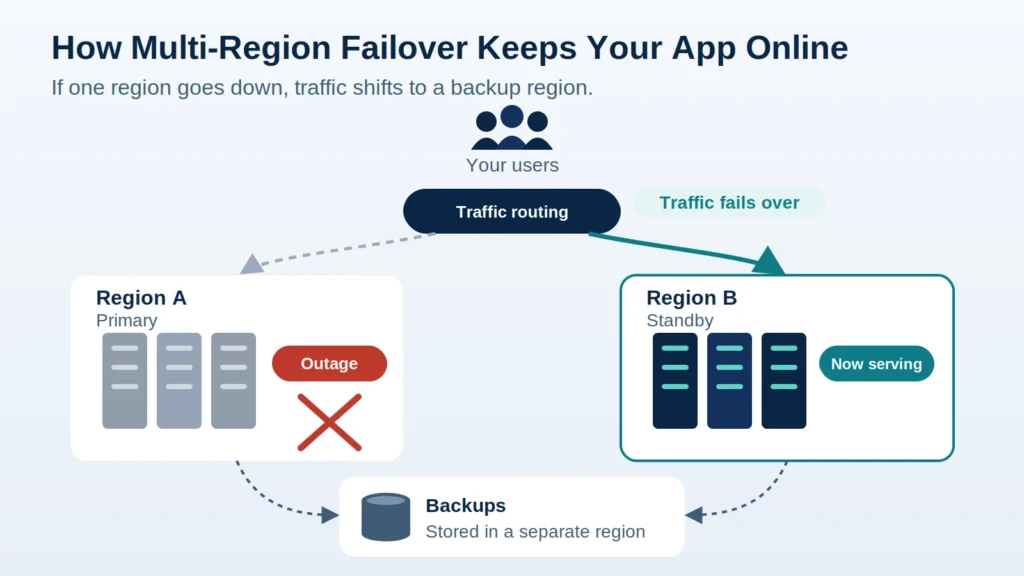
An uptime SLA is not the whole story, though. In October 2025, AWS’s oldest and most-used US region was disrupted for about 15 hours, and SLA credits rarely cover the business you lose during downtime. Ask whether the provider supports failover to a second region, and keep your backups outside your main region.
3. Evaluate Scalability and Flexibility
As your business grows, your hosting should be able to grow with it. Some providers make it simple to increase CPU and RAM on your existing servers, while others allow you to add extra servers to handle more traffic.
The most advanced options can automatically scale resources up or down depending on your current demand, so you never pay for more than you need. Auto-scaling works best when your app is built for it from the start, which is a core part of cloud development.
AWS is built for enterprise-level scaling. Kamatera gives you precise control over resources with the option to pay by the hour. Akamai Cloud (formerly Linode) offers straightforward scaling and predictable pricing, which is especially valuable for developers.
4. Prioritize Security and Compliance
Security sits at the top of what to look for in a cloud hosting provider, especially if you handle customer data, payments, or other sensitive information. Look for a provider that offers firewalls, SSL certificates, DDoS protection, and regular system updates. Make sure the provider has an automated backup system and restoration services when needed.
If compliance is a factor, for example, with HIPAA, PCI DSS, or GDPR, make sure your provider can meet those requirements. For HIPAA, that means the provider must sign a Business Associate Agreement (BAA) before any protected health information is stored on its servers. This is general guidance, not legal advice. For a deeper look, see our guide to HIPAA-compliant cloud hosting providers.
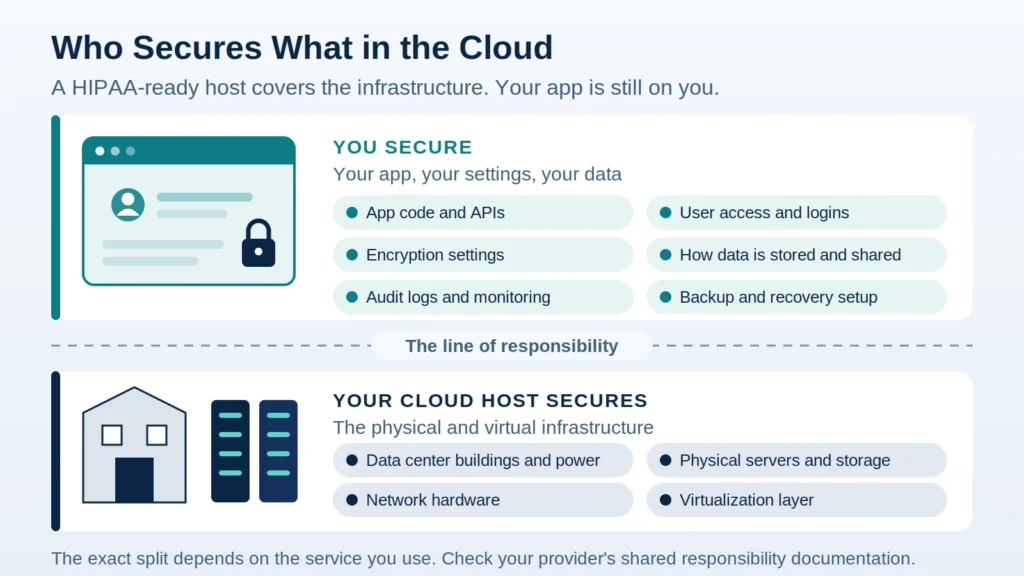
Keep in mind that a HIPAA-ready host does not make your app compliant on its own. The provider secures the infrastructure, but you are still responsible for how your app stores, accesses, and protects that data.
Among leading hosting providers in this area, Atlantic.Net has been in operation since 1994. It provides HIPAA- and HITECH-audited hosting from eight global data center regions, with US-based support available 24/7/365.
Kinsta protects WordPress sites with Cloudflare’s enterprise security features, and Azure holds a wide range of enterprise-grade compliance certifications.
Not sure your current hosting setup is ready to scale? Technology Rivers’ Application Assessment reviews your app for production readiness and, where you need it, HIPAA compliance, so you know what to fix before you grow.
5. Compare Pricing Models and Transparency
Cloud hosting prices often appear very different at first, so it is worth digging into how providers calculate them. Some providers charge you only for the resources you use, while others offer fixed monthly packages. Watch for extra costs such as fees for data transfers, backup storage, or premium support.
In this category, Atlantic.Net and Kamatera are known for their straightforward pay-as-you-go pricing. GoDaddy and HostGator work well for businesses that prefer predictable monthly costs. AWS and Google Cloud both offer free tiers or trial credits so you can test their services before committing.
6. Assess Customer Support
When your website goes down, you need quick help to fix the issue. For that, ensure that your hosting provider delivers 24/7 support through multiple channels such as live chat, phone, and tickets.
For this purpose, you can opt for Atlantic.Net, which provides round-the-clock access to experienced technicians. Kinsta’s support focuses on WordPress, so it is well suited to WordPress-specific issues. ScalaHosting includes 24/7 support with its managed VPS plans.
7. Consider Data Center Locations
The closer your servers are to your audience, the faster your site will load for them. If you serve customers worldwide, it is worth choosing a provider with data centers in multiple regions.
Also check any data storage regulations in your country or industry. In US healthcare, for example, HHS guidance on HIPAA and cloud computing explains what cloud providers must do when they store patient data.
To this extent, AWS, Google Cloud, and Azure all have truly global coverage. Atlantic.Net operates data centers in North America, Europe, and Asia, while Kamatera has more than 20 locations worldwide for low-latency access.
8. Check Compatibility with Your Tools and Workflows
Your hosting provider should support the operating systems, programming languages, and databases your project relies on. If you use a specific CMS like WordPress, look for optimized hosting environments. For developers, API access and integration options can make a big difference.
Kinsta is explicitly designed for WordPress performance and management. ScalaHosting offers its control panel, called SPanel, for simplified VPS management. AWS and Azure provide broad compatibility with a wide range of tools and frameworks. To see how the major platforms stack up, compare AWS, Azure, and Google Cloud for SaaS apps.
If you plan to add AI features, check whether the provider offers GPU capacity and managed AI services. For healthcare apps, also confirm those services can be used with protected health information.
9. Consider Ease of Use
If you are new to managing hosting, you need an interface that’s simple and intuitive. Some providers are built for beginners, with drag-and-drop tools and automated setup, while others cater to advanced users with full server access and custom configurations.
For example, GoDaddy, Wix, and HostGator are great for those who want minimal technical involvement. Atlantic.Net and ScalaHosting strike a balance between control and simplicity. Akamai Cloud (formerly Linode), Vultr, and AWS give more power to experienced developers who prefer command-line or API-based management.
10. Investigate Reputation and Real-World Feedback
Finally, don’t rely on marketing claims alone. Check recent reviews from other customers, particularly those with similar needs to yours. Independent performance tests for uptime, speed, and support responsiveness are worth checking too.
It also helps to see how hosting choices hold up in real projects, from healthcare apps to SaaS platforms.
Overview of Hosting Providers: The Best Options for 2026
Use this table as a starting point, not a ranking. How to choose a cloud hosting provider still comes down to the requirements you defined in step one.
| Provider | Best For | Standout Features |
|---|---|---|
| Atlantic.Net | Healthcare & compliance | HIPAA/PCI hosting, 100% uptime SLA, 24/7 expert support |
| AWS | Massive scalability & enterprise workloads | Broad service catalog, global availability zones |
| Azure | Microsoft ecosystem & hybrid cloud | Seamless Windows integration, enterprise compliance |
| Google Cloud | Data analytics & AI | BigQuery, AI/ML tools, Kubernetes leadership |
| GoDaddy | Small business ease | Domain + hosting bundles, 24/7 phone support |
| HostGator | Budget hosting | Low-cost shared/cloud hosting, beginner-friendly |
| Wix | Code-free website building | Drag-and-drop editor, all-in-one solution |
| Kinsta | Managed WordPress performance | Google Cloud compute-optimized VMs, Cloudflare Enterprise |
| Akamai Cloud (formerly Linode) | Developer-friendly VPS | Transparent pricing, global edge network |
| Vultr | Affordable global cloud | High-frequency compute, hourly billing |
| Kamatera | Custom cloud configurations | Fully tailored servers, hourly scaling |
| ScalaHosting | Managed VPS simplicity | Free SPanel, SShield security, AWS and UpCloud options |
Frequently Asked Questions
Cloud hosting vs shared hosting: which is better?
It depends on your stage. Shared hosting puts your site on one server with many others, which keeps costs low but limits performance and control. Cloud hosting draws resources from multiple servers, so it scales with traffic and handles failures better. Most growing businesses and any app handling sensitive data are better served by cloud hosting.
What is the difference between cloud hosting and VPS?
A VPS gives you a fixed slice of one physical server. Cloud hosting spreads your workload across a pool of servers, so resources can scale up or down on demand. If you need full single-tenant isolation instead, dedicated hosting is another option.
Is cloud hosting cheaper than VPS?
Not always. A VPS usually has a predictable monthly fee, while cloud hosting often bills for what you use. Cloud can cost less for variable traffic and more for steady, heavy workloads, so compare based on your expected usage.
Making Your Final Choice
The last step in how to choose a cloud hosting provider is to narrow your list to three to five providers that fit your needs and budget. You can take advantage of free trials or money-back guarantees to test the performance of a hosting provider with your actual workload. Evaluate not just how well they serve your current requirements but also their ability to support your growth over the coming years.
Your cloud hosting provider should operate as a true business partner: reliable, transparent, and adaptable to your business goals. Whether you choose Atlantic.Net for its compliance strength, AWS for its scalability, or Kinsta for WordPress optimization, your top priority should be selecting a provider whose strengths align with your specific objectives.
At Technology Rivers, we help businesses design, build, and manage secure, scalable cloud solutions that fit their operational needs. With 30+ HIPAA-compliant builds and 60+ healthcare apps delivered, from HIPAA-compliant healthcare platforms to enterprise SaaS applications, our cloud services are designed for performance, security, and long-term scalability, so your infrastructure evolves with your growth.
Ready to discuss the right cloud strategy for your business? Contact our team today to explore how we can help you deploy, optimize, and scale your cloud environment with confidence.