To make a Lovable AI app production ready, you audit what it already does, then strengthen the parts people will depend on: secure accounts and permissions, a sound database, reliable workflows, error handling and monitoring, tested performance, repeatable deployment, and a recovery plan. Most of that work builds on your prototype rather than replacing it.
Your Lovable app may already work. Users sign in, navigate the dashboard, and complete the main tasks, and you may have shown it to investors, a pilot clinic, or your first customers. Production readiness asks a harder question: can people depend on it every day?
In Part 1, we built VitalWatch, a remote patient monitoring (RPM) prototype where patients record vital readings, doctors review assigned patients, and administrators manage approvals and assignments. In this guide, we take VitalWatch through the work of preparing it for launch.
This is Part 2 of our Lovable series. Here’s how the series fits together:
- Part 1: How to Build an App with Lovable
- Part 2: How to Make a Lovable AI App Production Ready (this guide)
- Part 3: How to Make a Lovable App HIPAA Compliant
- Part 4: How to Build a Production-Ready HIPAA-Compliant App with Lovable
What Does Production-Ready Actually Mean?
A production-ready app keeps working when many people use it at once, a connected service goes down, or a user’s permissions change. A prototype only has to show that the idea works. That takes five qualities:
- Reliability means important actions complete consistently and failures are handled predictably.
- Security means users reach only the information and actions they’re authorized for.
- Performance is how quickly the app responds.
- Scalability is how well it handles growing demand.
- Maintainability decides whether developers can fix problems and add changes without breaking what works.
In VitalWatch, a demo shows a patient’s reading appearing on a doctor’s dashboard. Production readiness means the reading is saved correctly, only the right users can see it, failures are detected, and the workflow keeps working as usage grows.
The bar depends on the product. An internal tool and a patient-facing healthcare platform need very different levels of testing, availability, and oversight. The goal isn’t every possible feature before launch. It’s an app that supports its intended use without avoidable risk.
Why AI-Generated Apps Often Struggle in Production
AI tools build what you ask for, one prompt at a time. The problems that surface later sit in places no prompt asked about.
An app can show different dashboards to administrators and ordinary users while the database still lets ordinary users retrieve restricted records. Every screen looks correct, and the gap stays invisible until someone tests the database directly. A database can respond quickly with a few test entries and slow down as records accumulate. An external integration can fail without notifying anyone. And successive prompts can add duplicated functionality, unnecessary dependencies, and inconsistent code organization that make every future change slower.
None of this makes AI-generated code unsuitable for production. The question is whether the application’s architecture, security, and implementation can support its intended use.
Before making changes, the first step is to assess what already exists. This helps identify which components are working as expected, which issues need to be addressed before launch, and which improvements can wait. It also helps determine whether the existing architecture can support the application’s future requirements or whether certain components need to be replaced or rebuilt.
If you’ve built an app with Lovable and aren’t sure what needs to change before launch, Technology Rivers’ Application Assessment can help identify technical gaps and recommend practical next steps.
Step-by-Step: How to Make a Lovable AI App Production Ready
Step 1: Audit the Existing Application
Every effort to make a Lovable AI app production ready starts with knowing where it stands. Before changing code or hosting, establish what the app already supports and what’s still open.
We started VitalWatch’s audit in Lovable’s Plan Mode, where Lovable analyzes the app and proposes changes without implementing them. We used this prompt:
Now I want to make my app production ready. What’s missing in the current MVP to take it to a production-ready app?
We kept the prompt simple to see what Lovable would find in an app it had generated itself. It returned three phases:
- Phase 1, essential improvements: authentication, account management, database security, doctor alerts, input validation, loading and error states, mobile responsiveness, and performance.
- Phase 2, additional capabilities: doctor notes, messaging, patient-specific thresholds, reminders, data export, activity logging, and expanded administrator tools.
- Phase 3, launch considerations: custom domains, branded email, account deletion, data retention, and monitoring.
Lovable’s list is a starting point, but it can’t tell you which items block your launch. That depends on your product, users, and timeline, so we sorted every item by business impact: must fix before launch, can wait, or doesn’t need to change.
In VitalWatch, most of Phase 1 belonged in the first group, because gaps in authentication, database security, or alerts would affect patients and doctors from day one. Messaging and doctor notes could wait. It’s the same lesson as Part 1: when features are this easy to generate, the real work is choosing which ones the product needs.
That three-way sort is the most useful output of an audit. It keeps the budget on what launch requires. If someone else reviews your app, ask for their findings in the same three groups.
Step 2: Review the Application Architecture
Next, decide whether the existing architecture can support the product you plan to run.
Map the frontend, database, authentication service, backend functions, storage, and third-party integrations, and how they depend on each other. In VitalWatch, patients, doctors, administrators, assignments, and readings form connected workflows. A change to patient assignments changes which records a doctor can retrieve, so the backend and data-access rules have to support those relationships consistently, not just the screens.
Your team should be able to change how the app performs a task without rewriting everything that talks to it. Our engineers keep the business rules, or business logic, in separate service files, while API routes handle requests and responses. That way, changing how VitalWatch assigns patients to doctors doesn’t mean rebuilding unrelated screens.
The review shows which components can stay, which need targeted refactoring (duplicated logic, inefficient queries, tightly coupled components), and which can’t meet a requirement, such as restricting each doctor to their assigned patients’ records. A component that can’t enforce that may need replacing. The outcome is a clear picture of how much of the existing investment is worth keeping.
Once the application’s architecture is mapped, the next step is to review who can access its data and functionality. Each user role needs appropriate permissions, enforced consistently across the application and its database.
Step 3: Secure Authentication and Authorization
Authentication verifies who a user is. Authorization decides which records and actions that user can reach. A login screen covers only the first.
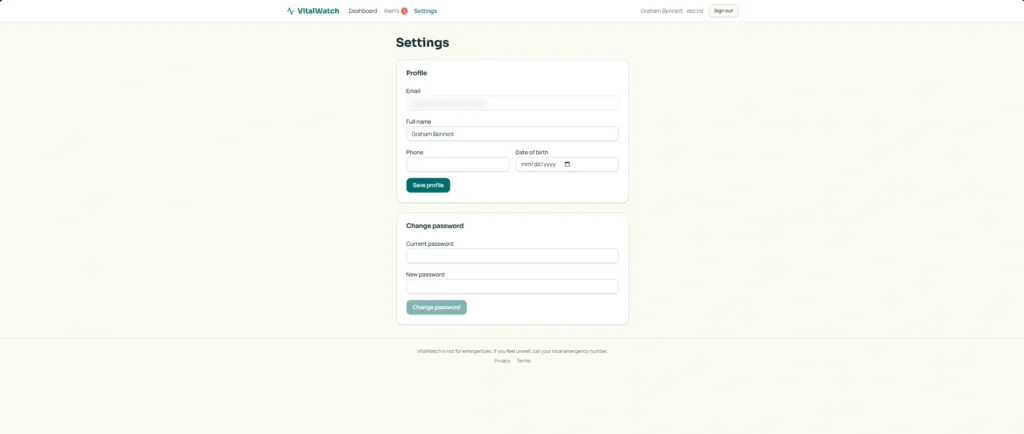
The prototype handled registration and sign-in. For production, VitalWatch needed the full account lifecycle:
- Password recovery
- Google sign-in
- A Settings page for profile updates and password changes
- An eight-character password minimum, a check against known leaked passwords, and the current password required before changing it
We tested Google sign-in, password recovery, and profile updates with test accounts, and each worked as expected.

Permissions come next. In VitalWatch, a doctor sees assigned patients, not every patient in the database. Administrators get broader management access, and patients see only their own information. Those restrictions have to be enforced in the backend or database, not by hiding interface elements.
Before launch, test what each role can reach, what happens when permissions change, and whether unauthorized requests are rejected.
Step 4: Review and Optimize the Database
Database design drives reliability, security, and performance.
We reviewed VitalWatch’s core tables: profiles, user_roles, patient_assignments, doctor_requests, and vital_readings. Together they hold users, their permissions, patient assignments, doctor requests, and recorded readings.
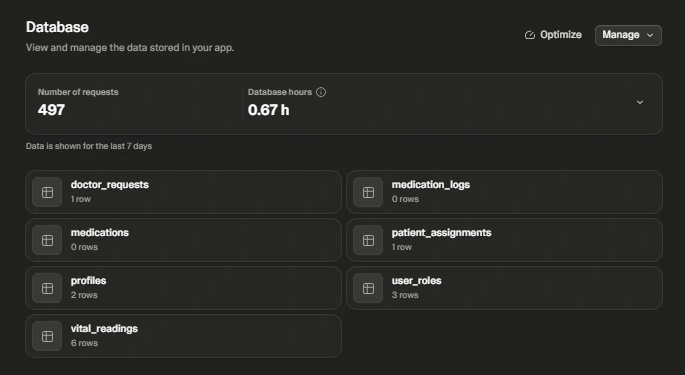
Lovable’s security check against these tables flagged internal database functions with broader access than the app required. They were restricted, and the follow-up scan came back clean.
A production review also checks relationships between records, data constraints, access policies, and the queries behind important workflows. For VitalWatch, that means preventing invalid patient assignments, restricting access to patient records, and retrieving reading histories efficiently as data grows.

Not every table needs redesigning. The question isn’t whether the tables look right. It’s whether the data model matches how care actually works: who can see which patient, and what happens when an assignment changes. A wrong rule can show a doctor another patient’s information, or hide information an authorized doctor needs.
An application also relies on external services such as authentication providers, email, storage, and APIs. These connections need to work securely and reliably for the application to function as intended. Once the database and access rules are reviewed, the next step is to secure these integrations and test the workflows that depend on them.
Step 5: Secure APIs and Complete Critical Workflows
List every external service your app uses, such as EHR integrations, authentication providers, email, storage, payment processors, and AI APIs. For each one, document its purpose, the data it sends or receives, the credentials it needs, and what happens when it’s unavailable.
Keep secret keys and other privileged credentials out of frontend code, where users could retrieve them, and have backend operations confirm that each user is allowed to perform the requested action.
Securing each service is half the work. The other half is making sure the workflows that depend on them hold up end to end. In VitalWatch, doctor alerts were the clearest case. The prototype showed flagged readings inside each patient record. For production, doctors needed one place to work through them, so VitalWatch gained an Alerts page listing readings awaiting review, a Mark reviewed action, and a pending-alert count in the navigation.
In testing with a doctor account, a flagged blood pressure reading appeared in the pending list and cleared once it was marked reviewed.
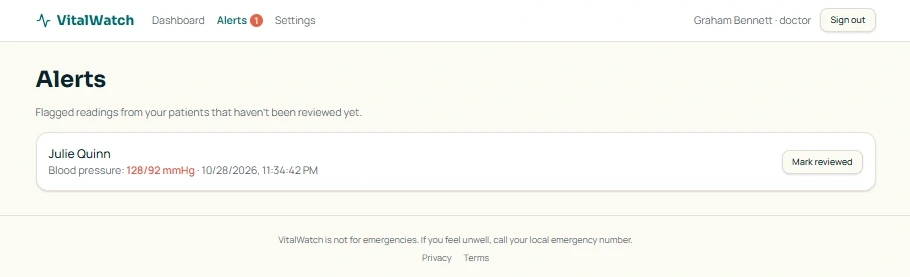
Doctors no longer open individual records to find readings that need attention. Marking an alert reviewed records acknowledgment, not clinical follow-up, so escalation and response procedures are a separate decision. Evaluate approval, payment, or booking workflows the same way, including what happens when a connected service fails.
Step 6: Implement Error Handling and Monitoring
An app should respond predictably when users enter unexpected information or services fail.
We tested VitalWatch’s validation with unusual heart-rate readings. It rejected 300 beats per minute and accepted 30 beats per minute while flagging it as abnormal. An unusual reading can be clinically significant rather than invalid, so validation rules should follow the app’s purpose, with clinicians setting the thresholds.
Error handling should cover failed requests, unavailable services, interrupted submissions, and database errors. Monitoring catches what users don’t report, such as failed operations, slow responses, and recurring errors, without exposing sensitive information in the logs.
Picture a patient submitting a reading and assuming it reached the care team. If the submission fails silently, they believe it arrived when it didn’t. Good error handling tells the user what happened, and monitoring lets the team detect and investigate the failure.
Just as important is deciding who responds when something breaks. A dashboard alone doesn’t make an app reliable.
Step 7: Improve Performance and Scalability
Test performance the way people actually use the app. For VitalWatch, the critical operations are signing in, submitting readings, retrieving patient history, and reviewing alerts.
Set a separate target for each, such as submitting a reading, opening a reading history, and loading the alert list, based on how much the workflow depends on it. Then test with the number of simultaneous users you realistically expect, not a single test account.
When something is slow, find the cause before approving more infrastructure spending. An inefficient query, too many frontend requests, limited backend capacity, and a slow external API each need a different fix, and extra server capacity won’t fix a badly structured query.
Planning for Lovable app scalability also means accounting for expected growth and infrastructure costs. You don’t need to build for massive demand on day one. You need evidence the app supports the people you’re launching to, and a plan for what happens as usage grows.
Once the application has been tested for performance and expected usage, those checks need to become repeatable. Automated testing helps verify that critical workflows continue to work as the application changes, without reintroducing issues that were already resolved.
Step 8: Establish Automated Testing
Manual testing confirms features work during development. Automated testing makes those checks repeatable every time the app changes.
The workflows we tested manually in Steps 3 to 6 are the first candidates for automation. Start with the ones the product depends on: a patient submits a reading and it’s saved; an assigned doctor can retrieve it; an unassigned doctor is denied access; and a doctor’s alert acknowledgment is recorded.
Decide with your technical team which failures block a release. A minor alignment issue can wait. A defect that exposes another user’s information, loses records, or breaks a core workflow can’t.
Step 9: Set Up Deployment and CI/CD
Once the app is reviewed and its key workflows validated, prepare the code and infrastructure for Lovable app deployment.
Connect to GitHub. Lovable’s GitHub integration puts the generated source code in a repository with version history. A Lovable code export through GitHub gives you the source files, but check what the repository actually contains before assuming the app is portable. Source code doesn’t bring the managed database, authentication infrastructure, stored records, or every external dependency with it.
Review and clean the code. Look for duplicated functionality and unused dependencies. Confirm required environment variables are configured, privileged credentials aren’t in the source code, and the app points at the production database, not a development or test one. Fix critical issues first and retest affected workflows after each change.
Prepare the environment. When our engineers move a Lovable app to independently managed hosting, they connect the project to GitHub, clone the repository locally, and configure environment variables without committing secrets to the repository. Where container-based deployment fits, they create Docker files for the frontend and backend so the app runs the same way in development and on the server. Databases and authentication providers are configured separately. Here’s the full AWS setup our team uses, from our deployment guide for another AI app builder.
Set up a release pipeline. Continuous integration (CI) automatically builds and tests each change. Continuous delivery moves validated changes through staging into production with the approvals your team needs. A staging environment is a separate copy for testing changes before real users get them, and for a healthcare app, it’s where a change that breaks a patient or doctor workflow should be caught. Version control records every change, so you can return to an earlier version. Define how to roll back a release before you need to.
Validate the deployment. For VitalWatch, that means retesting patient registration, reading submission, doctor access, alerts, administrator workflows, account recovery, and database connectivity in the new environment. A successful deployment means the software is running. Production readiness means it works correctly under real conditions.
Before deploying, you can use The Ultimate Software Development Checklist to review the planning and preparation tasks involved in taking a software project toward launch.
But getting an application running is only part of preparing it for production. Once it’s deployed, the team also needs to plan for what happens when something goes wrong. Failed releases, service outages, or data corruption can interrupt essential workflows or result in lost information.
That’s why production readiness also involves having reliable backups, tested recovery procedures, and clear responsibility for responding to incidents.
Step 10: Prepare Backup and Recovery Procedures
Even well-tested apps face failed deployments, outages, and data corruption. Recovery planning starts with two questions: how much recent data can you afford to lose, and how long can essential operations be down? The first sets how often you back up. The second sets how quickly the app must be restored.
For VitalWatch, the records that matter most are vital readings, patient assignments, and alert review history. Losing any of them breaks the link between what patients submit and what doctors review, so the recovery plan has to reflect what missing information means for care, not just the cost of restarting a server.
Test backups by restoring them; a backup that can’t be restored isn’t a recovery plan. Give whoever runs the app rollback procedures for releases and a named person responsible for incidents, so the team follows a practiced plan instead of improvising while users wait.
Should You Keep Hosting on Lovable or Move to Another Platform?
You do not necessarily need to move to another platform. If Lovable’s hosting meets your performance, security, operational, and growth requirements, staying reduces complexity and maintenance.
A useful test, especially without a technical team, is to ask whoever reviews your app: could we keep running this if we had to stop using Lovable? You may still stay, but the decision is stronger when you know what you control and what depends on an outside provider.
Independent infrastructure makes sense when you need more control over deployment, monitoring, integrations, or your organization’s cloud policies. For a healthcare app that will handle patient data, BAA coverage often settles the question, which Part 3 covers. Independent hosting isn’t a HIPAA requirement by itself, though, and it doesn’t make an app compliant.
Owning your code and running your own infrastructure are separate decisions. Code you can review and keep developing supports fundraising and due diligence. Your own infrastructure reduces dependence on one platform’s pricing and policies, but it makes your team responsible for security updates, monitoring, backups, and incident response. Weigh those against migration effort and cost; the right approach to Lovable app deployment depends on the product, not a preference for one platform.
Lovable Production Readiness Checklist
Use this checklist to judge whether you have a production-ready Lovable app, or to structure launch conversations with a development partner.
| Area | What should be verified |
|---|---|
| Code quality | Critical defects, dependencies, and maintainability have been reviewed |
| Architecture | Application components and external dependencies are documented |
| Authentication | Login, recovery, and session management work correctly |
| Authorization | Users cannot reach unauthorized records or operations |
| Database | Relationships, constraints, permissions, and important queries are reviewed |
| APIs | Credentials, access controls, and failure handling are validated |
| Reliability | Important workflows handle unexpected conditions |
| Performance | Critical operations meet defined targets |
| Scalability | Expected workloads have been tested |
| Automated testing | Critical functionality has repeatable tests |
| Deployment | Builds, configuration, releases, and rollback are documented |
| Recovery | Backups are configured and restoration is tested |
| Monitoring | Important failures can be detected and investigated |
When to Get a Technical Assessment
An assessment is most useful when your app handles sensitive information, people depend on it daily, you’re preparing for a pilot or launch, or you’re deciding whether to stay on Lovable’s hosting.
At Technology Rivers, an assessment starts with what you actually built, not an assumption about how finished it is. Our engineers, who have delivered 60+ healthcare apps and 30+ HIPAA-compliant builds, review the code, architecture, security, and production readiness, and for healthcare apps, how patient data moves through the system.
Every part of the app lands in one of four decisions: keep what’s solid, fix what needs improvement, replace components that aren’t right for production, and rebuild only where it genuinely makes sense. In our assessments of AI-built apps, most need targeted fixes, and full rebuilds are rare. For healthcare apps, the most common replacement is moving to a host or vendor that will sign a BAA. Our HIPAA-Compliant Vibe Coding service applies the same review to healthcare apps built with Lovable and other AI tools.
For healthcare apps, decide upfront whether reviewers can work with test data instead of live patient records, and whether an NDA or BAA is needed before sharing access.
How Much Does It Cost to Make a Lovable AI App Production Ready?
It depends on what the existing app can support and how much work your production requirements add. The work usually falls into three categories:
- Targeted improvements fix isolated issues, such as missing validation, configuration problems, incomplete error handling, or gaps in automated tests.
- Architectural improvements change more broadly, such as restructuring backend operations, redesigning database access, replacing dependencies, or improving deployment.
- Major replacement or rebuilding applies when fundamental architectural problems make the current approach hard to maintain or wrong for the product.
A useful estimate breaks the work into these categories, shows dependencies and what launch requires, and includes testing and ongoing operating costs. Fixing the app is only part of its long-term cost of ownership.
Don’t assume a rebuild just because AI generated the code. Equally, don’t keep patching an unsuitable architecture without counting the long-term cost, one of the common ways app development goes wrong. The most useful first investment is usually an assessment that establishes what can stay and what needs to change.
Frequently Asked Questions
Can you export both frontend and backend code from Lovable?
Yes, through Lovable’s GitHub integration, though the files you get depend on the app’s architecture and connected services. Exporting code doesn’t migrate managed databases, stored records, authentication infrastructure, or other external services.
Do you need Docker to deploy a Lovable application?
No. Docker is one deployment option. Whether it helps depends on the app’s architecture, hosting environment, and operational requirements.
Should you rebuild an AI-generated application before production?
Not automatically. An assessment should decide which components to keep, which need improvement, and whether any fundamental architectural limits justify rebuilding. Our guide on whether to fix or rebuild an AI-built app walks through that decision.
Is a production-ready Lovable app automatically HIPAA compliant?
No. Production-readiness improvements don’t establish HIPAA compliance. An app that handles protected health information needs additional safeguards, agreements, policies, and operational controls.
Final Thoughts: How to Make a Lovable AI App Production Ready
A working Lovable prototype is real progress, and preparing it for production doesn’t mean discarding it. It means knowing what to keep, strengthening the parts people will depend on, and making launch decisions on evidence, as we did with VitalWatch’s accounts, alerts, validation, and database access.
Have a working Lovable app and need to know what comes next? Technology Rivers can assess your codebase, architecture, and production requirements to show what can stay, what needs attention before launch, and whether hosting or architecture changes are justified.
Production readiness answers one question: can people depend on this app every day? For a healthcare product, there’s a second question production work alone doesn’t settle. Can it handle patient data the way HIPAA requires? In Part 3 of our Lovable series, we walk through that evaluation for a Lovable app.