
If you finished Part 2, your Base44 app has real authentication and role-based access. That’s the first production-readiness step. It does not make it HIPAA compliant, and treating those as the same milestone is the single most common mistake at this stage. This post walks through what it takes to make Base44 apps HIPAA compliant, starting with the four things you can actually build right now toward HIPAA readiness, using MindCare, our running example, to show exactly what that looks like, plus how to adapt every step to your own app.
This post works inside Base44. If you already exported and rebuilt the backend in Part 2, that backend prompt covered these same four areas; use Steps 4 to 6 here to test and extend it.
By the end of this post, you’ll have:
- A working answer to whether HIPAA actually applies to your app, and in what role
- Authentication, RBAC, patient-level data isolation, and audit logging built and tested
- A clear map of what’s still required before real patient data can responsibly enter the system
This is Part 3 of our Base44 series:
Part 1: AI App Development with Base44: How to Build a Healthcare App Using Vibe Coding (Step-by-Step)
Part 2: From AI Prototype to Production Ready: Deploy AI Apps with Base44
Part 3: How to Make Base44 Apps HIPAA Compliant (Step-by-Step Vibe Coding Guide)
Part 4: How to Build a Production-Ready HIPAA-Compliant App with Base44 (Vibe Coding Complete Guide)
Step 1: Know What It Takes to Make Base44 Apps HIPAA Compliant
Before you write a single prompt, understand that HIPAA compliance isn’t a switch Base44 can flip. It spans your application, your infrastructure, every vendor involved, your contracts, your policies, and an ongoing risk-analysis process. The HIPAA Security Rule requires administrative, physical, and technical safeguards protecting the confidentiality, integrity, and availability of ePHI, plus a documented risk analysis and risk-management process.
Before you build further, figure out what your app actually is under HIPAA. Start with these questions, honestly, about your own situation:
- Do you create, receive, maintain, or transmit health information on behalf of a healthcare provider, health plan, or clearinghouse? If yes, you’re likely a business associate, and you’ll need a signed Business Associate Agreement (BAA) with whoever you’re serving before any real patient data touches your app.
- Are you a healthcare provider, health plan, or clearinghouse yourself, billing or transmitting health information electronically? If yes, you’re likely a covered entity directly, subject to HIPAA on your own account, not through a contract with someone else.
- Does your app only ever touch data the user entered about themselves, with no healthcare provider or plan involved on the other end? If that’s genuinely true and stays true, HIPAA may not apply at all, though state privacy laws still might.
- Is a client or partner asking you to sign a BAA, or requiring HIPAA compliance in a contract? That’s usually the clearest real-world signal of which category you’re in, regardless of how you’d otherwise classify yourself.
These questions get you a working read on your situation, not a legal determination. For an app like MindCare, which connects patients with therapists and stores their appointments, the likely answer is business associate if it serves therapists’ practices, which is why it should be built assuming ePHI is involved from here forward. For the definitive answer for your specific case, use HHS’s own guidance on covered entities and business associates. If your situation is genuinely unclear, that’s a conversation for a compliance advisor, not something to resolve by reading a blog post.
Once you know where you stand, drop the framing of asking Base44 to “make my app HIPAA compliant” as a single request. Aim instead for HIPAA-ready architecture, plus a separate operational compliance process running alongside it.
Step 2: Map the Full Readiness Checklist, Then Pick Your Starting Point
This is the HIPAA readiness checklist for AI-generated apps that the rest of this post works through. It breaks into ten areas, in a reasonable build order:
- Your HIPAA role and vendor feasibility (can the platforms you’re using even support this)
- Security architecture and RBAC
- Patient-level data isolation
- Audit logging
- Encryption (in transit and at rest)
- Backup and disaster recovery
- Privacy controls (retention, deletion, access requests)
- Incident and breach response
- Administrative safeguards (security officer, workforce training, offboarding)
- Risk assessment, testing, and a formal compliance review
Pick where to start based on your own app, not a fixed sequence: a platform that never touches documents can deprioritize secure file storage, while one built around uploaded records can’t.
Everything in this post was built and tested with fictional test data only. Before real patient data enters your app, you need a signed BAA with every vendor that will handle it. Base44 doesn’t publish a BAA, and its terms bar protected health information unless Base44 has agreed otherwise in writing, so for most teams, real patient data means moving off Base44 first, using the export route from Part 2.
For MindCare, we started with areas 2 through 4, plus hardening Part 2’s authentication: secure authentication, RBAC, patient data isolation Base44 has to enforce itself, and audit logging. Steps 3 through 5 below walk through exactly how to make Base44 apps HIPAA compliant at this foundation level. Step 6 covers the vendor agreements from area 1 and areas 5 through 10.
Need help building toward a genuinely HIPAA-compliant healthcare application, not just a HIPAA-flavored one? Talk to our experts.
Step 3: Write the Base44 RBAC Prompt
This is the core of how to make Base44 apps HIPAA compliant at the technical level. It builds directly on Part 2’s authentication work and hardens it specifically for handling healthcare-related information. The ask to ChatGPT for this one was short: given those four areas, write a Base44 prompt that implements them without touching anything already working. What came back is long enough that it’s worth walking through piece by piece rather than all at once.
Say what’s in scope, and what’s explicitly not, before anything else
Just like Part 2’s prompt, this one opens by locking the existing feature list in place and naming exactly which four areas to touch. The “do not add” list is deliberately long, because healthcare scope creep is an easy trap, and it heads that off before the prompt gets to a single implementation detail:
Base44 Prompt: HIPAA Stage 1 Security (Authentication, RBAC, Data
Isolation & Audit Logging)
MindCare: HIPAA Security Foundation, Stage 1

I already have a working Stage 1 MVP of MindCare, a mental-health
therapist discovery and appointment-booking platform.

The existing application includes:
- Patient registration/login
- Therapist registration/login
- Patient therapist search
- Therapist profiles
- Therapist availability
- Appointment booking
- Patient appointments
- Therapist dashboard
- Therapist appointment details

I now want to strengthen the application's security foundation in
preparation for handling healthcare-related information.

IMPORTANT SCOPE

For this task, implement ONLY these four areas:
- Secure Authentication
- Role-Based Access Control (RBAC)
- Patient-Level Data Isolation
- Audit Logging

Do NOT implement other HIPAA features yet. Do NOT add:
- Clinical records, intake forms, diagnoses, treatment plans, session
  notes, assessments
- Prescriptions, medication management
- AI, telehealth, payments, insurance
- File/document storage or new clinical features
- Encryption architecture beyond Base44's existing platform capabilities
- Backup/disaster recovery functionality
- Advanced compliance dashboards

Do not rebuild existing Stage 1 functionality. Make the smallest
necessary changes.
Authentication gets hardened, not rebuilt
This section doesn’t introduce new login mechanics, since Part 2 already built those. It tightens what’s already there: email verification, a password reset flow that doesn’t leak which emails exist, and session handling that actually closes the door after logout:
1. SECURE AUTHENTICATION

Use Base44's native authentication system wherever possible; do not
create a custom one if Base44 already provides the required
functionality.

Users must be able to:
- Create an account
- Log in and log out
- Reset their password
- Maintain a secure authenticated session

Support patient and therapist roles. Identity must come from Base44's
authentication system. Do NOT store passwords in the application
database or expose credentials/tokens in frontend code.

Email Verification:
- Enable if Base44's native authentication supports it
- New users should verify email before accessing protected functionality

Password Reset:
- Forgot Password → Enter Email → Reset Link → New Password → Login
- Do not reveal whether a specific email exists ("If an account exists
  for this email, we'll send you instructions to reset your password")

Session Security:
- Use Base44's native session management
- Handle creation, expiration, logout, invalid sessions, unauthorized
  requests
- After logout, protected data must not remain accessible through normal
  navigation or backend requests
RBAC and permissions get spelled out as two separate things
Section 2 says roles can’t be selected or changed from the frontend. Section 3 is the actual permission table, what each role can and can’t touch, written out explicitly rather than left to be inferred from the data model:
2. ROLE-BASED ACCESS CONTROL

Implement strict RBAC for patient and therapist. The role must be
determined from the authenticated account.

Do NOT allow:
- Role selection after login
- Role changes through the frontend
- Trusting a role value supplied by the client

3. ROLE PERMISSIONS

Patient may:
- View public therapist profiles
- Search/filter therapists
- View availability
- Book an appointment
- View their own appointments
- Cancel their own eligible appointments
- View/update their own basic profile

Patient must NOT:
- Access the therapist dashboard
- Access another patient's information or appointments
- Modify therapist profiles/availability
- Change appointment ownership or their role
- Access administrative functionality

Therapist may:
- Access their own dashboard and appointments
- View patients associated with their own appointments
- View appointment details for their own appointments
- Update permitted appointment statuses
- View/update their own profile
- Manage their own existing availability

Therapist must NOT:
- Access another therapist's dashboard or appointments
- Modify another therapist's profile
- Access unrelated patients
- Change appointment ownership or their role
- Access administrative functionality
Isolation gets enforced per record, not per role
This is the part that actually stops a patient from reaching another patient’s data: every record needs an owner, and every access to it gets checked against that owner on the backend, not assumed from which screen a request came from:
4. SERVER-SIDE AUTHORIZATION

Do NOT rely only on frontend visibility or route hiding. Every protected
database/backend operation must verify:
- The requester is authenticated
- The account is active
- The requester has the required role
- The requester is authorized to access the requested record

Frontend controls are for user experience; backend/database permissions
are the actual security boundary.

5. PATIENT-LEVEL DATA ISOLATION

A patient must only access records belonging to themselves. Changing an
appointment ID, patient ID, URL parameter, or request parameter must NOT
allow Patient A to retrieve Patient B's information.

6. THERAPIST-LEVEL DATA ISOLATION

A therapist may only access patients legitimately associated with that
therapist through an appointment relationship. Changing a therapist ID,
patient ID, appointment ID, or URL parameter must not bypass
authorization.

7. APPOINTMENT ACCESS CONTROL

Appointments contain at minimum: appointment_id, patient_id,
therapist_id, date, time, appointment_type, status.

Before returning an appointment, verify the authenticated user is
authorized to access it:
- Patients: only where appointment.patient_id =
  authenticated_user.patient_id
- Therapists: only where appointment.therapist_id =
  authenticated_user.therapist_id

Do not allow retrieving another user's appointment by supplying a
different ID.

8. PREVENT ROLE ESCALATION

Test and prevent:
- A patient or therapist changing their own role (denied)
- A patient manually navigating to the therapist dashboard
  (denied/redirected)
- A therapist manually navigating to a patient-only route
  (denied/redirected)
- A patient changing an appointment ID to another patient's appointment
  (denied)
- A therapist changing a therapist ID to another therapist's (denied)
- An unauthenticated user accessing protected data (denied)

9. DATABASE SECURITY

Review existing Base44 database permissions and apply the smallest
necessary changes.
- Patients can read/update their own profile; cannot read/modify another
  patient's profile, modify their role, or modify another patient's
  appointment.
- Therapists can read/update their own profile and access their own
  appointments; cannot modify another therapist's profile, access
  another therapist's appointments, or modify another therapist's
  availability.
- Neither role can change patient_id, therapist_id, or appointment
  ownership unless explicitly authorized by business logic.

10. MINIMUM NECESSARY ACCESS

Use a least-privilege approach. Do not give a role access to an entire
database entity simply because the user needs one field from it; expose
only what's needed for the existing Stage 1 workflow. Do not introduce
additional clinical information.
The AuditLog gets a real schema, not just “log everything”
Sections 11 through 15 define exactly what gets recorded, what counts as a loggable event, and what a log entry actually looks like. They also set a rule that matters as much as any of it: once written, nobody, not even the people the log is tracking, can edit or delete an entry:
11. AUDIT LOGGING

Create an AuditLog entity with fields:
- id, timestamp, user_id, user_role, action
- resource_type, resource_id, result, metadata
- ip_address if safely available
- user_agent if safely available

Do not store passwords, authentication tokens, or unnecessary sensitive
information in audit logs.

12. ACTIONS THAT MUST BE LOGGED

- Authentication: login success/failure, logout, password reset
  request/completion, email verification, session/security failures
  where available
- Authorization: access denied, unauthorized role access attempts,
  permission violations
- Patient/appointment activity: appointment
  created/viewed/cancelled/status changed
- Therapist activity: profile created/updated, availability changed if
  applicable, patient/appointment record accessed
- Account activity: profile updated, account status changed,
  role-related security events

13. AUDIT LOG EXAMPLES

- Successful access: timestamp, user_id, user_role: therapist, action:
  VIEW, resource_type: appointment, resource_id, result: success
- Unauthorized access: same shape with result: denied

Do not store the patient's clinical information inside the audit log.

14. AUDIT LOG IMMUTABILITY

Regular patients and therapists must NOT be able to:
- Modify, delete, or disable audit logs
- Change their ownership
- Alter timestamps

Logs should be append-only wherever Base44's capabilities allow,
accessible only to appropriately authorized administrative/security
functionality. Do not create an admin UI unless one already exists.

15. AUDIT LOG FAILURE

Do not silently ignore audit-log failures for security-sensitive events.
Handle failures safely according to what Base44's platform supports,
without exposing internal audit infrastructure errors to patients.
The user-facing side still matters: routes, hidden UI, and error messages
Same principle as Part 2’s prompt: hiding something in the UI is a convenience, not a security boundary, and an error message that confirms too much (“no user exists with this email”) is its own kind of leak:
16. PROTECTED ROUTES

Classify routes clearly:
- Public: landing, therapist discovery, public profiles, login, signup,
  password reset, email verification
- Authenticated Patient: patient dashboard, My Appointments, patient
  profile, booking actions
- Authenticated Therapist: therapist dashboard, appointments, profile,
  availability, authorized patient/appointment information

Any future admin functionality stays unavailable unless explicitly
implemented and authorized.

17. FRONTEND SECURITY

The frontend should:
- Hide functionality inappropriate for the current role
- Redirect unauthorized users
- Display access-denied messages
- Never expose another user's private information

Do not treat frontend hiding as the security mechanism; backend/database
authorization must enforce the same rules.

18. SECURITY ERROR MESSAGES

Use messages like "You don't have permission to access this
information." Do not expose database details, internal IDs
unnecessarily, authorization logic, stack traces, authentication tokens,
or internal server errors.
“Done” means the old features work and the new attacks fail
The closing sections tie everything together into one acceptance bar: existing Stage 1 workflows still run end to end, and a specific list of attempted attacks all come back denied, not just “the happy path works”:
19. EXISTING STAGE 1 WORKFLOW MUST CONTINUE WORKING

After implementing these security changes, verify these workflows still
work:
- Patient: Login → Find Therapist → View Therapist → Select Availability
  → Book Appointment → View My Appointment
- Therapist: Login → Therapist Dashboard → View Appointment → View
  Authorized Patient Information → Update Appointment Status

20. SECURITY TESTING

Create at least Patient A, Patient B, Therapist A, and Therapist B test
accounts, using fictional test data only.

Test:
- Patient A views own appointment (allowed)
- Patient A views Patient B's appointment (denied)
- Patient A changes appointment ID (denied)
- Therapist A views own appointment (allowed)
- Therapist A views Therapist B's appointment (denied)
- Therapist A accesses unrelated patient (denied)
- Patient accesses therapist dashboard (denied)
- Therapist accesses patient-only functionality (denied)
- Patient or therapist changes role (denied)
- Logged-out user accesses protected data (denied)
- Successful login, failed login, appointment creation, appointment
  access, and unauthorized access attempts are all logged
The closing line that matters most: don’t let this become a compliance claim
This is the instruction worth copying into your own prompt no matter what you’re building: tell Base44 directly not to display “HIPAA Certified,” “HIPAA Compliant,” or any badge based on these changes alone. Adding auth, RBAC, and logging is real progress. It’s a technical foundation, not a compliance claim, and the prompt says so explicitly rather than leaving it implied:
21. DO NOT CLAIM HIPAA COMPLIANCE

This implementation is a technical security foundation for future HIPAA
readiness.
- Do not display "HIPAA Certified," "HIPAA Compliant," or "HIPAA
  Approved" in the application based solely on these changes.
- Do not create a HIPAA compliance badge.

22. Final Acceptance Criteria

Authentication:
- Real authentication in use, passwords handled by Base44's system
- Login/logout/password reset work; email verification works where
  supported
- Sessions are protected; unauthenticated users cannot access protected
  data

RBAC:
- Roles securely defined; users cannot change their own role
- Protected routes are role-aware; backend/database permissions enforce
  roles
- Frontend visibility is not the only security mechanism

Data Isolation:
- Patients only access their own data
- Therapists only access authorized appointment/patient information
- Users cannot bypass authorization by changing IDs
- Appointment ownership cannot be manipulated from the client

Audit Logging:
- Security-sensitive events, appointment access/actions, and
  unauthorized access attempts are logged
- Audit logs cannot be modified by patients or therapists
- Audit logs do not contain unnecessary sensitive information

Existing Functionality:
- Therapist search, profiles, availability, booking, patient
  appointments, and therapist dashboard all still work

IMPORTANT IMPLEMENTATION INSTRUCTION

Before making changes:
- Inspect the existing authentication implementation
- Inspect the existing Users, Patients, Therapists, Availability, and
  Appointments entities
- Inspect current route/page permissions
- Reuse the existing data model wherever possible

Do not duplicate user identities, create a second authentication system,
or unnecessarily rewrite existing Stage 1 functionality. Make only the
changes required to implement Authentication + RBAC + Patient-Level Data
Isolation + Audit Logging.

After implementation, provide a concise report containing:
- Authentication changes made
- RBAC rules implemented
- Database/data-isolation rules implemented
- Audit events implemented
- Security tests performed and their results
- Any Base44 limitations that prevent a requirement from being fully
  enforced
Don’t copy this Base44 RBAC prompt as-is, adapt it. MindCare has two roles, patient and therapist, and one central resource, the appointment. Your app might have three or four roles (patient, provider, front-desk staff, billing) and several resources that each need their own isolation rules. Work through this before you touch the prompt template above:
- List your actual roles first, on paper. For each one, write down what it can see and what it explicitly cannot, the same way MindCare separates patient and therapist permissions.
- Identify your core resources, the records that need an owner. Each one needs its own ownership field and its own access check, not one blanket rule for the whole app.
- Rewrite the scope section with your roles and resources substituted in, keeping the same structure: what to implement now, what to explicitly hold off on.
- Rebuild the privilege-escalation test list around your own roles. A billing role’s equivalent test is a billing user trying to reach clinical notes they have no reason to see, not the patient-versus-patient case shown here.
- Decide your own audit event list. Log whatever touches sensitive data or a permission boundary in your app specifically. Don’t just copy MindCare’s appointment-related events if appointments aren’t your core resource.
Step 4: Verify It Actually Works, Don’t Just Trust the Output
Once Base44 finishes, test patient data isolation Base44 claims to enforce the same way you’d test any access-control system: with separate test accounts trying to break it, not by clicking through as a single user.
The prompt asks for at least two accounts per role (Patient A and Patient B, Therapist A and Therapist B). Use them to deliberately try to reach data that shouldn’t be reachable: one patient trying to open another’s appointment by editing the URL, a patient trying to reach the therapist dashboard directly, or either role trying to change its own role value through the form or the browser console.
Then check the Base44 audit logging itself: not just that it exists, but that it’s actually catching what it’s supposed to. On MindCare, filtering the log during testing surfaced real denied entries tied to those exact role checks: a user attempting an action and getting denied back, with metadata like role=admin or non-patient attached to the result. One entry is worth calling out specifically: an appointment booking attempt from an admin account, logged as denied because only patients can book, with a user_agent of python-httpx/0.28.1 rather than a browser string. That’s a direct API call, not someone clicking around the UI, which is exactly the proof you want: the block held even when the frontend was bypassed entirely. Here’s that log:
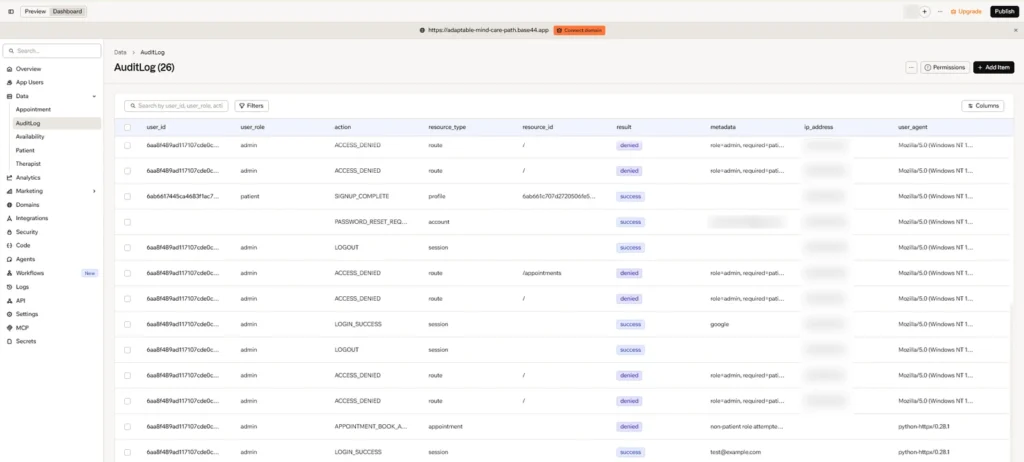
The same AuditLog also records ordinary account events like SIGNUP_COMPLETE, a password reset request, and LOGOUT, each tagged with a resource type such as profile, account, or session.
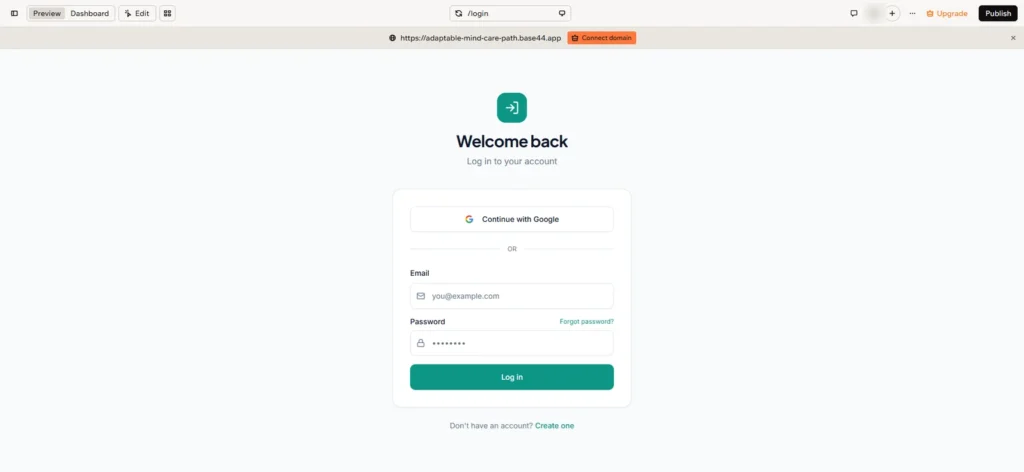
Review the authentication flow itself too, including whatever sign-in method you’re using and the password reset email flow. Here’s MindCare’s sign-in screen, with Google as one option:
Finally, confirm your sanitization rule held: the prompt says never log the actual token value, so check that your log records that a token was used, not the token itself.
Step 5: Add a Standing Audit Practice to Every Table
Separate from the dedicated Base44 audit logging table above, put a standard set of tracking fields on every table in your app. Base44 already adds created_date, updated_date, and created_by to every record automatically, so don’t redefine those. Add the ones it doesn’t: updated_by, deleted_at, and deleted_by. If you export and rebuild elsewhere, carry all six over. They’re easy to leave out, so write them into your prompt yourself, on every table, healthcare app or not. The dedicated AuditLog table answers “what security-relevant action happened and was it allowed.” These fields answer a narrower, constant question: who touched this specific record and when. Build both; they’re not the same mechanism, and one doesn’t substitute for the other.
While you’re reviewing your data layer, keep in mind what you can take with you. Base44’s export (Builder plan and up) includes the frontend and any backend functions, but not authentication, the database, or hosting; Part 2 covers what that means for self-hosting. CSV export works for reviewing individual tables. If you’re evaluating an external database like Supabase, treat an initial connection test as just that, a test, not a completed migration, until the data itself has actually moved.
Step 6: Plan the Remaining Areas
So far, this post has covered authentication, RBAC, patient data isolation, and audit logging. Here’s what’s still left, adjusted for what your own app actually touches:
- Signed BAAs with every vendor that could touch ePHI, before any real patient data enters the app. Base44 doesn’t publish a BAA, and its terms bar protected health information unless Base44 has agreed otherwise in writing. Unless you have that agreement, the practical path is the export route from Part 2, with the backend and database on hosting that will sign a BAA.
- Encryption, in transit and at rest, including field-level encryption for PHI specifically
- Secure, access-controlled document storage, if your app handles files or documents at all
- Backup and disaster recovery, tested through an actual restore, not just configured and left alone
- Privacy controls: a real privacy policy, data retention rules, and a deletion process
- Incident and breach response, decided before you need it, not during one
- Administrative safeguards: a named security officer, workforce training, access reviews when someone leaves
- A formal risk assessment and compliance review, ideally with a compliance advisor, not a prompt
None of these are code you can generate your way out of. Several are legal and organizational work that has to run alongside the technical build, which is exactly why “make Base44 apps HIPAA compliant” was never going to be a one-prompt task. Part 4 brings the full workflow together and picks up here.
Continue the Series
In Part 4, the full workflow comes together into a single guide: app generation, authentication, production deployment, and this HIPAA security foundation, combined into one end-to-end Base44 process, along with what still needs to happen before real patient data could responsibly enter the system.
If you’re trying to make Base44 apps HIPAA compliant for your own healthcare or AI-powered application, request a consultation to discuss your architecture, security model, and deployment strategy.