
AI app development with Base44 took MindCare, a patient-therapist scheduling app, from a plain-English idea to a working prototype with therapist search, profiles, booking, and a therapist dashboard, all from one structured prompt.
We still wouldn’t let a single real patient book through it. That gap, between an app that works in a demo and a product you can run a business on, is what this series is about.
Base44 is also a practical way to see how quickly a small application can be generated through prompt-driven development. This is often called “vibe coding,” describing what you want in plain language and letting the AI handle the implementation, rather than writing the code yourself.
To test that workflow on something closer to what our healthcare clients actually build, we created MindCare, a small patient-therapist scheduling app, using Base44. It’s a small vibe coding healthcare app combining two core flows in one:
- A patient-facing page to search for and book a therapist
- A therapist dashboard
The purpose of the experiment was to understand how Base44 generates applications from prompts, and how easily the generated output can be extended toward a HIPAA-friendly architecture for production deployment.
Across this series, the process moves from a simple AI-generated prototype to a more scalable and secure healthcare application:
- Part 1: AI App Development with Base44: How to Build a Healthcare App Using Vibe Coding (Step-by-Step)
- Part 2: From AI Prototype to Production Ready: Deploy AI Apps with Base44
- Part 3: How to Make a Base44 App HIPAA Compliant (Step-by-Step Guide for Vibe Coding)
- Part 4: How to Build a Production-Ready HIPAA-Compliant App with Base44 (Vibe Coding Complete Guide)
This series is part of our complete guide, How to Vibe Code: From Idea to Production-Ready, HIPAA-Ready Application.
This tutorial focuses on the first stage of how to build a healthcare app with Base44: generating a working prototype using AI-assisted software development.
Before You Start
You’ll need two accounts:
- A Base44 account
- A ChatGPT account, for turning your raw idea into a structured prompt before it goes to Base44
MindCare’s Stage 1 build was simple enough to fit inside Base44’s free tier. Check Base44’s current pricing before assuming your own idea will fit for free.
Using ChatGPT first is a preference in this post, not a requirement. Everything here can also be done by typing your idea directly into Base44 and iterating there.
Going through ChatGPT first tends to produce a more complete, structured prompt on the first pass, which is why we did it that way. Base44 alone works too. Just expect more back-and-forth inside Base44 itself to get to the same result.
What is AI App Development with Base44?
Base44 is an AI-powered no-code app builder. Describe what you want in plain English, and it can generate all of these together, rather than requiring each piece to be built separately:
- Frontend
- Backend
- Database
- Authentication
It runs on message credits, with a limited free tier and paid monthly plans that raise the credit allowance. A vague, half-formed prompt burns more credits than a clear, structured one, since the AI has to do more interpreting before it can build anything.
In practice, Base44 vibe coding is mostly about writing clear prompts and checking what comes back, not writing code.
Creating the Project in Base44
The raw idea started as a plain-English concept taken to ChatGPT, not typed straight into Base44. It took three messages to get to a usable prompt:
- Describe the idea and ask for stages. The first message asked ChatGPT to break the idea into stages, starting with a two-page MVP, and to write the Base44 prompt for that first stage.
- Ask for what’s missing. That first response didn’t come back with a technology stack attached, so the next message just asked ChatGPT for its suggestion. Its answer folded a recommended future-production stack (React/Next.js, Node.js, PostgreSQL, Prisma, and the rest) into a fuller, expanded version of the prompt that went past the MVP, including a patient clinical record page with intake forms and medical history.
- Trim back to Stage 1. Even though the request was for an MVP, what came back was a full clinical record system, not just the search-and-book flow. So the next message asked for a Stage 1-only version instead.
Two habits are worth keeping from this:
- If ChatGPT leaves something out that you actually want, whether that’s a tech stack, a missing field, or anything else, ask for it directly in the next message rather than assuming the first response is the final word.
- Don’t build everything GPT gives you. Keep it to what your own project actually requires at this stage, and trim or re-ask when a response overshoots that.
This is also the cheapest point to make product decisions. Every feature you cut here is one you don’t have to test, secure, or maintain later, and a tight Stage 1 scope makes it clear what you’re actually validating with users.
That’s what produced the actual Stage 1 prompt used to generate the app.
Base44 Stage 1 MVP Prompt – MindCare
These are the key sections of the Base44 MVP prompt actually used to generate the app.
Start with the goal, not the feature list. The prompt opens by stating what Stage 1 is actually supposed to prove: one specific flow, not a wishlist of features. It also says explicitly what not to build yet, right in the same breath as the goal, so there’s no ambiguity about scope from the first sentence:
MVP Goal

The goal of Stage 1 is to validate the basic workflow:

Patient → Find Therapist → View Therapist Profile → Select Appointment
→ Book Appointment → View Appointment

This is only the first stage of the product. Do not build yet:
- Full electronic health record
- Treatment plans
- Prescriptions
- Assessments
- Clinical documentation system

The MVP should feel like a polished healthcare SaaS product, not a
generic marketplace.
Define the two roles before the two pages. Naming exactly what a patient can do and what a therapist can do up front keeps the later page descriptions short. They just reference these permissions rather than re-explaining them:
Users

Patient can:
- Browse therapists
- Search and filter therapists
- View a therapist's profile
- See available appointment slots
- Book an appointment
- View their booked appointments

Therapist can:
- View their dashboard
- See upcoming appointments
- See basic information about patients who have booked with them
- View appointment details
- Update appointment status
Scope the pages to the one workflow that needs proving. MindCare’s Stage 1 goal is a single flow (patient books, therapist sees it), so the prompt asks for exactly the two pages that flow touches and nothing else. Page 1 covers search, a therapist profile, slot selection, and booking confirmation; Page 2 covers the therapist’s dashboard, an appointment list, and per-appointment detail with a status update. Both include realistic UI specifics (header structure, specialty filters, at least 5 fictional therapists) so Base44 isn’t left guessing at content. A different idea with a different core workflow would need a different page count. This one just happens to need two.
The data model stays deliberately thin. This is where “Stage 1 only” gets enforced structurally, not just stated as an intention. Notice what’s not in here: no clinical fields, no session notes, no diagnosis or treatment data. The appointment reason and message fields would still count as sensitive health information in a real product, which is why Stage 1 runs on fictional demo data only:
Data Model

Users:
- id, name, email, role (patient/therapist)

Patients:
- id, user_id, name, email, phone, age, gender, date_joined

Therapists:
- id, user_id, name, professional_title, specialties, biography,
  years_experience, location, languages, profile_image,
  appointment_types

Availability:
- id, therapist_id, date, start_time, end_time, status
  (available/booked/unavailable)

Appointments:
- id, patient_id, therapist_id, availability_id, date, time,
  appointment_type, reason, optional_message, status
  (upcoming/completed/cancelled), created_at

Important:
- Do not store the entire appointment or therapist information as one
  large text field.
Permissions get stated twice, once here and once later as explicit restrictions, on purpose. A patient not seeing another patient’s data isn’t left as an implication of the data model. It’s written out directly, and a demo role-switcher is explicitly allowed if full authentication would slow down getting the MVP working (that’s what Base44 built first):
Authentication & Permissions

Patient permissions:
- View therapists
- View therapist profiles
- View available slots
- Create appointments
- View their own appointments
- View their own profile

Patients must NOT:
- View other patients
- Modify therapist profiles
- View therapist-only dashboard information
- Modify other patients' appointments

Therapist permissions:
- View their own dashboard
- View their own appointments
- View patients associated with their appointments
- Update appointment status

Therapists must NOT:
- Access unrelated patients
- Access another therapist's appointments

Prototype note:
If full authentication makes the MVP unnecessarily complex, provide a
simple demo role selector/login that allows the app to be tested as
either a Patient or Therapist.
This is where the earlier future-stack suggestion actually shows up. ChatGPT’s recommended production stack from before doesn’t get built in Stage 1. Base44 uses its own native infrastructure for that. What it becomes here is a target direction: told explicitly so the app doesn’t get built in a way that makes migrating to that stack harder later.
Technology / Architecture

Use Base44's native infrastructure wherever possible.

Frontend:
- Base44's supported React/component-based approach
- Reusable components
- Responsive on desktop and mobile

Backend:
- Base44's native backend and business logic
- Kept modular so it can later be migrated to a conventional production
  stack

Database:
- Base44's native database
- Relational entities and IDs for Users → Patients/Therapists →
  Appointments → Availability
- Do not create an unnecessarily complicated database for Stage 1

Future production direction (structure toward this, do not build it
now):
- Next.js/React
- Node.js + TypeScript
- PostgreSQL
- Prisma
- AWS S3
- Secure authentication and RBAC
- REST APIs
The restrictions list is where hallucination gets headed off directly. Healthcare ideas have a huge surface area, and an AI left to fill gaps on its own will often fill them with something that sounds reasonable but was never asked for: a payments flow, a messaging feature, an AI diagnosis suggestion. Naming these out loud, even the obviously-not-yet ones, is what keeps that from happening:
Important MVP Restrictions

Do NOT build:
- Prescriptions
- Medication management
- Diagnoses
- Treatment plans
- Clinical assessments
- Session notes
- Detailed patient medical history
- AI diagnosis
- AI treatment recommendations
- Video consultations
- Payments
- Insurance
- Pharmacy integration
- Laboratory integration
- Wearable integrations
- Complex admin dashboard
- Multi-clinic management
- Billing
- Claims
- Complex messaging
- Advanced document management

Keep the MVP focused on therapist discovery and appointment booking.
The HIPAA line is deliberately a restriction, not a feature request. This is the same distinction Part 3 goes into in depth, stated here at the very first build stage, before there’s anything to overclaim yet:
Privacy & Prototype Disclaimer

This is a prototype using fictional/demo data.
- Do not claim the application is HIPAA compliant.
- Do not use real patient health information.

Build the data structure with future privacy and security requirements
in mind, including:
- Role-based access
- Authentication
- Audit logging
- Secure data storage
- Encryption
- Consent management

These are future production requirements, not Stage 1 implementation
requirements.
Success criteria close the prompt, so “done” is testable, not a feeling. Instead of ending on a vague “make it work,” the last section spells out the exact click-through path Base44 needs to support end to end, in both roles, using real saved data rather than a UI state that resets on refresh:
Stage 1 Success Criteria

Consider Stage 1 complete only when this works end-to-end.

Patient:
- Enters the application
- Searches for therapists
- Filters therapists
- Views a therapist profile
- Sees available appointment slots
- Selects a date/time
- Enters the appointment reason
- Confirms the appointment
- Appointment is saved
- Sees it under My Appointments

Therapist:
- Enters the application
- Sees the appointment on the dashboard
- Opens the appointment
- Sees the associated patient's basic information
- Sees the appointment reason/message
- Can update the appointment status

The entire flow should work using real database records rather than
hard-coded UI states wherever possible.
Once this prompt was submitted, Base44 generated the application automatically.
What Base44 Generated Automatically
After processing the prompt, Base44 produced an application that already included the patient search-and-filter flow, a therapist profile view, an appointment booking flow, and a therapist dashboard showing upcoming appointments. Base44 also seeded demo data automatically (a handful of test therapists and patients), so the app was clickable immediately rather than starting from an empty database.
Generated Patient and Therapist Views
Base44 used the prompt’s allowance and built a simple toggle between the patient and therapist views instead of real accounts. Switching to the therapist view didn’t work properly, and a toggle isn’t access control anyway, so a follow-up prompt asked Base44 to split the two views and add sign-up and sign-in with email and password.
This matters if you plan to show the prototype to investors or pilot clinics. Base44 took the shortcut the prompt allowed, and a toggle that lets anyone switch between patient and therapist views would be an access problem in a live product, not a design choice. Know which shortcuts your prototype took before you describe it as more than a demo.
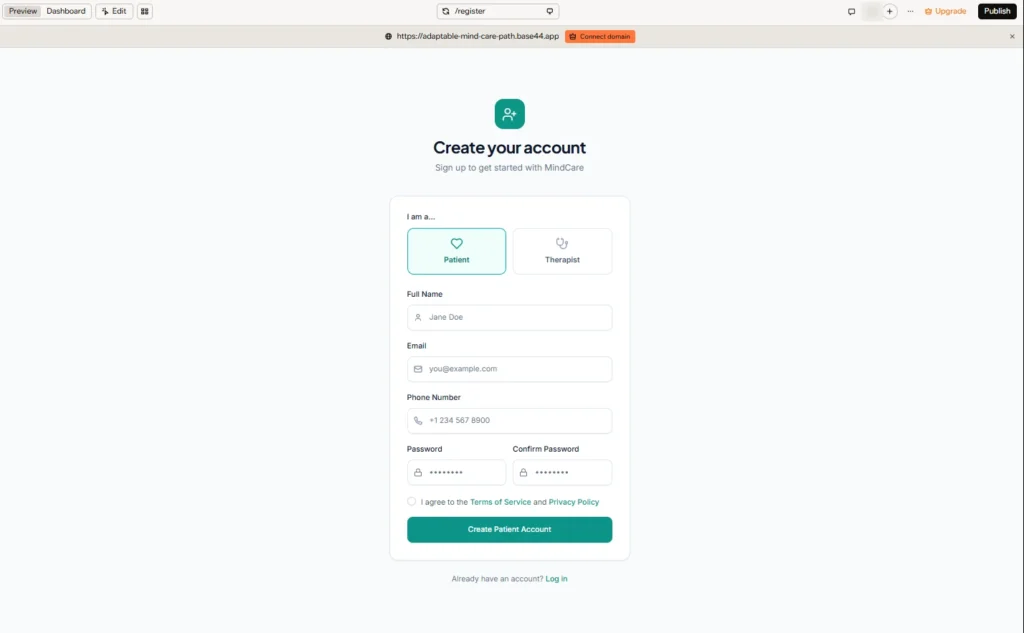
Here’s how each side of the app looks, starting with the patient. Patients sign up by choosing Patient on the Create your account screen and entering their full name, email, phone number, and password:
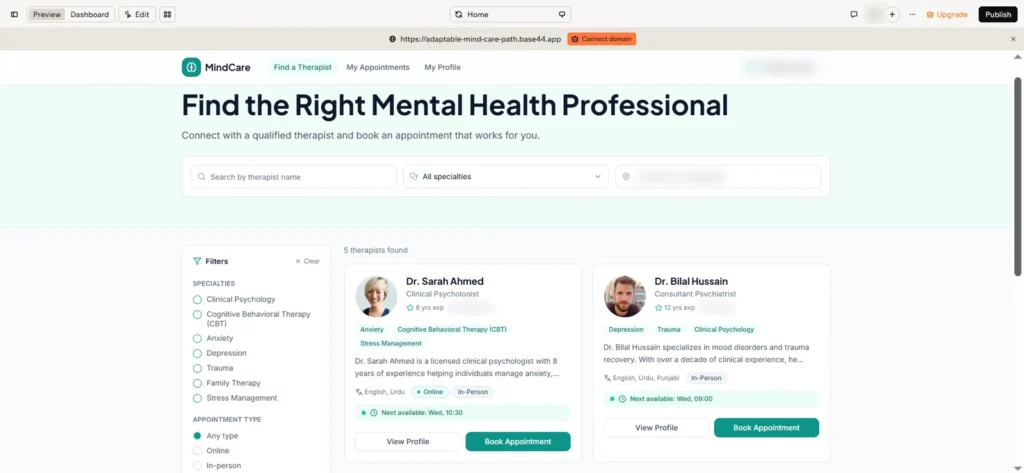
From there, the patient lands on the Find a Therapist page. This is where the booking flow starts: searching, filtering by specialty, and opening a therapist’s profile to pick an available slot.
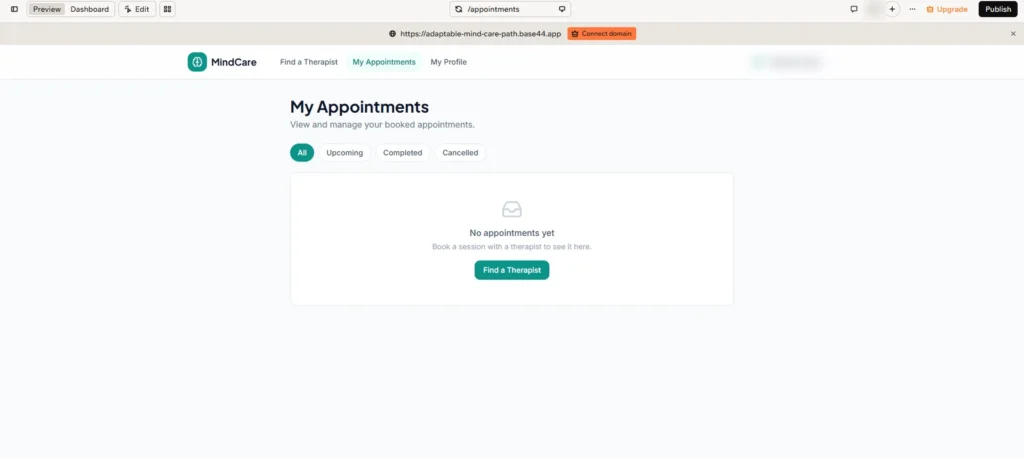
My Appointments is where booked sessions appear. Before any booking, it shows an empty state with a shortcut back to Find a Therapist:
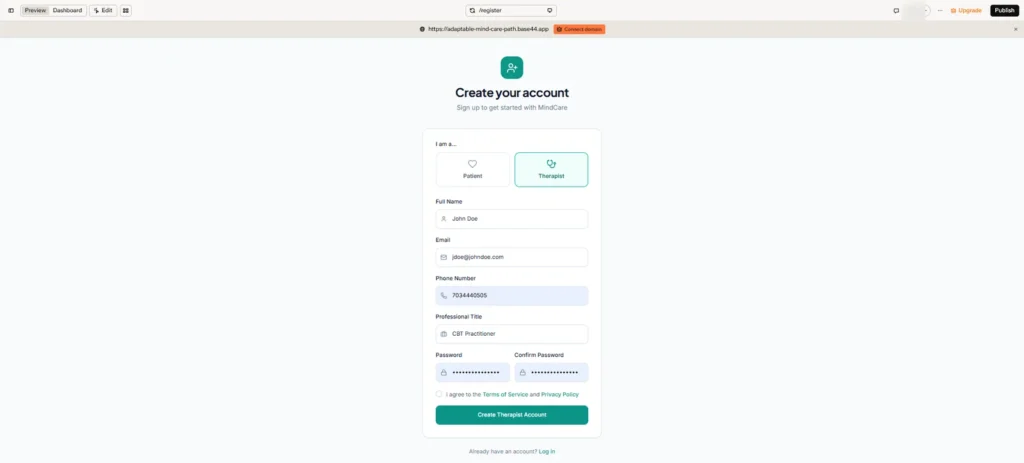
Therapists sign up on the same screen by choosing Therapist, which adds one extra field for their professional title:
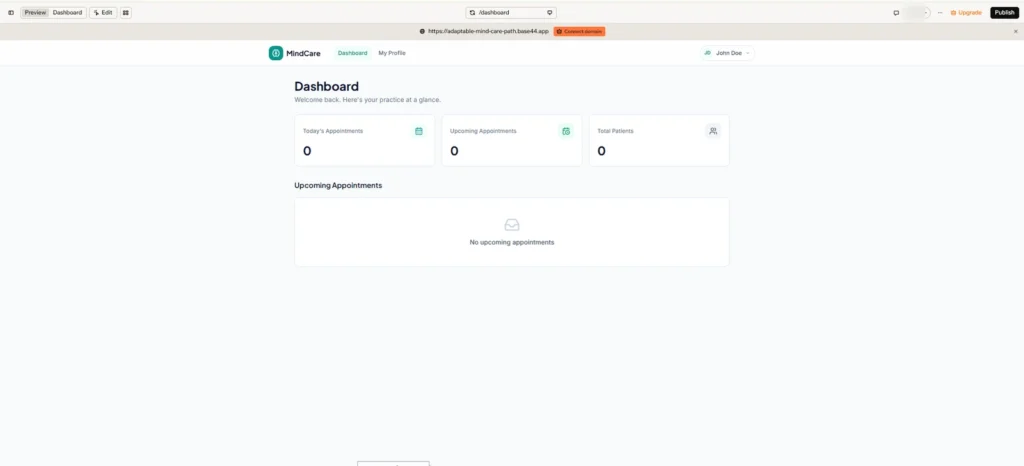
The therapist dashboard summarizes today’s appointments, upcoming appointments, and total patients. Here it’s shown before any bookings have come in:
Fixing a Generated Issue
Base44 can build most of a working app straight from a good prompt, but it doesn’t finish the job unsupervised. The part that still takes a human is testing the actual flows, clicking through as a patient and as a therapist, looking for whatever breaks, and feeding that back in as a follow-up change. One real example of that from this build:
In the first generated version, the preview wouldn’t load and showed this error: Error: useRole must be used within RoleProvider. That’s a sign the role logic, which decides whether a user sees the patient or therapist side, wasn’t wired up correctly yet. In a live product, that isn’t a cosmetic bug. Role logic decides whether a patient sees only their own appointments or someone else’s, and that kind of failure can end a clinic’s trust in your product.
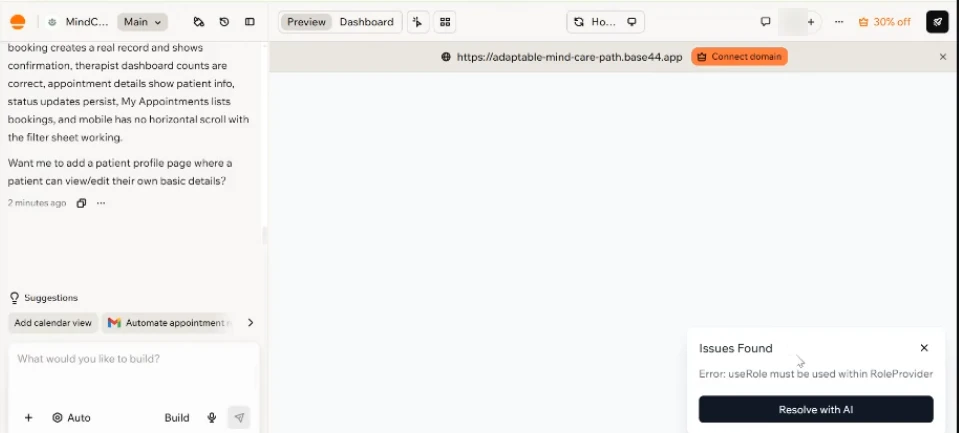
The fix was to copy the exact error text from the preview and paste it back into the chat, asking Base44 to resolve it directly, rather than trying to debug it manually.
Once Base44 fixed it, the preview loaded and the patient flow could be tested end to end. This one error isn’t the point on its own. It’s a stand-in for the habit: run the flow, catch what breaks, describe it precisely, let Base44 fix it, then run the flow again. That loop is most of what “reviewing” an AI-generated app actually looks like in practice.
Built a healthcare app with an AI tool and not sure what’s broken underneath? Technology Rivers runs code audits and architecture reviews on existing healthcare applications, keeping what works and fixing what doesn’t. Talk to us about reviewing your app
A Working Prototype Isn’t a Product Yet
MindCare works. A patient can book an appointment and watch it land on the therapist’s dashboard. But a clickable demo and a product real patients and clinics can trust are two different things, and the gap between them is where most of your budget and timeline will go.
Look at what the Stage 1 prompt deliberately ruled out: payments, insurance, video sessions, session notes, clinical records, and messaging. The sign-in Base44 added is basic email and password. Those were the right calls for testing one workflow. They’re also what your first paying clinic will expect on day one:
- Security beyond a login screen. Password resets, multi-factor authentication, session timeouts, and access rules that hold up when someone actually tests them.
- Audit trails. A record of who viewed or changed which appointment, and when. In healthcare, this isn’t optional.
- Payments and insurance. Collecting session fees, handling cancellations, and verifying coverage.
- Integrations. Calendar sync, video sessions, appointment reminders, and the EHRs clinics already use.
- Reliability. Backups, monitoring, error handling, and a plan for when something breaks.
- Code you own. An app that lives only inside a builder’s hosted environment is hard to present as a proprietary asset to investors or in due diligence. Code in your own repository, on your own infrastructure, is.
None of that shows up in a demo. All of it shows up the moment a clinic signs on.
What the prototype is good for right now: proving the booking flow makes sense to real therapists and patients, showing investors something they can click, and turning a vague idea into specific requirements before you pay for development.
Is Base44 HIPAA Compliant?
Not for real patient data. Base44 doesn’t offer a Business Associate Agreement (BAA) on its plans, and its Terms of Service ask you to confirm you won’t share protected health information with the platform unless Base44 has agreed to it in writing beforehand. That’s why MindCare runs on fictional data, and why the Stage 1 prompt told Base44 not to claim HIPAA compliance.
That doesn’t make Base44 the wrong place to start. It’s a fast way to validate a workflow, show a working concept to investors or pilot clinics, and pin down requirements, as long as every record in it is fake. Before a real patient books a real appointment, every service that handles their data needs a signed BAA. That means either getting Base44’s written agreement or moving the app and its data to infrastructure that offers one. Parts 2 and 3 of this series cover that decision.
Up Next: Moving to Production
Part 2 of this series continues this AI app development with Base44 workflow, turning the vibe coding healthcare app built here into a production-ready application: auditing the build for what’s missing (starting with whether the generated login and role checks actually hold up), adding real role-based access control for patients and therapists, and deploying the app outside Base44’s own hosted environment.
Why This Approach Matters
The order matters more than the tool. A structured prompt, like the Base44 master prompt example in this post, puts a clickable prototype in front of people quickly, and that’s where real feedback starts. A healthcare product can’t stop there, though. AI app development with Base44 gets you a working first version, but the security, compliance, and scalability layers a real healthcare product needs, including HIPAA requirements, still have to be designed and verified before real patients use it.
From Vibe Coding to Production: Where Technology Rivers Comes In
AI tools have made the first version of an app something anyone can build. That’s good news if you have an idea. It also means a working app no longer sets you apart. What sets you apart is whether it can carry real patients, real clinics, and real revenue.
Technology Rivers helps healthcare teams turn AI-built prototypes like MindCare into reliable, HIPAA-compliant products. Our team works across the full product lifecycle:
- Assessing what your prototype got right and what needs to be rebuilt
- Re-architecting generated code so it scales with users, features, and data
- Securing patient data with encryption, access control, audit logs, and BAA-covered infrastructure
- Integrating with the scheduling, payment, and EHR systems clinics already use
- Launching and supporting the product as your business grows
If you’ve already built something like MindCare in Base44, you haven’t wasted your time. You’ve built the clearest possible brief for what comes next.
Frequently Asked Questions
Do I need to know how to code to use Base44?
No. MindCare was built from plain-language prompts, and errors were fixed by pasting the error text back into the chat. The harder skill is knowing your users, your rules for who can see what, and how to test every flow until something breaks.
Is Base44 free to use?
Base44 has a free tier with a limited number of message credits, and MindCare’s Stage 1 build fit inside it. Bigger builds and some features need a paid plan, so check Base44’s current pricing against what your own idea needs.
Do failed attempts and bug fixes use Base44 credits?
Yes. Every prompt uses credits, including ones that produce the wrong result and the follow-ups that fix it. That’s the practical reason to scope your first prompt tightly and to paste exact error text when something breaks: fewer rounds of guessing means fewer credits spent.
What kind of apps can I build with Base44?
Base44 works well for MVPs, internal tools, dashboards, and customer portals where the core is a few user roles and a clear workflow. MindCare is an example: two roles, one booking flow, and a dashboard. The more integrations and rules your idea needs, the more testing and follow-up prompting it will take.
Can I build a healthcare app with Base44?
You can build a healthcare prototype with fictional data, which is what MindCare is. It’s useful for validating a workflow and showing a working concept. Real patient data is a different stage with its own requirements, which Part 3 of this series covers.
Final Thoughts
This experiment in AI app development with Base44 showed that a working healthcare scheduling app comes together quickly from a structured Base44 MVP prompt, and that turning the raw idea into a master prompt in ChatGPT first kept the build focused on Stage 1.
As a Base44 master prompt example, the one used here shows both what the workflow gets right and where it still needs a human pass: the generated output still lacks the production safeguards the prompt deliberately left out, like audit logging, encryption, and consent management, that anyone looking to build a healthcare app with Base44 can’t ship without.
That’s exactly where Part 2 of this series picks up.
Ready to take your Base44 prototype beyond the demo? We assess vibe-coded apps built in Base44, Replit, Lovable, and other AI tools for production and HIPAA readiness. Get your app assessed