Can Lovable actually build a real app, or just a polished prototype?
That is the question most teams are really asking when they explore AI app development with Lovable. They want to know how to write a prompt that generates something useful, not vague UI screens. They also want to understand what happens after generation, when the app needs real structure, deployment planning, and engineering decisions.
Lovable can accelerate full-stack app development in a big way. With the right prompt, it can generate a working application with frontend components, backend logic, database structure, and core flows in far less time than a traditional setup. But the quality of the result depends heavily on how clearly you define the app, the architecture, and the expected outputs.
In this guide, we’ll walk through a simple user management app to show how the process works from start to finish. You’ll learn how to structure a better prompt, what Lovable can generate well, and what still needs human review before an app is ready for real-world use.
By the end, you’ll understand how to go from idea to working app, faster than ever.
This is Part 1 of our Lovable series. We also cover the full journey from prototype to production-ready, HIPAA-compliant applications in the other parts of this guide:
- From AI Prototype to Production: How to Build Scalable AI Applications
- How to Make a Lovable App HIPAA Compliant (Step-by-Step for Vibe Coding Apps)
- How to Build a Production-Ready HIPAA-Compliant App with Lovable (Vibe Coding Guide
What is AI App Development with Lovable?
AI app development with Lovable is the process of using AI prompts to generate full-stack applications — including frontend, backend, database, and APIs — without manually writing code. It allows developers and teams to build functional applications faster by defining requirements instead of coding them from scratch.
Step 1: Creating a Project in Lovable for AI App Development
The first step in Lovable AI app development is creating a new project. Unlike traditional development, you don’t start with code. You start with a clear project description that defines what your application should do.
This shift from coding to prompting is what makes AI-powered app development faster and more efficient.
Why Prompt Quality Matters in Lovable App Development
In AI app development, your prompt acts as the foundation of your entire application. It defines:
- User interface and experience
- Backend logic and APIs
- Database structure
- Application architecture
A well-structured prompt helps you:
- Build faster
- Reduce rework
- Create scalable systems
- Generate production-ready code
This is what makes AI-powered app development tools like Lovable so powerful. Teams that move fast with AI still need clear requirements, system thinking, and strong execution — which is why choosing the right development partner matters. See how to choose the right AI development partner for healthcare and SaaS for a practical framework.
If you’re unsure how to structure prompts, architecture, or scalability from the start, explore our healthcare app development services to see how we help teams build production-ready applications.
Step 2: Writing a Production-Ready Prompt for AI App Development with Lovable
Once your project is created, the next step in developing an app in Lovable is defining a detailed and structured prompt. This is the most important part of the process.
Your prompt acts as the blueprint for your entire application. It defines how your app looks, how it functions, and how it scales. In real-world projects, we’ve seen that the quality of the initial prompt directly impacts how much rework is needed later. Well-structured prompts reduce iteration cycles and make the generated code significantly more maintainable.
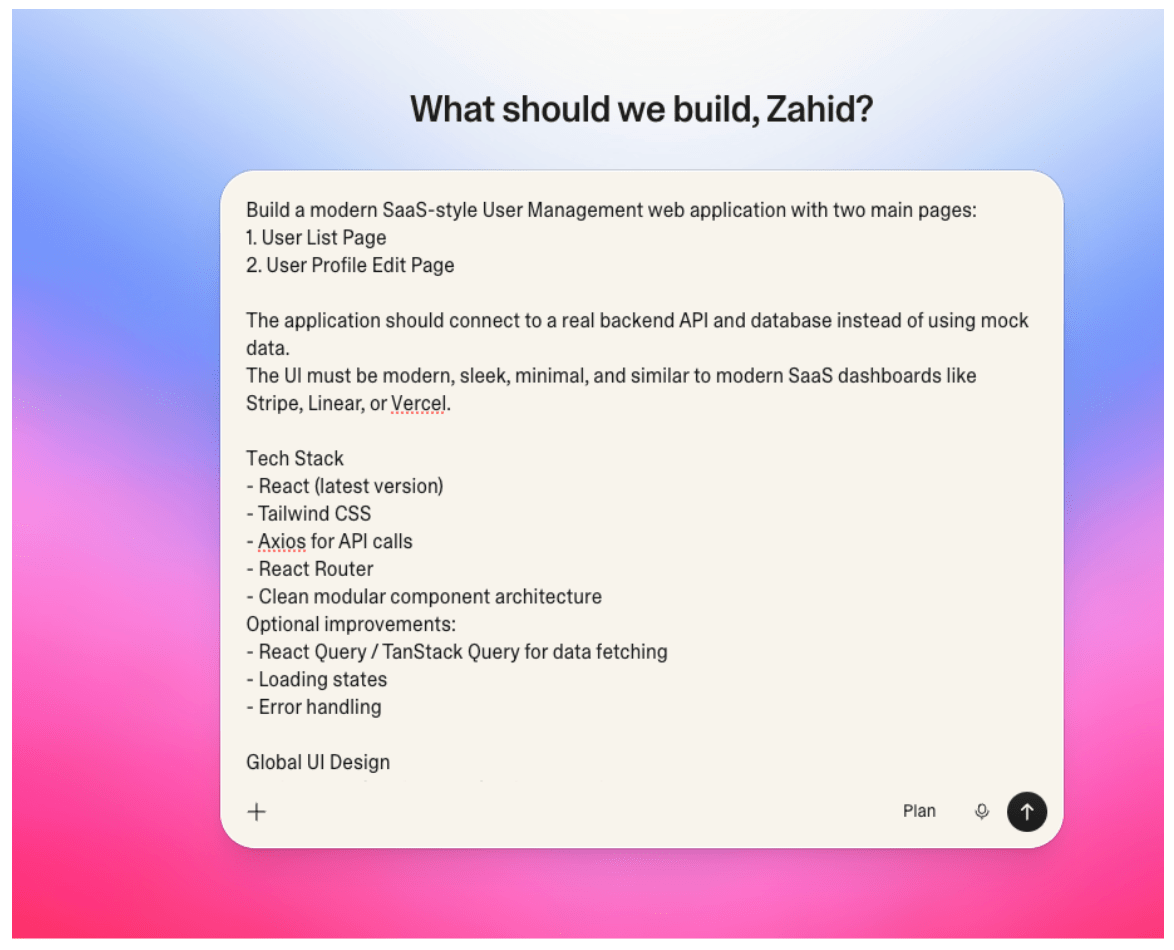
Here is an example of a well-structured Lovable prompt:
You are an expert prompt creator. Generate a prompt for me for a Lovable project.

I want to create a two-page app. On one page, I can see user listings, and I can update users by clicking on a user and updating the user profile.

The design should be modern and sleek. While creating a database, you need to follow these rules:
In every table, we should have audit fields: created_at, created_by, updated_at, updated_by, deleted_at, deleted_by. Table naming conventions and column naming conventions should follow snake_case. Table names and column names should be very descriptive so we can understand the function of the table and column just by seeing their names.

We want a user_activity table where we can track user activity based on different events like user logged in, user viewed user list, etc.

Regarding the technology stack, we will use: React (latest version), Tailwind CSS, Axios for API calls, React Router, clean modular component architecture, and Node.js.

Important: Write backend logic in a cloud-function-friendly modular architecture so it can later be easily wrapped into APIs for both local and production deployments, without major refactoring.
Define the Tech Stack and Architecture
Start by clearly specifying your technology stack. For this project, we use:
Frontend:
- React (latest version)
- Tailwind CSS
- Axios
- React Router
Backend:
- Node.js (Express preferred)
You should also define architectural standards:
- Clean modular architecture
- Separation of concerns (pages, components, services, API layer)
- Reusable components
- Scalable folder structure
This ensures your app follows best practices in full stack AI app development.
Define the Application Scope
In this example, we build a two-page user management application.
User Listing Page
This page is responsible for displaying users in a clean, modern interface. It includes:
- User details (name, email, phone, role, status)
- Clickable rows for navigation
- Search functionality
- Loading and empty states
- Responsive design
It also tracks user events such as:
- Viewing the user list
- Clicking a user profile
- Searching users
User Profile Page
This page allows users to view and update profile information. It supports:
- Creating new users
- Updating existing users
- Fields such as name, email, phone, role, and status
- Form validation and error handling
- Success and feedback states
It also tracks events like:
- Viewing profiles
- Creating new users
- Updating user data
Define UI and Design Requirements
To create a polished experience, define clear UI expectations. For this app:
- Modern SaaS-style dashboard
- Minimal and clean layout
- Tailwind-based UI
- Soft shadows and rounded corners
- Clean typography and spacing
- Simple navigation bar
- Smooth user experience
This improves usability and aligns with modern AI-powered app development standards.
Define Backend and API Requirements
A strong prompt also includes backend logic. For this app, define REST APIs such as:
GET /usersGET /users/:idPOST /usersPUT /users/:idPOST /user-activity
You should also include:
- Input validation
- Proper error handling
- Thin controllers
- Modular business logic
This ensures your app is scalable and production-ready.
Use a Cloud-Function-Friendly Architecture
To support scalability, your backend should be flexible. Key guidelines:
- Separate business logic from route handlers
- Keep controllers focused on request/response
- Use reusable service modules
- Avoid tight coupling with frameworks
This allows your application to run across:
- Local environments
- Production servers
- Serverless or cloud platforms
Define Database Rules and Structure
Database design is critical in secure AI app development. Follow these rules:
- Use snake_case naming conventions
- Use descriptive table and column names
- Include audit fields in every table
Example Tables:
- application_users — Stores user information
- user_activity — Tracks user interactions and events
This structure supports scalability and maintainability.
Track User Activity for Better Insights
The application should track user behavior. Examples include:
- User login
- Viewing user list
- Clicking profiles
- Updating data
- Searching users
This helps in analytics and improving user experience.
Define Deliverables
Your prompt should clearly define expected outputs:
- Full frontend (React + Tailwind)
- Full backend (Node.js APIs)
- Database schema
- API integration
- Clean folder structure
- Activity tracking implementation
Keep It Practical
One key rule in app development with AI is: do not over-engineer. Focus on:
- Clarity
- Readability
- Real-world usability
This ensures your generated application is both functional and maintainable.
Page 1 — User List Page
Route: /users
Fetch Users From API: GET /api/users
Response Example:
[
  {
    "id": 1,
    "name": "John Doe",
    "email": "[email protected]",
    "phone": "+1 234 567 890",
    "role": "Admin",
    "status": "Active",
    "createdAt": "2026-01-12"
  }
]
User List Layout:
- Top section:
- Title “User Management”
- Right side actions: Search input and “Add User” button
- Table Columns: Avatar, Name, Email, Role, Status, Created Date, Actions
- Table UI Behavior: Hover effects, status badges, avatar next to user name, smooth hover transitions
- Status Badge Colors: Active → Green, Inactive → Gray, Suspended → Red
- Search filters: Name or Email
- Pagination if users exceed 10 per page
- Loading state: Skeleton loader rows during fetch
- Error handling: Show “Unable to load users. Please try again” if API fails
- Navigation: Clicking row or edit icon navigates to
/users/:id
Page 2 — Edit User Profile
Route: /users/:id
Fetch User Data: GET /api/users/:id
Editable Fields:
- Profile Photo
- Full Name
- Phone Number
- Role (Dropdown: Admin, Manager, User)
- Status (Dropdown: Active, Inactive, Suspended)
- Address
- Notes
Form UI:
- Clean form layout: two columns on desktop, one column on mobile
- Form validation
- Disabled save button while saving
- Loading spinner on submit
- Avatar upload preview
- Smooth page transitions
Save User Changes API: PUT /api/users/:id
Payload Example:
{
  "name": "John Doe",
  "email": "[email protected]",
  "phone": "+1 234 567 890",
  "role": "Admin",
  "status": "Active"
}
Success Behavior:
- Show success toast: “User updated successfully”
- Redirect back to
/users
Cancel Button: Returns to user list without saving.
Step 3: Generating the Application in Lovable
Once your prompt is ready, the next step in Lovable app development is generating the full application. This is where your structured prompt is transformed into a working product.
Generate the Application from Your Prompt
To begin:
- Paste the complete prompt into the Lovable project description window
- Review the prompt to ensure all requirements are included
Lovable uses this input to generate your entire application, including frontend, backend, and database structure.
Enable Cloud Services
Lovable may prompt you to enable cloud services. These services allow:
- Connection to a real database
- Backend execution
- API functionality
You should accept this option, as it enables a fully functional application environment. Cloud services typically run on a pay-as-you-go model, making it easy to scale as needed.
Automatic Application Generation
Once everything is set:
- Submit your prompt
- Lovable begins generating the application automatically
Within minutes, the platform creates:
- Frontend (React + Tailwind UI)
- Backend (Node.js APIs)
- Database schema
- API integrations
From Prompt to Full-Stack Application
This step highlights the power of AI-powered app development.
Instead of manually building:
- Components
- APIs
- Database schemas
Lovable generates a complete full stack AI app development foundation based on your input.
What You Get
In a short time, you will have:
- A working user interface
- Connected backend services
- Functional APIs
- A structured codebase ready for further development
This significantly reduces development time and accelerates the entire AI app development process.
Step 4: Generated User Management Interface
Once the application is generated, Lovable provides a fully functional user interface.
This is where you start seeing the real impact of AI app development.
The generated app includes a modern, production-style UI with key features already implemented.
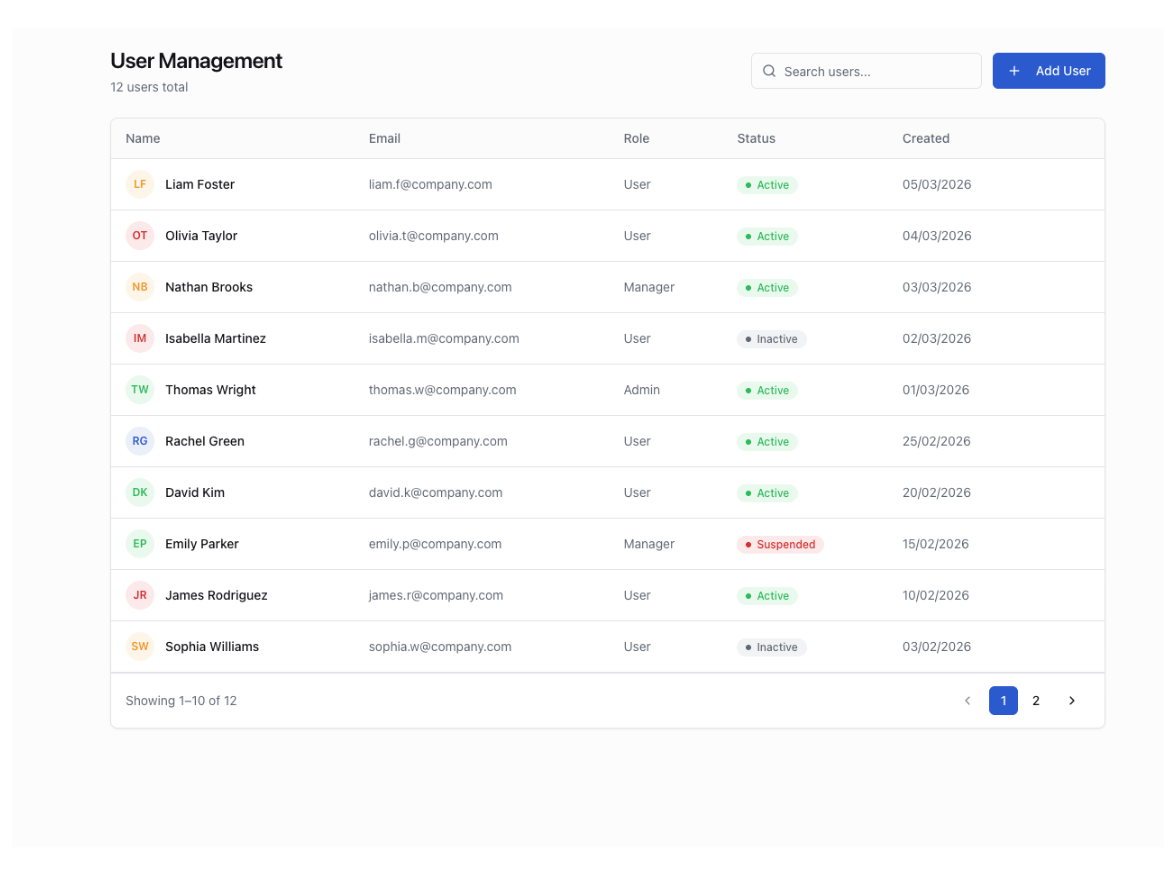
User Listing Page
The application includes a user listing page designed with a clean, SaaS-style layout. It comes with:
- A modern table interface
- User details such as name, email, role, and status
- Built-in search functionality
- Status badges for quick visual identification
- Clickable rows for navigation
The interface is responsive and designed for usability, following best practices in AI-powered app development.
User Profile Editing Page
The generated application also includes a user profile editing page. This page allows you to view and update user details through a clean and intuitive interface. It includes:
- Editable fields for user information
- Save and cancel actions
- Form validation and feedback states
- A responsive and sleek layout
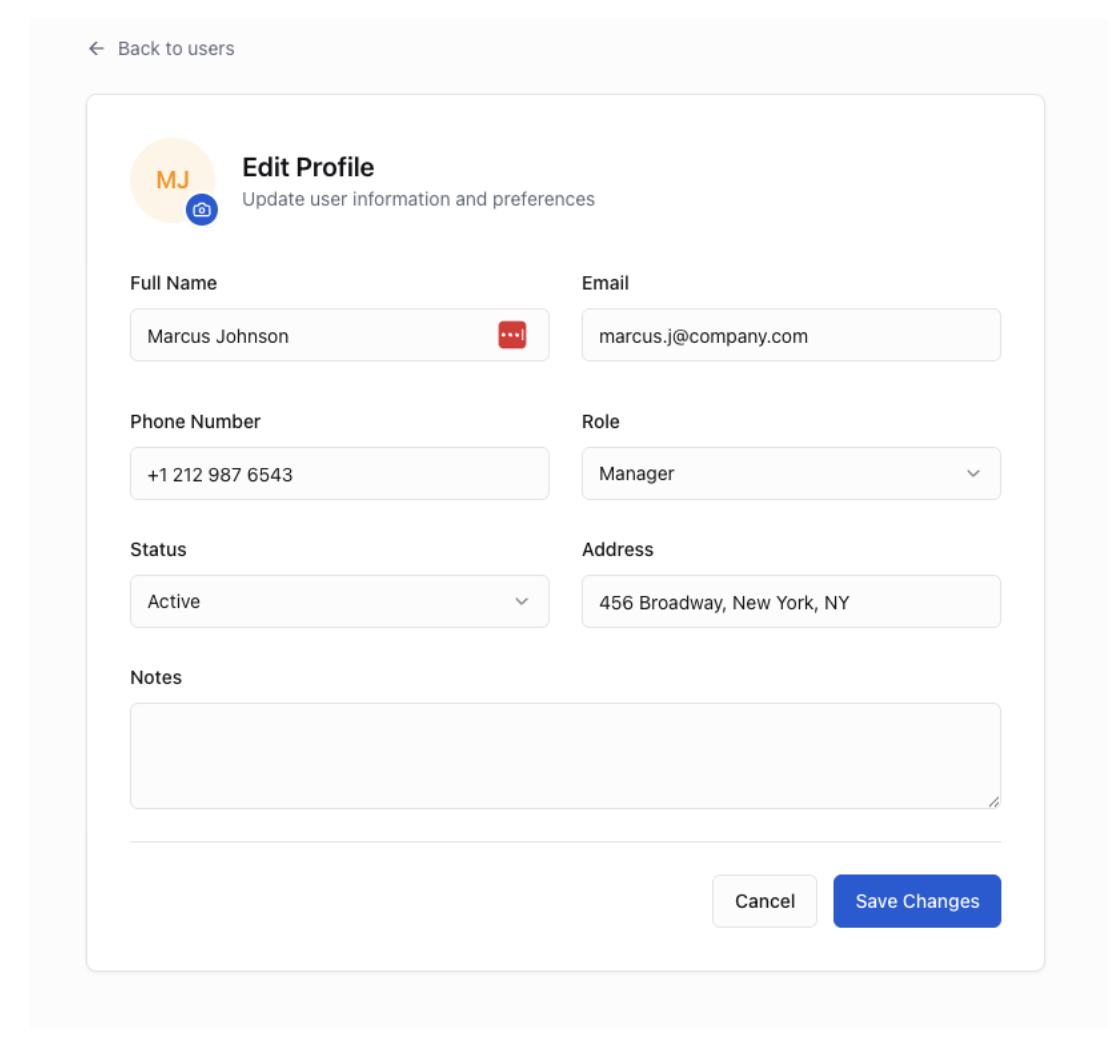
This interface is fully functional and connected to a real backend. That means you can:
- Fetch user data
- Update user profiles
- Save changes instantly
This demonstrates the power of AI app development, where both frontend and backend are generated and integrated automatically.
Understanding the Generated Folder Structure
Lovable not only generates the interface but also provides a clean and scalable project structure:
src
├── components
│   ├── UserTable
│   ├── UserRow
│   ├── UserForm
│   ├── AvatarUpload
│
├── pages
│   ├── UsersList
│   ├── EditUser
│
├── services
│   ├── api.js
│
├── hooks
│   ├── useUsers.js
│
├── router
│   ├── routes.js
What This Structure Means
This modular setup follows best practices in full stack AI app development. It helps you:
- Organize code into reusable components
- Separate UI, logic, and data handling
- Maintain a scalable and clean architecture
- Easily extend features in the future
Expected Result
After generation, you get a fully working application. You can:
- Fetch users from the API
- Search, paginate, and display user data
- Edit user profiles
- See updates reflected instantly
This gives you a strong foundation for building real-world applications using AI-powered app development tools like Lovable.
Step 5: Exporting Code and Database
Once your application is generated and verified, the next step in AI app development is exporting your project for further use. This allows you to take full control of your application and continue development outside Lovable.
Export Your Project
To get started:
- Connect your Lovable project to a GitHub repository
- Export the complete codebase
- Download the database (such as the users table) as a CSV file
This gives you access to:
- Frontend code (React + Tailwind)
- Backend logic (Node.js APIs)
- Database structure
Exporting your project ensures:
- Full ownership of your application
- Flexibility to customize features
- Ability to integrate with other systems
- A smooth transition to production development
This is an essential step in moving from generated output to real-world AI-powered app development. Explore our portfolio to see how we help organizations move from prototype to production-ready applications.
Step 6: Dockerizing the Application Environment
After exporting your application, the next step is to prepare it for deployment. This is where Docker becomes important.
Why Use Docker
Docker allows you to run your application in a consistent environment. Instead of dealing with setup issues across systems, you package your app into containers that work the same everywhere. This is critical for:
- Local development
- Testing environments
- Production deployment
Set Up Docker for Your Application
To containerize your app:
- Create Dockerfiles for both frontend and backend
- Configure services to run together
- Run the application locally using Docker
This ensures your application behaves consistently across environments.
Prepare for Scalable Deployment
Docker also prepares your app for cloud deployment. You can easily deploy your application to platforms such as:
- AWS ECS
- Kubernetes
- Other container-based environments
This is a key step in building scalable AI applications and ensuring secure AI app deployment. Without proper environment setup, applications can fail in production. Fast generation does not remove the need for sound architecture, deployment discipline, and technical oversight — as we explain in why software projects fail: 5 lessons from 30 years of software architecture.
Docker helps you:
- Standardize your deployment process
- Reduce environment-related issues
- Improve reliability and scalability
Moving from a generated application to a production-ready system requires careful planning around infrastructure, security, and scalability. If you’re preparing to deploy your application, schedule a free call with our team who can help you design a reliable and secure deployment strategy.
What Lovable Accelerates, and What Still Requires Engineering
Lovable significantly changes how quickly teams can go from idea to working application. However, speed alone is not enough. To build scalable, secure, and production-ready systems, teams still need strong architecture, clear requirements, and experienced engineering oversight.
AI accelerates development, but it doesn’t replace engineering judgment. In many cases, teams still need to stabilize, restructure, or extend AI-generated applications before they are ready to scale. That is especially true when a fast prototype starts showing architectural or maintainability issues — which is why fixing broken SaaS projects with AI-driven development is a useful next read.
This tutorial demonstrates how to:
- Generate a functional application using Lovable and AI prompts
- Create a modern SaaS-style UI
- Export project code for backend integration
- Set up Docker for local and cloud deployment
At this stage, the application is fully functional but not yet production ready. Infrastructure, monitoring, and security improvements will be addressed in the next blog.
If you’re exploring AI-powered app development and want to build beyond prototypes into production-ready systems, our team can help you design, scale, and launch your application with the right architecture and strategy. Book a call with our experts today.
What Comes Next After Building Your AI App?
You now have a working application built with Lovable. But a working app is not the same as a production-ready system. To scale your application, improve performance, and prepare for real users, you need to focus on architecture, backend design, and deployment strategies.