You built an app with Replit, Lovable, Base44, or another AI tool, and now you need to decide whether to fix or rebuild your vibe-coded app before launch. It runs. People can sign in, click through, and save data. Now someone tells you it has to be rebuilt before launch, and you’re not sure whether that’s true or just a reflex.
In our assessments, most vibe-coded apps need fixes, and a full rebuild is uncommon. They need an honest review that sorts each part into one of four buckets: keep, fix, replace, or rebuild. A full rewrite is only the right call when the problems sit in the foundation, not in a few features.
Building an app with AI tools is easier than ever. But a working prototype isn’t the same as a secure, scalable product, and this guide shows you how to tell which parts of yours are ready. It builds on our main guide, How to Vibe Code: From Idea to Production-Ready, HIPAA-Ready Application, and goes deeper into the decision every founder hits once the app starts working. If you haven’t built yet, the same four outcomes show you which early decisions keep costly fixes off your list later.
Why “Should I Rebuild?” Is the Wrong First Question
Asking whether to rebuild treats your app as one thing. It isn’t. It’s a stack of separate parts: the screens, the business logic, the database, sign-in and permissions, the APIs, the hosting, and the third-party services wired in. Each part can be in very different shape.
Two common mistakes come from skipping that breakdown:
- Rebuilding because the code is AI-generated. Where code came from doesn’t decide its quality. AI-written code can be clean and well structured. Hand-written code can be a mess. A rewrite triggered by the label alone throws away working parts and burns budget.
- Launching because the app looks finished. A polished interface tells you nothing about what’s underneath. The biggest risks sit in the database, the backend, and the hosting, where you can’t see them. Working features don’t mean the app is 80% done.
The better question is: which parts of this app are ready, which can be improved, and which can’t safely go forward as they are?
Keep, Fix, Replace, or Rebuild: The Four Outcomes
Deciding whether to fix or rebuild your vibe-coded app starts with sorting each part into one of four buckets. Here’s what each means and what usually puts a component there.
| Outcome | What it means | Typical signs |
|---|---|---|
| Keep | The part works, is understandable, and is safe to build on | Clear structure, consistent naming, behaves correctly in testing, no security gaps found |
| Fix | The part is sound but needs targeted improvement | Missing tests, weak input validation, messy but readable code, duplicated logic |
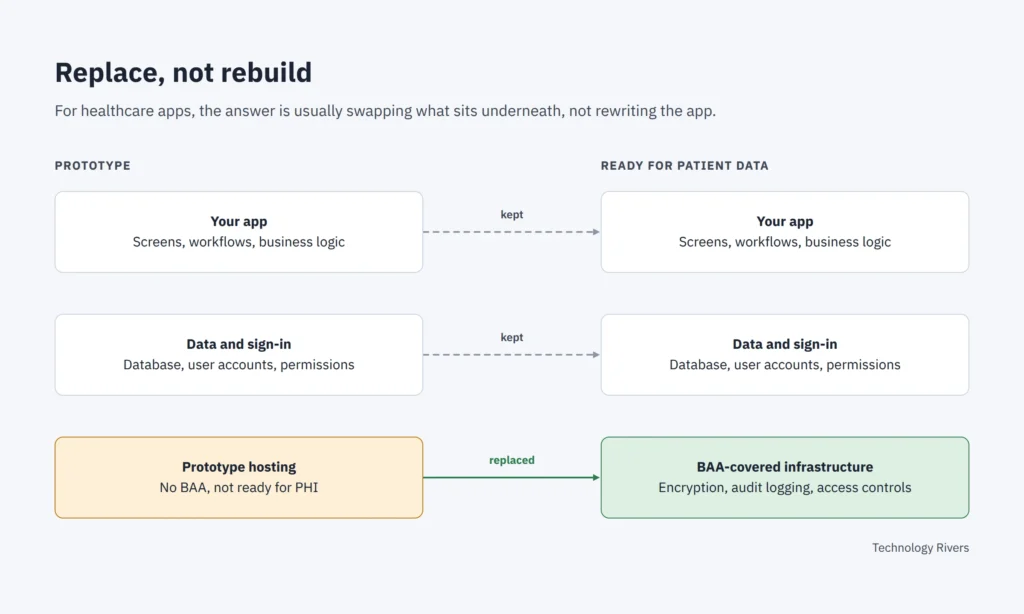
| Replace | The part does its job, but the tool or service behind it isn’t right for production | A sign-in provider, host, or database that can’t meet your security or contract needs |
| Rebuild | The part’s design is wrong, so patches keep failing | Bugs that return after every fix, a data model that can’t represent your real rules, permissions that only exist in the interface |
Keep
If a component passes review, leave it alone. Rewriting working code adds cost and risks new bugs with no benefit.
Fix
In our assessments, this is where most vibe-coded apps land. Refactoring tangled files, adding automated tests, tightening validation, and cleaning up error handling are normal production work. They don’t require starting over. That’s the core of refactor vs rebuild: refactoring keeps the design and improves the code, while rebuilding replaces the design itself.
Replace
Sometimes the code is fine but a dependency isn’t. A prototype platform, a sign-in service, or a database might work well for testing but not meet the requirements of a live product. Replacing that one piece is far cheaper than rebuilding the app around it.
Rebuild
In our assessments, full rebuilds are rare. Rebuild a specific area only when its design is the problem. One sign that looks minor but often isn’t: permissions that are hidden in the interface but not enforced on the server. That usually points to how the app was designed, not a single bug.
Even then, rebuild the area, not necessarily the whole app.
Case Study: How We Sorted a Vibe-Coded Therapy App
In our Replit Agent tutorial, we built a therapy scheduling app from a four-sentence prompt. Patients find therapists by city and book open times. Therapists manage availability and see who booked them. Here’s how its issues would sort into the four buckets.
| Issue found in testing | Outcome | Why |
|---|---|---|
| Buttons that didn’t move to the next screen, and booking a slot failing with an error | Fix | Small, contained bugs Agent fixed from plain-language reports |
| City and state not saving for patient accounts, with no error shown | Fix | The server was discarding a field. One targeted change solved it, but only testing caught it |
| New accounts could act as both patient and therapist | Rebuild (sign-up flow only) | The role choice sat in the wrong place, after account creation. The fix was a redesigned, staged sign-up, not a patch |
| App hosted on a platform that doesn’t sign a BAA | Replace | Fine for a prototype with fictional data. Not acceptable for real patient data |
| Seeded demo therapists and open times | Keep | Labeled as fictional demo profiles, with a cleanup path for removing them later |
Notice what didn’t happen: nobody rewrote the whole app. One flow was redesigned, one piece of infrastructure needs to move, and the rest was fixed or kept. Not sure how your own app would sort? That’s the question an application assessment answers.
The issues in this one app fall into the categories we see most often in vibe-coded apps: broken user flows, data that doesn’t save correctly, gaps in user roles and access control, errors in core features, and infrastructure that isn’t ready for patient data.
What happened next: we prepared the app for production and added HIPAA safeguards, including role-based access, audit logging, screen timeouts, and stronger authentication and authorization. The replace step, moving to infrastructure covered by a BAA, comes after the app is exported from Replit. Follow both stages: moving the app toward production and adding HIPAA safeguards.
A Quick Pre-Launch Self-Check for Your Vibe-Coded App
Before an engineering review, a quick self-check shows you the gaps you can spot from the outside, which is the first step in deciding whether to fix or rebuild your vibe-coded app. It won’t tell you whether your app is ready to launch, but it gives you a clear list of questions to bring to that review.
- List what you actually have. Write down the main parts: screens, database tables, sign-in method, hosting platform, and every outside service the app calls (email, payments, AI models, analytics).
- Test every flow as every type of user. Sign up with a brand-new account, not just your saved test login. First-visit bugs only show up for first-time users.
- Check that data really saves. After each form, leave the page, refresh, and confirm the values are still there. Silent data loss is easy to miss.
- Try to see what you shouldn’t. Log in as one user and try to open another user’s records by changing a link or ID. If it works, permissions only live in the interface.
- Look for exposed secrets. Ask your AI tool, or a developer, to confirm no API keys or passwords sit in the frontend code or the repository.
- Track repeat bugs. If the same kind of problem keeps coming back after repeated fixes, flag that area as a rebuild candidate.
- Review every vendor. For each outside service, note what data it receives and whether its terms fit a live product.
- Note your first guess for each part. Use the table above. An engineering review confirms or corrects those calls.
This self-check only covers what’s visible from the outside. Code quality, architecture, and security need engineers who can read the code, which is what an application assessment covers.
Before You Handle Patient Data: How HIPAA Changes the Answer
If your app will handle protected health information (PHI), more parts move out of “keep” and into “fix” or “replace.” The bar isn’t just whether the app works. It’s whether every system that touches patient data is set up to protect it.
That usually affects:
- Hosting and databases. Any vendor that stores or processes PHI needs to sign a Business Associate Agreement (BAA). Some prototype platforms, including Replit, don’t, which makes hosting a replace item. In the healthcare apps we assess, replacing is usually the answer: moving to a host or vendor that signs a BAA solves the problem without rebuilding the app.
- Third-party services. Email, analytics, logging, and AI model providers all count if PHI passes through them. Each one needs the same BAA check.
- Access control. Users should only reach the records they’re allowed to see, enforced on the server.
- Audit logging and encryption. You need a record of who accessed or changed data, and encryption in transit and at rest.
Even data that looks harmless can count. In the therapy app above, a patient’s name and email next to a therapy appointment can be PHI, because it shows that person is receiving mental health care.
Also keep in mind that software alone doesn’t make an organization HIPAA compliant. The app can be built to support compliance, but policies, training, and contracts are part of it too. Our HIPAA Compliant Mobile & Web App Development Checklist covers the technical safeguards in more detail.
Building for healthcare? Our HIPAA-Compliant Vibe Coding service takes AI-built apps from prototype to production with the technical foundation needed to support HIPAA requirements.
Haven’t Built Yet? Plan to Avoid the Rebuild
If you’re still planning your app, you can keep most parts out of the replace and rebuild buckets by settling a few things before you start prompting:
- Your data model. Decide what records the app keeps and how they connect, so AI doesn’t invent tables one feature at a time.
- User roles. Decide who can see and change what, so permissions are designed in rather than patched on.
- Where it will run. If the app will handle patient data, pick hosting and services that will sign a BAA, so you’re not moving everything later.
Our complete vibe coding guide covers building with production and HIPAA requirements in mind from day one. If you’re starting a new healthcare product, our HIPAA Application Accelerator builds your custom app on an existing managed HIPAA platform, so you don’t build that foundation from zero.
The Business Side: Cost, Ownership, and Valuation
The choice to fix or rebuild your vibe-coded app isn’t only technical. It affects your budget, your timeline, and what your company is worth.
- Cost and time. A full rebuild restarts much of the work you’ve already done. Targeted fixes and replacements usually get you to launch faster and keep your early users’ feedback loop running.
- Ownership. Make sure you can export your code and data from the platform you built on. If your product only runs inside one vendor’s environment, that’s a dependency, not an asset.
- Valuation. Investors and acquirers may look at whether you own a maintainable, documented codebase. A clean, well-structured product built on code you control supports differentiation. A fragile app nobody can safely change does the opposite, no matter how good it looks.
What a Technology Rivers Application Assessment Includes
An Application Assessment is an independent review of what you’ve built, so the decision to fix or rebuild your vibe-coded app is based on evidence. For vibe-coded apps, it looks at whether the app is ready to move past the prototype stage: code quality, architecture, security, maintainability, dependencies, infrastructure, and production readiness. For healthcare apps, a deeper HIPAA and PHI review covers areas such as PHI handling, access control, audit logging, encryption, infrastructure, and data flows.
How the review works: We combine four methods: automated analysis with industry-standard tools, our proprietary AI-powered Code Audit that checks code against defined engineering rules, review by experienced engineers, and a manual product and UX review.
What you receive:
- An application health summary covering strengths, risks, and the biggest areas needing attention
- Findings organized by area, such as code, architecture, security, infrastructure, testing, AI, or HIPAA
- Priorities, so you know what needs attention now, what to plan for, and what can wait
- Recommended actions for significant findings, including what to keep, fix, replace, or rebuild
What happens next is your choice. Your own team or current development partner can work from the roadmap, or Technology Rivers can implement it.
What we need from you: There’s no fixed list. We work with whatever you can share, such as access to the app, a code export, or a walkthrough of what it does.
How long it takes: That depends on the size of the app and how much the review needs to cover.
Get a Second Opinion Before You Rebuild
Getting a prototype built is the easy part now. Turning it into a secure, scalable product is where Technology Rivers helps founders, drawing on 60+ healthcare apps and 30+ HIPAA-compliant builds. Our Application Assessment reviews what you’ve built and tells you what to keep, fix, replace, or rebuild. Building for healthcare? See our HIPAA-Compliant Vibe Coding solution.
For the full journey from idea to a production-ready, HIPAA-ready app, go back to our complete vibe coding guide.
Frequently Asked Questions
Should you fix or rebuild your vibe-coded app before launch?
Rarely. In our assessments, most vibe-coded apps need targeted fixes and a few replaced components, and full rebuilds are uncommon. A full rebuild only makes sense when the core design, such as the data model or permission structure, can’t support how the app needs to work.
Is AI-generated code bad for production?
Not automatically. AI-generated code can be well structured or poorly structured, just like hand-written code. Judge it by testing, code review, and security checks, not by who or what wrote it.
Can I rebuild just part of my app?
Yes. A rebuild can target one area, such as the sign-up flow, the data model, or the permission system, while the rest of the app stays in place. In the therapy app example, only the sign-up flow was redesigned.
Can I launch a vibe-coded healthcare app with real patient data?
Only after the hosting, database, and every service that touches PHI are covered by a BAA and the right safeguards are in place. Some prototype platforms, including Replit, don’t sign BAAs. In most healthcare apps we assess, the answer is to replace the host or vendor, not rebuild the app.
How long does it take to make a vibe-coded app production-ready?
It depends on how many parts land in fix, replace, or rebuild. An app that’s mostly keep and fix can move quickly. One that needs core design changes takes longer, because those changes ripple through the rest of the app.
How much does an application assessment cost?
Pricing depends on the app and the scope of the review. Contact us to talk through what your app needs.
Do I have to hire Technology Rivers to fix what the assessment finds?
No. The assessment gives you a prioritized roadmap. Your own team or current development partner can implement it, or Technology Rivers can.