Want to design a HIPAA-compliant healthcare app that actually improves patient outcomes, boosts engagement, and meets regulatory standards? The right UX design can make that happen.
A good user experience (UX) isn’t just about clean visuals or smooth interactions—it’s about helping users manage their health effectively and consistently. In healthcare tech, thoughtful UX design can lead to real-world impact: studies show it can increase patient engagement by up to 60% and improve medication adherence by as much as 40% (Journal of Medical Internet Research).
In this article, we’ll explore the key UX design principles that drive outcomes in healthcare apps, from behavioral psychology and accessibility to regulatory compliance and iterative design. Whether you’re a product owner, startup founder, or digital health leader, understanding how UX design drives better outcomes is essential to building apps that truly serve.

Understanding UX Design in Healthcare
1. Human-Centered Design Principles
Human-centered design (HCD) in healthcare is all about putting the user first. Whether it’s a patient, caregiver, or medical professional, the goal is to create apps that are not just functional but also easy to use and understand. To do this, designers need to step into the users’ shoes, experiencing the app from their perspective. This approach often involves interviews, observations, and usability testing to truly grasp what users need and want.
2. The Role of Behavioral Psychology
Behavioral psychology is key to designing healthcare apps that actually help users improve their health. By understanding what drives user behavior, designers can build features that encourage healthier habits.
Two foundational models stand out: BJ Fogg’s Behavior Model (Motivation, Ability, Trigger), which helps ensure desired actions happen at the right moment, and the COM-B Model (Capability, Opportunity, Motivation → Behavior), which accounts for environmental and personal factors. For example, adaptive medication reminders based on user patterns or telehealth tools designed for low-connectivity areas reflect these principles.
By embedding these models into app flows, like goal setting, nudges, and reminders, healthcare apps can meaningfully improve adherence and health outcomes.
3. Integration of Accessibility and Inclusivity
Designing healthcare apps means thinking about everyone, including those with disabilities, language barriers, or low health literacy.
Accessibility should follow WCAG (Web Content Accessibility Guidelines) to ensure apps are perceivable, operable, understandable, and robust. It also means applying plain language principles to reduce medical jargon, incorporating cognitive accessibility by minimizing mental load, and addressing health literacy through clear explanations and culturally sensitive content.
Inclusive design isn’t just ethical. It’s foundational to reaching and helping every patient, especially the most vulnerable.

Why UX Design Matters in Regulated Healthcare Environments
In compliance-heavy sectors like healthcare, UX design isn’t just about convenience. It’s about safety, trust, and clinical outcomes. A confusing interface can lead to missed medications, incomplete symptom tracking, or delayed care. That’s why healthcare apps must strike a careful balance between regulatory compliance (HIPAA, GDPR) and user-first design.
But this balance is rarely simple. Over-indexing on compliance can result in clunky experiences like endless consent screens, confusing privacy notices, or multi-step logins that frustrate users and discourage app adoption. On the other hand, overlooking compliance in the name of simplicity can expose organizations to serious legal and ethical risks.
Smart UX design weaves regulatory requirements seamlessly into the experience, ensuring that critical functions like consent management, secure messaging, and data sharing feel intuitive rather than obstructive. It also challenges common assumptions, for example, that older adults can’t use health apps by designing with accessibility and inclusivity in mind.
Finally, while emerging technologies like AI offer exciting potential, not every AI-driven feature meaningfully improves care. Chatbots, predictive analytics, and automation must be deployed carefully to avoid undermining patient trust or introducing bias.
In short, great healthcare UX design doesn’t just check boxes. It balances competing demands to deliver safe, trustworthy, and user-centered experiences.

Challenges in Healthcare UX Design
1. Regulatory Compliance (e.g., HIPAA, GDPR)
Designing healthcare apps means navigating strict regulations like HIPAA in the U.S. and GDPR in Europe, which are crucial for protecting patient data and privacy. The challenge is to integrate these rules into the app without making the user experience difficult. For instance, apps need to handle detailed consent forms and data management processes in a way that complies with these laws but still feels straightforward to the user.
2. Ensuring Data Privacy and Security
Keeping patient data secure is a top priority. This involves using strong security measures like encryption, secure authentication, and access controls. However, it’s important that these security steps don’t make the app too difficult to use. For example, while a complex password system can protect data, it shouldn’t be so complicated that users struggle to log in. The goal is to find a balance where the app is both secure and user-friendly.
3. Balancing Usability and Legal Requirements
Meeting legal and regulatory standards can sometimes make an app more complicated to use. Designers need to simplify these processes to keep the user experience smooth. For example, if regulations require extra steps for entering data or getting consent, the app’s interface should guide users through these steps as easily as possible. This way, the app stays compliant without sacrificing ease of use.

Benefits of Good UX Design in Healthcare Apps
1. Improved Patient Engagement and Adherence
A well-designed healthcare app makes it easier for patients to stay on top of their health. Clear navigation and intuitive interfaces help users manage treatment plans, schedule appointments, and follow medical advice. Studies have shown that user-friendly apps can boost patient adherence to treatment plans by up to 30% (source: Journal of Medical Internet Research), leading to better health outcomes.
2. Enhanced Communication Between Patients and Providers
Good UX design also improves communication between patients and their healthcare providers. Features like secure messaging, easy access to medical records, and simple appointment scheduling make it easier for patients to get the support they need. This ongoing interaction builds trust and helps patients feel more supported throughout their healthcare journey.
3. Increased Workflow Efficiency for Healthcare Professionals
For healthcare professionals, well-designed apps can streamline workflows and reduce time spent on administrative tasks. User-friendly interfaces, intuitive dashboards, and clear data visualization allow doctors to access patient information quickly, leading to more efficient and informed decision-making. Improved UX can also help reduce medical errors, enhancing overall patient safety.

Best Practices for UX Design in Healthcare Apps
1. Conducting User Research and Usability Testing
Understanding what users need is the foundation of good UX design. This means doing thorough user research through interviews, surveys, and usability testing. By getting direct feedback from patients, caregivers, and healthcare professionals, designers can pinpoint issues and find ways to improve the app. This ongoing feedback loop ensures the app truly meets users’ needs, improving their overall experience. In fact, apps designed with direct user feedback can boost user satisfaction by 40%.
2. Designing for Accessibility and Inclusivity
Healthcare apps need to be accessible to everyone, including people with disabilities. This involves adding features like screen reader compatibility, voice commands, and adjustable text sizes. Inclusivity also means providing multilingual support and clear instructions to accommodate users from diverse backgrounds with varying levels of health literacy. Inclusive design can increase user engagement by as much as 30%, particularly when accessibility features are thoughtfully integrated (source: International Journal of Medical Informatics), making sure no one is left out.
3. Utilizing Emerging Technologies (AI, VR, Wearables)
AI offers enormous potential for personalization, predictive analytics, and conversational interfaces. It can tailor medication reminders, anticipate health events, or power chatbots that triage symptoms.
But AI isn’t a silver bullet. Transparency is crucial. Users must know when they’re interacting with AI versus a human, and explainability is essential so recommendations don’t feel like a black box. Finally, designers must guard against over-reliance, ensuring AI augments rather than replaces human care.
When designed thoughtfully, AI can meaningfully improve healthcare UX without compromising trust or safety.
These technologies make apps more interactive and effective. For example, implementing AI in healthcare apps has been shown to improve diagnostic accuracy by up to 25%, depending on the specific application (source: Journal of the American Medical Association).
4. Implementing Iterative Design Processes
Iterative design is all about making continuous improvements based on user feedback and testing. This process involves creating prototypes, testing them with real users, and making adjustments as needed. By refining the app in this way, designers can keep it relevant and user-friendly over time. Iterative design processes have been shown to reduce user error rates by as much as 50%, particularly when continuous testing and user feedback are prioritized (source: Human-Computer Interaction Journal), which enhances overall patient safety.

Case Studies and Examples
Successful Healthcare Apps with Excellent UX
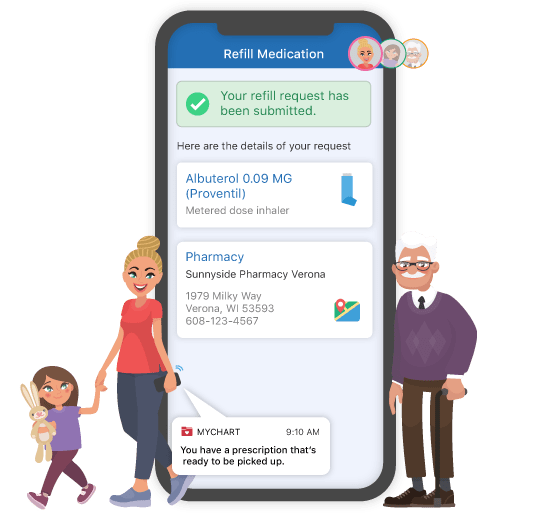
MyChart
MyChart, developed by Epic Systems, is known for its user-friendly interface that lets patients easily manage appointments, view test results, and communicate with healthcare providers. A notable feature is its integration with fitness trackers, allowing users to share their physical activity data with their doctors.
Lessons Learned:
- User-Centered Design: MyChart’s focus on user needs keeps it practical and effective for both patients and healthcare providers.
- Continuous Feedback: Regular updates based on user feedback help keep MyChart relevant and user-friendly.
- Integration: Seamless integration with EHRs and fitness trackers enhances the app’s functionality and usability.
Babylon Health
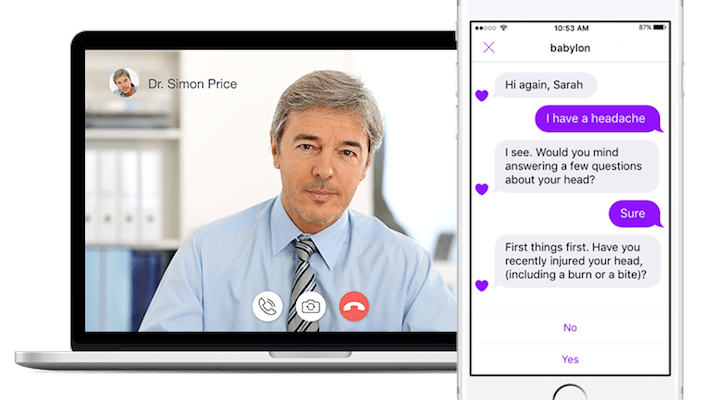
Babylon Health is celebrated for its innovative UX design, which uses AI to provide personalized medical advice. The app’s AI can analyze data from a user’s smartphone, such as activity levels and heart rate, to offer more tailored health recommendations.
Lessons Learned:
- Use of AI: AI-driven personalized health advice significantly boosts user engagement and satisfaction.
- Accessibility: Multilingual support and simple navigation make the app accessible to a wide range of users.
- Proactive Health Management: Features like virtual consultations and symptom checkers encourage proactive health management, increasing user engagement.
Maven Clinic
Maven Clinic is a virtual care platform focused on women’s and family health, offering access to fertility, maternity, postpartum, and pediatric services. Its personalized, concierge-like experience — including around-the-clock access to specialists and coaches — stands out for its human-centered design and culturally sensitive approach.
Lessons Learned:
- Personalization: Tailoring care to each user’s needs builds trust and increases engagement.
- Inclusivity: Designing for diverse populations ensures equitable access to care.
- Human + Digital Integration: Combining digital tools with live human support delivers a high-touch experience.
Cityblock Health
Cityblock Health serves Medicaid and lower-income communities, delivering personalized care that addresses both medical and social needs. Its platform combines mobile technology, community-based services, and care teams to reach underserved populations.
Lessons Learned:
- Social Determinants of Health: Designing beyond the clinical encounter to address housing, food, and transportation barriers.
- Accessibility: Simple interfaces and proactive outreach help bridge the digital divide.
- Trust Building: Community-based engagement strengthens patient relationships and adherence.
These examples show that by focusing on user needs, incorporating feedback, and using advanced technology, it’s possible to create healthcare apps that are both effective and user-friendly.
Practical Tools: UX + Compliance Checklist and Maturity Model
To help healthcare founders and product teams turn best practices into action, we recommend two tools:
A UX + Compliance Checklist and a Healthcare UX Maturity Model. These will help you evaluate where your app stands today and where to invest next.
UX + Compliance Checklist
Use this checklist to pressure-test your healthcare app design:
▢ Does the app clearly explain data use and obtain informed consent?
▢ Is the login and authentication process secure but user-friendly (e.g., multi-factor without excessive friction)?
▢ Are privacy policies and terms presented in plain, understandable language?
Is sensitive health data encrypted both in transit and at rest?
▢ Are accessibility features (screen reader compatibility, adjustable text size, alternative input methods) built in?
▢ Can users easily access support including escalation to a human when needed?
Checking these boxes helps ensure your app meets both regulatory and usability standards.
Healthcare UX Maturity Model
This maturity model helps teams map their UX progress and set goals for continuous improvement:
1. MVP Stage: Core functionality, basic usability, minimal compliance
2. Usability Stage: Intuitive navigation, responsive design, early user testing
3. Accessibility Stage: WCAG compliance, inclusive design, multilingual support
4. Personalization Stage: Adaptive content, user-specific insights, behavioral nudges
5. Predictive UX Stage: AI-driven recommendations, predictive analytics, proactive health interventions
Moving up this maturity curve helps healthcare apps evolve from basic tools into powerful platforms for engagement and outcomes.

Leverage UX Design to Build a Successful Healthcare App
Mastering UX design is essential for anyone looking to build a successful, compliant healthcare app. As we’ve explored, a user-centered approach, combined with accessible interfaces, AI integration, and continuous iteration, can dramatically improve patient engagement and health outcomes.
At Technology Rivers, we don’t just build apps. We help you transform patient engagement through exceptional design. Whether you’re launching from scratch or improving an existing platform, our team specializes in developing HIPAA-compliant, AI-accelerated healthcare solutions that put users first.
✅ Download our FREE HIPAA-Compliant Web And Mobile App Development Checklist to assess where your app stands today and identify high-impact improvements.
Or…
📅 Book a free strategy call with our team to explore how we can help you design secure, scalable healthcare platforms that deliver real outcomes.
Let’s work together to turn your app into a tool that truly makes a difference.