In today’s fast-paced business environment, manual workflows simply can’t keep up. Teams spend hours updating spreadsheets, moving data across platforms, and chasing down leads—time that could be spent on higher-value work. That’s where workflow automation comes in.
At Technology Rivers, we experimented with Make.com to see how AI-powered workflows could streamline integrations, minimize errors, and support process scalability.
This blog walks you through how Make.com scenarios work, real examples of automation in action, and the tangible benefits businesses gain when they adopt no-code automation with AI.
The Problem: Manual Workflows Drain Resources
Even with modern SaaS tools, many businesses still struggle with disconnected processes. Common challenges include:
- Data silos – customer or operational data lives in multiple apps without syncing.
- Duplicate work – teams re-enter the same data in different systems.
- Missed opportunities – slow response times when leads or tickets aren’t handled in real time.
- Scaling issues – manual processes don’t grow with your business.
Without automation, teams risk losing efficiency, accuracy, and momentum.

Our Approach with Make.com
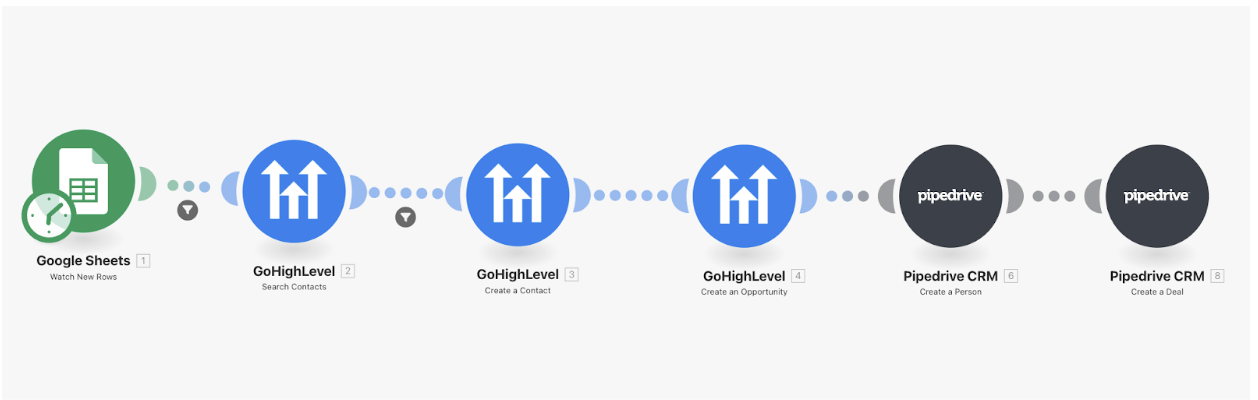
We use Make.com scenarios to automate workflows from start to finish. A scenario is essentially a chain of events that moves data between apps with logic built in. Here’s how it works:
Step 1. Define a Trigger
Every scenario begins with a trigger—the event that kicks things off.
Example: A new row is added to Google Sheets with a lead’s contact information.
Step 2. Add Modules for Actions
Modules are the steps that perform tasks. These could be sending emails, creating records in a CRM, or updating a database.
Example: Search for the contact in GoHighLevel CRM.
Step 3. Apply Filters and Condition
To avoid unnecessary actions, Make.com supports filters and conditions.
Example: If the contact already exists, stop the workflow. If not, continue.
Step 4. Map Data Between Apps
Data fields from one system can be mapped into another with no code.
Example: Map “Name, Email, Phone” from Google Sheets → GHL contact fields.
Step 5. Connect the Flow End-to-End
Finally, all modules are connected so the process runs from trigger to output without manual intervention.Example: If the contact is new, create both a contact record and an opportunity in GHL.
The result: every new lead in Google Sheets is automatically added to GHL—complete with an opportunity record—without any manual data entry.
Challenges We Encountered While Automating
While building real-world scenarios, we faced a couple of challenges worth highlighting:
- Custom Field Mapping: When creating leads in GoHighLevel, we had added custom fields for opportunities. However, in Make.com we couldn’t directly map those custom fields in the module. This became a limitation we had to work around.
- Trigger Setup Limitations: Ideally, we wanted the scenario to run only when a new row was added to the spreadsheet. Instead, Make.com’s trigger ran on a time-based schedule (like every 15 minutes or at set intervals). This mismatch caused some initial confusion and required additional setup.
These challenges underscore the importance of testing and understanding tool limitations before scaling automation workflows.
Real-World Use Cases
1. Lead Management for Sales Teams
Scenario: Capture leads from web forms → push into CRM → assign to sales rep.
Impact: Sales teams never miss a lead, and response time is faster.
2. Marketing Campaign Automation
Scenario: Segment contacts based on behavior → add them to personalized email workflows.
Impact: Higher engagement with tailored messaging.
3. Healthcare Operations (HIPAA-Compliant Workflows)
Scenario: Sync patient intake forms with scheduling and notifications.
Impact: Reduced admin overhead, improved compliance, and better patient experience.
Benefits of Using Make.com for AI Automation
Automation with Make.com isn’t just about speed—it changes the way businesses operate:
- Efficiency: Cut repetitive manual tasks.
- Scalability: Processes grow as your business grows.
- Accuracy: Reduce errors from manual data entry.
- Real-time response: Trigger actions instantly when events occur.
- Cost savings: Free up employee time for strategic work.
- AI integration: Enrich workflows with AI services like ChatGPT or custom ML models.
Checklist: Best Practices for Success
When designing automation workflows, we recommend:
✓ Start small—automate a single repetitive task first.
✓ Map data carefully between apps to avoid mismatches.
✓ Use filters to prevent duplicates and errors.
✓ Test workflows thoroughly before going live.
✓ Document your scenarios so others can understand and maintain them.
✓ Monitor performance and adjust as processes evolve.
Conclusion
Automation is no longer optional—it’s a competitive advantage. By using Make.com with AI integrations, we can help businesses streamline lead management, optimize marketing, and improve operations across industries.
At Technology Rivers, we specialize in designing custom process automation solutions that unlock efficiency and scalability. Whether you’re a startup looking to grow or an enterprise modernizing operations, the right automation strategy can transform your workflows.