
Every healthcare practice follows similar patterns of scheduling appointments, prescription refills, and questions patients already asked their doctor last week. None of it looks like a crisis day to day. All of it adds up to operational bottlenecks in healthcare that cap how much a practice can grow, how much it collects, and how many patients it can actually see.
At Technology Rivers, we hear a version of this from nearly every healthcare client we work with, whether it’s a solo oncology practice, a multi-location clinic, or a company managing home-based patient care. The specifics change. The pattern doesn’t.
What Counts as Operational Bottlenecks in Healthcare
A bottleneck, in this context, is any task that depends on a limited number of staff doing repetitive work by hand, and that limits how much volume a practice can handle without hiring more people. These manual healthcare workflows show up in five places most often:
- Scheduling and rescheduling appointments by phone
- Form intake, patients filling out the same information on paper or over a call
- Prescription refill requests, which usually require a human to receive, verify, and route the call
- Post-visit follow-up, patients calling back with questions after a procedure or a new prescription
- Documentation and reporting, especially anything tied to compliance, audits, or billing
None of these require clinical judgment. They just require time, and a fixed number of staff only has so much of it.
Where These Show Up, and When
Operational bottlenecks in healthcare don’t all appear at the same point in a patient’s journey, which is part of why they’re easy to underestimate. Areas where these usually occur include the following:
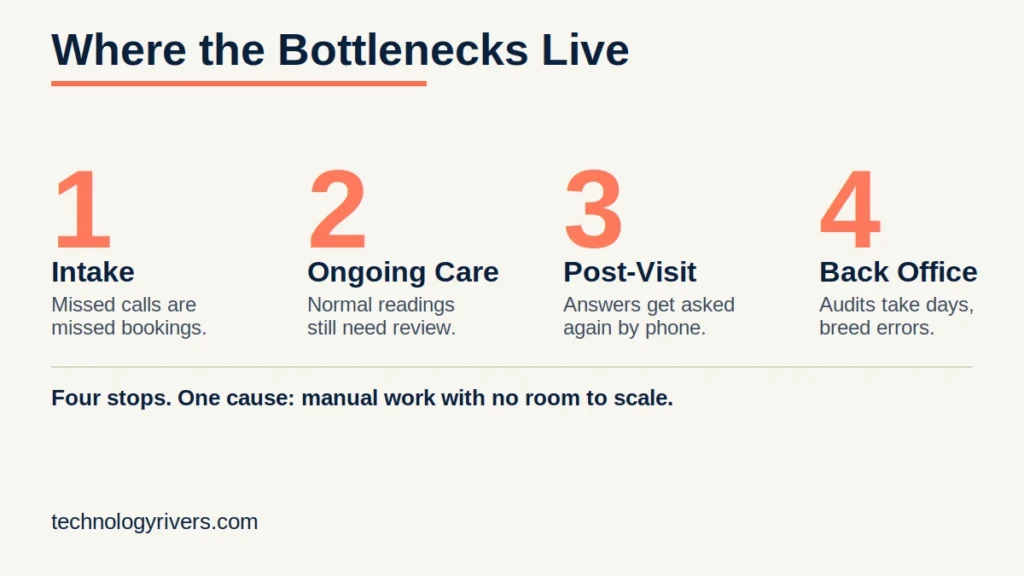
At intake. A practice with limited front-desk staff can’t answer every call the moment it comes in. Every missed call is a missed booking, and every booking handled manually takes minutes that could go to something else.
During ongoing care. Clients that require frequent visits and daily checkups, for example daily insulin checks or blood pressure readings, become time-consuming for the staff even when the reading is normal. For one healthcare provider we worked with, staff now rely on a remote patient monitoring platform that automatically reviews incoming blood pressure and weight readings sent from home devices.
It flags anything outside a patient’s normal range on its own. Manual review doesn’t scale well, and it also has to meet specific requirements: a minimum number of readings per month and a minimum number of review minutes to qualify for reimbursement. Without a system tracking that automatically, staff either under-document the review time or spend time tracking it by hand.
After the visit. Post-visit questions are one of the most predictable sources of repeat contact, and also one of the easiest to overlook. One oncology client described a recurring pattern: patients go home post-surgery with instructions, and then call back with follow-up questions. Should I take this medication? What do I do if this happens? Many of those answers already exist in the conversation the doctor had with the patient.
Using workflows and automation can help deal with such recurring problems where a chatbot that can reference the clinic’s own information and the specific patient’s case can resolve a large share of those calls without a person picking up the phone.
In the back office. Back-office work rarely gets the same attention as anything patient-facing, but it eats just as much time. The manual registration of massive datasets results in redundant workflows that delay processing and ultimately hinder long-term organizational growth. This involves doing treatment plans, log notes, and onboarding manually. For one provider in autism care services, we built a therapeutic services portal that helps automate this documentation.
The result wasn’t just slow before, it was error-prone, and errors in that kind of documentation translate directly into Medicaid billing mistakes. Similar bottlenecks also occur when a government audit requires records of who worked with which patient over a specific date range, pulling that together manually can take a dedicated staff member days. That kind of healthcare process automation turned a days-long manual pull into something the system could assemble on its own.

The Distinction That Gets Confused: EHR Gaps vs. Process Gaps
This pattern shows up across projects like these. It’s usually the same complaint, “our system is slow,” and that complaint can point to two very different kinds of operational bottlenecks in healthcare.
Sometimes the bottleneck is a real gap in the EHR itself, one of the EHR integration challenges that shows up as a feature that’s missing, or two systems that don’t talk to each other. A common version of this is an EHR that can store incoming lab or device readings but has no built-in way to flag which ones fall outside a patient’s normal range, so a person has to check every single value by hand to catch the ones that matter. Without that feature built in, it’s not a people problem, it’s a tooling problem. We break down what that tooling gap actually looks like in our roundup of EHR and EMR modernization approaches.
Other times, the EHR is doing exactly what it’s supposed to do, and the bottleneck is how people work around it. This usually includes problems during audit documentation. The data existed already. What was missing was a way to query and assemble it quickly, a process fix layered on top of the existing system, not a replacement for it. A common version of this is a system that already logs every patient visit with a timestamp and a staff ID, all the data an audit would need, but nobody built a report that pulls those fields together, so someone has to reconstruct it by hand from the raw records every time a request comes in. That’s not a broken system, it’s a manual process built around a system that was never asked to do this job.
Not every bottleneck sorts cleanly, though. Take the most common one of all: patients still calling in to book, reschedule, or ask for a refill, because there’s no other way to do it. On the surface that looks like an obvious EHR gap, the system has no patient-facing booking option, so of course people have to call. But that’s often not the real story. Many EHRs already include online scheduling; the practice just never turned it on, never trained the front desk to point patients to it, or never freed up staff time to rely on it.
So the same complaint, “people keep calling to schedule,” can point to a genuine software gap, a workflow habit nobody updated, or both at once. That ambiguity is exactly why “our EHR is the problem” becomes the default explanation practices reach for, even when the real issue has nothing to do with EHR integration challenges and everything to do with redesigning how the front desk operates.
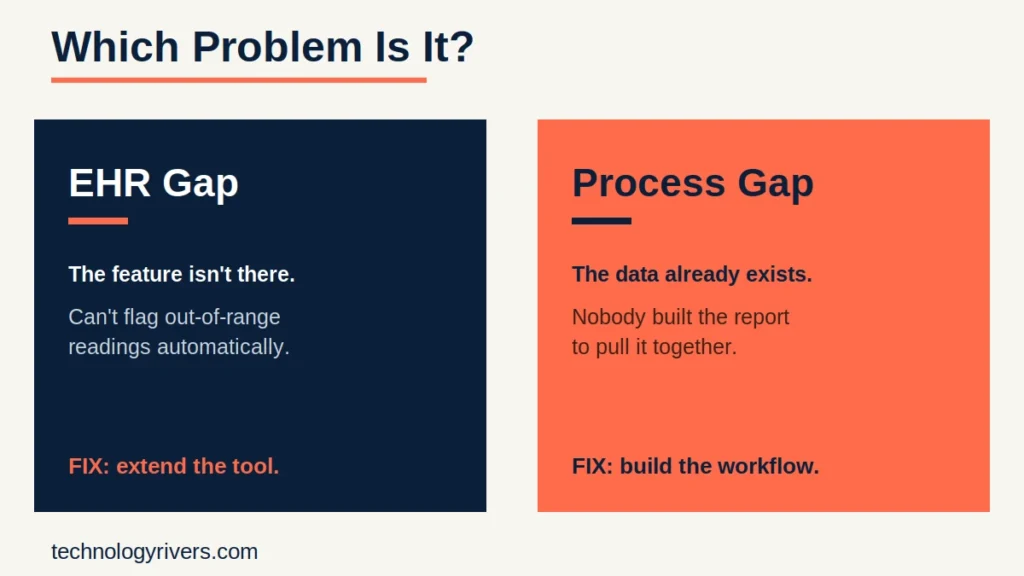
Getting this distinction right matters because the fix is different in each case. Buying a better tool won’t solve a process problem, and redesigning a workflow won’t fix a genuine software gap.
The Cost of Leaving It Manual
Every one of these operational bottlenecks in healthcare has a downstream cost, and it’s rarely just “this is annoying”:
- Staffing doesn’t scale linearly. With manual healthcare workflows, more patients means more calls, which means more staff, which means rising costs without a matching rise in what the practice can actually deliver.
- Revenue leaks out through errors. Manual documentation is where small errors compound. A missed field, a mistyped code, a visit logged under the wrong date, each one easy to miss on its own, but multiplied across hundreds of patient records, they turn into claims that get delayed, kicked back, or denied outright.
- Compliance exposure grows. When an audit requires records assembled by hand, the process is slow and the risk of an incomplete or inconsistent record goes up.
- Patient experience erodes. A patient who has to call back three times to get a straight answer, or wait on hold to book an appointment, is a patient more likely to look elsewhere.
If any of this sounds familiar, staffing that can’t keep pace, errors turning into billing losses, compliance risk building up in the background, the first step isn’t picking a tool. It’s mapping where the bottleneck actually starts. Talk to Technology Rivers about mapping your workflow before you commit to a fix.

A Better Starting Point: Map the Workflow Before You Buy a Tool
Solving operational bottlenecks in healthcare rarely starts with buying the tool everyone else bought. It’s mapping the actual workflow first: where staff are struggling, where patients are frustrated, where the same complaint keeps surfacing. From there, the fix might be an existing tool, an integration between two systems already in place, or a custom-built workflow specific to how that practice actually operates. There’s no single answer that applies to every practice, which is exactly why the mapping step comes first.
If a healthcare project involves protected health information at any point in this process, that’s worth flagging early. Any tool or workflow touching PHI needs a signed Business Associate Agreement with the vendor before that data goes anywhere near it, and that conversation is easier to have before implementation than after.
How We Map It: The Blueprint Process
At Technology Rivers, we don’t start coding until there’s a clear plan in place. A great software product isn’t built on assumptions, it’s built on a blueprint that maps out every detail before development begins. The same approach applies before any healthcare workflow automation project begins. Here’s how that plays out:
Ghazenfer walks through this same sequencing on the Lessons from the Leap episode, Avoiding Costly Mistakes: The Blueprint Process in Software Development.
- Understand the vision and the actual workflow first. The first step is understanding your vision, goals, and user needs. We collaborate closely with you to define what success looks like, uncover potential challenges, and outline the core functionality, not what the practice assumes is happening on the ground.
- Talk to everyone touching the problem. Front desk, nurses, doctors, billing, since the same complaint often shows up differently depending on who’s describing it.
- Map the pain points against real data. Call volume, appointment no-shows, documentation turnaround time, so the bottleneck is a measurable pattern, not just a feeling.
- Lay out the details before building anything. We map out user flows, architecture, and technical requirements before a single line of code is written.
- Decide the fix case by case. Sometimes an existing tool already solves it. Sometimes two systems need to integrate. Sometimes nothing on the market fits, and the right move is building something specific to the practice.
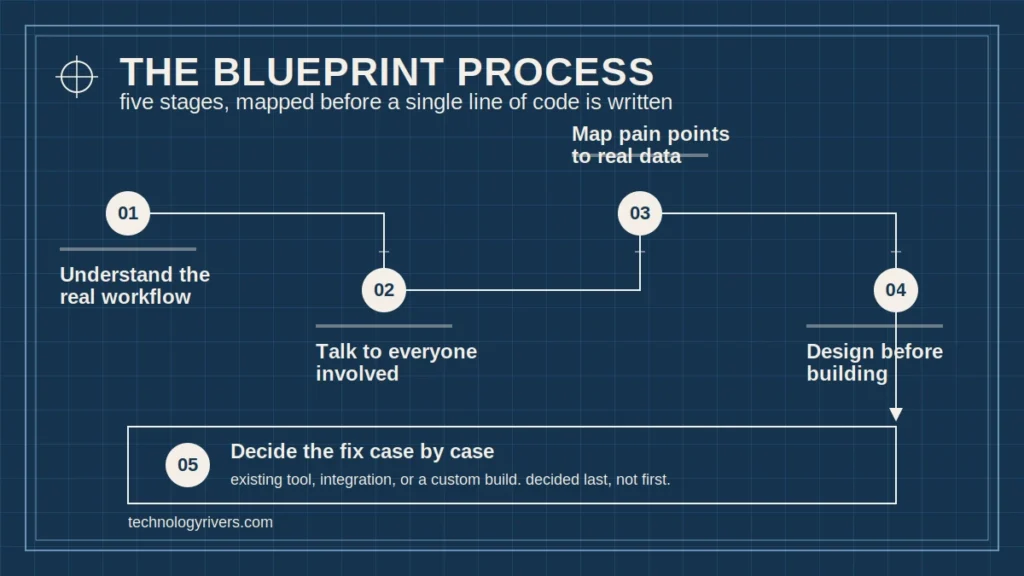
Skipping straight to step 5 without the groundwork is the most common reason healthcare workflow automation projects miss the mark. Read more on why every software project needs a blueprint.
Where to Start
Most practices don’t need another list of automation tools to sort through. What they need is a clear picture of where operational bottlenecks in healthcare actually live inside their own day-to-day operations, and that picture only comes from mapping the workflow itself, not from browsing a vendor catalog. Once that picture exists, choosing between an existing tool, a system integration, or genuine healthcare process automation stops being a guess. That’s the real starting conversation, not a sales pitch for a specific piece of software.
Ready to find out where your own operational bottlenecks are hiding? Get in touch with Technology Rivers and start with a blueprint, not a guess.