Can you build a production-ready, HIPAA-compliant app with Replit using AI-generated code? You can build a working application and implement important technical safeguards, but getting it ready for real patients takes more than successful prompts and automated tests.
We tested that process by building a new therapy scheduling application with Replit Agent. The app included patient and therapist portals, appointment management, therapist approval, encryption, audit logging, record history, and session management.
In this final part of our four-part Replit series, you’ll get three master prompts to build a healthcare application, prepare it for production, and implement HIPAA-focused safeguards. We’ll also show what each stage achieved in our therapy scheduling experiment.
Our experiment established a production-ready and HIPAA-ready technical foundation. We did not independently validate the application, deploy it to an approved healthcare environment, or establish that it was ready to process real protected health information (PHI).
This guide brings together the first three parts of our series:
- Part 1: AI App Development with Replit Agent — Building the initial application.
- Part 2: Deploy AI Apps with Replit — Preparing the application for production.
- Part 3: How to Make a Replit App HIPAA Compliant — Implementing HIPAA-focused technical safeguards.
The series is also part of our complete guide, How to Vibe Code: From Idea to Production-Ready, HIPAA-Ready Application.
The Core Idea: Three Replit Master Prompts
Instead of asking AI to build an entire healthcare product in one step, we separated development into three stages:
- Build: Create the application, including user roles, main workflows, interface, and database.
- Production readiness: Review the existing application, address technical gaps, and improve reliability and security.
- HIPAA readiness: Implement technical safeguards relevant to healthcare information.
Each prompt builds on the previous stage, taking your application from an initial idea through production preparation and HIPAA-focused technical safeguards.
Use the prompts with your own healthcare application, reviewing the results at each stage before moving forward.
Before You Start: Define Your Application
Before opening Replit, decide what your application needs to do.
You don’t need a detailed technical specification. Start with three questions:
- What problem does the application solve? Describe its main purpose in one or two sentences.
- Who will use it? Identify the user roles and their responsibilities.
- What features are essential? Focus on the workflows required for the first version.
For our experiment, we wanted a therapy scheduling application where patients could find therapists, book online or in-person sessions, and manage appointments. Therapists needed to manage their availability and view bookings.
We described this idea to ChatGPT and asked it to create a development prompt for Replit Agent.
ChatGPT expanded the description into requirements for user roles, database tables, scheduling workflows, and fictional demonstration data.
This gave us a starting point for the first build. Defining provider approval, scheduling rules, and other business requirements would become important during production review.
Master Prompt 1: Build Your Healthcare Application
The first Replit master prompt turns a product idea into a working application.
It covers user roles, permissions, database persistence, fictional demonstration data, and end-to-end testing.
Replace the bracketed sections with your own application details.
Copyable Master Prompt 1
I want to build a healthcare application using Replit Agent.

Application idea:
[DESCRIBE YOUR APPLICATION AND THE PROBLEM IT SOLVES]

Intended users:
[LIST THE MAIN USER TYPES]

Essential features:
[DESCRIBE THE MAIN ACTIONS USERS NEED TO PERFORM]

Build a functional, responsive MVP based on this idea.

Before building:
- Define the user roles and what each can access.
- Identify the main screens and workflows.
- Plan the database and how records will be stored.
- Identify missing requirements or assumptions.
- Keep the first version focused on essential features.
- Show me the implementation plan for approval.

During development:
- Use a persistent database.
- Implement authentication and server-side permissions.
- Prevent users from accessing unauthorized records.
- Use fictional demonstration data only.
- Do not introduce unnecessary features.

After building:
- Test registration and login for each user role.
- Test the main workflows from beginning to end.
- Check that changes are saved correctly.
- Test access restrictions and error handling.
- Fix issues found during testing.

Report what was built, what was tested,
and what still needs improvement.

Do not claim the application is production-ready
or HIPAA-compliant at this stage.
What Happened When We Tested It
We submitted our therapy scheduling requirements to Replit Agent on the free plan.
After a few minutes of Agent work, the application included patient and therapist registration, a directory of five fictional therapists, booking, rescheduling, cancellation, and availability management.
The application used a persistent database rather than relying on hardcoded appointment records.
We tested the main workflows using patient and therapist accounts, and they worked during our manual checks.
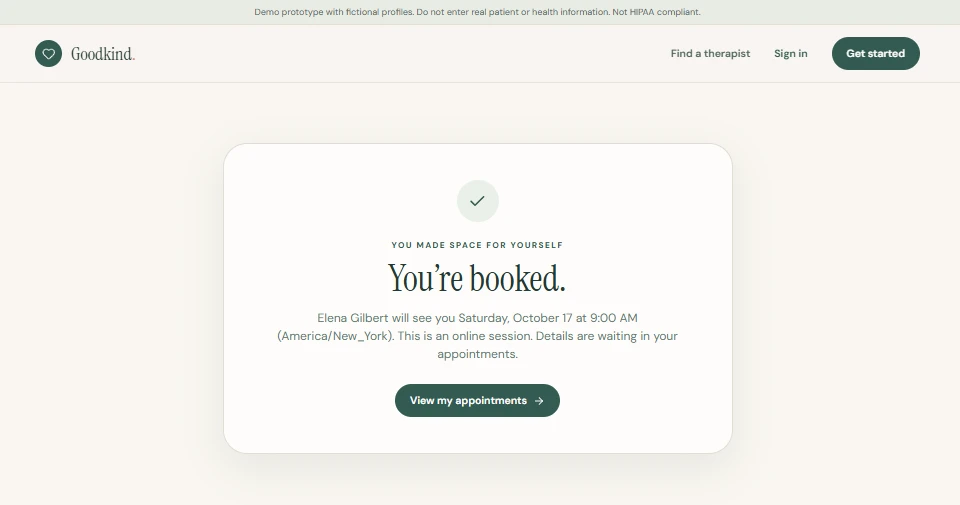
The working prototype gave us a foundation to improve. Production review would focus on provider approval, reliable availability rules, and consistent appointment times across U.S. time zones, without rebuilding the application.
Master Prompt 2: Make Your Replit App Production-Ready
A functioning MVP is not automatically a production-ready Replit app.
Before real users depend on it, founders need to understand whether the application handles permissions, database updates, errors, and operational requirements reliably.
The next master prompt guides Replit Agent through a production-readiness review of the existing application, with prioritized changes and a launch checklist. For a detailed account of this stage, see Part 2.
Use Replit Plan mode so Agent can assess the application and propose changes before modifying the code.
Copyable Master Prompt 2
Review the application we just built and prepare
it for production readiness.

First, assess the existing application for:
- Authentication and account permissions
- Database integrity and persistence
- Core workflow reliability
- Input validation and error handling
- Common web security vulnerabilities
- Performance and reliability concerns
- Deployment and infrastructure dependencies
- Monitoring, backups, and recovery requirements

Identify missing requirements, technical risks,
and features that are incomplete.

Prioritize issues that affect security,
data integrity, and core functionality.

Do not add unnecessary features or change
working functionality without a clear reason.

Show me a prioritized implementation plan
before making changes. Wait for my approval.

After implementation:
- Test the main workflows.
- Verify user permissions.
- Check database consistency.
- Test relevant error conditions.
- Confirm existing features still work.
- Report test results and unresolved issues.

Create a launch checklist identifying:
- Completed improvements
- Remaining technical requirements
- Infrastructure and deployment tasks
- Operational decisions requiring human approval

Use fictional data only during testing.

Distinguish implemented production safeguards
from independently verified deployment readiness.
What Happened When We Tested It
We asked Replit Agent in Plan mode to assess production readiness. It clarified whether the intended launch would involve real patient information, and we set the scope as a U.S. scheduling application using fictional data, with HIPAA-focused safeguards addressed separately.
The review prioritized provider verification, appointment reliability, time-zone handling, and security. We approved the proposed changes before implementation.
Replit Agent implemented therapist approval, strengthened availability rules to prevent overlapping openings, and improved appointment-time handling across U.S. time zones. It also added protections against common web attacks and automated tests for the main workflows.
For a scheduling product, these controls help ensure that only approved therapists are listed and that appointment availability and times remain consistent for users.
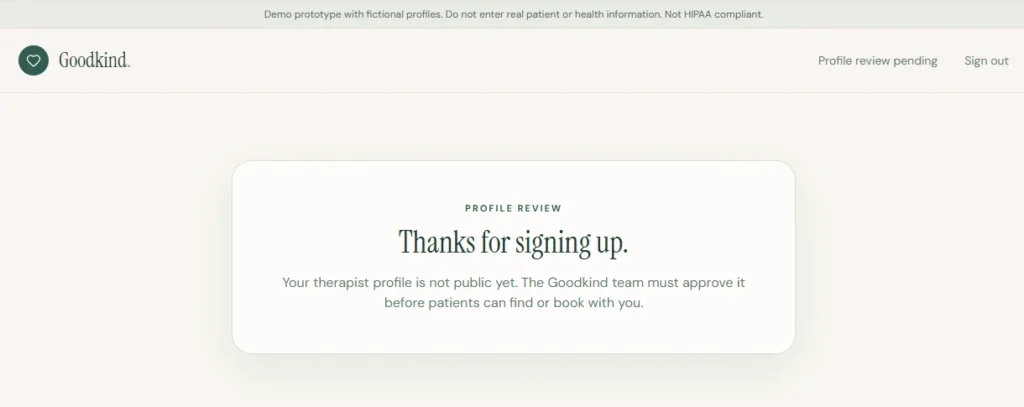
The screenshot shows the updated provider onboarding workflow, where a newly registered therapist awaits administrator approval before appearing in the provider directory.
Agent also created a launch checklist covering requirements that code alone could not complete, including provider approval procedures, backups, incident response, and legal review.
These changes strengthened the existing application without a rebuild. The launch checklist also made clear which operational tasks still required human ownership before deployment.
Master Prompt 3: Make Your Replit App HIPAA-Ready
The third stage adds technical safeguards relevant to healthcare information.
This master prompt asks Replit Agent to assess existing controls before implementing encryption, access restrictions, audit logging, session management, and record history. For the detailed experiment, see Part 3.
Use Replit Plan mode to review the proposed safeguards and confirm that Agent’s assumptions match your application.
Copyable Master Prompt 3
Review this healthcare application and prepare
its technical foundation for HIPAA readiness.

Use fictional data only.

First, assess the existing application for:
- Authentication and session validation
- Role-based access controls
- Audit logging
- Encryption of sensitive information
- Automatic session timeout
- Record tracking and history

For each safeguard, identify what exists,
what is missing, and what needs improvement.

Plan and implement the required safeguards:

1. Authentication
Verify the signed-in session on every private
request and reject unauthorized access.

2. Access control
Enforce permissions on the server.
Users must only access authorized records.
Administrative privileges must be controlled
server-side and cannot be self-assigned.

3. Audit logging
Record who accessed or changed records,
what action occurred, and when.
Avoid unnecessary sensitive information
in audit logs. Protect logs from tampering.

4. Session management
Implement an inactivity timeout with a warning
before the session expires.

5. Encryption
Review any existing encryption.
If encryption is missing, implement appropriate
protection for sensitive fields before
creating record history.
Store keys securely outside source code.

6. Record tracking
Add these fields where appropriate:
created_at, created_by, updated_at, updated_by,
deleted_at, deleted_by.

Set actor identifiers on the server.
Do not invent historical information.

7. Record history
Preserve previous versions of records where
change history is required.
Record who made changes and when.
Protect sensitive historical information
and restrict access to authorized operators.

8. Cancellation and deletion
Treat appointment cancellation as a status change,
not automatically as record deletion.
Preserve appropriate history and apply deletion
tracking only where required.

Before implementation:
- Show me the plan.
- Identify assumptions and dependencies.
- Wait for my approval.

After implementation:
- Test authentication and role restrictions.
- Test unauthorized access.
- Verify encryption and audit logging.
- Test session expiration and record history.
- Report completed and incomplete safeguards.
- Explain where each safeguard can be inspected.
- Identify tasks requiring human action.

Do not assume hosting, Business Associate
Agreements, risk analysis, or organizational
compliance requirements are completed.

Do not claim HIPAA compliance based only
on generated code.
What Happened When We Tested It
Replit Agent implemented encryption for names and emails, server-controlled administrative access, audit logging, record tracking, encrypted record history, and a 15-minute inactivity timeout.
The implementation also required a manual configuration step. We created an encryption key and added it to Replit Secrets, along with the administrator’s email address. This kept sensitive configuration values outside the application code.
Once configured, the application completed its automated tests successfully.
The tests supported the implemented workflows, but did not independently validate the security of the application.
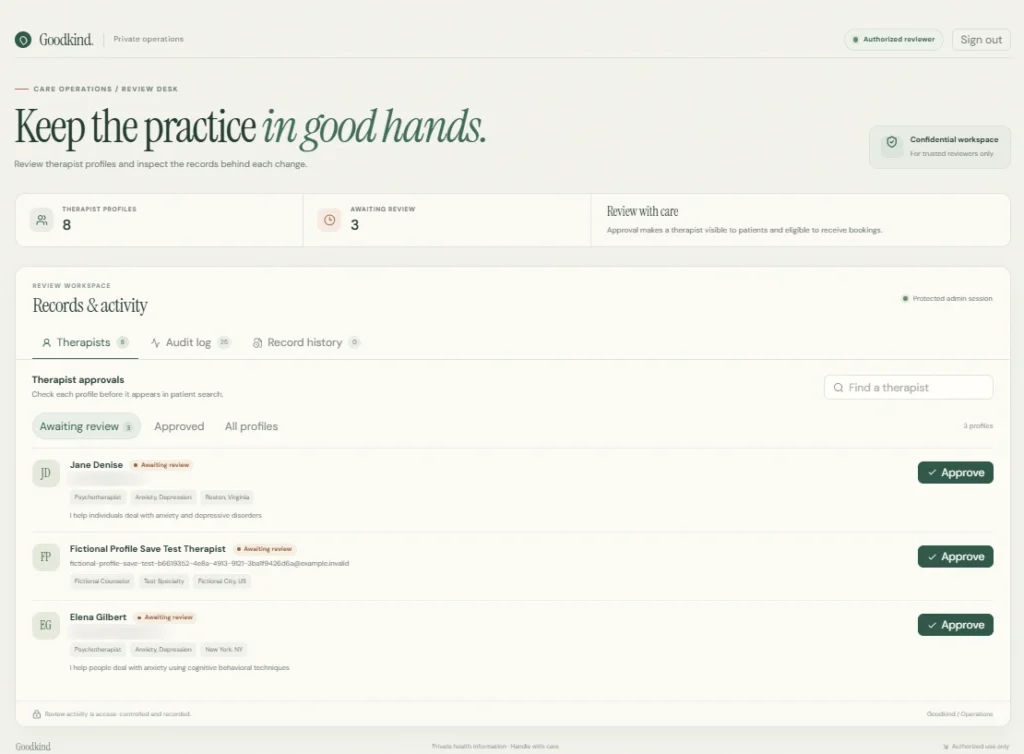
The admin dashboard displayed names and emails because administrators were authorized to view them.
In the database, the same sensitive fields appeared as encrypted values.
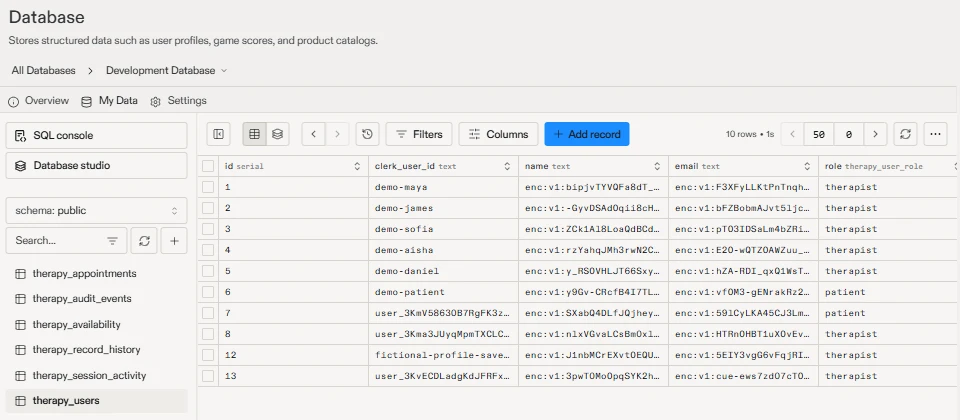
These screenshots illustrate the difference between authorized display of sensitive fields and their encrypted storage. Before any real PHI is processed, the application would still require independent security assessment, appropriate infrastructure, vendor agreements, and organizational controls.
The HIPAA Security Rule addresses administrative, physical, and technical safeguards. Implementing technical controls in application code is only part of the overall responsibility.
What the Three Replit Master Prompts Built
The three stages took our application from a basic product idea to a working system with production-ready and HIPAA-ready technical foundations.
| Stage | What was implemented |
|---|---|
| Prompt 1: Build | Patient and therapist accounts, therapist discovery, booking, rescheduling, cancellation, availability, and database persistence |
| Prompt 2: Production readiness | Therapist approval, improved scheduling rules, time-zone handling, additional security measures, automated tests, and a launch checklist |
| Prompt 3: HIPAA readiness | Encryption, administrative access, audit logging, record history, and session timeout |
The table summarizes the functionality implemented during our experiment; it does not represent an independently validated deployment.
How to Run the Three Prompts in Replit
You don’t need to build a therapy scheduling application to follow this process.
- Start with Prompt 1. Describe your application, intended users, and essential workflows. Review Agent’s proposed plan before approving the build.
- Test the first version. Create fictional accounts, complete the main workflows, and check that records save correctly.
- Run Prompt 2. Use Replit Plan mode to review the production-readiness assessment and approve changes that address genuine gaps.
- Run Prompt 3. Review the HIPAA-focused safeguards, correct assumptions, and approve implementation.
- Test the results. Check access restrictions, database behavior, encryption, audit logging, and session management.
If you already have a working application, you can start with Prompt 2.
Review each stage’s proposed changes and test results before moving to the next.
From Replit Prototype to Production: Three Things You Can’t Skip
Moving a Replit prototype to production involves more than improving application code.
Even after the three development stages, founders need to address ownership, infrastructure, and operational responsibilities.
1. Code Ownership and Portability
Can you export the complete codebase? Can the database move? Will authentication continue working if you change hosting providers?
Moving source code to GitHub helps establish version control and gives your team a shared place to manage development.
But exporting code does not automatically move databases, authentication services, secrets, or other managed infrastructure.
Before launch, understand which components you control and what would need to change if you move the application.
This matters when hiring an engineering team, changing vendors, or preparing for investment.
2. Healthcare-Ready Hosting and Vendor Agreements
A healthcare application intended to handle protected health information needs infrastructure and vendors appropriate for that use.
That includes hosting, authentication, storage, email, monitoring, and other services that may process PHI.
Where required, Business Associate Agreements must be in place.
Moving an application to a hosting provider that supports HIPAA-related requirements does not automatically make the application compliant.
The application, infrastructure, data flows, and operating organization must be evaluated together.
3. Operational Responsibility
Someone must approve providers, review permissions, manage backups, monitor security events, and respond to incidents.
Agent can build functionality that supports these responsibilities, but it cannot replace the people and policies behind them.
Before processing real patient information, the organization must also address applicable risk analysis, training, written policies, vendor management, and ongoing compliance obligations.
Signs You’ve Outgrown Doing It Yourself
AI development tools can take founders through much of the early development process.
However, experienced engineering and security support becomes especially valuable when:
- You’re preparing to process real patient information.
- A healthcare customer requests a security assessment.
- Your product needs EHR or other complex integrations.
- You need to migrate hosting, authentication, or databases.
- Changes repeatedly break existing functionality.
- You cannot confidently verify your application’s security controls.
You do not necessarily need to rebuild an AI-generated application.
Some applications need targeted improvements, while others require larger architectural changes.
The decision should come from reviewing the actual code and infrastructure.
Our article, Do I Need to Rebuild My Vibe-Coded App Before Launch?, explores how to make that decision.
Replit Prototype to Production: Where Technology Rivers Comes In
Replit Agent can help founders build functional applications and implement technical safeguards relevant to healthcare software.
But deciding whether an application is ready for real-world use requires more than reviewing the generated interface or trusting automated test results.
At Technology Rivers, we help healthcare founders assess AI-generated applications, identify what can be retained, and address the engineering, security, and infrastructure gaps that matter before launch.
That may involve improving existing code, validating access controls, preparing healthcare-ready infrastructure, or supporting the application as requirements grow.
The goal is not to rebuild every AI-generated application. It is to preserve useful work and turn it into a dependable healthcare product.
Key Lessons
Build in Stages Instead of Asking AI to Do Everything at Once
Separating application development, production readiness, and HIPAA readiness makes requirements easier to review and reduces the risk of overlooking important decisions.
Review Agent’s Plan Before Approving Changes
Confirm that proposed safeguards match the existing application, and approve changes only after checking dependencies and access requirements.
Treat Readiness as Something You Verify
Automated tests and successful workflows are evidence of progress, not proof of launch readiness. Verify the security, infrastructure, and operational requirements that apply to your product.
Frequently Asked Questions
Is Replit HIPAA compliant?
Do not assume a Replit project is an approved environment for real patient information.
Before processing PHI, verify the platform’s current contractual and technical capabilities, including whether appropriate Business Associate Agreements are available for the services involved.
Our experiment used fictional information and did not establish a compliant production environment.
Can I build a HIPAA-compliant app with Replit?
You can use Replit Agent to build an application and implement technical safeguards relevant to HIPAA readiness, including authentication, role-based access, encryption, audit logging, and session management.
However, a HIPAA-compliant app with Replit requires more than generated code. The final system must be assessed and operated with appropriate infrastructure, vendor agreements, policies, and organizational safeguards.
What is Replit Plan mode?
Replit Plan mode allows you to review Agent’s proposed implementation before approving code changes.
We used it during production preparation and HIPAA-readiness work to inspect Agent’s assumptions, identify missing requirements, and correct its plans before implementation.
Can I use these Replit master prompts on an existing application?
Yes. If your application’s core functionality already exists, start with Master Prompt 2 to assess production readiness.
Then use Master Prompt 3 to evaluate and implement HIPAA-focused safeguards.
Do I need to rebuild my Replit application from scratch?
Not necessarily. The decision depends on the application’s architecture, dependencies, security controls, and deployment requirements.
A technical assessment can identify which components can be retained and which need modification.
Is HIPAA-ready the same as HIPAA-compliant?
No. HIPAA-ready describes preparation toward meeting applicable HIPAA requirements. In this experiment, it refers to the implemented technical foundation.
HIPAA compliance also depends on organizational responsibilities, appropriate vendor agreements, risk analysis, policies, procedures, and ongoing oversight.
How do I make a production-ready Replit application?
Review the application’s architecture, authentication, permissions, database integrity, error handling, and deployment requirements.
Address the identified gaps, implement appropriate tests and monitoring, and establish backup and recovery procedures.
For healthcare products, our HIPAA Compliant Mobile & Web App Development Checklist provides additional areas to evaluate.
Ready to Take Your Prototype to Production?
Building an application with AI is becoming faster and more accessible.
The next challenge is making sure that application can support real users, protect sensitive information, and operate reliably as the business grows.
The three prompts provide a practical sequence for building an MVP, strengthening it for production, and implementing healthcare-specific safeguards—while keeping launch decisions subject to independent review.
If you’ve built a healthcare prototype and want to understand what it needs before launch, contact Technology Rivers to discuss the next stage.